The PromptsRush blog
Tutorials30 Prompts for Claude Code Agents (Hooks, Subagents, Reviews)
30 copy-ready Claude Code agent prompts for hooks that always run, subagents with one job each, spec-based code reviews, GitHub Actions and headless CI, built on Anthropic's own Claude Code docs and checked against version 2.1.330.
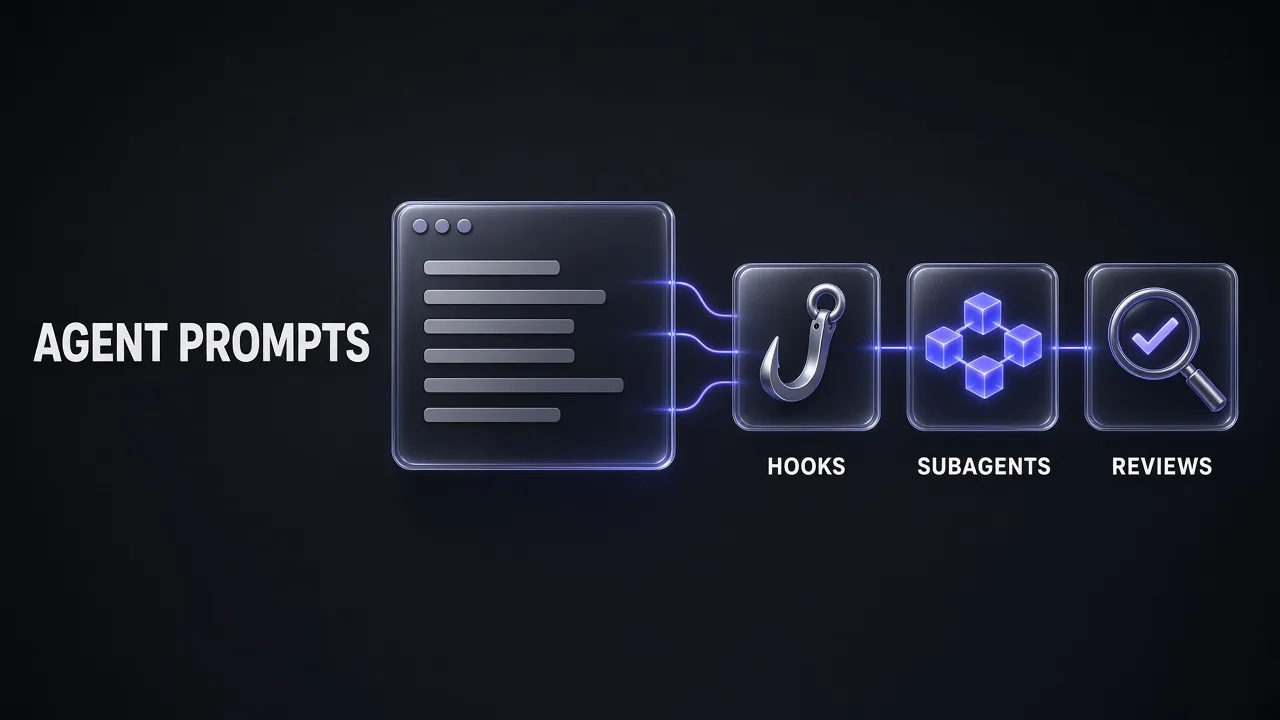
The best Claude Code agent prompts don't ask for code. They ask Claude to build a worker: a hook that always runs, a subagent with one job and the minimum tools, a reviewer that checks the spec instead of your taste. Get that layer right once and every later session inherits it. Get it wrong and you have an agent that skips the tests whenever it feels done.
This cheat sheet gives you 30 copy-ready prompts for Claude Code agents, grouped into seven sections: setup, hooks, subagents, delegation, code reviews, CI and GitHub, and packaging it all as a plugin. Every prompt is built on Anthropic's own Claude Code documentation, checked on 22 November 2026 against Claude Code 2.1.330, and every one ends with a check you can see.
It closes our Claude Code week. If you are still deciding which building block fits which job, start with Claude Skills vs MCP tools vs subagents, then come back here for the prompts.
Who These Claude Code Agent Prompts Are For
Short version: developers who already use Claude Code daily and want it to run more of the workflow without being watched. The prompts assume you know your stack and your repo. They write the config, scripts and agent files you would otherwise piece together from the docs.
- Solo developers who want guardrails (protected files, a green test suite before Claude stops) without approving every step by hand.
- Tech leads who want shared, checked-in subagents and hooks so every engineer's Claude follows the same rules.
- Teams moving reviews to AI, whether through
/code-review, the managed Code Review service or a GitHub Action they control. - Platform and DevOps engineers wiring
claude -pinto CI, scheduled jobs and PR workflows.
How to Use These Prompts
- Fill every [PLACEHOLDER]. Square brackets mark what only you know: paths, commands, model aliases, limits. A placeholder left in is an invitation to guess, and agents that guess write hooks that block the wrong thing.
- Run them in order the first time. Prompts 1 to 3 produce the protected-paths list, spec and clean project instructions the later prompts reference.
- Keep the proof step. Almost every prompt ends with "pipe sample JSON in", "run it once" or "show me the diff". That step is how you know the hook fires and the subagent loaded.
- Project vs personal. Anything in
.claude/can be committed and shared. Anything in~/.claude/applies to all your projects and stays on your machine. The prompts say which one they write to; change it if your team wants the opposite. - Copy in one drag. Every prompt sits in its own code block.
Prompt 1 rewrites your project instructions. If you have never written them properly, our guide on how to write AGENTS.md and CLAUDE.md explains what belongs there before you start pruning.
Claude Code's Agent Layer: The Facts That Shape These Prompts
Everything below comes from Anthropic's Claude Code docs on hooks, subagents, /code-review and GitHub Actions, checked on 22 November 2026.
| Building block | What it is | What it means for your prompts |
|---|---|---|
| Hooks | 33 lifecycle events; command, HTTP, MCP tool, prompt and agent handlers | Use them for rules that must always hold. Exit code 2 blocks; stderr becomes Claude's feedback. |
| Subagents | Markdown files in .claude/agents/ or ~/.claude/agents/; only name and description required | Write the description as a trigger. Restrict tools. Misspelled fields are silently ignored. |
| Built-in agents | Explore and Plan (read-only), general-purpose | Ask for Explore when you want a cheap, read-only map without your CLAUDE.md loaded. |
| Nesting and limits | Subagents can spawn subagents 3 layers deep; 20 running per session by default | Fan-out prompts should cap how many workers they start. |
| Skills | SKILL.md files; custom commands are now merged into skills | Repeatable instructions you trigger with /name; can run in a forked subagent with context: fork. |
/code-review | Bundled review on any plan, run as a background subagent; --fix, --comment, effort levels | Low effort = fewer false positives. It reads CLAUDE.md, not REVIEW.md. |
| Managed Code Review | GitHub PR reviews for Team and Enterprise, billed through usage credits | Tune it with REVIEW.md; it never approves or blocks a PR. |
| Headless and CI | claude -p, --output-format json, --json-schema; anthropics/claude-code-action@v1 | Give unattended runs a schema, a tool allowlist and a budget cap. |
Model choice matters more in agents than in chat, because each worker can run on its own model. On the Anthropic API, Claude Code's opus alias currently resolves to Opus 5.5, sonnet to Sonnet 5.5 and haiku to Haiku 5.5, and you can pin a full ID such as claude-opus-5-5. If you want a lower-cost model behind Claude Code for long background runs, Z.ai's GLM Coding Plan documents a setup that maps Claude Code's model variables to GLM models.
9 Meta-Rules for Claude Code Agent Prompts
- Deterministic goes in a hook; judgment goes in a subagent. "Always run the formatter" is a hook. "Decide whether this change needs a migration" is a subagent or a skill.
- Write descriptions as triggers. Claude delegates based on the
description. "Use after code changes in billing/ and before commits" beats "Expert reviewer". - Grant the fewest tools. Start a subagent with
Read, Grep, Globand add only what a real run proves it needs. - Every worker returns a summary with a word limit. The point of a subagent is to keep noise out of your context; an unbounded report puts it straight back.
- Prove it before you trust it. Pipe sample JSON into hook scripts, run each new subagent once, and check
/hooksand/tasks. - Give reviewers a reference, not a mood. A spec, a REVIEW.md or a CLAUDE.md rule produces findings you can act on. "Find problems" produces nits.
- Guard every loop. Stop hooks check
stop_hook_active; headless runs get--max-budget-usd; subagents getmaxTurns. - Remember the hook can't undo.
PostToolUseruns after the tool. Anything you want to prevent belongs inPreToolUseor a permission deny rule. - Keep shared rules short. Every subagent that loads CLAUDE.md pays for it in context. Our context engineering patterns for Claude Code show how to move task-specific rules out.
Setup: Give Your Agents a Shared Map (Prompts 1–3)
Every agent you build later reads the same project instructions, so fix those first. Run these three in a normal session at default effort.
1. Audit CLAUDE.md for Agent Use
Trim project instructions so every subagent and hook works from the same short, true rules.
Read CLAUDE.md and any files in .claude/rules/. Then audit them for agent use.

Goal: a CLAUDE.md under [LINE_LIMIT] lines that any subagent can rely on.

For every rule, label it KEEP, MOVE or CUT:
- KEEP: true today, needed on most tasks (build, test, lint commands; repo layout; hard rules).
- MOVE: true but only needed for one kind of task. Say where it belongs: a skill, a subagent's system prompt, or a path-scoped rule file.
- CUT: stale, duplicated, vague ("write clean code") or already enforced by a linter or hook.

Check each command you KEEP by running it once and reporting the exit code.

Output:
1. A table: rule | label | reason | new home (for MOVE).
2. The rewritten CLAUDE.md as a diff.
Do not apply the diff until I reply "apply".
2. Interview Me, Then Write the Agent Spec
Turn a vague automation idea into a spec your hooks and subagents can be built from.
I want to automate this part of my workflow in Claude Code: [WORKFLOW, e.g. "every PR gets a test run and a review before I look at it"].

Interview me before you design anything. Ask one question at a time, at most [N] questions, about:
- what triggers the work and what "done" looks like
- which steps must ALWAYS happen (candidates for hooks) and which need judgment (candidates for subagents or skills)
- which files, commands and tools are off-limits
- where it runs: my terminal, claude -p in CI, or GitHub

Then write SPEC-agents.md with: trigger, steps, the component for each step (hook / subagent / skill / CI job) with a one-line reason, permissions needed, the check that proves each step worked, and open questions.

Stop after writing the spec. No config files yet.
3. Map the Repo With Explore Before Any Agent Touches It
Get a cheap, read-only map so later agents start with facts instead of guesses.
Use the Explore subagent at "very thorough" to map this repository. Do not edit anything.

Report back in under [WORD_LIMIT] words:
- entry points and the 5-10 files that matter most for [AREA, e.g. "the payments flow"]
- how to build, test and lint, with the exact commands
- generated, vendored or secret-bearing paths an agent must never edit (lockfiles, .env*, migrations, build output)
- existing .claude/ config: settings files, hooks, agents, skills, commands
- anything that looks like it would surprise a new engineer

End with a "protected paths" list in a code block I can paste into a hook script.
Explore is read-only and starts without your CLAUDE.md, so it is a cheap first pass. Keep the protected-paths list: prompt 4 turns it into a hook.
Hooks: Rules That Always Run (Prompts 4–10)
Hooks are the deterministic layer. A hook is a command (or an HTTP endpoint, MCP tool, prompt or agent) that Claude Code runs at a fixed point in its lifecycle, whether or not the model remembers to. Anthropic's hooks reference lists 33 events today. Four of them cover most of what teams need: SessionStart, PreToolUse, PostToolUse and Stop.
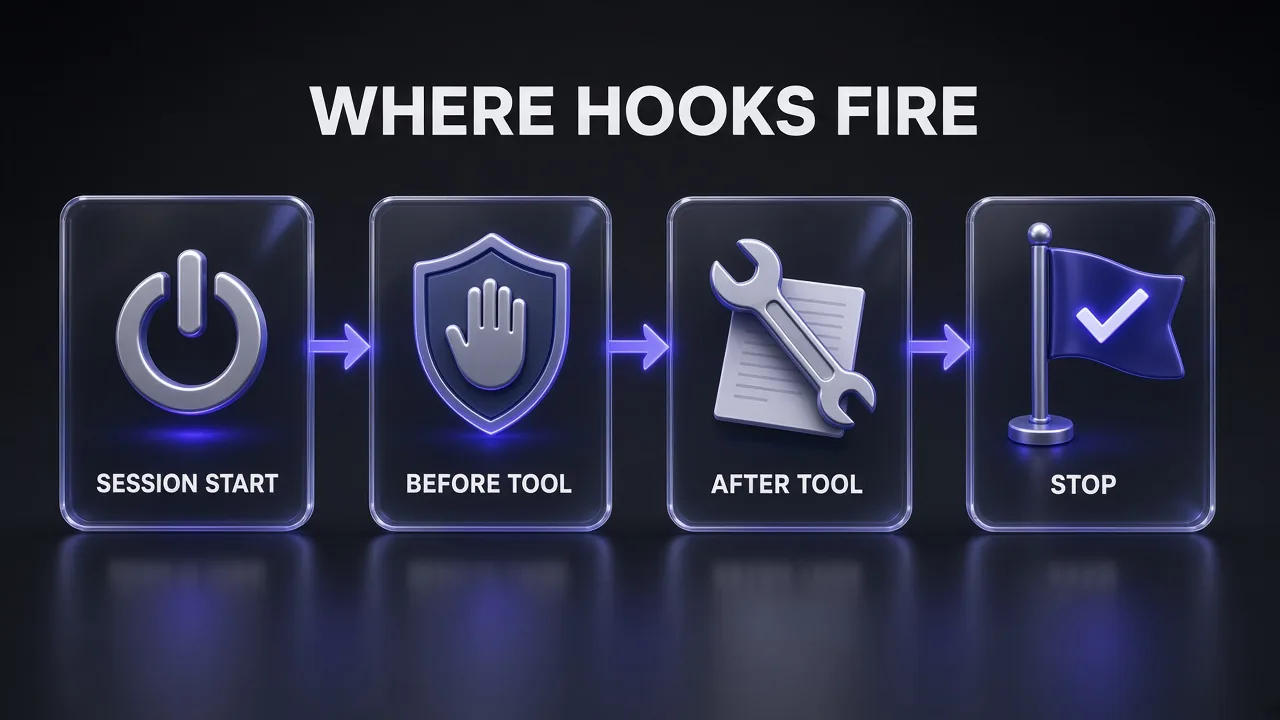
Three facts shape every hook prompt below. A PreToolUse hook that exits with code 2 blocks the call, and Claude reads your stderr message as the reason. A hook's deny holds even in bypassPermissions mode. And PostToolUse can't undo anything, because the tool has already run. Each prompt asks Claude to write the hook, then prove it with piped sample JSON before you trust it.
4. Block Edits to Protected Files
A PreToolUse hook that stops Edit and Write on secrets, lockfiles and generated code.
Write a PreToolUse hook that blocks the Edit and Write tools on protected paths.

Protected patterns: [PATTERNS, e.g. ".env", "package-lock.json", ".git/", "src/generated/"]

Requirements:
- Script at .claude/hooks/protect-files.sh, executable, reads the hook JSON from stdin with jq, takes .tool_input.file_path.
- On a match: print "Blocked: <path> matches protected pattern <pattern>. [WHAT_TO_DO_INSTEAD]" to stderr and exit 2. Otherwise exit 0.
- Register it in .claude/settings.json under hooks.PreToolUse with matcher "Edit|Write" and the command "$CLAUDE_PROJECT_DIR"/.claude/hooks/protect-files.sh. Merge with any existing hooks; don't replace the object.
- Also add matching Edit deny rules under permissions.deny, because Bash can still write these files.

Prove it: pipe two sample JSON payloads into the script (one protected path, one normal path) and show both exit codes. Then show me the final settings.json diff.
5. Format Every File Claude Edits
A PostToolUse hook that runs your formatter after each edit so diffs stay clean.
Add a PostToolUse hook to .claude/settings.json that formats each file Claude edits.

- Matcher: "Edit|Write"
- Command: extract .tool_input.file_path with jq, then run [FORMATTER_COMMAND, e.g. "npx prettier --write --ignore-unknown"] on that one file only.
- Skip files under [SKIP_PATHS] and exit 0 if the formatter isn't installed, so a missing tool never blocks work.
- Keep the hook silent on success.

Then test it: create a scratch file with deliberately bad formatting, edit it once, and show me the file before and after. Delete the scratch file when done.
6. Don't Let Claude Stop Until the Checks Pass
A Stop hook that sends Claude back to work while tests or type checks fail, without looping forever.
Write a Stop hook that keeps Claude working until this check passes: [CHECK_COMMAND, e.g. "npm run typecheck && npm test -- --run"].

Script: .claude/hooks/require-green.sh
- Read the hook JSON from stdin. If .stop_hook_active is true, exit 0 immediately (this prevents an endless loop).
- Run the check. On success exit 0.
- On failure, print the last [N] lines of output plus "Fix these failures before finishing." to stderr and exit 2.
- Skip the check when no files changed this turn (git diff --quiet and git diff --cached --quiet both succeed).

Register it under hooks.Stop in .claude/settings.json with a timeout of [SECONDS].

Explain in two sentences what happens if the check can never pass, and how I would raise or lower the block cap.
The stop_hook_active guard matters. Claude Code overrides a Stop hook after it blocks eight times in a row with no tool call in between, and CLAUDE_CODE_STOP_HOOK_BLOCK_CAP changes that number. The script should still exit cleanly on its own.
7. Re-Inject Critical Context After Compaction
A SessionStart hook on the compact matcher that restores the rules a summary tends to drop.
Long sessions in this repo lose key rules after compaction. Add a SessionStart hook with matcher "compact" that prints a short reminder to stdout, which Claude Code adds to context.

The reminder should include:
- the [PACKAGE_MANAGER] and test command
- the current task from [TASK_FILE, e.g. "NOTES.md"], first 20 lines only
- the last 5 commits (git log --oneline -5)
- [HARD_RULES, max 3]

Keep the total output under [WORD_LIMIT] words. Put the logic in .claude/hooks/after-compact.sh, executable, and register it in .claude/settings.json.

Then tell me which of these lines belong in CLAUDE.md instead, because they're needed on every session, not only after compaction.
Compaction summarises the conversation to free space, and the details it drops are usually the rules you stated once, early on. Our explainer on context rot covers why long sessions drift; this hook is the cheapest fix.
8. Get Notified When Claude Needs You
A Notification hook so long agent runs ping you instead of waiting silently.
Add a Notification hook to my user settings (~/.claude/settings.json) so I get a desktop notification whenever Claude Code is waiting for input or permission.

My OS: [macOS / Linux / Windows]. Use the native command (osascript, notify-send or PowerShell). Title: "Claude Code". Message: "[PROJECT_NAME] needs your attention".

Merge it into the existing "hooks" object as a sibling of any other events.

Then give me the exact steps to trigger a test notification, and the one setting to check if nothing appears.
9. Security-Review My Existing Hooks
An audit for hooks that leak secrets, run unquoted input or auto-approve too much.
Audit every hook this project can run. Read .claude/settings.json, .claude/settings.local.json, ~/.claude/settings.json, any plugin hooks/hooks.json, and the hooks: blocks in .claude/agents/ and .claude/skills/. Do not change anything.

For each hook report: event, matcher, what it runs, and a risk rating (high / medium / low) for:
- unquoted or unescaped use of tool input in a shell command
- PermissionRequest or PreToolUse hooks that return "allow" with an empty or ".*" matcher
- secrets printed to stdout (which reaches Claude's context) or sent to an HTTP endpoint
- scripts referenced by relative path instead of "$CLAUDE_PROJECT_DIR"
- missing timeouts on slow commands, and Stop hooks with no stop_hook_active guard

Finish with the 3 highest-risk fixes as diffs, ordered by severity.
10. A Prompt Hook That Checks the Definition of Done
A type: prompt Stop hook that judges whether the task is finished, for cases a script can't check.
Write a Stop hook of type "prompt" for this project. It should ask the model to compare the conversation with our definition of done and return {"ok": false, "reason": "..."} if anything is missing.

Definition of done for this repo:
- [CRITERION_1, e.g. "every new function has a test"]
- [CRITERION_2, e.g. "CHANGELOG.md updated for user-facing changes"]
- [CRITERION_3]

Rules for the hook prompt:
- Only judge the listed criteria. Ignore style.
- If a criterion can't be met in this session (for example, it needs a deploy), return "impossible": true with the reason so the turn can end.
- Keep the reason to one actionable sentence.

Add it to .claude/settings.json, and tell me when I should switch it to a command hook instead.
Prompt hooks send your prompt plus the hook input to a Claude model and default to a 30-second timeout. Use one when the decision needs judgment. When the check is a command with a pass or fail result, a command hook is cheaper and more reliable.
Subagents: Workers With One Job Each (Prompts 11–17)
A subagent is a Markdown file with YAML frontmatter in .claude/agents/ (project) or ~/.claude/agents/ (personal). Only name and description are required. The rest, including tools, model, effort, permissionMode, hooks, memory and isolation, decides what the worker can do. Each one runs in its own context window and returns only a summary, which is the whole point: the noise stays out of your main conversation.
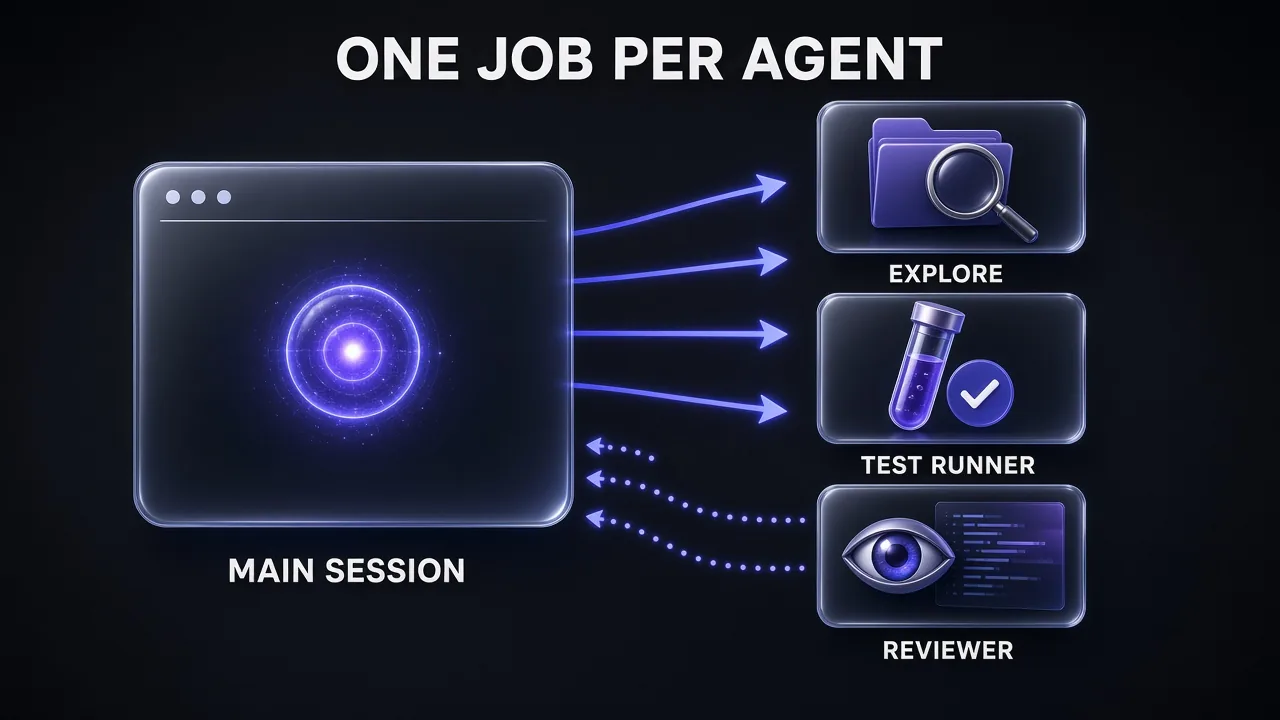
One warning from the subagent docs that every prompt below respects: Claude Code silently ignores a frontmatter field it doesn't recognise. Misspell disallowedTools and the restriction you thought you had never applies. So each prompt ends by checking the file loaded the way you meant.
11. A Read-Only Code Reviewer Subagent
A reviewer that can read, search and run git, but has no Edit or Write tools.
Create a project subagent at .claude/agents/reviewer.md.

Frontmatter:
- name: reviewer
- description: one sentence that tells Claude to use it after code changes and before commits in [AREA]
- tools: Read, Grep, Glob, Bash
- model: [MODEL_ALIAS, e.g. "sonnet" or "inherit"]
- effort: [EFFORT, e.g. "high"]

System prompt (the body) should tell it to:
1. Run git diff [BASE]...HEAD and read only the changed files plus their direct callers.
2. Report correctness bugs, security issues and missing tests. Skip style unless it hides a bug.
3. Rank findings Critical / Warning / Suggestion with file:line and a one-line fix.
4. Never edit files. If a fix needs a command, show it instead of running it.

After writing it, list any frontmatter field names you're unsure about, then ask the reviewer to review the last commit so I can see one real run.
Bash is in the tool list so the reviewer can run git. That also means it can change files through the shell, a point Anthropic's own code-reviewer example makes. Pair it with prompt 4's hook, or swap Bash for a narrow permission rule, if you need it truly read-only.
12. A Cheap, Fast Test-Runner Subagent
Route noisy test output to a smaller model and get back only the failures that matter.
Create .claude/agents/test-runner.md: a subagent that runs tests and returns only what I need to act on.

- description: use proactively after code changes to run [TEST_COMMAND] and summarise failures
- tools: Bash, Read, Grep
- model: haiku
- maxTurns: [N, e.g. 15]

Body instructions:
- Run the narrowest test command that covers the changed files first, then the full suite only if that passes.
- Return: pass/fail counts, each failing test name, the first assertion error, and the most likely file to fix. Max [WORD_LIMIT] words.
- Never paste full logs. Never edit source files.

Then run it once and tell me how many tokens of test output stayed out of our main conversation (estimate from the log length).
Routing a narrow job to a lower-cost model is one of the documented reasons subagents exist. For the full effort and model trade-offs, see our guide to Claude Code subagent effort and ultrathink.
13. Turn a Repeated Instruction Into a Subagent
Find the delegation you keep retyping and make it a reusable file.
Look back through this session (and NOTES.md if it exists). Find instructions I've given you more than once for the same kind of side task, such as "check the docs for X", "run the migrations and tell me if anything breaks" or "search the codebase for every caller of Y".

For the top [N] candidates, propose a subagent:
- name and a description under 25 words that says WHEN to use it
- the minimum tools it needs, and the tools it must not have
- model and effort, with a one-line reason
- whether it should be project (.claude/agents/) or personal (~/.claude/agents/)

Write the file for the strongest candidate only. Explain why the others are better as a skill, a hook, or nothing.
14. A Subagent That Learns Your Review Preferences
Use the memory field so corrections you give once carry into the next session.
Update .claude/agents/reviewer.md to add persistent memory.

- Add memory: [SCOPE: "project" to share via git, "local" to keep it out of git, "user" for every project]
- Add to the system prompt: before reviewing, read your memory directory. After I accept or reject a finding, record the rule in one line (for example: "We allow any in test fixtures"). Never store code, secrets or customer data in memory.
- Cap memory at [N] rules; merge duplicates; delete rules I later contradict.

Then tell me the exact directory the memory will live in for the scope I chose, and whether I should add it to .gitignore.
15. An Implementer Subagent in Its Own Worktree
Let a worker make changes on an isolated copy of the repo, so your working tree stays untouched.
Create .claude/agents/implementer.md for well-scoped changes that should not touch my working tree.

- isolation: worktree
- tools: Read, Edit, Write, Grep, Glob, Bash
- permissionMode: [MODE, e.g. "acceptEdits"]
- description: use for self-contained tasks with a clear test, such as [EXAMPLE_TASK]

Body: implement only the task in the delegation prompt; run [TEST_COMMAND] before returning; return the branch name, a summary under 150 words, and the test result. If the task needs changes outside [ALLOWED_DIRS], stop and report instead.

Then delegate this task to it: [TASK]. When it returns, show me the diff from its branch before anything is merged.
Worktree isolation branches from your default branch by default, not your current HEAD, and Claude Code cleans the worktree up if the subagent makes no changes. Tell the worker which base you expect if it isn't the default branch.
16. A Database Subagent That Can Only Read
Frontmatter hooks that let a data subagent run SELECTs and block every write.
Create .claude/agents/db-reader.md for answering questions from our database.

- tools: Bash, Read
- description: use when I ask a question that needs data from [DATABASE_NAME]
- hooks: a PreToolUse hook with matcher "Bash" that runs ./scripts/validate-readonly-query.sh

Write that script too. It reads the hook JSON from stdin, takes .tool_input.command, and exits 2 with a clear stderr message if the command contains INSERT, UPDATE, DELETE, DROP, ALTER, TRUNCATE, CREATE, GRANT or COPY (case-insensitive). Otherwise exit 0.

Body instructions: use [CLI, e.g. "psql $READONLY_DATABASE_URL"]; always add LIMIT [N]; return the query, a short answer and a small table.

Test the script with one SELECT and one DELETE piped in as JSON. Remind me what I must do for a project subagent's frontmatter hooks to run.
That last line matters. Frontmatter hooks in a project subagent only run after you accept the workspace trust dialog for the folder, and a -p session doesn't count as trusted. Until then the subagent still runs, without the hook.
17. Audit Why Claude Isn't Delegating
Fix vague descriptions so automatic delegation picks the right worker.
List every subagent available in this session: built-in, .claude/agents/, ~/.claude/agents/ and plugin agents. For each, show name, description, tools and model.

Then score each description from 1 to 5 on: says WHEN to use it, names a concrete trigger, doesn't overlap another agent.

For anything scoring under 4, rewrite the description in under 25 words. Flag pairs of agents that compete for the same tasks and suggest which to merge or delete.

Finally, check each file for frontmatter fields Claude Code doesn't recognise (exact camelCase matters, for example disallowedTools and maxTurns) and list them.
Delegation and Orchestration (Prompts 18–21)
Once the workers exist, the prompts change from "build an agent" to "run several". Claude Code allows subagents to spawn their own, up to three layers below the main conversation by default, and caps a session at 20 running subagents. Our tutorial on multi-agent workflows with Claude Code covers the architecture. These prompts are the day-to-day versions.
18. Fan Out Research, Merge One Answer
Parallel Explore runs on separate questions, with one merged report instead of five transcripts.
I need to understand [QUESTION, e.g. "how auth tokens flow from login to every API call"].

Split it into [N] independent questions. Run one Explore subagent per question, in parallel, each at "medium" thoroughness, each told to return under 200 words with file:line evidence.

Then merge the answers yourself:
- one diagram in plain text (boxes and arrows) of the flow
- contradictions between the reports, and which one the code supports
- unanswered questions

Do not edit files. If a question turns out to need a web source, say which page and stop; don't guess from memory.
When the missing piece is outside the repo, such as a library changelog or a vendor API page, a research tool does that part better. We compared the options in Lorka vs Genspark vs Perplexity for research. Paste the cited answer back in as context for the next prompt.
19. Debug With Competing Hypotheses
Several workers each try to prove a different cause, so you don't anchor on the first guess.
Bug: [SYMPTOM]. Reproduction: [STEPS or TEST_NAME].

Before fixing anything, list 3-4 plausible root causes. Spawn one subagent per hypothesis. Each one must:
- try to PROVE its hypothesis with evidence (a failing test, a log line, a code path), or disprove it
- not edit source files; scratch tests under [SCRATCH_DIR] are allowed
- return: verdict (confirmed / ruled out / unclear), evidence, and confidence 1-5

Then pick the cause with the strongest evidence, write a minimal fix plus a regression test, and run [TEST_COMMAND]. Delete the scratch tests at the end.
If the hypotheses need to argue with each other, that is what agent teams are for: teammates message each other directly through a shared task list. Teams are still experimental, off by default, and use more tokens than a single session. Turn them on with CLAUDE_CODE_EXPERIMENTAL_AGENT_TEAMS=1 only when subagents reporting back isn't enough.
20. Plan a Large Change for /batch
Shape a sweeping migration so /batch can split it into safe, independent units.
I'm going to run /batch for this change: [CHANGE, e.g. "replace our custom fetch wrapper with the new http client in every service"].

Before I do, prepare it:
1. Find every affected file and group them into units that can change independently (no shared file between units).
2. For each unit: files, the exact edit pattern, and the test command that proves it.
3. Flag files that can't be split cleanly; those I'll do by hand first.
4. Write the result to MIGRATION.md as a checklist.

Then give me the one-line /batch instruction to paste, referencing MIGRATION.md, with "skip any unit whose tests fail and list it at the end".
/batch is a bundled skill that breaks the work into 5 to 30 independent units and, once you approve the plan, spawns one background subagent per unit in an isolated worktree. A clean unit list is what makes that safe.
21. Hand a Side Task to a Fork
Use /subtask when the side job needs everything you've already discussed.
/subtask [SIDE_TASK, e.g. "write the migration guide for the API change we just agreed, in docs/migrations/, following the decisions above"]

Constraints for the fork:
- Use only decisions already made in this conversation; list any you had to assume.
- Touch only [PATHS].
- When done, return a summary under 100 words and the list of files changed.
A fork inherits the full conversation, unlike a fresh subagent, and runs in the background while you keep working. Use it when re-explaining the context would cost more than the task itself. /tasks shows it while it runs.
Code Reviews (Prompts 22–26)
Claude Code has three review paths. /code-review runs in your session on any plan and counts toward your usage. The managed Code Review service reviews GitHub pull requests for Team and Enterprise organisations and is billed separately. And you can write your own reviewer subagent or skill. We walked through the first two in our /code-review and Claude Security walkthrough. These prompts get better results out of all three.
22. Review Against the Spec, Not Your Taste
A reviewer that checks requirements and edge cases, and is told to skip style.
Use a subagent to review the [FEATURE] diff (git diff [BASE]...HEAD) against [SPEC_FILE].

Check:
- every requirement in the spec is implemented; quote the requirement and the file:line that satisfies it
- each edge case listed in the spec has a test
- anything implemented that the spec didn't ask for

Report only gaps that affect correctness. Skip style, naming and formatting.

Output a table: requirement | status (done / partial / missing) | evidence | fix. Don't change any files.
The "skip style" line comes straight from Anthropic's best-practices page, which warns that a reviewer asked to find problems will always find something. Fix every nit and you end up with extra abstraction and tests for cases that can't happen.
23. Triage /code-review Findings Before You Fix
Turn a raw findings list into a fix plan, so --fix doesn't change things you'd reject.
I just ran /code-review [EFFORT] on this branch. For each finding above:

1. Re-check it against the code. Mark it CONFIRMED, FALSE POSITIVE (say why) or NEEDS CONTEXT (ask me one question).
2. For CONFIRMED findings, give severity (bug / risk / cleanup), the smallest fix, and the test that would have caught it.
3. Group the fixes into one commit per concern.

Apply only the CONFIRMED bug and risk fixes, one group at a time, running [TEST_COMMAND] after each. Leave cleanups as a list for me. Commit nothing until I say so.
Two flags help here. /code-review low reports only the findings it is most confident in, so you see fewer false positives, while medium through max widen coverage. And --fix edits run outside your session's checkpoints, so /rewind won't undo them all. Use git.
24. Write REVIEW.md for Managed Code Review
Tune what the GitHub Code Review service flags, so the bot reviews like your senior engineers.
Our org uses Claude Code Review on GitHub. Write a REVIEW.md for this repo.

Base it on: [SOURCES, e.g. "the last 20 merged PRs' human review comments", "CONTRIBUTING.md"].

Include:
- "Always flag": the 5-8 issue types our reviewers actually catch (with one short example each)
- "Never flag": things our linters, formatters or CI already enforce
- areas that deserve extra scrutiny: [PATHS, e.g. "billing/", "auth/"]
- what counts as important vs a nit in this codebase

Keep it under [LINE_LIMIT] lines. Tell me which rules should live in CLAUDE.md instead, because local /code-review reads CLAUDE.md but not REVIEW.md.
That split is easy to get wrong. Per Anthropic's docs, the managed service reads REVIEW.md and CLAUDE.md, while local /code-review follows CLAUDE.md only.
25. A Security Pass With a Verifier
Pair /security-review with an independent check so you only act on real issues.
Run /security-review on this branch.

Then, for each finding, spawn a fresh subagent that did not see the review. Give it only the finding and the file path. Its job: try to build a concrete exploit path or a failing test for the issue, without editing source files (scratch tests under [SCRATCH_DIR] are fine).

Return a table: finding | verifier verdict (exploitable / not exploitable / unclear) | evidence | suggested fix.

Fix only the exploitable ones, smallest change first, and add the verifier's test as a regression test. Delete the remaining scratch files.
/security-review reviews the diff between your branch and origin's default branch, so it needs an origin remote.
26. A Reviewer That Dispatches Verifiers
A nested-subagent reviewer: one verifier per finding, one clean summary back to you.
Update .claude/agents/reviewer.md so that, after it drafts its findings, it spawns one verifier subagent per finding.

Each verifier gets the finding, the file and the diff only. It must confirm or reject the finding with evidence in under 100 words and must not edit files.

The reviewer then returns only CONFIRMED findings, ranked by severity, plus a count of rejected ones.

Keep the reviewer's model at [MODEL] and set the verifiers to [VERIFIER_MODEL, e.g. "haiku"] by giving them their own agent file with a model field. Tell me how deep this nesting goes against the default spawn limit.
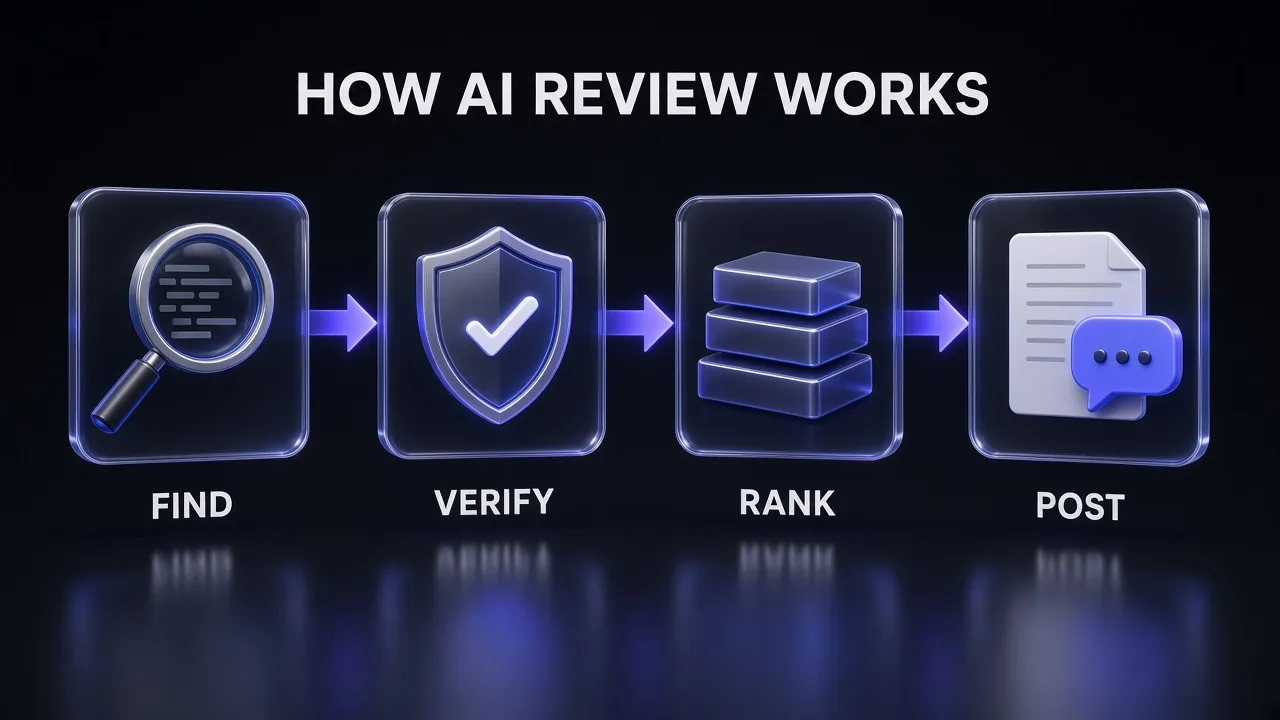
This mirrors how Anthropic describes the managed service: several agents find candidate issues, a verification step filters false positives, then findings are ranked and posted. The docs use the same pattern, a reviewer dispatching a verifier per finding, as their example for nested subagents.
CI and GitHub (Prompts 27–29)
The same agents run unattended. claude -p runs a prompt non-interactively, --output-format json adds cost and session metadata, and the anthropics/claude-code-action@v1 GitHub Action runs Claude in a workflow: in interactive mode when someone mentions @claude, or in automation mode when the workflow passes a prompt. If your review agents need GitHub or docs access through MCP, our list of the best MCP servers for Claude Code covers the useful ones.
27. Set Up a PR Review Workflow You Control
A GitHub Actions workflow that runs the code-review plugin on every PR, with tools scoped tight.
Write .github/workflows/claude-review.yml for this repo.

- Trigger: pull_request types opened, synchronize, ready_for_review, reopened
- Permissions: contents read, pull-requests read, issues read, id-token write. Nothing broader.
- Steps: actions/checkout (fetch-depth 1), then anthropics/claude-code-action@v1 with:
  - auth from secrets.[ANTHROPIC_API_KEY or CLAUDE_CODE_OAUTH_TOKEN]
  - the code-review plugin from the official plugin marketplace
  - a prompt that runs the plugin's code-review skill with --comment for this PR
  - claude_args that allow only the inline-comment MCP tool

Then list: what happens on PRs from forks in a public repo, which secret I need to add and where, and how to run it on one test PR before enabling it for everyone.
If you would rather not maintain a workflow, the managed Code Review service needs no workflow file. Running the Action yourself trades that convenience for control of the prompt, model and triggers.
28. Headless Triage With a JSON Contract
A claude -p call your CI can parse, with a schema so the output never drifts.
Write a script ci/claude-triage.sh that runs Claude Code headless on a failed CI job.

- Input: the path to the failed job's log, [LOG_PATH].
- Run: claude -p with a prompt that reads the log and the diff since [BASE], --allowedTools limited to Read, Grep and Bash(git diff *), --output-format json, and a --json-schema that requires: category (flaky / test-bug / code-bug / infra), summary (string, max 300 chars), suspect_files (array of strings), confidence (1-5).
- Add --max-budget-usd [AMOUNT] so a runaway job stops.
- Parse the result with jq, print a one-line summary, and exit 0 even when the triage is "code-bug" (the CI job already failed; this only explains it).

Then show me how to test it locally on a saved log.
29. A Scheduled Repo Health Report
A daily automation-mode workflow that reports risk instead of waiting for someone to ask.
Write .github/workflows/claude-daily-report.yml that runs on a cron schedule ([CRON, e.g. "0 3 * * 1-5"], in UTC) using anthropics/claude-code-action@v1 in automation mode.

Prompt for Claude: summarise yesterday's merged commits, open issues labelled [LABEL], and any TODO or FIXME added in the last 24 hours. Rank the top 3 risks.

- Use claude_args to set --model [MODEL_ID] and allow only the GitHub MCP tools needed to list commits and issues.
- Permissions: contents read, issues read, id-token write.
- Output goes to the workflow log. Optional: post it as an issue only if [CONDITION].

Remind me of the two GitHub rules for scheduled workflows that could make this silently stop running.
The two rules: GitHub runs scheduled workflows only from the default branch, and in public repositories it disables the schedule after 60 days without repository activity.
Package It for the Team (Prompt 30)
The last prompt bundles everything that worked into something a teammate can install in one step.
30. Bundle Hooks, Subagents and Skills Into a Plugin
Turn your best agent setup into a versioned, shareable package.
Package this project's agent setup as a Claude Code plugin named [PLUGIN_NAME].

Include: the subagents in .claude/agents/ that we kept, the hooks we rely on (moved into the plugin's hooks/hooks.json), and any skills in .claude/skills/.

Before moving anything:
1. List each component and whether it's safe to share (no hardcoded paths, secrets, or personal settings).
2. Note fields that behave differently in plugin subagents (for example, hooks, mcpServers and permissionMode in a plugin subagent's frontmatter are ignored) and how to handle each.
3. Propose the folder layout and the plugin manifest.

Then build it, run claude plugin validate on it, and give me a README with install steps and what each component does in one line.
Plugin subagents ignore hooks, mcpServers and permissionMode in their own frontmatter, so those hooks move into the plugin's hooks/hooks.json. That is the step most people miss when they share a setup that worked fine locally.
How to Chain These Prompts Into One Agent Setup
Run once, in this order, and you end the afternoon with a setup the whole team can install:
- Map and clean up (1-3). Explore maps the repo, you prune CLAUDE.md, and the spec says which step becomes a hook, a subagent or a CI job.
- Lay the guardrails (4-10). Protected files first, then formatting, then the green-tests Stop hook. Audit the result with prompt 9 before you rely on it.
- Add the workers (11-17). Reviewer and test runner first; they pay off on day one. Add memory, worktrees and the database reader when a real task needs them.
- Run them together (18-21). Fan-out research, competing hypotheses and
/batchare where the workers save hours instead of minutes. - Review everything (22-26). Spec review on every feature, triage before
--fix, verifiers on security findings. - Take it off your laptop (27-30). PR workflow, headless triage, the daily report, then package it as a plugin.
For agents that need live web pages, such as a docs-research subagent checking an API's current behaviour, give them a scraper such as Firecrawl through MCP instead of letting them guess from training data. Our walkthrough of Firecrawl with Claude shows the setup, and the same MCP server works from Claude Code.
7 Mistakes That Make Claude Code Agents Unreliable
- Using a hook as a security boundary on its own. The hook's
iffilter is best-effort, and a PreToolUse hook on Edit doesn't stop a shell command from writing the same file. Pair hooks with permission deny rules,permissions.blockWritesOutsideWorkingDirectories(added in 2.1.314) or sandboxing. - Matchers that match everything. An empty or
.*matcher on a PermissionRequest hook that returns "allow" approves every prompt, file writes and shell commands included. - Stop hooks with no exit. Without the
stop_hook_activecheck you get eight forced continuations and a warning instead of a finished task. - Typos in frontmatter.
disallowed_toolsinstead ofdisallowedToolsis ignored without an error. Runclaude --debugand search the log when a restriction doesn't seem to apply. - Forgetting workspace trust. A project subagent's frontmatter hooks don't run until the folder is trusted, and
-psessions never count as trusted. - Fixing every review finding. Reviewers asked to find problems always find some. Triage first (prompt 23) and tell reviewers to skip style.
- Treating
--fixlike a normal edit. A background review's fixes sit outside your checkpoints, so/rewindwon't restore everything. Commit before you run it.
Effort is the other lever people forget. A reviewer at high and a test runner at low often beat one session at max; our guide on how to choose thinking level and effort has the decision table.
The Verdict
Honest answer: most teams need four pieces, not thirty. A protected-files hook (prompt 4), a green-tests Stop hook (prompt 6), a read-only reviewer (prompt 11) and a spec review on every feature (prompt 22) catch most of what goes wrong when an agent works unattended. Add the rest as real tasks call for them, and package what survives a month of use (prompt 30).
My take: the hook layer is the part most people skip and the part that changes behaviour most, because it's the only layer the model can't talk itself out of.
Frequently Asked Questions
9 questions answered
Written by
PromptsRush
November 22, 2026 · 35 min read
Keep reading
Keep your curiosity going.

How to Build a Faceless YouTube Channel With HeyGen + ElevenLabs + Descript
A step-by-step faceless YouTube workflow: script for the ear, build one narrator voice in ElevenLabs, give it a recurring HeyGen Avatar 6 host, edit in Descript, and pass YouTube's originality and AI-disclosure rules. Prices checked 21 Nov 2026.

25 Best Nano Banana 2.1 Prompts for Product & Fashion Shots
25 copy-ready Nano Banana 2.1 prompts for ecommerce packshots, lifestyle scenes, label-accurate packaging, virtual try-on, lookbooks and campaign edits, built on Google's own prompting guide, with current API pricing and reference-image tips.
How to Build an AI UGC Ad Factory: Arcads + HeyGen + ElevenLabs
A step-by-step AI UGC ads workflow: turn one brief into a hook matrix, script it for AI actors, voice it in ElevenLabs, batch-test in Arcads, add product-in-hand cuts in HeyGen, and localize only the winners, with real credit math.