The PromptsRush journal
TutorialsWhat Is Context Rot? Why Long Context Fails (and How to Fix It)
Context rot is the quiet accuracy drop LLMs show as their context window fills. Here's what Chroma's research and Lost in the Middle actually found, how to spot it in your agents, and four fixes that work: compact, retrieve, isolate and prune.

Advertisement
Short version: context rot is the drop in accuracy you get as a model's context window fills up. The model doesn't crash or throw an error. It just gets quietly worse: it misses a fact it was given, follows an old instruction instead of the new one, or gives up on a task it could have finished with a cleaner prompt. A 1M-token window tells you how much a model can accept. It doesn't tell you how well the model will use it.
The fix isn't a bigger window. It's a smaller, cleaner context: compact long histories, retrieve just in time, isolate noisy work in subagents, and prune old tool results. This guide covers what the research shows, why it happens, how to spot it, and how to apply each fix. If you're new to the bigger discipline this sits inside, start with our primer on what context engineering is and how it differs from prompt engineering.
Sources: Chroma's Context Rot report, the "Lost in the Middle" paper, Anthropic's context engineering post, the Claude and Gemini API docs and three 2026 studies, all checked on 24 October 2026. We haven't run our own benchmark, so every number below comes from a named source.
What Is Context Rot?
Context rot is a simple, uncomfortable finding: a model does not treat its 100th token and its 100,000th token equally. Claude's API docs define it directly: as token count grows, "accuracy and recall degrade, a phenomenon known as context rot." Three things make it different from a normal bug:
- It's gradual. Anthropic calls it "a performance gradient rather than a hard cliff". There's no token count where everything breaks. Quality slides.
- It's silent. You get a confident answer that's slightly wrong, or "I can't find that" when the answer is in the prompt.
- It's universal but uneven. Anthropic says it "emerges across all models", though some degrade more gently. Severity depends on the model, the task and what fills the window.
Everything counts toward the window: the system prompt, every message (including tool results, images and documents), tool definitions, and the output, including thinking. In an agent loop, tool results are usually the fastest-growing slice, which is why agents rot faster than chats.
Pro tip: Prompt caching doesn't help here. Claude's docs are explicit that "cached prompt prefixes still occupy the context window: prompt caching changes what you pay for those tokens, not whether they count." Caching fixes cost. It doesn't fix rot. Our guide to Claude prompt caching covers the cost side.
What the Research Actually Shows
The term took off with a July 2025 report from Chroma, the vector database company. Kelly Hong, Anton Troynikov and Jeff Huber tested 18 models, including GPT-4.1, Claude 4, Gemini 2.5 and Qwen3, across 194,480 LLM calls. They kept each task's difficulty constant and changed only the input length, so any drop is down to length alone.
Their starting point was the "needle in a haystack" test: hide one fact in a long document and ask for it. Frontier models ace it, which made long context look solved. Chroma's point is that the test mostly checks exact word matching, the easy case. Real work needs the model to infer relevance.
The four findings that matter
- Performance consistently drops as input grows, across every experiment, even on deliberately simple tasks.
- Vaguer questions rot faster. When question and answer are less similar, accuracy falls off more quickly with length. That's the realistic case.
- Distractors hurt unevenly. One passage that looks relevant but isn't reduces accuracy, and four compound it. Claude models tended to abstain when unsure; GPT models had the highest rates of confident wrong answers.
- Structure matters in odd ways. Across all 18 models, the needle was easier to find among shuffled sentences than in coherent essays. Chroma doesn't claim to explain why.
The most practical result: focused beats full
Chroma's most useful test for builders used LongMemEval, a benchmark of long chat histories. Models answered 306 questions twice: with a focused prompt of about 300 tokens, and with the full history of about 113,000 tokens. Every model family scored significantly higher on the focused version. Thinking modes narrowed the gap but didn't close it.
Honest answer: that's the case for context engineering in one experiment. The model could answer; it answered worse when it had to find 300 relevant tokens in 113,000 first. As Chroma puts it, whether information is present "is not all that matters; what matters more is how that information is presented."
Lost in the Middle: Position Matters Too
The older half of the story is a 2023 Stanford-led paper by Nelson Liu and colleagues, "Lost in the Middle". Models got a question plus 10, 20 or 30 Wikipedia passages, one of which held the answer, and the researchers moved that passage around.
The result was a U-shaped curve. Models were best at using information placed at the very start of the context (primacy bias) or the very end (recency bias), and noticeably worse when it sat in the middle. In the 30-document test, GPT-3.5-Turbo (16K) scored 73.4% with the answer first, 50.5% with it tenth, and 63.7% with it last. In the worst cases it fell below its closed-book score of 56.1%: worse with the answer in front of it than with no documents at all.
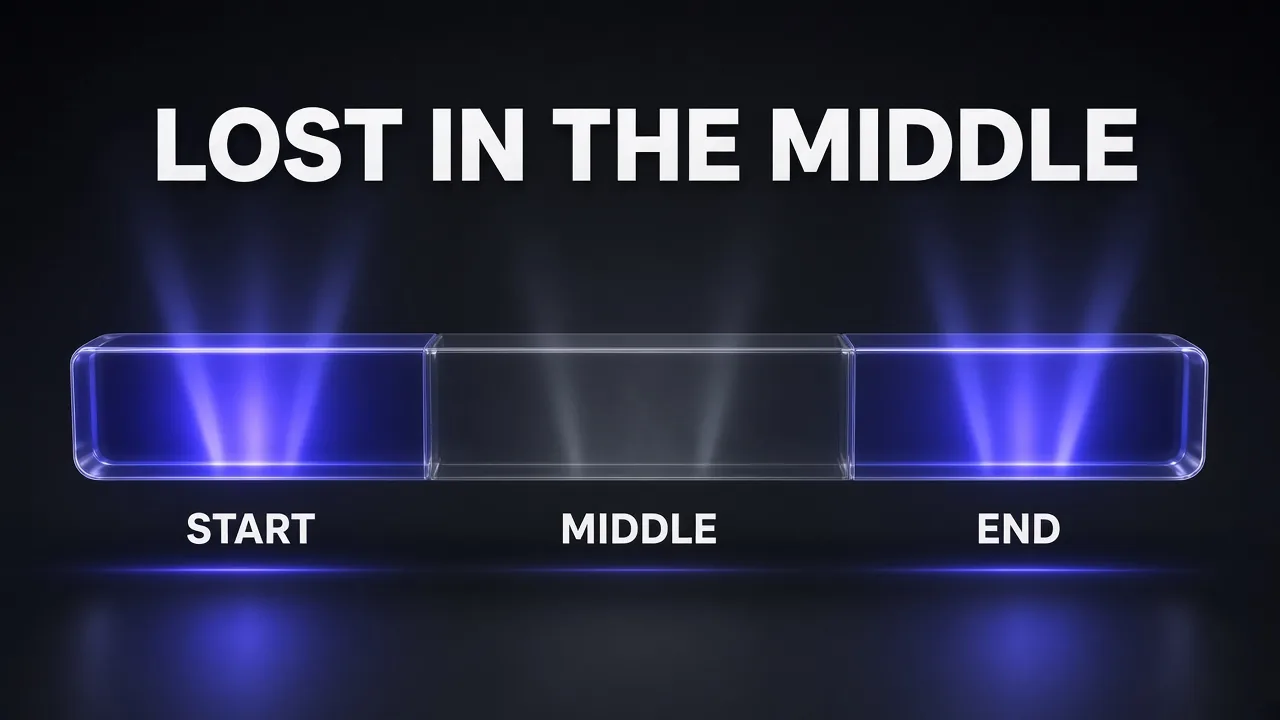
Two caveats. Those are 2023 models (GPT-3.5-Turbo, Claude-1.3, MPT-30B, LongChat-13B), so don't quote the percentages as today's. And Chroma found no notable variation across 11 needle positions on its own task, so position effects depend on the task. The rule that holds across both: don't bury the thing that matters.
Two more findings still hold up as advice. Extended-context model versions performed almost identically to their shorter siblings on prompts that fit both, so more capacity didn't buy more attention. And going from 20 to 50 retrieved documents improved accuracy by only about 1.5% for GPT-3.5-Turbo and about 1% for Claude-1.3, so the authors pointed to reranking and retrieving fewer documents.
Why Long Context Degrades
The mechanism isn't settled. Anthropic's engineering post gives the most useful working explanation, framed as an "attention budget":
- Attention is spread across pairs. Every token can attend to every other, n² relationships for n tokens, and as context grows that ability "gets stretched thin".
- Training data skews short. Models see fewer long sequences in training, so they have less practice with context-wide dependencies.
- Stretching costs precision. Techniques like position encoding interpolation extend context length with some loss in positional precision.
My take: you don't need the mechanism to act on it. Anthropic's principle is to find "the smallest possible set of high-signal tokens that maximize the likelihood of some desired outcome." Google's long-context guide is blunter: if you don't need tokens passed to the model, avoid passing them.
Is Context Rot Still Real in 2026?
Claude Opus 5.5, Sonnet 5.5 and Haiku 5.5 ship with 1M-token windows by default, and Gemini 4 Argon shares a 1M window across input, thinking and output (see our Gemini 4 Argon explainer). Have the labs trained rot away? The 2026 evidence says partly, depending on what you measure.
- A null result on simple retrieval. A June 2026 preprint by Sahil Jagtap (George Mason University, not peer reviewed) found no measurable length-driven degradation on synthetic retrieval probes for gpt-5.5, gpt-5.4, gpt-5.4-mini and claude-sonnet-4-6 up to 150,000 tokens, while noting it can't speak to real multi-turn agent work.
- Real drops on agentic coding. A September 2026 Boolean study ran 20 terminal-bench v4 tasks after 0, 250,000 or 500,000 tokens of earlier conversation. GPT-5.6 Sol fell from a 31% to a 24% pass rate at 250k, related filler or not. Claude Opus 5 held flat with unrelated filler but dropped from 50% to 40% with task-related filler. At 250k and above, GPT-5.6 Sol sometimes snapped back to answering an earlier question.
- Giving up early on long searches. A 2026 arXiv paper on long-horizon deep search found extensive context made four open-source models give up or settle on uncertain answers early, and that rot depends on what the context contains, not only its length.
Honest answer: on clean retrieval, 2026 models look far more robust than 2023 ones. In long-running agent work, rot still shows up. Remember the Boolean result: relevant-looking old context hurt even the model that ignored irrelevant context. That's exactly what an agent's own history is. Our Claude Opus 5.5 overview covers what changed in the current Claude generation.
Signs Your Agent Has Context Rot
Check the window before you blame the model when you see these:
- It forgets an early instruction. "Don't touch the migrations folder" from turn 3 stops being followed by turn 40.
- It answers an old question instead of the current request, the failure Boolean saw at 250k tokens.
- It says the information isn't there when it is. In one of Chroma's examples, Claude Sonnet 4 said it couldn't work out the days between two events because the dates weren't in the chat history. They were.
- It gives up, hedges or repeats work, re-reading files and re-running searches whose results are buried.
- A fresh session fixes it. The clearest test: if the task works in a new chat with a short brief, the old context was the problem.
Agents that drive a browser or desktop fill the window with screenshots, so they rot sooner. Our guide to safe Claude computer use workflows covers keeping those sessions short.
How to Fix Context Rot: Compact, Retrieve, Isolate, Prune
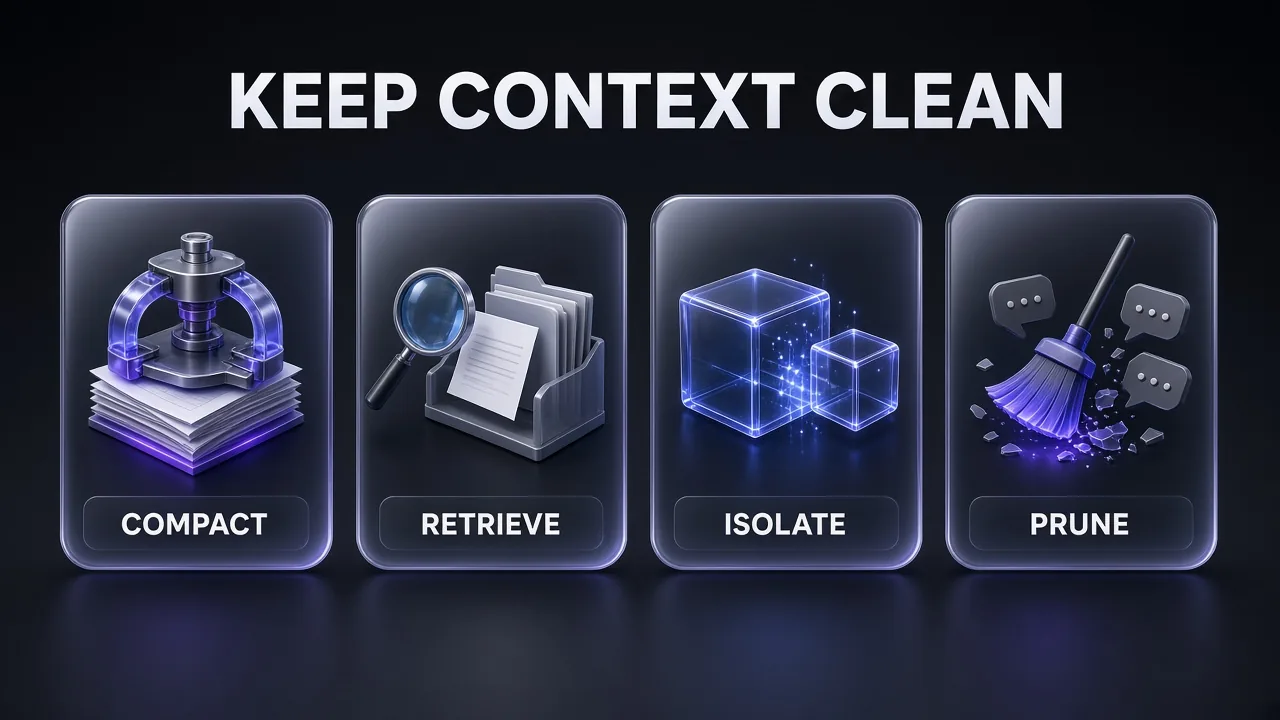
Every fix keeps the window small and high-signal, and they stack. Anthropic's list for long-horizon work is compaction, structured note-taking and sub-agents; the 2026 deep-search paper tested compaction, trimming and isolation.
1. Compact: summarize the history and start over from the summary
Compaction has the model summarize a long conversation and continues from the summary. Anthropic calls it "the first lever in context engineering". In Claude Code, the summary keeps architectural decisions, unresolved bugs and implementation details, and the agent continues with it plus the five most recently accessed files.
On the Claude API, server-side compaction is the recommended default. Threshold compaction uses the compact_20260112 strategy with the compact-2026-01-12 beta header. It triggers at 150,000 input tokens by default, and the minimum trigger you can set is 50,000:
"context_management": {
  "edits": [
    {
      "type": "compact_20260112",
      "trigger": {"type": "input_tokens", "value": 100000},
      "pause_after_compaction": false
    }
  ]
}
Compaction is lossy: Anthropic warns it can drop "subtle but critical context whose importance only becomes apparent later". A custom instructions string replaces the default summary prompt entirely, and each compaction is an extra billed sampling step. For manual compaction or custom instructions, use a prompt like this:
Compaction Summary Prompt
You are about to lose the full history of this session. Write a continuation summary that lets you resume the task in a fresh context with no other information.

Include, in this order:
1. Goal: the user's original request, success criteria and every constraint they set (quote constraints word for word).
2. Current state: what is done, which files or artifacts were created or changed (with paths), and what is still open.
3. Decisions: each decision made and why, including approaches that were tried and failed.
4. Open problems: unresolved bugs, errors and questions.
5. Next steps: the exact next 3 actions, in order.

Leave out raw tool output, file contents you can re-read, and chit-chat. Keep it under 800 words.
Pro tip: Compact before you need to. The 2026 deep-search paper found more frequent compaction and trimming reduced rot, at higher cost. Wait until the window is full and the summary is written by an already-degraded model.
2. Retrieve: load what you need, when you need it
Anthropic describes a shift toward just-in-time context: the agent keeps lightweight references (file paths, queries, links) and loads data with tools only when needed. Claude Code loads CLAUDE.md up front and uses glob and grep to pull files on demand. For retrieval setups:
- Retrieve fewer, better chunks. "Lost in the Middle" found that going from 20 to 50 documents barely helped. Rerank and cut.
- Documents first, question last. Claude's long-context tips say queries at the end "can improve response quality by up to 30 percent in tests". Google's Gemini guide agrees.
- Clean what you fetch. Raw HTML navigation and boilerplate burn tokens and act as distractors. Fetch clean Markdown.
Firecrawl describes itself as a context API for AI agents: it searches and scrapes the web and returns clean Markdown or structured data, so your agent reads the article, not the page chrome. To plug it into Claude Code, see our roundup of the best MCP servers for Claude Code.
3. Isolate: give noisy work its own context window
Searching a codebase, reading logs and running tests are noisy. In the main conversation, the output sits in your window; in a subagent, only the conclusion comes back. Claude Code's docs say to use one "when a side task would flood your main conversation with search results, logs, or file contents you won't reference again", because each one works in its own context window and returns only its summary.
Per Anthropic, a subagent might explore with tens of thousands of tokens but return a summary of often 1,000 to 2,000. Claude Code's built-in read-only Explore subagent exists for exactly this. A request this simple works:
Use a subagent to run the test suite and report only the failing tests with their error messages.
Isolation isn't free: many subagents returning detailed results still fill your context, and each spends its own tokens. The deep-search paper found isolation highly model-dependent. Ask for short, structured reports.
4. Prune: clear old tool results and messages
Once an agent has acted on a file, the raw contents usually aren't needed again. Anthropic calls clearing old tool results "one of the safest lightest touch forms of compaction". Claude's context editing does it server-side with the clear_tool_uses_20250919 strategy and the context-management-2025-06-27 beta header. By default it kicks in at 100,000 input tokens, keeps the 3 most recent tool uses, and replaces each cleared result with a placeholder so Claude knows something was removed:
"context_management": {
  "edits": [
    {
      "type": "clear_tool_uses_20250919",
      "trigger": {"type": "input_tokens", "value": 30000},
      "keep": {"type": "tool_uses", "value": 3},
      "clear_at_least": {"type": "input_tokens", "value": 5000},
      "exclude_tools": ["web_search"]
    }
  ]
}
exclude_tools protects results you must keep. clear_at_least matters because clearing invalidates your cached prefix, so each clear should be worth the cache write. A matching clear_thinking_20251015 strategy handles old thinking blocks, and Claude's memory tool lets the model save what matters before it's cleared. Prune the fixed prefix too: Anthropic flags bloated tool sets as a common failure mode.
Two more fixes worth adding
- Take notes outside the window. Have the agent keep a progress file (NOTES.md,
progress.txt,tests.json) plus git history and read them back after a reset. - Start fresh on purpose. Claude's prompting guide says a brand-new context can beat compaction because current models rediscover state well from the filesystem. Boolean's advice: new sessions or compact whenever possible.
A Step-by-Step Context Hygiene Workflow
The routine for any long-running agent, in order:
- Measure. Log input tokens per turn from the
usagefield; the token counting endpoint estimates requests in advance. - Slim the fixed prefix. Trim the system prompt, unused tools, MCP servers and CLAUDE.md.
- Retrieve just in time. Pass paths and links, not contents; clean web pages to Markdown.
- Order what you load. Long documents first, in clear tags; question last.
- Delegate noisy work to subagents that return short reports.
- Prune automatically with tool result clearing and
exclude_tools. - Compact early, well below the limit, with a precise summary prompt.
- Persist state in a progress file and git so a fresh session can resume.
To find what's bloating a session you already have, paste this into the agent itself:
Context Audit Prompt
Before we continue, audit your own context for this session.

1. List the 5 largest items in your context (tool results, file contents, documents, earlier answers) and estimate their size in tokens.
2. Mark each one KEEP (still needed for the current task), SUMMARIZE (needed, but a 2-3 sentence note would do) or DROP (no longer relevant).
3. List every instruction or constraint I've given you in this session, word for word, and flag any that conflict with each other.
4. Name the current task in one sentence and the next 3 steps.

Don't continue the task yet. Give me the audit so I can decide whether to compact or start a fresh session.
The model's token estimates are guesses; use the API's usage numbers for real counts.
Tool Stack for Fighting Context Rot
| Job | Tool or feature | What it does for context rot |
|---|---|---|
| Compact | Claude API server-side compaction (compact_20260112); Claude Code auto-compaction | Replaces long history with a summary before the window fills |
| Prune | Claude context editing (clear_tool_uses_20250919, clear_thinking_20251015) | Clears old tool results and thinking blocks server-side |
| Isolate | Claude Code subagents (built-in Explore, custom agents in .claude/agents/) | Runs noisy work in a separate window and returns a summary |
| Retrieve | Firecrawl, MCP servers, glob/grep | Loads clean, relevant content on demand instead of up front |
| Persist | Claude memory tool, progress files, git | Keeps state outside the window so sessions can reset |
| Measure | usage field, token counting endpoint | Shows how fast the window grows and where tokens go |
| Cheaper side work | Smaller or lower-cost models for subagents and summaries | Makes frequent compaction and delegation affordable |
Compacting early and delegating often mean more model calls, so it can pay to run summaries and searches on a cheaper model. For an alternative model family for that side work, Z.ai's GLM models are one option to test against your own tasks. For tuning how hard each of those calls thinks, see our guide on choosing thinking_level and effort for real workloads.
Common Mistakes
- Treating window size as a quality promise. Google's guide notes single-needle retrieval can reach around 99%, but accuracy drops when you need several facts at once.
- Pasting whole repos "just in case". Every irrelevant token is a potential distractor.
- Keeping one chat alive for days. Stale, related-looking history is what hurt Claude Opus 5 in Boolean's test. Start new sessions per task.
- Compacting with a vague summary prompt. A dropped constraint is forgotten for good.
- Assuming caching solves it. Cached tokens still sit in the window.
- Spawning subagents for everything. Use them for noisy, self-contained work only.
The Verdict
Context rot is real, measurable, and mostly a design problem. The best 2026 models are much better at clean retrieval and ignoring obviously irrelevant text, but still vulnerable to what agents produce most: long, related, partly stale history.
Short version: don't fill the window because you can. Compact early with a precise summary prompt, retrieve just in time, isolate noisy work in subagents, and prune old tool results automatically. Keep the question at the end and the important facts out of the middle. Do that and a 1M-token window becomes headroom, not a trap.
If you hand multi-step research to an agent such as Genspark, the same rules apply: give it a focused brief with the question stated clearly, not a dump of everything you have.
Frequently Asked Questions
Keep Reading
Frequently Asked Questions
8 questions answered