The PromptsRush journal
TutorialsHow to Build Multi-Agent Workflows With Claude Code
A step-by-step guide to multi-agent workflows in Claude Code: specialist subagents, the orchestrator, pipeline and parallel patterns, git worktrees, hooks, agent teams and dynamic workflows, with current limits from Anthropic's docs and three copy-ready prompts.
Advertisement
Short version: most multi-agent work in Claude Code needs only two things: subagents for delegation and git worktrees for isolation. Add agent teams when your workers genuinely need to talk to each other, and dynamic workflows when a job needs dozens of agents or a script you can rerun. Start any bigger and you pay for coordination you don't use.
Claude Code now has five built-in ways to run agents in parallel, and they overlap. This guide turns them into one build path, adding complexity only when the job calls for it. If you're still deciding what belongs in a subagent rather than a skill or an MCP server, read our breakdown of Claude skills vs MCP tools vs subagents first.
Sources: the Claude Code docs and changelog, checked on 27 October 2026 against version 2.1.311. We haven't benchmarked these setups ourselves, so every limit and number below comes from Anthropic's documentation.
What You'll Build in This Guide
- Two specialist subagents: a read-only reviewer and a test runner.
- Three working patterns: orchestrator, pipeline and parallel sessions in worktrees.
- Guardrails with tool allowlists, permission rules and hooks.
- A scaling path to agent teams, dynamic workflows and headless runs, plus three copy-ready prompts.
The Five Ways Claude Code Runs Agents in Parallel
Anthropic's docs list five approaches. They differ in who coordinates the work and where it runs.
| Approach | Who coordinates | Status (Oct 2026) | Best for |
|---|---|---|---|
| Subagents | Claude, inside one session | Generally available | Side tasks that would flood your main conversation; focused workers that return a summary |
Agent view (claude agents) | You, from one screen | Research preview | Several independent tasks you hand off and check on later |
| Agent teams | A lead Claude session | Experimental, off by default | Work where teammates must share findings and challenge each other |
| Dynamic workflows | A JavaScript script Claude writes | Available on paid plans and the API | Audits, large migrations and cross-checked research with dozens to hundreds of agents |
| Projects | Claude, across cloud threads | Public beta on Pro and Max | Long-running streams of work at claude.ai/code that keep going when your machine is off |
Three helpers sit alongside them. Worktrees give each session its own git checkout. Cross-session messaging lets sessions you run yourself pass findings to each other. And /batch is a bundled skill that splits one large change into 5 to 30 worktree-isolated subagents.
The real win is that every agent gets its own context window. A session that mixes exploration, logs and edits degrades as it fills, the problem we cover in what context rot is and how to fix it.
Three Multi-Agent Patterns: Orchestrator, Pipeline and Parallel
Nearly every multi-agent setup is one of three patterns, or a mix.
- Orchestrator. One lead agent plans, hands pieces to helpers, and merges what comes back. In Claude Code the lead is your main conversation and the helpers are subagents or teammates.
- Pipeline. Agents run in sequence, each one taking the previous agent's output as input: find issues, then fix them, then verify. The docs call this "chaining subagents."
- Parallel. Independent sessions work side by side without a coordinator, each in its own git worktree so their edits can't collide.
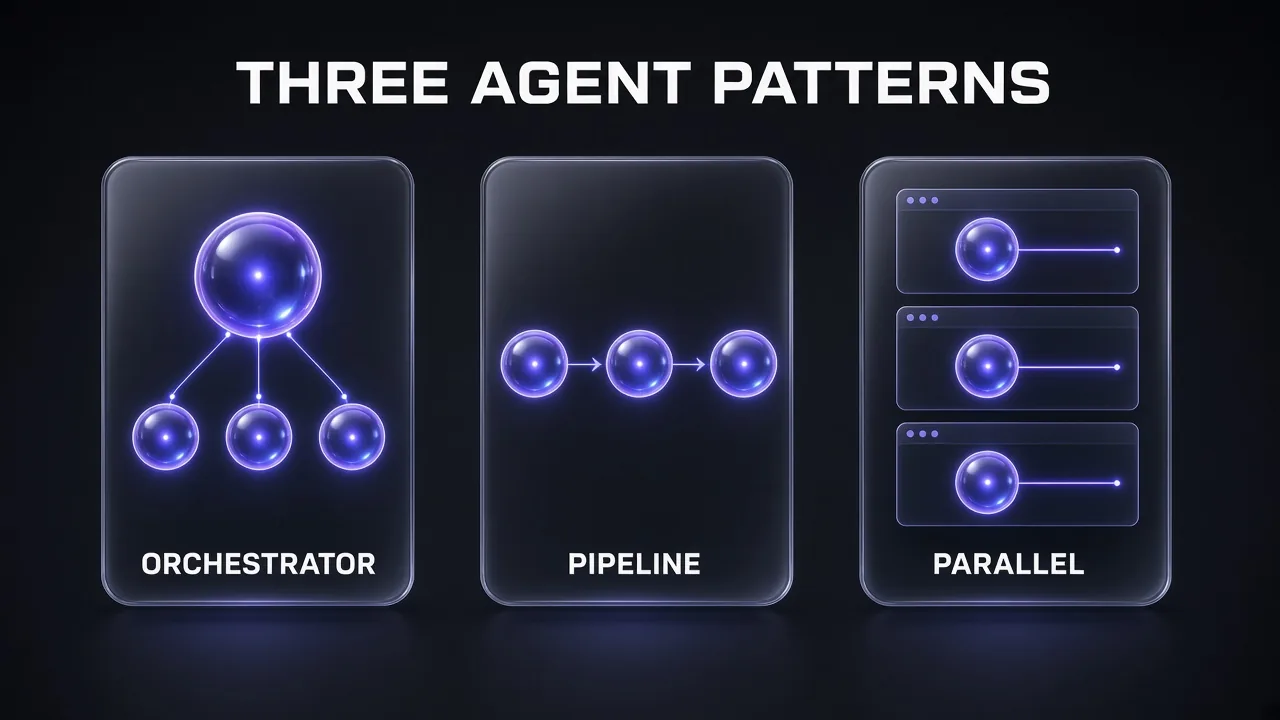
The docs' test: same files means worktrees; workers that need to talk means agent teams; everything else starts with subagents.
Step 1: Define Specialist Subagents
A subagent is a Markdown file with YAML frontmatter; the body becomes its system prompt. Only name and description are required, and Claude uses the description to decide when to delegate. Commit project subagents in .claude/agents/; personal ones go in ~/.claude/agents/.
A read-only reviewer (no Write or Edit, so it can't change code):
---
name: code-reviewer
description: Reviews changed code for bugs, security issues and readability. Use proactively after code changes.
tools: Read, Grep, Glob
model: sonnet
---

You are a senior code reviewer. Review only the files you are given.
Report each issue as: file, line, severity (high/medium/low), fix.
Return a short ranked list. Do not rewrite whole files.
And a cheap test runner with a turn limit:
---
name: test-runner
description: Runs the test suite and reports only failing tests with their error messages.
tools: Bash, Read, Grep
model: haiku
maxTurns: 15
---

Run the project's test command. Return failing test names,
the assertion or error text, and the most likely cause. Nothing else.
The fields worth knowing for multi-agent work:
| Field | What it does |
|---|---|
tools / disallowedTools | Allowlist or denylist. Omit tools and the subagent inherits every tool available to subagents. |
model | sonnet, opus, haiku, fable, a full model ID, or inherit. |
maxTurns | Stops the agent after N turns and returns partial output Claude can resume. |
isolation: worktree | Runs the agent in a temporary git worktree; removed automatically if it made no changes. |
skills / mcpServers | Preload full skills, or give this agent MCP servers the main session doesn't have. |
effort, hooks, permissionMode | Per-agent effort level, lifecycle hooks and permission mode. |
Two details catch people out. Claude Code silently ignores frontmatter fields it doesn't recognise, so spell them exactly (camelCase). And unlike the built-in Explore and Plan agents, custom subagents load your CLAUDE.md files, so a bloated one gets copied into every worker. Our guide to writing AGENTS.md and CLAUDE.md files that actually work covers how to keep that file lean; set omitClaudeMd: true on workers that get everything they need from the delegation prompt.
Pro tip: keep descriptions short. They take up context every session, and Claude Code warns at startup once your custom subagents' combined descriptions pass 15,000 tokens. Put detail in the body, which loads only when the agent runs.
Generate a Specialist Subagent Team
I want to split work in this repository across specialist Claude Code subagents.

1. Read the project structure, package files and test setup.
2. Propose 3 subagents, for example a read-only reviewer, a test runner and a docs checker, based on what this repo actually needs.
3. For each one, write the full file for .claude/agents/[NAME].md with YAML frontmatter: name, a one-sentence description that says when to use it, the smallest tools list that works, a model (use haiku for mechanical jobs, sonnet for judgment), and maxTurns.
4. Write a system prompt body under 12 lines that defines exactly what the agent returns.
5. Explain each tools choice in one line. Do not create the files until I approve.
Step 2: Run the Orchestrator Pattern (Fan Out, Merge Back)
The orchestrator needs no setup beyond Step 1. Your main conversation plans the split, delegates each piece to a subagent, and merges their summaries into one answer.
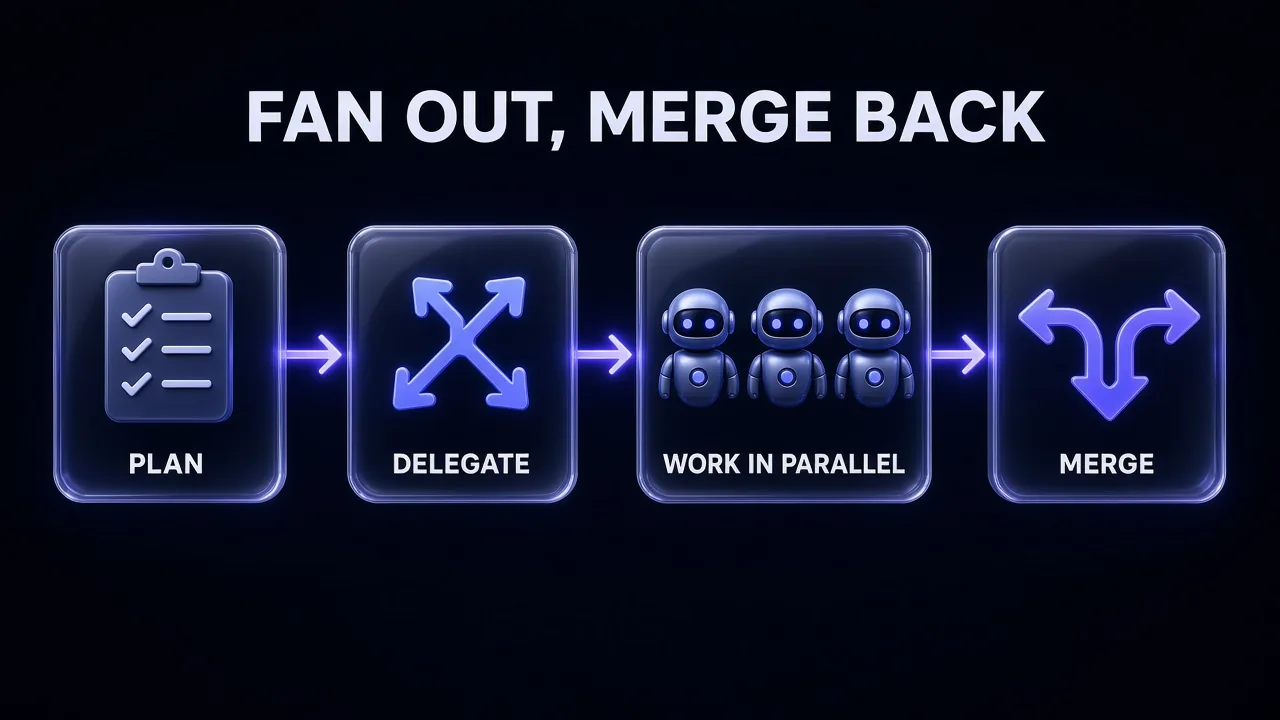
You trigger it in plain English, building on the docs' example:
Research the authentication, database, and API modules in parallel
using separate subagents. Each one returns: entry points, external
dependencies, and the three riskiest functions. Then merge the
findings into one table and flag anything that crosses modules.
To guarantee a specific worker runs, @-mention it (@agent-code-reviewer). How the fan-out behaves in current versions:
- Subagents start in the background by default. Their permission prompts surface in your main session;
/tasksshows their status. - Up to 20 run at once. Past that, spawning fails until a slot frees up. Change it with
CLAUDE_CODE_MAX_CONCURRENT_SUBAGENTS. - Subagents can nest three layers deep. Set
CLAUDE_CODE_MAX_SUBAGENT_SPAWN_DEPTHto1to switch nesting off. - Forks are the cheap exception.
/subtask draft unit tests for the parserstarts a fork that inherits your full conversation and shares its prompt cache, so it costs less than a fresh subagent for work that needs the same context.
The merge step is where orchestration goes wrong: every summary lands back in your main context. Tell each worker the exact shape to return (a table row, five bullets) and you control how much comes back. That's the same discipline we describe in 12 context engineering patterns for Claude Code agents: the subagent reads the mess so your lead doesn't have to.
Research fan-outs often need web data. If your agents need clean page content rather than raw HTML, a scraping API is the usual piece to connect.
Step 3: Chain Subagents Into a Pipeline
A pipeline runs agents in order, and Claude passes the relevant output from one to the next:
Use the code-reviewer subagent to find performance issues,
then use the optimizer subagent to fix them.
A practical three-stage chain:
- Explore (built-in, read-only): map the files involved and return a list.
- Implementer (custom, can edit): change only the files on that list.
- test-runner (custom, Haiku): run the suite and report failures back to the lead.
Two features make pipelines sturdier. Resume instead of restart: Claude can continue a finished subagent with the SendMessage tool, keeping its full history (Explore and Plan are one-shot and can't be resumed). maxTurns as a circuit breaker: a stage that hits its limit returns partial output that Claude can resume.
Pro tip: Claude doesn't carry your conversation into a fresh subagent. It writes a delegation message instead. If a rule must reach every stage, such as "never touch the vendor/ folder," restate it when you ask for the pipeline.
Step 4: Isolate Parallel Edits With Git Worktrees
Subagents share your working directory by default, which means overwritten files the moment two agents edit at once. Git worktrees give each session its own checkout and branch.
For the parallel pattern, open one terminal per task:
claude --worktree feature-auth
claude --worktree fix-billing-rounding
claude --worktree "#1234"        # branch from pull request 1234
Each creates .claude/worktrees/<name>/ on a branch called worktree-<name>. Three setup steps:
- Ignore the folder: add
.claude/worktrees/to.gitignore. - Copy secrets in: list gitignored files like
.envin a.worktreeincludefile at the project root. - Pick a base: worktrees branch from your remote default branch; set
"worktree": {"baseRef": "head"}to build on unpushed work.
For subagents, ask Claude to "use worktrees for your agents," or add isolation: worktree to the frontmatter. Worktrees with no changes are removed automatically, and Claude Code blocks isolated agents from editing your main checkout.
For one large change, /batch migrate src/ from JavaScript to TypeScript does this for you: it proposes 5 to 30 independent units, then spawns one background subagent per unit in its own worktree once you approve.
To dispatch and walk away, claude --bg "investigate the flaky settings test" starts a background session and claude agents opens agent view to monitor them all. It's a research preview.
Step 5: Add Guardrails With Tools, Permissions and Hooks
More agents means more tool calls you didn't watch. Prompts are requests; these controls are enforced.
1. Narrow each agent's tools. Strip whole MCP servers with entries like mcp__github in disallowedTools, or give one agent a server through mcpServers. Our list of the best MCP servers for Claude Code is a good shortlist for which servers deserve a dedicated agent.
2. Block agents you don't want spawned. Add them to the permission deny list in your settings:
{
  "permissions": {
    "deny": ["Agent(Explore)", "Agent(my-custom-agent)"]
  }
}
Note that Bash(git push *) in disallowedTools removes all of Bash from that agent; to block only pushes, put it in permissions.deny.
3. Hook into the agent lifecycle. A PreToolUse hook in settings.json also checks every tool call a subagent makes, and SubagentStart and SubagentStop match on the agent's name.
{
  "hooks": {
    "SubagentStop": [
      {
        "matcher": "test-runner",
        "hooks": [
          { "type": "command", "command": "./scripts/log-test-report.sh" }
        ]
      }
    ]
  }
}
The hook receives the agent's final message in last_assistant_message. Version note: Claude Code 2.1.311 (26 October 2026) fixed SubagentStop hooks firing about twice a minute per running subagent instead of once, so update before relying on it.
Step 6: Scale Up With Agent Teams (Experimental)
When workers need to share findings and hand tasks to each other, agent teams add a lead session, teammate sessions, a shared task list and direct messaging. They're experimental and off by default:
{
  "env": {
    "CLAUDE_CODE_EXPERIMENTAL_AGENT_TEAMS": "1"
  }
}
Then describe the team, reusing Step 1's agents as roles:
Spawn three teammates to review PR #142: security (use the
code-reviewer agent type), performance and test coverage.
Use Sonnet for each. Have them challenge each other's top
issue before you write the summary.
- Coordination. Teammates self-claim the next unblocked task; claiming uses file locking. Split-pane display needs tmux or iTerm2.
- Size. Start with 3 to 5 teammates and about 5 to 6 tasks each.
- No worktrees. Teammates aren't isolated in worktrees, so split the work so each owns different files.
- Quality gates.
TeammateIdle,TaskCreatedandTaskCompletedhooks can block with exit code 2, e.g. until tests pass. - Limits. One team per session, no nested teams, and
/resumedoesn't restore in-process teammates.
Side effect: with teams enabled, any subagent Claude names launches as a teammate, so teams can form uninvited.
Step 7: Codify Big Jobs as Dynamic Workflows
Dynamic workflows move the plan out of Claude's turn-by-turn judgment and into code. Claude writes a JavaScript script, a runtime runs it in the background, and intermediate results stay in script variables, not your context. Anthropic launched them in late May 2026 for "dozens to hundreds of agents per run."
Run the bundled /deep-research <question>, put ultracode (or "use a workflow") in a prompt, or use /effort ultracode for the session. Watch progress with /workflows.
ultracode: audit every route handler under src/routes/ for missing
authentication checks, and adversarially verify each finding
before reporting it
The script uses agent() for one subagent, pipeline() for one per list item, and parallel() to run a set at once. Press s in /workflows to save a run to .claude/workflows/ as a reusable /name command.
| Workflow limit | Default |
|---|---|
| Concurrent agents | Up to 16, fewer on machines with fewer CPUs (CLAUDE_CODE_WORKFLOW_MAX_CONCURRENT_AGENTS, 1 to 256) |
Items per parallel() or pipeline() call | 4,096 |
| Agents per run | 1,000 total |
| "Large workflow" warning | More than 25 agents or a projected 1.5 million tokens |
Workflows are available on all paid plans and the API (on Pro, enable them in /config). Test on one directory first, because every agent's tokens count; our Claude Code API pricing guide explains how they're billed.
Plan a Multi-Agent Run Before You Start It
Before doing anything, plan how to split this task across Claude Code agents: [DESCRIBE THE TASK].

1. List the independent units of work and the files each one touches.
2. Pick one pattern and justify it in two lines: orchestrator (subagents, results merged by you), pipeline (chained subagents), or parallel (separate sessions in git worktrees).
3. Flag any two units that touch the same file and say how to avoid the conflict (worktrees, sequencing, or merging the units).
4. For each unit, name the subagent to use, its model (haiku, sonnet or opus) and the exact output it must return, in under 10 lines.
5. Estimate how many agents will run at once and say whether a dynamic workflow would be a better fit.
Stop and wait for my approval before spawning anything.
Run Multi-Agent Workflows Headless and From the Agent SDK
To put a review team into CI, use non-interactive mode, claude -p:
claude -p "Use the code-reviewer subagent on the files changed since main,
then summarise the findings" \
  --agents ./agents.json \
  --allowedTools "Read,Grep,Glob,Agent" \
  --output-format json
--agentstakes subagent definitions as JSON or, in-pmode, a JSON file path.--json-schemawith--output-format jsonreturns validated output in astructured_outputfield.--bareskips auto-discovery of hooks, skills, subagents, MCP servers and CLAUDE.md for reproducible runs; it needs an API key and can't run background subagents.
Agent teams don't spawn in -p or SDK sessions, and the ultracode keyword doesn't work in -p prompts.
The Claude Agent SDK (Python and TypeScript) gives you the same loop as a library: pass subagents in the agents option as AgentDefinition objects and include Agent in your allowed tools.
Turn a Multi-Agent Review Into a CI Job
Write a shell script that runs a multi-agent code review with Claude Code in CI.

Requirements:
- Use claude -p with --bare so results don't depend on local config.
- Define two subagents in a file called agents.json: a read-only reviewer (Read, Grep, Glob) and a test runner (Bash, Read) on a smaller model.
- Pass only the files changed against [BASE BRANCH].
- Use --output-format json with a --json-schema that returns an array of findings: file, line, severity, message.
- Exit non-zero if any finding has severity high.
- Explain each flag in a comment. Assume ANTHROPIC_API_KEY is set as a CI secret.
What Multi-Agent Runs Cost, and the Pitfalls to Avoid
Honest answer: parallel agents buy speed and a cleaner context, not lower bills. Each subagent's requests count toward your usage limits; ten agent view sessions use quota roughly ten times as fast as one, and agent teams use about 7 times more tokens than a standard session when teammates run in plan mode. To keep spend sane:
- Route mechanical work to smaller models:
model: haikufor test runners; Sonnet for teammates. - Use forks for context-heavy side tasks. They share the main session's prompt cache. Our explainer on Claude prompt caching covers why cache hits matter so much here.
- Set effort per agent. See how to choose thinking level and effort for where each level pays off.
If the API bill is the blocker, test other models on your scripted tasks. Z.ai's GLM models are one alternative to compare.
The mistakes that waste the most runs:
- Parallel edits without worktrees. Two agents, one file, one silent overwrite. Isolate or partition.
- Vague or unbounded delegation. A fresh subagent sees only what Claude writes it, and ten three-page reports refill the context you were protecting.
- Reaching for teams first. For sequential or same-file work, the docs say subagents or one session do better.
- Forgetting cleanup. Worktrees from
-pruns aren't removed automatically. Checkgit worktree listnow and then.
Verdict: Start With Subagents, Isolate With Worktrees, Scale Only When It Pays
My take: start with two or three well-scoped subagents and the orchestrator pattern. Add isolation: worktree once more than one agent edits code. Use teams only when workers need to debate, and workflows when the job deserves a script. For how Claude Code compares with other agentic tools, see our Claude Code vs Google Antigravity comparison.
| Your job | Use |
|---|---|
| Research or log-heavy side task | One subagent (or a fork) |
| Independent investigations, one answer | Orchestrator: parallel subagents, merged by the lead |
| Find, then fix, then verify | Pipeline: chained subagents |
| Separate features or bugs in one repo | Parallel: claude --worktree sessions or agent view |
| One large mechanical change | /batch |
| Workers that must debate and share tasks | Agent teams (experimental) |
| Dozens of agents or a rerunnable process | Dynamic workflows |
The same planning discipline helps when the "agents" are research tools outside your terminal. Genspark works best with the same kind of focused brief you'd give a subagent: one question, clear constraints, a defined output.
Frequently Asked Questions
8 questions answered