The PromptsRush journal
TutorialsHow to Write AGENTS.md and CLAUDE.md Files That Actually Work
A six-step guide to AGENTS.md and CLAUDE.md files coding agents actually follow: how Claude Code, Codex, Cursor and Copilot load them, what to put inside (commands, conventions, boundaries, gotchas), and a copy-ready template.
Advertisement
Short version: a good AGENTS.md or CLAUDE.md is short, specific and boring. It lists the exact commands an agent should run, the conventions it would otherwise guess wrong, the things it must never touch and the traps that have bitten your team before. Everything else is noise that costs tokens and dilutes the rules that matter.
Many instruction files fail the other way: they read like a README or an architecture essay. This guide shows you how to write AGENTS.md and CLAUDE.md files that coding agents actually follow, based on the official docs from Anthropic, OpenAI, Cursor and GitHub. If you're new to the idea of curating what a model sees, start with our primer on what context engineering is, because an instruction file is context engineering in its simplest form.
Sources: agents.md, the Claude Code memory docs, the OpenAI Codex AGENTS.md guide, Cursor's Rules docs and GitHub's Copilot custom instructions docs, all checked on 25 October 2026. Where we give opinions, we say so.
What You'll Get From This Guide
- How each tool finds your files: global, project and folder levels in Claude Code, Codex, Cursor and Copilot, and what happens when they conflict.
- A six-step method to go from an empty repo (or a bloated file) to a lean instruction file.
- A four-part content framework: commands, conventions, boundaries and gotchas.
- A copy-ready template for a shared AGENTS.md plus a thin CLAUDE.md, and two prompts to draft and audit yours.
AGENTS.md vs CLAUDE.md: What Each File Is
AGENTS.md is an open, tool-neutral format. The official site describes it as "a README for agents": a predictable place for build steps, tests and conventions that would clutter a human README. It emerged from work across OpenAI Codex, Amp, Google's Jules, Cursor and Factory, and is now stewarded by the Agentic AI Foundation under the Linux Foundation. The site says it is used by over 60,000 open-source projects. There are no required fields: it's plain Markdown with any headings you like.
CLAUDE.md is Claude Code's native instruction file. Anthropic calls it persistent instructions that Claude reads at the start of every session, at user, project or organisation scope. It also supports features AGENTS.md doesn't define, such as @path imports and a personal CLAUDE.local.md.
Honest answer to "which one should I write?": both, but only one of them should hold the content. Recent Claude Code versions can read AGENTS.md directly, and most other agents read AGENTS.md natively, so a shared AGENTS.md plus a thin CLAUDE.md is the setup we recommend for any repo touched by more than one coding agent. (Still picking an agent? Our Claude Code vs Google Antigravity comparison covers that choice.)
| Tool | Reads AGENTS.md? | Native file(s) | Nesting |
|---|---|---|---|
| Claude Code | Yes, from v2.1.277, when no CLAUDE.md is on the path (configurable) | CLAUDE.md, .claude/CLAUDE.md, CLAUDE.local.md, .claude/rules/ | Subfolder files load on demand |
| OpenAI Codex | Yes, natively | AGENTS.md, AGENTS.override.md | One file per directory, root down to working dir |
| Cursor | Yes, root and subdirectories | .cursor/rules/*.mdc | Nested files combine; more specific wins |
| GitHub Copilot | Yes, anywhere in the repo | .github/copilot-instructions.md, .github/instructions/*.instructions.md | Nearest AGENTS.md takes precedence |
| Gemini CLI | Via setting (context.fileName in .gemini/settings.json) | Its own context file | Not covered here |
GitHub's docs add one more wrinkle: instead of AGENTS.md, Copilot can also use a single CLAUDE.md or GEMINI.md stored at the root of the repository.
How Agents Find and Stack Instruction Files
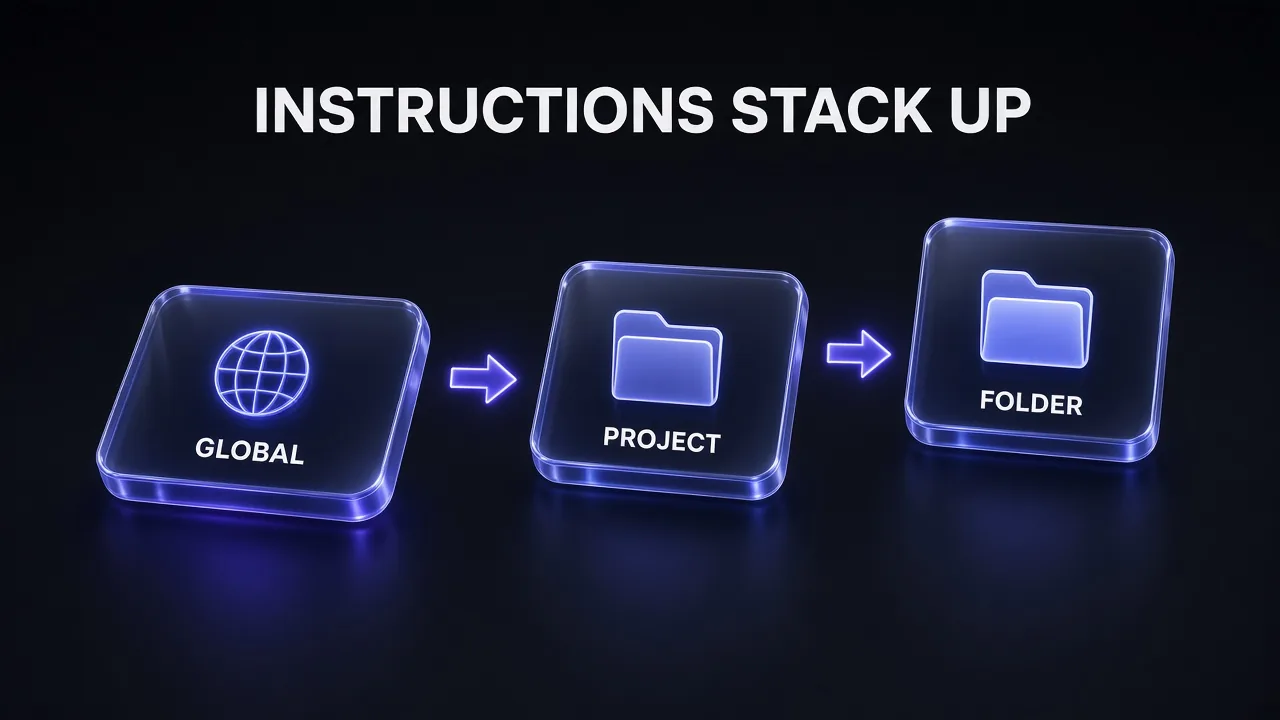
Every major agent builds its instructions from several levels, broad to specific. A global file holds your personal defaults for every repo. A project file at the repo root holds team rules. Folder files inside packages or services hold local exceptions. The agent concatenates them in that order, so the most specific file is read last and usually wins when two rules disagree. In Claude Code the levels are ~/.claude/CLAUDE.md, then ./CLAUDE.md, then subfolder CLAUDE.md files; in Codex they are ~/.codex/AGENTS.md, then the repo-root AGENTS.md, then one file per directory down to where you launched it.
Claude Code: concatenate, closest read last
Claude Code loads CLAUDE.md and CLAUDE.local.md from your working directory and every directory above it at launch. Files in subdirectories load on demand, once Claude reads or edits a file there. Anthropic is explicit that the files "are concatenated into context rather than overriding each other": content runs from the filesystem root down, and within one directory CLAUDE.local.md comes after CLAUDE.md. An organisation can also ship a managed CLAUDE.md (for example /etc/claude-code/CLAUDE.md on Linux) that loads before everything else and can't be excluded.
The catch: if two instructions contradict each other, the docs warn that Claude "may pick one arbitrarily." Concatenation is not a priority system, so don't rely on a subfolder file to cancel a root rule. Rewrite the root rule instead.
Codex: one file per directory, with overrides
Codex builds an instruction chain once per run. At the global level it reads AGENTS.override.md if it exists, otherwise AGENTS.md, in ~/.codex. Then it walks from the project root (usually the Git root) down to your current directory, taking at most one file per directory: AGENTS.override.md first, then AGENTS.md, then any names in project_doc_fallback_filenames. Files closer to your working directory appear later and override earlier guidance. It skips empty files and stops adding once the combined size hits project_doc_max_bytes, which is 32 KiB by default.
Cursor and Copilot: nearest file wins
Cursor supports AGENTS.md in the project root and any subdirectory; nested files are combined with their parents, "with more specific instructions taking precedence." Copilot says the nearest AGENTS.md in the directory tree takes precedence. The agents.md site sums up the shared rule: the closest AGENTS.md to the edited file wins, and explicit chat prompts override everything.
The 6-Step Method at a Glance
- Pick one source of truth so you never maintain two diverging files.
- Generate a draft, then cut it with
/initor a prompt. - Fill in the four parts: commands, conventions, boundaries, gotchas.
- Split by scope into global, project, folder and personal files.
- Keep it short and verifiable, under the limits each tool sets.
- Verify what loaded and maintain it like code.
Step 1: Pick One Source of Truth
If your team uses Claude Code alongside Codex, Cursor or Copilot, put the real content in AGENTS.md. Then decide how Claude Code should see it. Anthropic's docs lay out the defaults clearly:
- Only AGENTS.md exists: Claude Code (v2.1.277 or later) reads it as project instructions.
- AGENTS.md and a CLAUDE.md or CLAUDE.local.md both exist on the path: Claude reads the CLAUDE.md files only, unless you change the "Project instructions" setting in
/configtoclaude-md-and-agents-md. - CLAUDE.md imports AGENTS.md: Claude reads CLAUDE.md with AGENTS.md pulled in through the import, and never reads it twice.
That second case surprises people. Adding a personal CLAUDE.local.md to a repo that relies on AGENTS.md stops Claude reading AGENTS.md for you. Our recommendation is the import pattern, because it works in every case Anthropic lists, including sessions that can't load AGENTS.md directly:
@AGENTS.md

## Claude Code

Use plan mode for changes under src/billing/.
A symlink (ln -s AGENTS.md CLAUDE.md) also works if you have no Claude-specific notes, but Anthropic flags two drawbacks: Claude's Edit and Write tools refuse to write through a symlink, and Git on Windows checks a committed symlink out as a one-line text file unless core.symlinks is enabled. If anyone on the team uses Windows, use the import.
Step 2: Generate a Draft, Then Cut It
Don't start from a blank page. In Claude Code, run /init: it analyses the codebase and writes a starting CLAUDE.md with build commands, test instructions and conventions it discovers. If a CLAUDE.md already exists, it suggests improvements instead of overwriting. It can also pull in other tools' files such as .cursorrules, .cursor/rules/ and .github/copilot-instructions.md. The agents.md site makes the same point for every tool: most coding agents can scaffold a file "if you ask nicely."
The draft is a starting point, not the finished file. Anthropic's own /doctor checkup proposes trims along exactly these lines, cutting directory layouts and architecture overviews Claude can derive from the codebase while keeping pitfalls, rationale and conventions that differ from tool defaults. If you're on another agent, this prompt does the same job:
Draft a Lean AGENTS.md From Your Repo
Read this repository before writing anything: package manifests, CI workflow files, lint and test configs, the README and CONTRIBUTING docs.

Then write an AGENTS.md of at most 80 lines with exactly four sections:
1. Commands: the exact install, dev, build, lint, typecheck and test commands, including how to run a single test file. Only include commands you found in the repo.
2. Conventions: only rules that differ from common defaults for this stack, each with a one-line example from a real file path.
3. Boundaries: three lists titled Always, Ask first and Never (for example generated folders, secrets, migrations, production configs).
4. Gotchas: non-obvious traps you found evidence for (env vars, ordering of commands, flaky tests, legacy folders).

Rules: no project history, no marketing copy, no generic advice like "write clean code", no directory tree dump. If you are unsure whether a command works, list it under a "To verify" heading instead of stating it as fact.
Step 3: Fill In Commands, Conventions, Boundaries and Gotchas
Everything worth putting in an instruction file falls into four buckets. If a line doesn't fit one of them, it probably belongs in a README, a skill or nowhere.
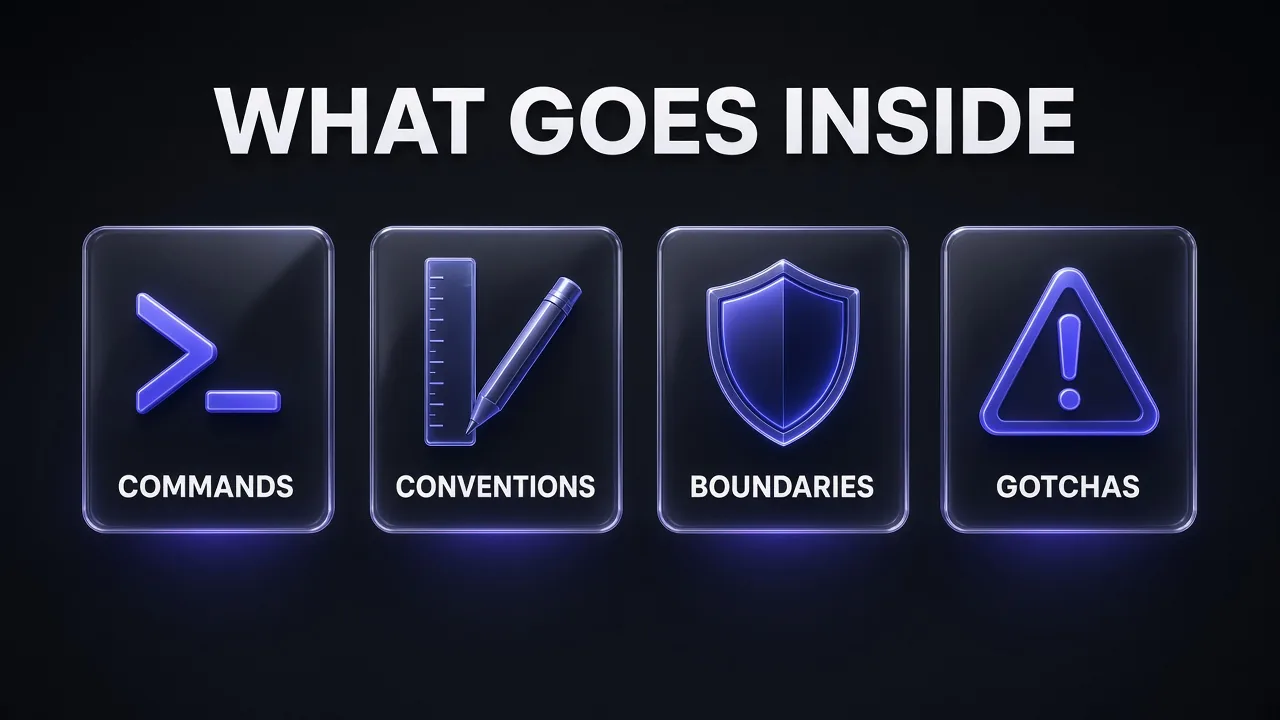
This split lines up with the sources. The agents.md site's popular sections are build and test commands, code style, testing instructions and security considerations, plus "anything you'd tell a new teammate." GitHub's analysis of over 2,500 agents.md files for Copilot custom agents found the strongest files cover commands, testing, project structure, code style, git workflow and boundaries.
Commands: exact, with flags, near the top
Commands are the highest-value lines in the file, because they save the agent from guessing your package manager or test runner. GitHub's advice is to put executable commands early and "include flags and options, not just tool names." Include the fast path too: how to test one file, lint one package, typecheck without a full build. The agents.md FAQ notes that agents will try to run the checks you list and fix failures before finishing, so a listed test command is also a quality gate.
Conventions: only what differs from defaults
Models already know common style conventions. Cursor's docs say it plainly: don't copy entire style guides, "use a linter instead." What the agent can't infer is your house choices: named exports only, money stored as integer cents, API handlers in a specific folder, a particular error-response shape. Anthropic's examples set the bar: "Use 2-space indentation" instead of "Format code properly"; "API handlers live in src/api/handlers/" instead of "Keep files organized." GitHub adds that one real code snippet beats three paragraphs describing a style.
If you also maintain design rules for front-end work, keep them in their own file. A design.md file for UI conventions keeps visual tokens and component rules out of the instruction file that loads into every session.
Boundaries: always, ask first, never
Boundaries tell the agent what not to touch: secrets, generated folders, vendored code, migrations, production configs. In GitHub's analysis, "never commit secrets" was the most common helpful constraint. We like a three-tier layout (Always, Ask first, Never) because it turns vague caution into decisions an agent can act on.
Pro tip: Instruction files are guidance, not enforcement. Anthropic says CLAUDE.md is context, "not enforced configuration," and points you to hooks and permissions.deny for anything that must never happen. Write the boundary in the file and enforce it in settings or CI.
Gotchas: the lessons you already paid for
Gotchas are the non-obvious traps: the test suite that needs a local Redis, the env var that must be set before the build, the legacy folder nobody should refactor, the command that must run before another. Anthropic's rule of thumb for when to add something is useful here: add it when Claude makes the same mistake a second time, when code review catches something it should have known, or when you type the same correction you typed last session. These are the lines /init can't discover.
Step 4: Split by Scope
A single root file works for small repos. As a codebase grows, move each rule to the narrowest level where it's true:
| Scope | Claude Code | Codex / AGENTS.md tools | Put here |
|---|---|---|---|
| Global (you) | ~/.claude/CLAUDE.md, ~/.claude/rules/ | ~/.codex/AGENTS.md | Personal habits across all repos |
| Project (team) | ./CLAUDE.md or ./.claude/CLAUDE.md | Root AGENTS.md | Commands, conventions, boundaries for everyone |
| Folder | Subfolder CLAUDE.md, path-scoped rules | Nested AGENTS.md or AGENTS.override.md | Package or service exceptions |
| Personal, this repo | CLAUDE.local.md (gitignored) | No standard equivalent | Sandbox URLs, your test data |
For monorepos, nested files are the main tool. The agents.md site notes that the main OpenAI repo had 88 AGENTS.md files at the time of writing. In Claude Code you have a second option: .claude/rules/ files with a paths frontmatter field load only when Claude works with matching files, so API rules stay out of context while it edits CSS. Cursor's equivalent is a .mdc rule with globs.
---
paths:
  - "src/api/**/*.ts"
---

# API rules
- Validate every request body at the handler boundary.
- Return errors as { code, message }.
Multi-step procedures (a release checklist, a migration runbook) don't belong in a file that loads every session at all. Anthropic suggests moving them into a skill, which loads only when relevant; our guide on how to create your first Claude skill walks through that. Deciding between skills, MCP tools and subagents is its own question, and we cover it separately.
CLAUDE.local.md is still a documented, current feature. It loads alongside CLAUDE.md and is appended after it, so your notes are the last thing Claude reads at that level. Add it to .gitignore. One caveat from the docs: a gitignored CLAUDE.local.md only exists in the worktree where you created it, so for preferences you want across worktrees, import a file from your home directory instead.
Step 5: Keep It Short and Verifiable
In our view, length is where most instruction files go wrong, and the docs back up the instinct to cut. Anthropic recommends targeting under 200 lines per CLAUDE.md, warning that longer files "consume more context and reduce adherence." Codex stops reading project instructions at 32 KiB combined by default. Cursor suggests keeping each rule under 500 lines and splitting large ones.
Two details are easy to miss. First, @path imports help you organise a long file but don't reduce its context cost, because imported files load with the CLAUDE.md that imports them. Second, every line in a file that loads at launch competes for the model's attention for the whole session. That's the same dynamic behind context rot, where accuracy drops as the window fills.
Make every instruction checkable. "Run pnpm test --filter api before committing" can be verified; "test your changes" cannot. A useful filter, in our opinion: would a competent developer new to this repo get this wrong without being told? If not, delete the line.
Pro tip: Claude Code strips block-level HTML comments from CLAUDE.md before injecting it. Use them to leave notes for human maintainers (why a rule exists, who to ask) without spending context tokens.
Step 6: Verify What Loaded and Maintain It
Never assume a file loaded. Each tool gives you a way to check:
- Claude Code: run
/contextand look under Memory files, or/memoryto list and open every CLAUDE.md, CLAUDE.local.md and auto memory location. Subfolder files load on demand, so they appear only after Claude touches a file there. - Codex: run
codex --ask-for-approval never "Summarize the current instructions."from the repo root; it should echo global and project guidance in precedence order. - Cursor: check rule status under Customize, Rules.
- Copilot: expand the references on a chat response and look for your instructions file.
Then maintain the file like code. Claude Code's /doctor prompt-audit (v2.1.283 or later) scans your CLAUDE.md, CLAUDE.local.md and AGENTS.md files for instructions written for older models, references to files or commands that no longer exist, and contradictions, and it proposes edits without changing anything until you approve. Cursor's guidance is the right habit for every tool: start simple and add rules only when you see the agent making the same mistake repeatedly. We'd add the reverse: when a convention changes, update the instruction file in the same pull request.
Audit and Trim an Existing Instruction File
You are reviewing an AI coding agent instruction file (AGENTS.md or CLAUDE.md). I will paste it below along with the repo's package manifest and CI config.

Return a table with one row per instruction and these columns: Instruction, Bucket (Command, Convention, Boundary, Gotcha, or None), Verdict (Keep, Rewrite, Move, Delete), Reason.

Apply these rules:
- Delete anything the agent can infer from the code or that a linter already enforces.
- Rewrite vague lines into specific, checkable ones.
- Flag commands that do not match the manifest or CI config.
- Flag pairs of instructions that contradict each other.
- Mark multi-step procedures or rules that only apply to one folder as Move, and say where (nested file, path-scoped rule, or skill).

Finish with the rewritten file, under 120 lines, grouped under Commands, Conventions, Boundaries and Gotchas.

[PASTE FILE AND CONFIGS HERE]
A Copy-Ready AGENTS.md and CLAUDE.md Template
Here's the skeleton we recommend. Replace every bracketed value with something real from your repo, and delete any section you can't fill with a specific line.
# AGENTS.md

[One line: what this repo is, stack with versions]

## Commands
- Install: [pnpm install]
- Dev server: [pnpm dev]
- Test all: [pnpm test]
- Test one file: [pnpm vitest run path/to/file.test.ts]
- Lint + typecheck: [pnpm lint && pnpm typecheck]
- Run lint and tests before every commit.

## Conventions
- [Named exports only; no default exports]
- [API handlers live in src/api/handlers/]
- [Money is integer cents, never floats]
- Follow the pattern in [src/api/handlers/users.ts] for new endpoints.

## Boundaries
- Always: [add or update tests for code you change]
- Ask first: [new production dependencies, database migrations]
- Never: [commit secrets or .env files, edit dist/ or generated/]

## Gotchas
- [Integration tests need a local Redis on port 6379]
- [Run pnpm db:generate after editing schema.prisma]
- [legacy/ is frozen; do not refactor it]

## Git
- [Conventional commits: feat:, fix:, chore:]
# CLAUDE.md
@AGENTS.md

## Claude Code only
- Use plan mode for changes under [src/billing/].
- Personal notes go in CLAUDE.local.md (gitignored).
That's roughly 30 lines. Grow it only when the agent gives you a reason to.
Common Mistakes That Make Instruction Files Fail
- Writing a README for agents that is really a README. Project history, motivation and feature lists don't change what the agent does.
- Two diverging copies. A CLAUDE.md and an AGENTS.md with different content guarantees one goes stale. Import or symlink instead.
- A stray CLAUDE.md hiding your AGENTS.md. In Claude Code's default mode, any CLAUDE.md or CLAUDE.local.md on the path means AGENTS.md isn't read.
- Contradictions across levels. Claude may pick either rule. Fix the broader file rather than adding a counter-rule.
- Treating rules as security. Instruction files shape behaviour; hooks, permissions and CI enforce it.
- Secrets in the file. It's committed and loaded into the model's context. Keep credentials and connection strings out.
- Tool setup in the wrong place. MCP server connections are configured in the tool's settings, not described in prose. If you're choosing servers, see our list of the best MCP servers for Claude Code.
Verdict: Start With 30 Lines and Earn Every One After That
My take: the best instruction file is the one you'd hand a strong contractor on their first morning. Exact commands, the few house rules that differ from normal, a clear list of things not to touch, and the traps that cost someone an afternoon. Put that in AGENTS.md so every agent reads it, import it from a thin CLAUDE.md, push folder-specific rules down the tree, and keep anything procedural in skills.
Then treat the file as living code: verify it loads, prune it when models get better at defaults, and add a line only when the same mistake happens twice. If you want the bigger picture of where an instruction file sits next to compaction, subagents and hooks, our 12 context engineering patterns for Claude Code show how the pieces fit together.
Frequently Asked Questions
7 questions answered