The PromptsRush journal
TutorialsHow to Build a Faceless YouTube Channel With HeyGen + ElevenLabs + Descript
A step-by-step faceless YouTube workflow: script for the ear, build one narrator voice in ElevenLabs, give it a recurring HeyGen Avatar 6 host, edit in Descript, and pass YouTube's originality and AI-disclosure rules. Prices checked 21 Nov 2026.
Advertisement
Short version: a faceless YouTube channel in late 2026 is a production line, not a trick. You write a script, turn it into a voice with ElevenLabs, give that voice a recurring on-screen host with HeyGen Avatar 6, and cut, caption and clip the whole thing in Descript. The tools are the easy part. The part that decides whether the channel ever earns money is whether each video is genuinely different and useful, because that is exactly what YouTube reviewers look for before they let a channel into the Partner Program.
This tutorial walks through the full build: picking a niche that survives a monetization review, scripting for the ear, building a voice you can reuse, using a HeyGen host without spending credits on every second of the episode, editing in Descript, and publishing with the right AI disclosure. Every price below comes from the vendor's own pricing page or help docs, checked on 21 November 2026. If you would rather appear as a digital twin of yourself than a designed character, our guide on how to create an AI avatar for YouTube covers that route instead.
What You Will Have at the End
By the end you will have a repeatable weekly system with a fixed input and a fixed output at each stage:
- A niche and a format that can carry 50+ distinct videos without repeating itself.
- A script template written for listening, with a hook, a payoff and a reason to stay.
- One consistent narrator voice in ElevenLabs that you reuse across every episode.
- A recurring host character in HeyGen that opens and closes each video, so the channel has a face without having your face.
- A Descript edit with B-roll, captions and Shorts cut from the same project.
Honest answer on expectations: this stack makes production fast and cheap. It does not make a channel succeed on its own. The channels that get monetized are the ones where a viewer could not swap one video for another and notice no difference.
Why HeyGen, ElevenLabs and Descript Together
Each tool owns one stage, and their pricing rewards different kinds of use. ElevenLabs is priced by characters of text, so it is cheap to iterate on a script until the read sounds right. HeyGen is priced in credits per minute of generated avatar video, so you want to animate only the moments that need a face. Descript is priced by hours of media and AI credits, so it is where the long timeline lives: B-roll, captions, music and the final export.
You could do more inside one tool. ElevenLabs now generates images and video, HeyGen has its own voices and a Video Agent, and Descript has AI voices and avatars. Overlap is fine. The reason to split the jobs is control: when the voice is wrong you fix it in one place, and every downstream video inherits the fix. Our best AI video stack breakdown explains the same split for cinematic work with Kling and HeyGen.
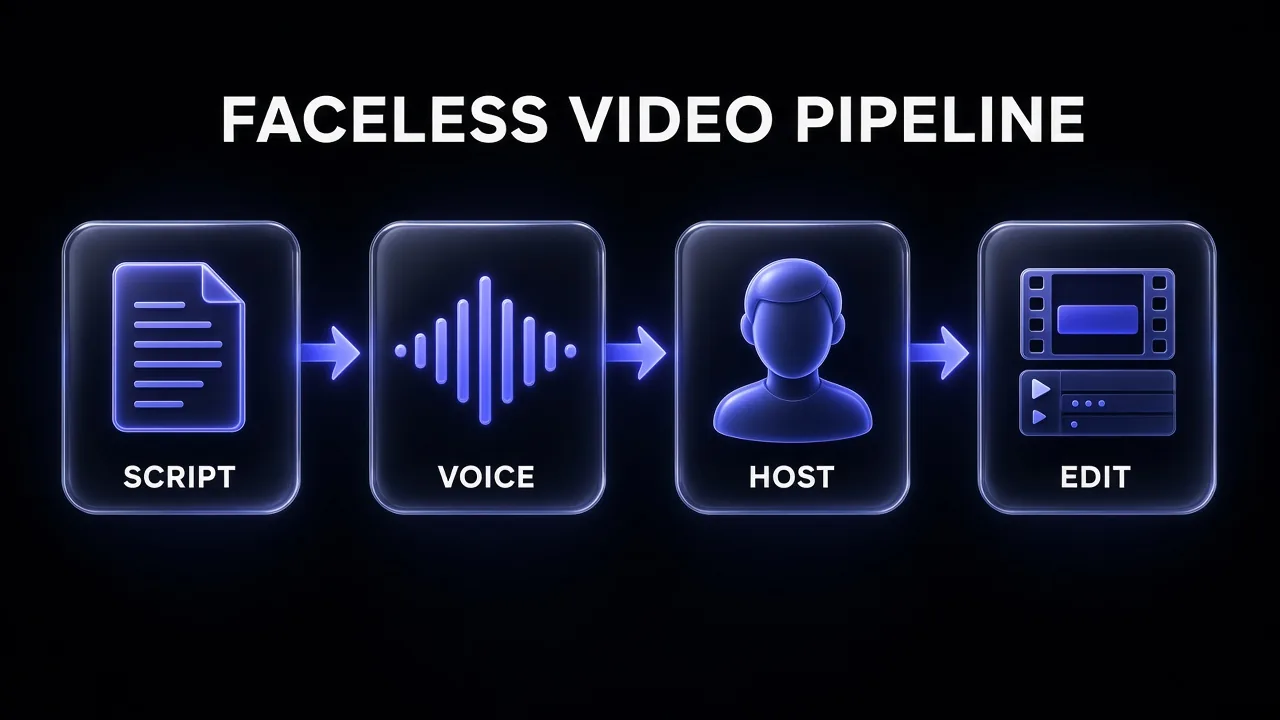
The diagram above is the whole tutorial in one picture. The rest of this post is one section per box.
Step 1: Pick a Niche That Survives a Monetization Review
Start with the rule, not the niche. YouTube's monetization policies say monetized content should be your original creation and should "not be mass-produced, generic, repetitive, or manipulative." Its guideline on generic or repetitive content describes channels whose videos look like they are made with a template, or that feel repetitive after watching several in a row. A same intro and outro is fine; the substance of each video has to be materially different.
Reviewers cannot watch everything, so YouTube says they focus on a channel's main theme, its most viewed videos, its newest videos, the videos with the most watch time, the titles, thumbnails and descriptions, and the About section. That gives you a practical test: if a stranger looked at your five newest videos and your About page, would they see a point of view or a content farm?
Niches that suit a faceless character host share three traits:
- The value is in the explanation, not the presenter. History explainers, personal finance basics, software tutorials, science questions, book breakdowns.
- Each episode has a distinct question. "Why did the Bronze Age collapse?" and "Why did Rome stop using concrete?" are different videos. Ten "top 10 facts" lists are not.
- You can add something. Your own research, a structure nobody else uses, a recurring segment, a dry sense of humour in the script.
Avoid niches built on re-reading other people's content: Reddit story narration with stock footage, news read-alouds, and compilation channels. They are fast to make and they are precisely what the "mass-produced" language is aimed at.
Niche Validation Prompt
Act as a YouTube strategist. I want to start a faceless educational channel about [BROAD TOPIC] with a recurring animated host character.

1. Propose 5 sub-niches. For each, give the core viewer question, the audience, and why a narrated explainer format suits it.
2. For the strongest sub-niche, list 30 distinct episode ideas. Each must answer a different specific question. No listicles, no "top 10" formats, no re-telling of other creators' videos.
3. Flag any idea that could look repetitive next to the others and replace it.
4. Suggest one recurring segment (30-60 seconds) that would make every episode recognisably ours.
Return a table: episode title, core question, primary source type to research.
Step 2: Write Scripts for the Ear
A faceless video lives or dies on the script, because the narration is carrying the job a presenter's face normally does. Write for listening:
- Hook in the first 15 seconds. State the question and why the answer is surprising. No channel intro before the hook.
- Short sentences. Text-to-speech handles long clauses badly. One idea per sentence.
- Mark the host moments. Tag the 2-4 lines your on-screen character will say, usually the hook, a mid-video aside and the sign-off. Everything else is voiceover over B-roll.
- Write B-roll cues in brackets. "[map of the eastern Mediterranean]" next to the line it covers saves an hour in the edit.
A narrated video runs at roughly 140-160 spoken words a minute, so an 8-minute episode is around 1,200 words of script. Keep that number in mind; it drives your ElevenLabs credit budget in the next step. For a bigger library of hook, title and script prompts, see our YouTube script, hook and title prompts.
Faceless Explainer Script Prompt
Write a YouTube script for a faceless explainer channel.

Topic: [EPISODE QUESTION]
Audience: [WHO WATCHES]
Length: about [1200] words (8 minutes spoken)
Narrator voice: [calm, dry humour, curious]
Host character: [NAME], a [DESCRIPTION] who appears on screen for short moments.

Structure:
- 0:00 Hook: the question and the surprising part of the answer, under 40 words. Mark as [HOST].
- Context: what the viewer needs to know first.
- 3 main beats, each ending with a small payoff.
- One mid-video aside from the host, under 30 words. Mark as [HOST].
- Conclusion that answers the question in one sentence.
- Sign-off under 20 words. Mark as [HOST].

Rules: short spoken sentences, no filler phrases, no "in this video we will". Put a B-roll cue in [brackets] after every 2-3 sentences. List every factual claim at the end with the source I should verify it against.
Pro tip: Ask for the list of factual claims every time and actually check them. A confident wrong fact in a narrated explainer is the fastest way to lose the comment section, and the comment section is your audience research.
Step 3: Build Your Narrator Voice in ElevenLabs
Your voice is the brand. Viewers of faceless channels recognise the narrator long before they recognise the thumbnail style, so pick one voice and keep it.
- Choose the voice. Either pick a voice from the ElevenLabs library, design one from a text description, or clone your own. Instant Voice Cloning starts on the Starter plan; Professional Voice Cloning starts on Creator.
- Lock the settings. Once a read sounds right, note the model and the voice settings and reuse them for every episode. Changing models mid-series is the most common reason a channel's narrator suddenly "sounds different".
- Generate in sections. Paste the script in chunks of a few paragraphs. It is far easier to regenerate one awkward sentence than an 8-minute file.
- Export the host lines separately. The [HOST] lines become their own short audio files. HeyGen Avatar 6 can take a pasted script or uploaded audio; uploading the ElevenLabs lines keeps the on-screen host and the voiceover in the same voice.
On cost: ElevenLabs' pricing page lists text-to-speech at about 1 credit per character on its Multilingual v2 model (Flash and Turbo models can cost less via the API). By our arithmetic, a 1,200-word script is roughly 7,000 characters, so roughly 7,000 credits before retakes.
| ElevenLabs plan | Price (monthly) | Credits / month | What matters for this workflow |
|---|---|---|---|
| Free | $0 | 10,000 | Fine for testing voices; the commercial license is listed from Starter up |
| Starter | $6 ($1 first month) | 30,000 | Commercial license, Instant Voice Cloning; about 4 episodes of narration a month by our estimate |
| Creator | $22 ($11 first month) | 121,000 | Professional Voice Cloning; comfortable for weekly long-form plus retakes |
| Pro | $99 | 600,000 | Multiple channels or daily uploads |
Unused credits on paid plans roll over for up to two months, according to the same page, which helps if your upload schedule is lumpy. ElevenLabs is also running a Black Friday sale on annual plans until 1 December. For the plan-by-plan detail, read our ElevenLabs Starter vs Creator vs Pro breakdown.
Step 4: Create a Recurring Host Character in HeyGen
This is where a faceless channel gets a face. HeyGen turns a still image, a stock presenter or a custom avatar, plus a script or an audio file, into a talking, lip-synced clip. Avatar 6 is the current expressive engine: it generates facial expressions and gestures that follow the line being said. HeyGen's pricing comparison table lists a maximum Avatar 6 duration of 1 minute on the Free plan and 30 minutes on Creator, Pro, Business and Enterprise.
That matters for two reasons. A stylised character is more memorable than a stock-looking human, and, as we cover in Step 7, clearly non-realistic animation sits on the "no disclosure needed" side of YouTube's AI rules. If you would rather use one of HeyGen's ready-made presenters, paid plans list 700+ stock video avatars, which is a faster way to start and still gives you a consistent face.
Design the character once
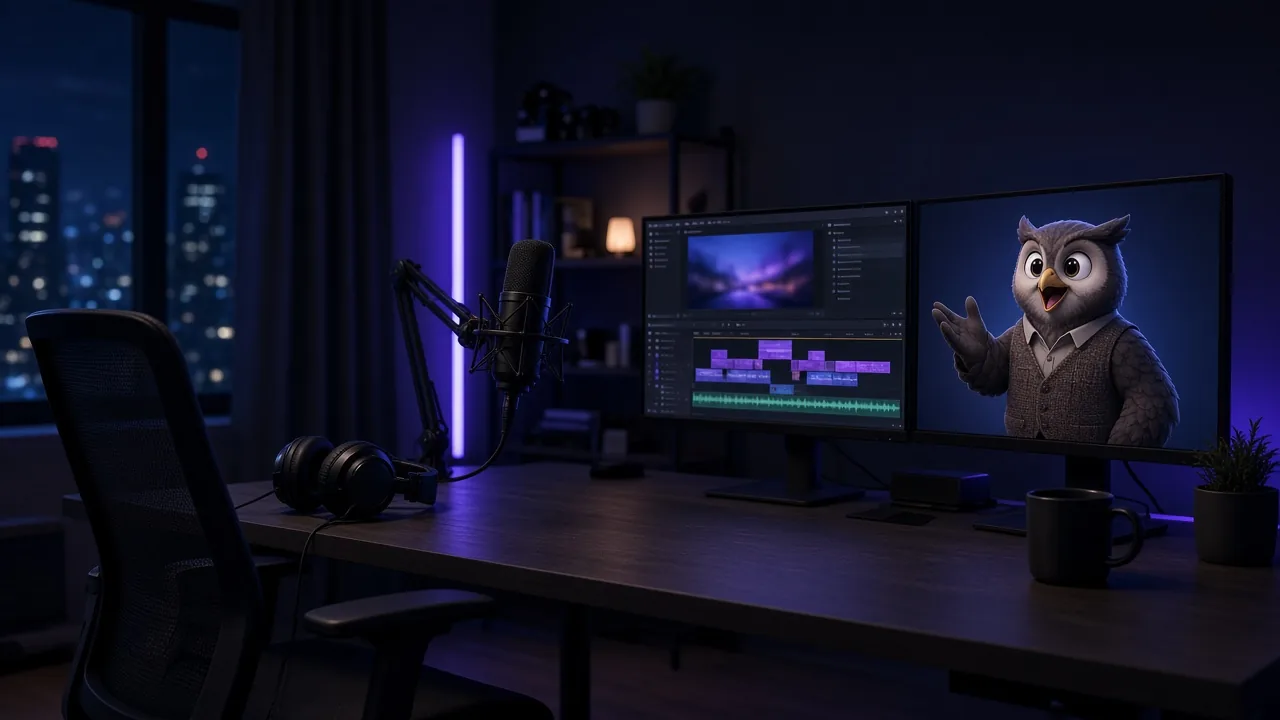
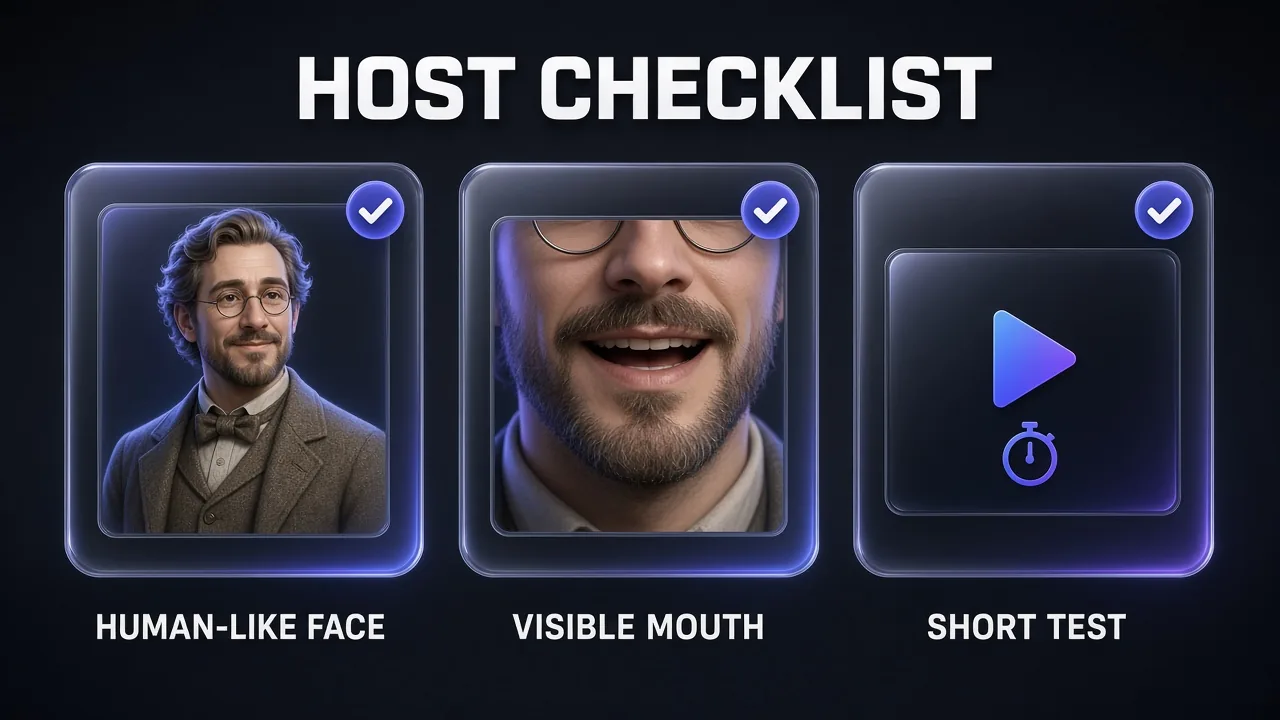
In HeyGen, go to Avatar, then Avatars, then New Avatar, and choose Create a virtual character. You can upload a portrait or use Design with AI and describe the host (name, appearance, pose and style). Wait for the look to be validated before you generate videos with it. HeyGen's photo-avatar guide is specific about what lip-syncs well: a face close to human proportions, with clearly visible eyes, a visible mouth and lips, and the character large in the frame. Animal, robot or fantasy designs can work if the face structure stays human-like. Beaks, snouts and heavy masks that hide the mouth usually do not.
Generate or commission one front-facing portrait that follows those rules, and reuse that same look on every episode. If you need more than one outfit or angle, keep the face, palette and art style consistent so the channel stays recognisable.
Generate only the host moments
Do not animate the whole episode. HeyGen's help article on credits lists Avatar 6 Turbo at 20 credits a minute at 720p or 1080p, and 35 credits a minute at 2K. Avatar 6 Pro, which starts on the Pro plan, is 40 credits a minute at 720p or 1080p and 58 at 2K. Photo avatars and digital twins cost the same. Creator includes 600 credits a month, which is 30 minutes of Avatar 6 Turbo at 1080p by our arithmetic. That is plenty for short host clips, and a poor use of the budget if you animate a full 10-minute talking head. Two or three host moments of 10-20 seconds each give the channel a recognisable presenter and keep the credit spend small. HeyGen's Avatar 6 guide also notes that Avatar IV is a good choice for illustrated, 3D or non-human characters when it appears in your model picker; that engine is listed at 16 credits a minute for a photo look.
Avatar 6 Turbo: credits for host time
At HeyGen's published rate of 20 credits per minute, 1080p
Source: HeyGen help article How to Use Credits on HeyGen, checked 21 Nov 2026; totals are our arithmetic
The straightforward path in the app is Guided Creation: from Home, choose Create new video, then Guided Creation. Pick your avatar and look, paste the host script or upload the ElevenLabs audio, set a presenter style (start with Natural), then open Avatar model, choose Turbo or Pro and a resolution, and generate. HeyGen's own guidance is to start with Turbo for everyday videos, because at 1080p it uses half as many credits as Pro. In Guided Creation you can turn on Show tags to add blue tone tags such as [excited] or green motion tags for a specific gesture. In AI Studio, put gestures in the avatar's custom motion box and, if you want tone tags in the script, switch the voice to HeyGen Voice. Generate a short test clip first; lip-sync and framing problems show up in the first few seconds, and unused credits are better spent on a retake than on a long failed render.
Host Performance Direction
Avatar: [CHARACTER DESCRIPTION, e.g. a friendly illustrated scholar in a tweed waistcoat, human-like face, clearly visible eyes and mouth] sitting at a cluttered study desk, medium close-up, 16:9, front-facing.

Presenter style: Natural, with a short Custom note: dry, curious energy; small head tilts on questions; one raised-hand gesture on the punchline. Leave a few seconds between gestures.

Tone tags to place in the script: [curious] on the opening question, [warmly] on the sign-off.

Keep the face fully visible, no camera movement, background static and slightly out of focus.
HeyGen's paid plans are billed in credits. Creator is $29 a month, or $24 a month if you pay annually ($288 billed once a year), for 600 credits, 1080p export and no HeyGen watermark. Pro starts at $49 a month, or $41 a month billed annually ($488 a year) at the 1,000-credit tier, and adds Avatar 6 Pro, 4K export and the option to raise the monthly credit allowance. Higher Pro tiers go up to 100,000 credits a month at $4,300. Business is $149 a month, or $119 billed annually, for 1,500 credits and team features. The Free plan includes up to 3 watermarked videos a month, each up to 1 minute, and does not use credits, so it is fine for a test and a poor fit for a channel you intend to publish. Monthly unused credits roll over for one more billing cycle; annual credits accumulate until renewal. Creator cannot buy one-time credit packs; if you run out, you upgrade to Pro. HeyGen's Digital Twin FAQ says you can use and distribute the videos you create across platforms, including for commercial purposes, as long as your inputs do not infringe copyright and stay appropriate. Our HeyGen review covers the app in more depth.
Step 5: Assemble and Edit in Descript
Descript is where the episode becomes a video. Import the full ElevenLabs narration and the HeyGen host clips, and Descript transcribes everything so you can edit by editing text.
- Lay the narration down first. It is the spine. Delete flubbed lines in the transcript and the audio follows.
- Drop host clips on their lines. Place each HeyGen clip over the matching [HOST] line and remove the duplicate narration underneath.
- Fill the rest with B-roll. Use your bracketed cues: maps, diagrams, screen recordings, licensed footage or Descript's stock library. Change the visual every 4-8 seconds.
- Clean the audio. Studio Sound evens out the voice; Remove Filler Words matters less for TTS narration than for real speech, but run it on any recorded segments.
- Caption it. Burned-in captions help on mobile and on Shorts. Descript generates them from the transcript.
- Cut Shorts from the same project. Create Clips proposes short moments; the host's hook line is usually your best Short.
Underlord, Descript's AI co-editor, can do much of the rough assembly from a prompt, but review every cut: it does not know which B-roll actually matches your fact. Our guide to captioning, chaptering and repurposing YouTube videos with AI goes deeper on the Shorts and chapters side.
| Descript plan | Annual billing | Monthly billing | Media hours | AI credits | Export |
|---|---|---|---|---|---|
| Free | $0 | $0 | 1 hour | Not listed | Watermark-free export is listed from Hobbyist |
| Hobbyist | $16/mo | $24/mo | 10 | 400 | 1080p |
| Creator | $24/mo | $35/mo | 30 | 800 | 4K, unlimited stock media |
| Business | $50/mo | $65/mo | 40 | 1,500 | Brand Studio, translation and dubbing |
For a weekly 8-10 minute channel, Hobbyist covers the media hours; Creator is worth it once you lean on the stock library or want 4K. The full plan comparison is in our Descript pricing guide.
Step 6: Thumbnails, Titles and Packaging
Packaging is the other half of a faceless channel. Your host character is your biggest packaging asset: put the character's face, with a clear expression, on every thumbnail, next to a two to four word hook. Over time viewers recognise the character in the feed the way they would recognise a human creator.
Keep titles honest. YouTube's reviewers look at metadata, and a thumbnail that promises something the video does not deliver hurts both the review and your retention. Our collection of prompts for high-CTR YouTube thumbnails has layouts that work with a recurring character.
Step 7: Disclosure, Originality and Monetization
Two YouTube policies apply directly to this workflow, and they are different things.
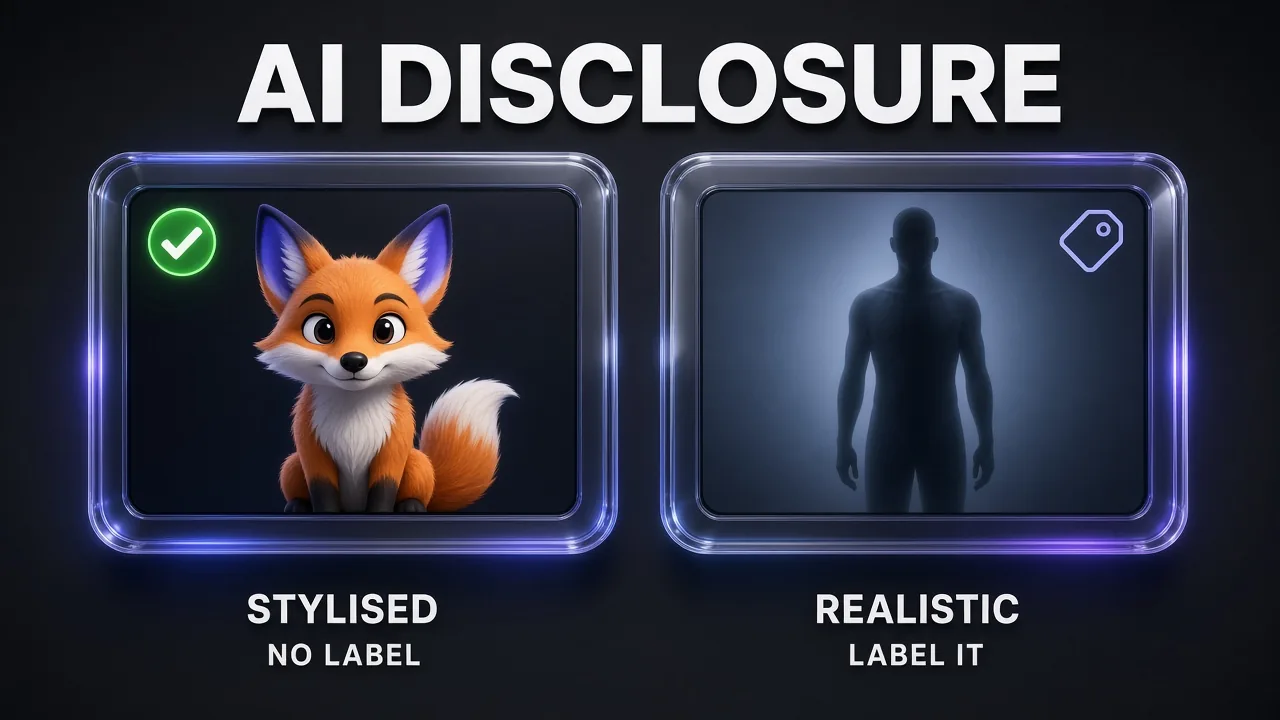
AI disclosure. YouTube requires creators to disclose AI-generated or altered content that seems realistic, using the AI-use setting at upload. Its help page lists things that do not need disclosure: clearly non-realistic animation, using AI for scripts, outlines, thumbnails and titles, captions, and cloning your own voice for voiceovers. It lists things that do: making a real person appear to say something they did not, altering footage of real events, and generating realistic scenes that did not happen. A clearly cartoon host is plainly non-realistic. A photoreal human host is a closer call, and our advice is to tick the setting whenever the character could pass for a real person.
Originality. Disclosure does not make content monetizable, and a label does not hurt monetization either. What matters is the authenticity rule from Step 1. A channel using these exact tools can pass or fail review purely on whether each episode has its own substance.
The thresholds. To apply for the YouTube Partner Program you need 1,000 subscribers plus either 4,000 qualified public watch hours in the last 12 months, or 10 million qualified Shorts views in the last 90 days. Shorts Feed watch time does not count toward the 4,000 hours. After you apply, YouTube says a decision typically takes about a month, and it keeps checking channels after acceptance.
What It Costs Per Month
Here is a lean starting stack for one weekly long-form episode with a few Shorts, using monthly billing on each vendor's pricing page:
| Tool | Plan | Monthly price | Role |
|---|---|---|---|
| ElevenLabs | Starter | $6 ($1 first month) | Narration and host lines, commercial license |
| HeyGen | Creator | $29 ($24 on annual) | Host avatar clips, 1080p, no watermark |
| Descript | Hobbyist | $24 ($16 on annual) | Edit, captions, Shorts |
| Total | $59 ($46 with HeyGen and Descript annual) |
If you outgrow Starter's 30,000 characters, Creator at $22 is the next step on the ElevenLabs side. If you need Avatar 6 Pro, 4K export or more than 600 HeyGen credits a month, HeyGen Pro starts at $49. For how avatar and video model prices compare, see our AI video cost per second comparison.
Common Mistakes That Sink Faceless Channels
- Animating the whole video. Ten minutes of a talking character burns credits and usually makes a worse video. Use the host as punctuation.
- Swapping voices or models mid-series. The narrator is the brand. Lock the voice and settings in a note.
- Publishing unchecked facts. The script prompt lists every claim; verify each one against a real source.
- A template that shows. Same intro is fine. Same structure, same B-roll and same "5 facts" shape every week is what the repetitive-content guideline describes.
- Skipping a short test in HeyGen. Lip-sync and framing problems show in the first seconds. Test a brief clip before the full host segment.
- A host face that hides the mouth. HeyGen's photo-avatar guide warns that beaks, snouts, masks or a character that is too small in the frame lead to weak lip-sync. Use a front-facing look with a clearly visible mouth.
- Ignoring disclosure on realistic hosts. If the character could be mistaken for a real person, use the AI-use setting.
Our Verdict
My take: HeyGen, ElevenLabs and Descript are a strong, affordable stack for a faceless channel because each one is clearly best at its own stage and none of them forces you to animate or narrate more than you need. Start with ElevenLabs Starter, HeyGen Creator and Descript Hobbyist, make your first five episodes, and only upgrade the tool that actually becomes the bottleneck.
The bigger decision is editorial. Pick a niche where every episode answers a different question, give your host a personality, and check your facts. Do that and the tools stay in the background, which is exactly where they belong. If you also want a UGC-style ad pipeline from the same voices, our AI UGC ad factory tutorial reuses much of this setup.
Frequently Asked Questions
Frequently Asked Questions
8 questions answered