The PromptsRush journal
TutorialsHow to Choose thinking_level and effort for Real Workloads
A practical method for picking Gemini's thinking_level and Claude's effort per workload: classify requests, start low within vendor guidance, measure thinking tokens and quality on your own traffic, then escalate only what fails, without breaking your cache.

Advertisement
Short version: don't pick one reasoning setting for your whole app. Sort your requests into a few workload tiers, start each tier at the low end of what Google and Anthropic recommend for that kind of task, measure thinking tokens and quality on your own traffic, and only escalate the tiers that actually fail. For Gemini that dial is thinking_level; for Claude it's effort. The method is the same for both.
This is the practical companion to our Gemini thinking levels vs Claude effort comparison, which covers every allowed value and which models support what. This guide answers the next question: which setting should each workload use?
Sources: Google's Gemini thinking guide, Anthropic's effort documentation and both pricing pages, checked on 22 October 2026. We haven't benchmarked these settings, so there are no latency numbers or "we tested" claims here. The starting points are our reading of vendor guidance; the method exists so you confirm them on your traffic.
The Two Dials in One Minute
Gemini's thinking_level sets how deeply the model reasons before it answers. On generateContent you pass it as thinkingLevel inside thinkingConfig. Google calls it "required for Gemini 4 and recommended for Gemini 3 models." Gemini 4 Argon accepts low, medium and high, and defaults to medium. Google's one-line descriptions sum up the levels: low "minimizes latency and cost," medium is "balanced thinking for most tasks," and high "maximizes reasoning depth," with a warning that the model "may take significantly longer to reach a first (non thinking) output token."
Claude's effort lives at output_config.effort and accepts low, medium, high, xhigh and max (support varies by model). Anthropic says it "affects all tokens in the response," tool calls and thinking included. Most Claude models default to high; Claude Opus 5.5 and Claude Haiku 5.5 default to medium, which matters if you moved up from Opus 5 (see our Claude Opus 5.5 overview). It's "a behavioral signal, not a strict token budget."
What you can't do matters as much as what you can, because it sets the floor for your cheapest tier:
- Gemini 4 Argon: "You cannot disable thinking."
minimalisn't supported on Argon or Gemini 3.8 Flash (it returns an error), solowis the floor. Whereminimalexists, Google notes it "does not guarantee that thinking is off." - Claude Opus 5.5: adaptive thinking is always on;
thinking: {"type": "disabled"}returns a 400 at every effort level. Effort is the primary lever. - Claude Sonnet 5.5: rejects
disabled; the lowest setting isthinking: {"type": "between_tools"}, which works atlow,mediumandhigheffort only. - Claude Haiku 5.5:
disabledis allowed athigheffort or below, but not atxhighormax.
The Four-Step Method: Classify, Start Low, Measure, Escalate
Both vendors land on the same advice. Anthropic's best practices say to set effort explicitly, use low for "speed-sensitive or simple tasks," "test your use case," and "consider dynamic effort" based on task complexity. Google's thinking guide splits tasks into easy, medium and hard and maps each to less or more thinking. Turned into a repeatable process, that's four steps: classify each request into a workload tier, start low within the vendor's recommended range for that tier, measure thinking tokens, truncations and quality on real traffic, then escalate only the tiers that fall short.
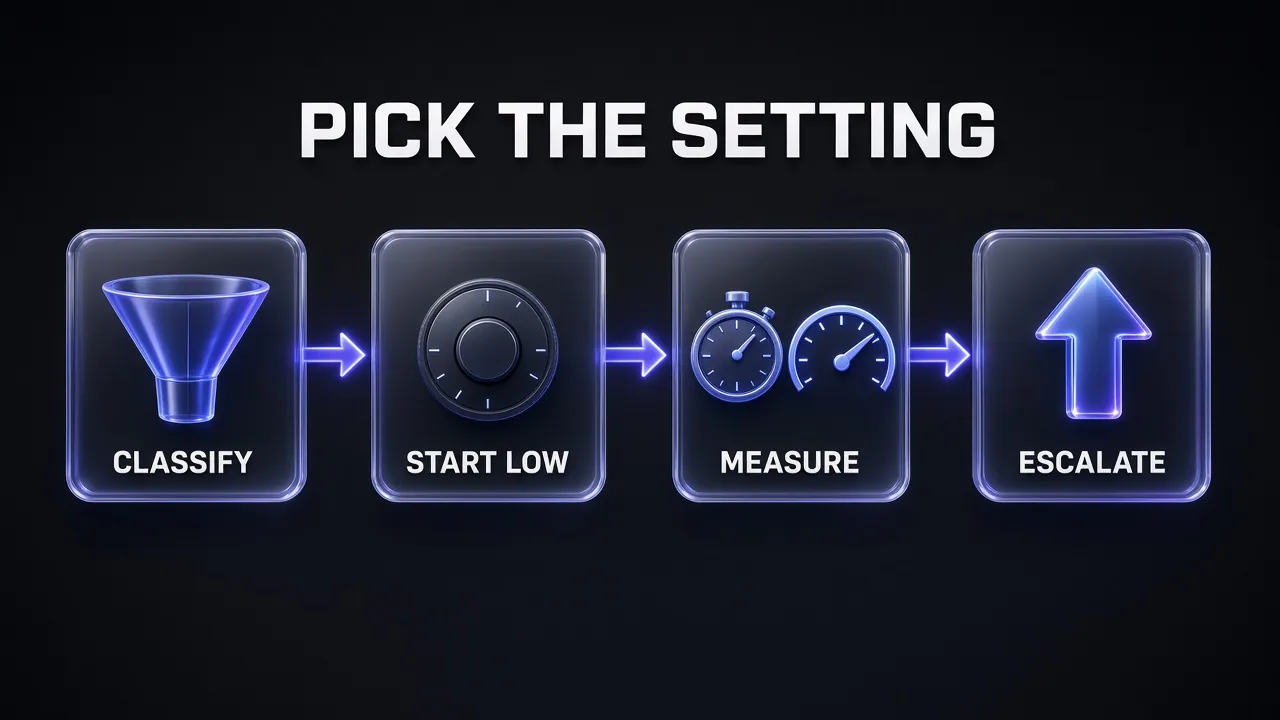
Skip classification and you get one global setting that is too slow for chat and too shallow for coding. Skip measurement and "start low" becomes "stay low and hope."
Step 1: Classify Each Request Into a Workload Tier
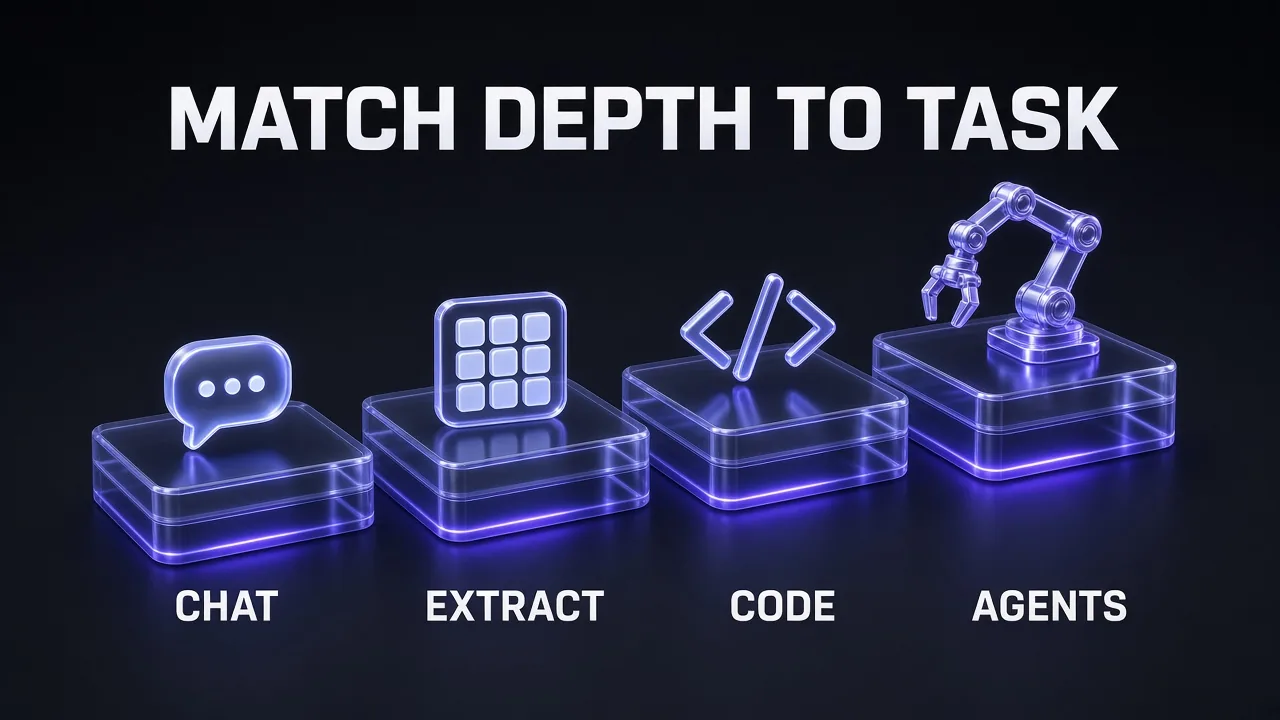
We use four tiers, matching the diagram further down: Chat, Extract, Code and Agents. They are our convenience, not a vendor taxonomy, but each lines up with tasks Google or Anthropic gives explicit guidance for.
- Chat: interactive replies, customer support, short Q&A and quick summaries where a person is waiting for the first token.
- Extract: classification, tagging, field extraction, routing decisions, and summarising a document into a fixed structure. High volume, narrow output, usually machine-read.
- Code: writing, reviewing and debugging code in a single request or a short session.
- Agents: multi-step tool loops, long-running coding agents and long research that chains search, reading and synthesis.
Classify on signals you already have: which feature sent the request, whether the output is structured, whether tools are attached, and whether a human is waiting. A rules-based router covers most apps. If your traffic is genuinely mixed, a small, cheap model call at the lowest setting can do the classification for you:
Classify a Request Into a Reasoning Tier
You are a request router. Read the user request below and assign exactly one tier.

CHAT: conversational reply, support answer, short Q&A or quick summary; a person is waiting.
EXTRACT: classification, tagging, field extraction or a fixed-format summary; output is structured.
CODE: write, review or debug code in one response.
AGENTS: needs several tool calls, multi-step planning, or long research across sources.

Rules: if the request fits two tiers, pick the higher one. If it is ambiguous, pick CHAT.
Reply with only the tier name in capitals and nothing else.

Request:
[PASTE REQUEST]
Keep the router itself at the floor (low on either platform). Google lists classification as an easy task where thinking "is not required."
Workload-by-Workload Starting Points
The table summarises where each vendor's guidance points per tier. Treat every cell as a starting point to test: Anthropic repeatedly tells you to run an effort sweep on your own evals. If you haven't settled on a model yet, our Gemini 4 Argon vs Claude Opus 5.5 comparison comes first.
| Tier | Gemini 4 Argon thinking_level | Claude effort starting point | Vendor guidance it's based on |
|---|---|---|---|
| Chat / support | low | low or medium | Google: low minimizes latency. Anthropic: Sonnet 5.5 chat "start with medium or low"; Haiku 5.5 low for chat |
| Extract / classify / fixed summaries | low (or minimal on models that offer it) | low | Google: thinking "not required" for classification. Anthropic: low for simpler tasks such as subagents; Haiku 5.5 low for simple high-volume requests |
| Code | high | Model-dependent: Sonnet 5.5 and Haiku 5.5 medium; Opus 4.7/4.8 xhigh; Opus 5 high | Google: high thinking for coding tasks. Anthropic per-model recommendations |
| Agents / long research | high | medium for well-specified loops, high for harder or longer ones, xhigh for 30-minute-plus runs | Google: maximum thinking for multi-step planning. Anthropic: xhigh for "long-running agentic and coding tasks (over 30 minutes)" |
Chat and support
Latency is the constraint, so start at the bottom. On Gemini 4 Argon that means low, since minimal isn't available. On Claude, Anthropic's Sonnet 5.5 guidance is direct: "For chat and other latency-sensitive work, start with medium or low." For Haiku 5.5 it recommends low, "the cheapest and fastest level, for chat, short tool tasks, and simple, high-volume requests." Even at low, Claude "still thinks on sufficiently difficult problems."
Extraction, classification and summarisation
This is where most over-spending hides. Google's own example of an easy task is "Is this email asking for a meeting or just providing information?", and it says thinking "is not required" for that kind of work. Anthropic's level table puts low on "simpler tasks that need the best speed and lowest costs, such as subagents." Anthropic also warns, in its Opus 4.7 guidance, that max on "structured-output or less intelligence-sensitive tasks" can "lead to overthinking."
Summaries split two ways. Short, fixed-format summaries belong here at the floor. Long synthesis across many documents behaves more like research, so move it up a tier. Google adds one more lever for long outputs: "Prompt the model to think less for lengthy outputs to save tokens."
Coding
Coding is where the vendors diverge most by model, so read the guidance for the exact model you call. Google recommends "a high thinking budget" for "complex math problems or coding tasks," which on Gemini 4 Argon means high. Anthropic's advice depends on the model:
- Claude Opus 4.7 and 4.8: "Start with xhigh for coding and agentic use cases," and step down only "when you've measured that the lower level holds quality on your evals."
- Claude Opus 5: start at
high, "step up to xhigh for demanding coding and agentic work." - Claude Sonnet 5.5: for agentic coding, "start with medium for well-specified tasks and move to high for harder or longer ones," with
max_tokensset to 128,000 and streaming. - Claude Haiku 5.5: "Start with medium for most work, including agentic coding."
- Claude Opus 5.5: no fixed coding level; Anthropic says to "run an effort sweep on your own evals rather than carrying settings over from an earlier model."
"Start low" here means the low end of the recommended range, not the lowest value the API accepts. Choosing between coding agents instead? Our Claude Code vs Google Antigravity comparison covers the tools built on these models.
Routing also works across vendors. If your Code tier is cost-sensitive, a lower-priced coding model can take the well-specified jobs; our GLM-5.3 coding prompts show what Z.ai's model handles well.
Agentic tool loops and long research
Effort shapes tool use directly on Claude. Lower levels "make fewer tool calls," "combine multiple operations into fewer tool calls" and "proceed directly to action without preamble"; higher levels "make more tool calls" and "explain the plan before taking action." That saves cost, but watch the failure mode: Anthropic notes Haiku 5.5 at low in long agent prompts "is more likely to skip a search, stop early, or skip a check," and it recommends high for "knowledge work, longer agent tasks, and strict instruction following."
For research-style agents, the Opus 4.7 guidance calls xhigh the starting point for "exploratory tasks such as repeated tool calling, detailed web search, and knowledge-base search." On Gemini, Google puts "multi-step planning" in the complex bucket that gets maximum thinking. One structural detail helps you budget: in a Claude tool loop, "the first request after new user input typically carries most of the reasoning," and follow-ups that only process tool results can skip thinking. Agents that drive a browser or desktop add their own safety questions, covered in our Claude computer use guide, and the tools you attach shape the loop too (see our MCP servers for Claude Code roundup).
If your research loop spends its tool calls fetching and cleaning web pages, a scraping API that returns clean markdown keeps those steps short.
Step 2: Start Low, and Give the Cap Room
Starting low only works if the output cap doesn't sabotage the test. On both platforms, thinking tokens and answer tokens share one limit.
Gemini: max_output_tokens includes thought tokens and acts as "a hard cutoff enforced by the infrastructure without changing how the model allocates its thinking." If the model hits it while reasoning, you get finish_reason: MAX_TOKENS and "truncated or empty output," and you're still billed for the thinking. Google's advice is explicit: "To reduce cost or latency without truncating responses, lower thinking_level (low or medium) instead of setting a small max_output_tokens." On Gemini 4, a single non-streaming generateContent request returns up to 32,768 tokens and a streaming one up to 65,536; longer outputs use long decode, explained in our Gemini 4 Argon explainer.
Claude: max_tokens is "a hard cap on total output for the request, thinking and response text combined." A cap "sized for a response with no thinking is often too small," and in a tool loop each request has its own cap, so it "doesn't bound the whole turn's spend." For Opus 4.7, 4.8 and Opus 5 at xhigh or max, Anthropic suggests starting at 64k tokens.
Here's a minimal Gemini router that sets the level per tier and records thinking tokens:
from google import genai
from google.genai import types

client = genai.Client()

# Starting points per tier; tune them on your own evals
LEVELS = {"chat": "low", "extract": "low", "code": "high", "agents": "high"}

def ask_gemini(tier: str, prompt: str):
    response = client.models.generate_content(
        model="gemini-4-argon",
        contents=prompt,
        config=types.GenerateContentConfig(
            thinking_config=types.ThinkingConfig(thinking_level=LEVELS[tier]),
            max_output_tokens=16384,  # thinking + answer share this cap
        ),
    )
    u = response.usage_metadata  # log() = your own metrics sink
    log(tier, thoughts=u.thoughts_token_count, output=u.candidates_token_count)
    return response.text
And the Claude equivalent. The model and the effort map are examples; swap in the starting points for the model you actually use:
import anthropic

client = anthropic.Anthropic()

EFFORT = {"chat": "low", "extract": "low", "code": "medium", "agents": "medium"}

def ask_claude(tier: str, prompt: str):
    response = client.messages.create(
        model="claude-sonnet-5-5",
        max_tokens=32000,  # hard cap on thinking + reply; agentic coding: 128000 + streaming
        output_config={"effort": EFFORT[tier]},
        messages=[{"role": "user", "content": prompt}],
    )
    u = response.usage  # log() = your own metrics sink
    log(tier,
        output=u.output_tokens,  # authoritative billed total
        thinking=u.output_tokens_details.thinking_tokens,
        stop=response.stop_reason)  # watch for "max_tokens"
    return response
Pro tip: Set effort explicitly even when you want the default. Anthropic lists it as best practice number one, and it protects you when a model change shifts the default, as Opus 5.5 did by moving fromhightomedium.
Step 3: Measure on Your Own Traffic
Neither vendor publishes per-level latency or typical thinking-token counts, so the only numbers that count are yours. Run a representative sample of each tier at two adjacent settings and compare. Anthropic's steering guide lists the right metrics: how often thinking triggers, "output token usage, latency, and answer quality on the cases that matter to you."
Where to read the numbers:
- Gemini
generateContent:usageMetadata.thoughtsTokenCountfor thinking andcandidatesTokenCountfor the answer (thoughts_token_countandcandidates_token_countin Python). - Gemini Interactions API:
usage.total_thought_tokensandusage.total_output_tokens. - Claude:
usage.output_tokensis "the inclusive, authoritative total used for billing," andusage.output_tokens_details.thinking_tokensshows how much of it went to reasoning. When streaming, that breakdown arrives only on the finalmessage_deltaevent. - Truncations: count
finish_reason: MAX_TOKENS(GeminigenerateContent), status"incomplete"(Interactions API) andstop_reason: "max_tokens"(Claude). A rising truncation rate is your first sign that a tier is starved. - Latency: time to first answer token and total time, measured in your own client.
Quality is the hard part. Score extraction against labelled examples. For chat, code and research, use a blind pairwise comparison: the same request answered at two settings, in random order, judged by a grader:
Blind-Grade Two Answers From Different Reasoning Settings
You are grading two answers to the same request. You do not know which setting produced which answer.

Request:
[PASTE REQUEST]

Answer A:
[PASTE ANSWER A]

Answer B:
[PASTE ANSWER B]

Grade each answer from 1 to 5 on: correctness, completeness against the request, following every instruction, and absence of unnecessary length.
Then state which answer is better overall, or "tie" if the difference would not matter to a user.
Reply in this format:
A: correctness X, completeness X, instructions X, concision X
B: correctness X, completeness X, instructions X, concision X
Winner: A, B or tie
Reason: one sentence
If the lower setting ties or wins on a tier, keep it.
Step 4: Escalate Only What Fails
Escalate one tier and one notch at a time, then re-measure. Anthropic gives a clear rule for the two ways a capped request can fail: if you see stop_reason: "max_tokens", either "raise max_tokens to give the model more room" or "lower the effort level so Claude thinks less." Which one, it says, "depends on whether the truncated responses needed the reasoning." The same logic applies to Gemini's MAX_TOKENS finish reason.
For shallow answers, Anthropic's advice on Opus 4.7 is to "raise effort rather than prompting around it." Prompt steering is the secondary lever: Anthropic calls changing effort "usually the better first lever, because it is a calibrated control rather than a wording-sensitive instruction," and notes that on Haiku 5.5 telling the model to answer directly "didn't stop it from thinking."
Routing Per Request Without Breaking Your Cache
Routing separate requests is easy: each call takes its own setting. The trap is changing it inside one long Claude conversation that relies on prompt caching.
Anthropic's steering guide puts it plainly: "The resolved effort value is rendered into the prompt, so changing it between requests invalidates cache breakpoints." Its advice: "pick a thinking configuration and a top-level effort level for each conversation and keep them." Setting effort explicitly to the model's default is equivalent to omitting it and doesn't break the cache. If you haven't set up caching yet, start with our Claude prompt caching guide.
When some turns in a conversation need more or less effort, use per-message effort (beta). It's available on the Claude API and Google Cloud for Claude Fable 5.1, Mythos 5.1, Opus 5.5, Opus 5, Sonnet 5.5 and Haiku 5.5, and needs the beta header mid-conversation-output-config-2026-07-01. You add a role: "system" message with empty content and the new level; everything before it stays unchanged, "so the cached prefix still matches."
# Header: anthropic-beta: mid-conversation-output-config-2026-07-01
{
  "model": "claude-opus-5-5",
  "max_tokens": 64000,
  "output_config": {"effort": "high"},
  "messages": [
    {"role": "user", "content": "Plan the refactor of the billing module."},
    {"role": "assistant", "content": "...plan..."},
    {"role": "system", "content": [], "output_config": {"effort": "low"}},
    {"role": "user", "content": "Rename the helper to formatInvoice and confirm."}
  ]
}
Two caveats: a change placed after a user turn holding only tool_result blocks waits for the next user turn with new input, and on Sonnet 5.5 with between_tools, or Haiku 5.5 with thinking disabled, a per-message effort that differs from the level in effect returns a 400.
On Gemini, Google's thinking pages don't describe any cache effect from changing thinking_level, so we won't invent one. If you depend on caching there, check your cached-token counts before and after you introduce per-request routing; our Gemini vs Claude caching comparison explains how the two caching models differ.
Pro tip: Thinking-heavy sessions often outlast Claude's default 5-minute cache lifetime. Anthropic suggests the 1-hour cache duration for longer thinking sessions and multistep workflows.
What Thinking Costs and How It's Billed
Reasoning is billed at output prices on both platforms, which is why high-volume extraction is where routing pays off first.
- Gemini: "response pricing is the sum of output tokens and thinking tokens," and you pay for the full thoughts, not the summary. Gemini 4 Argon is $2 input and $10 output per million tokens through 30 November 2026, then $4 and $20 from 1 December 2026. Thought signatures you send back also add to input tokens.
- Claude: thinking is "billed as output tokens, even when the thinking text isn't returned." Output runs $20 per million on Opus 5.5, $10 on Sonnet 5.5 and $0.50 on Haiku 5.5 (prompts up to 100K tokens). Thinking blocks from earlier turns that stay in context are billed again as input.
The practical takeaway: pick the model first, then the setting. A cheaper model at a higher setting may match a pricier model at a lower one for less money, which is why Anthropic suggests comparing Haiku 5.5 at xhigh or max with Sonnet 5.5 "on performance, cost, and speed."
Common Pitfalls
- Carrying settings across models. Opus 5.5 defaults to
mediumwhere Opus 5 defaulted tohigh, and Sonnet 5.5's levels are recalibrated. Re-run the sweep after every model change. - Using a tiny output cap to save money. On both platforms the cap includes thinking, so a small cap produces truncated or empty answers that are still billed. Lower the level instead, as Google advises.
- Expecting effort to shorten replies. On Opus 5, Anthropic says changing effort "does not reliably shorten responses"; prompt for length instead.
- Toggling top-level effort mid-conversation. It restarts Claude's cache. Use per-message effort or keep it fixed.
- Starving agents of tool calls. Fewer tool calls suit short tasks, not research loops that must search and check.
What the model sees also shapes how much reasoning it needs; our piece on context engineering covers that side.
The Verdict
My take: the right reasoning setting is a per-workload decision, and the vendors' own docs already give you a sensible first guess for each one. Put chat and extraction at the floor (low on Gemini 4 Argon, low to medium effort on Claude), start code and agent work where the model's own guidance says (from medium on Sonnet 5.5 and Haiku 5.5 to xhigh on Opus 4.7 and 4.8, high on Gemini), and let measured thinking tokens, truncations and blind-graded quality decide every move after that.
Keep the cap generous, keep top-level effort constant inside cached Claude conversations, and re-run the sweep every time you change models.
Frequently Asked Questions
Keep Reading
Frequently Asked Questions
8 questions answered