The PromptsRush journal
TutorialsClaude Code /code-review & Claude Security Plugin: A Practical Walkthrough
Claude Code has two review tools people mix up: /code-review finds correctness bugs on any plan, and the Claude Security plugin runs a multi-agent vulnerability scan that hands you patches. Here are the commands, flags, 2.1.316 findings cards, costs and a weekly routine.
Advertisement
Short version: Claude Code now has two review tools that most developers mix up. /code-review is a built-in command that hunts for correctness bugs in your branch, on any plan, inside your own session. The Claude Security plugin is a separate install that runs a multi-agent vulnerability scan and hands you patches you apply yourself. Use the first on every branch, the second before anything security-sensitive ships.
This walkthrough covers both from the official docs as they stand on 10 November 2026: the exact commands, the flags worth knowing, what changed in version 2.1.316 (findings cards and the new severity analytics), what each one costs, and a routine that chains them without burning your plan. If you tuned subagent effort with this morning's guide to Claude Code subagent effort and ultrathink, that setup matters here too, because /code-review runs as a subagent.
What You'll Have at the End
- A clear picture of the four review layers in Claude Code and which one to reach for at each stage.
- A working
/code-reviewhabit: the right target, the right effort level and when to add--fixor--comment. - The Claude Security plugin installed, a first scan run and its patches applied the safe way, one pull request at a time.
- A
REVIEW.mdfile if your team uses the managed Code Review service on GitHub. - A realistic cost picture, including when ultrareview's $5 to $25 runs are worth it.
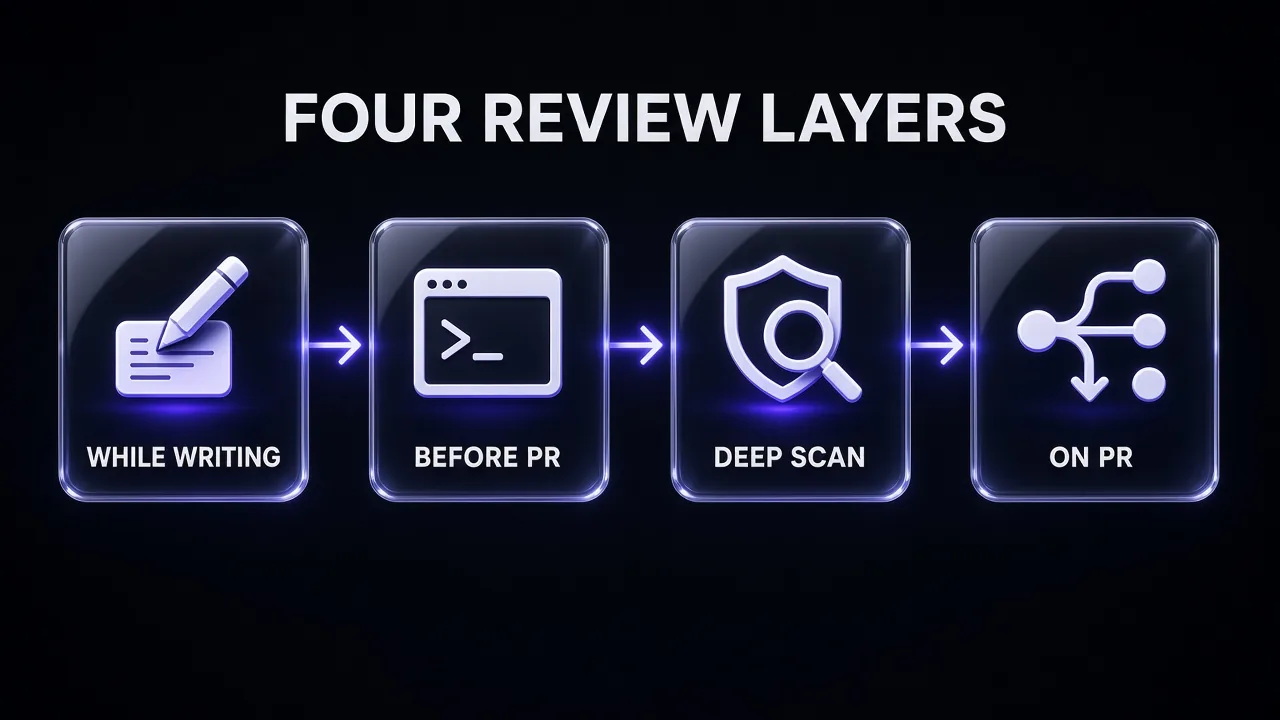
The Four Review Layers, Explained Simply
Anthropic's Claude Security plugin documentation lays out a defense-in-depth stack. Here is the same stack in plain terms: six tools across four stages, with the plan each piece needs.
| Stage | Tool | What it does | Who can use it |
|---|---|---|---|
| While Claude writes | security-guidance plugin | Reviews Claude's own changes for common vulnerabilities in the same session | Plugin install |
| Before you open a PR | /code-review | Correctness bugs in your branch, reported in your conversation | Any plan |
| Before you open a PR | /security-review | A single security pass over the current branch | Built in |
| On demand, deep | Claude Security plugin | Multi-agent scan of a repo or diff, independently verified findings, reviewed patches | Paid plan, API or cloud provider |
| On demand, in the cloud | Ultrareview (/code-review ultra) | A fleet of bug-hunting agents in a cloud sandbox | claude.ai sign-in; 3 free runs, then usage credits |
| On every pull request | Code Review (managed) | Multi-agent review that posts inline comments on GitHub | Team and Enterprise |
My take: you don't need all six. A solo developer gets most of the value from /code-review on every branch plus a Security plugin scan on auth, payments and anything that touches user input. Teams on GitHub add the managed service so nobody has to remember.
Step 1: Run Your First /code-review
Per the /code-review documentation, you type the command at the Claude Code prompt in the session where you're working. It works on any plan, and because it runs in your own session it counts toward your plan usage or API bill like everything else you do there. /review is an alias.
/code-review
With no target, it reviews the commits on your branch ahead of its upstream plus your uncommitted changes. If the branch has no upstream, Claude compares against main, or against the previous commit. In a terminal session the review runs as a background subagent with its own context window, so your conversation stays clean and you can keep working. The findings land in the chat when it finishes.
A quick history note: the command was called /simplify before v2.1.147 and applied fixes by default. If you have old scripts calling /simplify to find bugs, switch them to /code-review --fix. Today /simplify is a separate cleanup-only command.
Point it at the right target
Anything you type after the effort level and flags becomes the target. These are the forms the docs list:
| To review | Type |
|---|---|
| Current branch plus uncommitted changes | /code-review |
| Your last 15 commits | /code-review HEAD~15..HEAD |
| One branch against another | /code-review main...my-feature |
| A single commit | /code-review abc1234^..abc1234 |
| A pull request by number | /code-review 1234 |
| A file or directory | /code-review src/auth |
Pro tip: passing a teammate's PR number is the fastest way to pre-review before you approve. You get the bug list in your terminal without anything posted publicly until you choose --comment.
Step 2: Pick an Effort Level and the Flags That Matter
Effort is the main dial. At low, the review reports only the findings it's most confident in, so you see fewer false positives. From medium through max, it broadens coverage. Depending on your model and effort, a review can also flag reuse, simplification and efficiency cleanups on top of bugs.
/code-review high
/code-review low src/payments
/code-review high --fix
/code-review --comment 1234
One behaviour catches people out: when you don't type a level, the review reuses the last level you typed, even from an earlier session, and shows a notice such as "Reusing high effort, the level you typed last time". If you never typed one, it uses the session's current effort. Levels passed in a non-interactive -p run don't update the remembered value. For how effort levels map to cost per model, see our breakdown of Gemini thinking levels vs Claude effort.
| Flag | What it does | Needs |
|---|---|---|
--fix | Applies the findings to your working tree after the review, through your permission mode | Built in |
--comment | Posts findings on a GitHub PR as inline comments, or on a GitLab MR as one note via glab | GitLab support from v2.1.257 |
--max-findings n|all|default | Raises or resets the cap on reported findings (the findings tool's limit is 32) | v2.1.288 or later |
--post | On an ultra review of a github.com PR, preselects posting findings to the PR | v2.1.227 or later |
The --fix rewind gotcha
This is the one detail worth reading twice. A background review applies its --fix edits outside your session's checkpoints. After one, /rewind only restores files Claude had already edited in your conversation; the review's edits to other files stay. Honest answer: commit or stash before you run /code-review --fix, so git diff and git restore are your undo button. If you want /rewind to cover the fixes, run the review in the foreground, either through claude -p or by setting CLAUDE_CODE_DISABLE_BACKGROUND_TASKS=1.
Step 3: Read the New Findings Cards (2.1.316)
How findings look depends on where you run the review. In a terminal, and in -p runs with text or JSON output, Claude reports them as text in the reply. In host apps that ask for a findings list, such as the Claude Desktop app, Claude uses a ReportFindings tool instead, and each entry shows the file location, a one-sentence summary and a category tag such as correctness.
Version 2.1.316, released on 31 October 2026 according to the Claude Code changelog, extended that card: a /code-review started from the Code tab in Claude Desktop or on the web now shows the findings card in cloud and claude remote-control sessions too, instead of a plain-text list. When Claude later fixes findings in the same session, the list updates and marks each one fixed, skipped or no change needed. That turns the review into a checklist you can actually close out.
Make the review follow your rules
The local command follows your CLAUDE.md, including in -p runs. It does not read REVIEW.md, which belongs to the managed GitHub service. So put review rules you want everywhere ("all DB queries must be scoped to tenant_id", "no secrets in logs") in CLAUDE.md. Our guide to writing AGENTS.md and CLAUDE.md files that actually work covers how to keep that file short enough that Claude respects it.
Turn your team's review checklist into CLAUDE.md rules
I'm setting up Claude Code's /code-review for my repository. Below is our team's informal review checklist and a short description of the stack.

Rewrite it as a "Review rules" section for CLAUDE.md:
- 6 to 10 rules, each one line, written as a checkable statement ("Every new API route has an integration test")
- Group them under Correctness, Security and Data handling
- Drop anything a linter, formatter or type checker already enforces
- Flag any rule that is too vague to verify from a diff and suggest a sharper version

Stack: [LANGUAGE / FRAMEWORK / DATABASE]
Checklist: [PASTE YOUR CHECKLIST]Step 4: Know When to Escalate to Ultrareview
/code-review ultra sends the job to ultrareview, a fleet of bug-hunting agents in a cloud sandbox. It compares your current branch against the repository's default branch, plus uncommitted and staged changes, and typically takes 5 to 15 minutes. Add --fix and Claude applies the findings when they come back.
The cost model is different from the local review. Pro, Max and Ultra accounts each get three free runs, a one-time allotment that doesn't refresh. After that, a review typically costs $5 to $25 in usage credits depending on the size of the change, and the launch dialog shows an estimate first. Usage credits must be switched on before a paid run can launch. If you're weighing plans, our comparison of Claude Ultra vs Max vs Pro explains what each tier includes.
Two limits to know. Ultrareview needs a claude.ai sign-in and isn't available on Amazon Bedrock, Google Cloud's Agent Platform, Microsoft Foundry, or to organisations with Zero Data Retention, the HIPAA configuration or customer-managed keys; in those cases /code-review ultra falls back to a local review. And for scripts, use the claude ultrareview subcommand, because claude -p '/code-review ultra' launches the cloud review and exits without waiting for findings. The subcommand waits, up to 45 minutes by default (--timeout changes it). If you are wiring several Claude agents into one pipeline, our guide to multi-agent workflows with Claude Code shows where a review step fits.
Pro tip: save ultrareview for the merges that would hurt to roll back: schema migrations, auth changes, billing logic. For everyday branches, a local /code-review high is enough and costs nothing beyond normal usage.
Step 5: Install the Claude Security Plugin
The Claude Security plugin landed in Claude Code in the week of 20 to 24 July 2026, per the Claude Code what's new digest. Where /code-review looks for bugs, this plugin does a security researcher's job: by default, on a whole-repo scan, agents map your architecture, build a threat model, hunt for vulnerabilities and have every finding independently reviewed before it reaches the report.
Check the prerequisites first:
- A paid plan, Anthropic API access or a cloud provider such as Bedrock, Agent Platform or Foundry. The scan uses dynamic workflows; on Pro, switch them on from the Dynamic workflows row in
/config. - Python 3.9 or later on your
PATHaspython3. The tooling uses only the standard library, so nothing gets installed. - Git for change scans and patches. A full scan works in any directory, with or without version control.
Then, at the Claude Code prompt:
/plugin install claude-security@claude-plugins-official
Choose an install scope when asked. If Claude Code says the marketplace isn't found, add it with /plugin marketplace add anthropics/claude-plugins-official; if it says the plugin isn't in the marketplace, refresh with /plugin marketplace update claude-plugins-official. If the summary says Run /reload-plugins to apply., do that. If plugins are new to you, our roundup of the best MCP servers for Claude Code shows how add-ons slot into a session. The plugin makes no model calls of its own: the agents run on your session's model, with a few supporting steps such as repository mapping on the sonnet alias.
Step 6: Run a Scan and Read the Report
The plugin adds one command, /claude-security, which opens a menu with three jobs: scan the codebase, scan a set of changes, and suggest patches. You can skip the menu and ask directly, for example /claude-security scan my branch or "scan commit abc1234".
- Pick a scope. The plugin reads your repo first, then offers the whole repo or focused areas such as the API layer or auth code, each with a file count and relative cost. Answer "I don't know" and it picks a default for your repo size.
- Pick an effort.
lowis a quick first look that skips the architecture map and threat model;mediumis the default;highadds more hunting in the same code. Findings get the same independent verification at every level. Name it in the request:/claude-security scan my public API code at high. - Confirm. Nothing runs until you do. A scan can take a while, use a lot of tokens, and needs Claude Code left open until it finishes. It works best in auto mode, so its agents don't stop at every permission prompt.
Change scans only cover committed code, so commit or stash work in progress first. Each scan writes a timestamped CLAUDE-SECURITY-<timestamp>/ folder in your repo, with its own .gitignore so a stray git add never commits it:
| File | What's in it |
|---|---|
CLAUDE-SECURITY-RESULTS.md | The readable report: each finding's ID (F1, F2...), impact, exploit scenario, severity, confidence and recommendation |
CLAUDE-SECURITY-RESULTS.jsonl | The same findings, one JSON object per line |
CLAUDE-SECURITY-RESULTS.sarif | A SARIF 2.1.0 log with CWE categories, for GitHub code scanning and similar tools |
CLAUDE-SECURITY-REVISION-<commit>.json | Which commit was scanned, at what effort, and whether uncommitted changes were included |
Scans are nondeterministic, so two runs on the same code can surface different findings. If a large repo returns less than you expected, the docs suggest a high scan, a second scan, or both. That's also why the revision stamp matters: every report is tied to the exact code and settings it covered.
Step 7: Turn Findings Into Patches, Safely
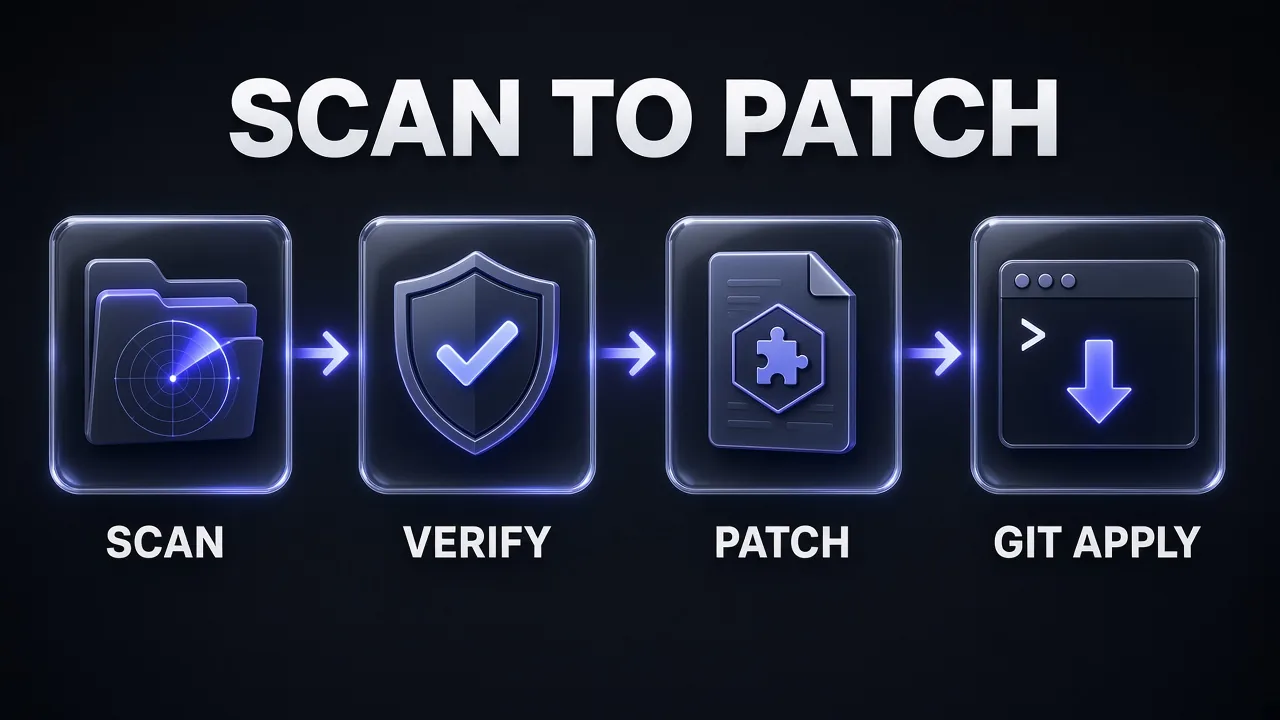
Run /claude-security again, pick Suggest patches (or say "fix finding F3"), and choose the findings to address. Each patch is drafted in a scratch copy of your repo, then reviewed by a separate agent that runs your tests when the code has them. A patch is written only if that reviewer can vouch it fixes the one finding, adds no new vulnerability and leaves behaviour otherwise unchanged; otherwise you get a note explaining why. If the code has since changed, the finding is skipped and a fresh scan is offered.
Patches are never applied automatically. They sit in the report's patches/ folder as F1.patch, F2.patch and so on, each with a note. Apply one per pull request:
git switch -c fix/security-F1
git apply CLAUDE-SECURITY-<timestamp>/patches/F1.patch
git commit -am "Fix F1 from Claude Security scan"
If the patch note says the code had no tests, treat the review as untested and add one before merging. Then run /code-review on that branch: a second, independent pass on the fix costs little and catches the regressions security patches sometimes introduce.
Triage a Claude Security report before patching
Here is the CLAUDE-SECURITY-RESULTS.md report from a Claude Security plugin scan of my repository.

For each finding:
1. Restate the risk in one plain sentence a product manager would understand
2. Rate business impact as High, Medium or Low for a [TYPE OF APP] with [NUMBER] users, and say why
3. Say whether it needs a patch now, a ticket, or no action, and what evidence would change that call

Then give me the order to patch them in, one pull request each, and list any finding where the report's confidence looks too high for the evidence given.

Report: [PASTE REPORT]
Step 8: Add the Managed Code Review on GitHub (Teams)
If your organisation is on a Team or Enterprise plan with repos on GitHub (including GitHub Enterprise Server), an Owner can switch on Code Review, the managed service. It runs on Anthropic's infrastructure in four stages: several agents examine the diff and surrounding code in parallel, a verification step filters false positives, the survivors are deduplicated and ranked by severity, and the results are posted on the pull request.
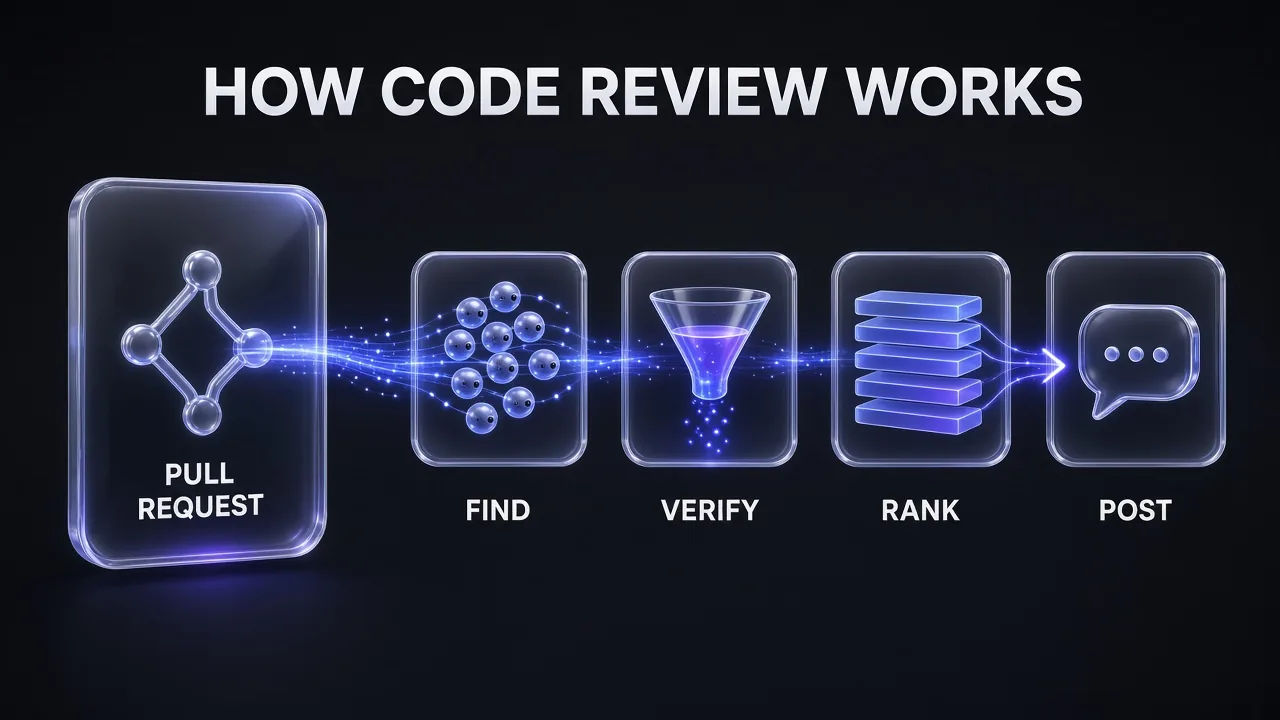
Each review leaves inline comments, a summary and a check run named Claude Code Review. The check never concludes as a failure and a review never approves or blocks a PR, so merging stays a human call. Inside a review, repo access is read-only; it doesn't push commits, and it reads code rather than building or running it. Findings carry one of three markers:
| Marker | Severity | Meaning |
|---|---|---|
| 🔴 | Important | A bug that should be fixed before merging |
| 🟡 | Nit | Minor, worth fixing but not blocking |
| 🟣 | Pre-existing | A bug already in the codebase, not introduced by this PR |
Owners choose a review level, Quick, Standard (the default) or Deep, for the whole organisation, and can override it per repo. Each repo also has a Review runs setting: once after PR creation, after every push, or manual. Anyone with write access can comment these on a PR:
@claude reviewor@claude review once: one review now, no subscription.@claude review always: a review now, plus one on every later push.@claude review stop(alsoofforpause): ends that subscription without starting a review.
Drafts and pull requests from forks are skipped automatically, so request those with a comment.
Write a REVIEW.md that cuts the noise
The managed service reads CLAUDE.md as project context and REVIEW.md as review-only instructions. It reads REVIEW.md from the base or default branch, never from the PR's own changes, so a contributor can't rewrite the rules in the PR they want approved. Protect your default branch. A trimmed version of the pattern in Anthropic's Code Review customisation guide:
# Review instructions

## What Important means here
Reserve Important for findings that would break behavior, leak data,
or block a rollback. Style and naming are Nit at most.

## Cap the nits
Report at most five Nits per review.

## Do not report
- Anything CI already enforces: lint, formatting, type errors
- Generated files under src/gen/ and any *.lock file

## Always check
- New API routes have an integration test
- Database queries are scoped to the caller's tenant
Keep it short: like any instruction file, a lean REVIEW.md gets followed more reliably than a long one, the same idea behind our context engineering patterns for Claude Code. One more evidence rule from the docs is worth adding if false positives cost your team time: "behavior claims need a file:line citation in the source, not an inference from naming."
Watch the new severity card
Also in 2.1.316, the Code Review analytics page at claude.ai/analytics/code-review gained a findings-by-severity card: the period's total findings, a daily chart stacked by severity, and each severity's count. Next to it sit PRs reviewed, month-to-date Code Review cost, auto-resolved comments, and a per-repo breakdown with estimated cost. A rising Important count on one repo is the clearest signal to give it the Deep level; a wall of Nits says your REVIEW.md needs a cap.
What It Costs
| Tool | How it's billed |
|---|---|
/code-review | Normal session usage on your plan, or API tokens |
| Claude Security plugin | Normal usage; scans can use a significant number of tokens |
| Ultrareview | 3 one-time free runs on Pro, Max and Ultra, then typically $5 to $25 per review in usage credits |
| Managed Code Review | Token usage billed to the organisation as usage credits, separate from plan usage; no flat per-review price |
Managed reviews scale with review level, change size, code complexity and how often reviews run. A repo you add starts at After every push, the most expensive setting, so Anthropic's Code Review costs guide suggests a pilot: set a spend limit, run a few repos on "once after PR creation" or manual, read the Average cost column, then multiply by monthly PRs (and pushes per PR if you go per-push). When a budget runs out, reviews are skipped and the PR gets a comment saying why. For the token side of local reviews, our Claude Code API pricing guide has the per-model rates.
A Weekly Review Routine That Doesn't Burn Your Plan
- Every branch:
/code-reviewat your remembered level before you push. Add--fixonly after committing. - Sensitive branches (auth, payments, file uploads, anything parsing user input):
/claude-security scan my branchatmedium, then patch one finding per PR. - Risky merges: one ultrareview, using free runs first.
- Monthly: a full Security plugin scan of one focused area at
high, rotating through the codebase. - Teams: managed Code Review set to "once after PR creation", with
@claude review alwayson high-stakes PRs.
To keep the main session cheap while reviewers think harder, give your custom review subagents a higher effort than your explorer agents, as covered in Claude skills vs MCP tools vs subagents.
Common Mistakes
- Running
--fixon a dirty tree. Background fixes sit outside checkpoints, so/rewindwon't fully undo them. Commit first. - Putting local rules in REVIEW.md.
/code-reviewignores it. Shared rules go inCLAUDE.md. - Treating "no findings" as "secure". Anthropic says plainly that a review with no findings doesn't mean code is error-free or secure. Keep your static analysis and dependency scanners in CI.
- Scanning uncommitted work. Security plugin change scans only see committed code.
- Batching patches. One patch per PR keeps each fix reviewable and easy to revert.
- Scripting
claude -p '/code-review ultra'. It doesn't wait for results; useclaude ultrareview.
Verdict
Short version: /code-review is the habit, the Security plugin is the audit. The local command is free beyond normal usage, runs out of your way as a subagent, and the 2.1.316 findings cards make it easy to work through results. The Security plugin is slower and more token-hungry, but its independently reviewed patches and SARIF output make it the most useful security tool Claude Code ships today, as long as you apply patches yourself, one at a time. Teams on GitHub should add the managed service with a tight REVIEW.md and watch the new severity card to decide where Deep reviews are worth paying for.
Frequently Asked Questions
8 questions answered