The PromptsRush journal
TutorialsClaude Prompt Caching Explained: Cut Agent Costs Without Losing Quality
How Claude prompt caching works, what cache writes and reads cost on Opus 5.5, Sonnet 5.5 and Haiku 5.5, where to put cache_control breakpoints, 5-minute vs 1-hour TTLs, and how to confirm cache hits in your agent's usage fields.

Advertisement
Short version: Claude prompt caching lets the API reuse the start of your prompt instead of processing it again on every request. For an agent that resends the same tools, system prompt and growing history on every turn, that one change usually cuts input cost by several times. Answer quality stays the same, because Anthropic's docs state the response is identical to what you'd get without caching. You turn it on with a single cache_control field, then spend ten minutes making sure nothing in your prompt quietly breaks it.
This guide covers how caching works, what it costs on the current Claude models, where to put breakpoints, how to pick between the 5-minute and 1-hour cache, and how to prove you're getting hits. Every number comes from Anthropic's documentation, checked on 20 October 2026. We haven't run our own benchmarks, so measured savings below are Anthropic's figures and are labelled that way. If you're new to the idea of shaping what goes into a model's context, our guide to context engineering is a useful primer.
What Prompt Caching Actually Does
Before Claude writes a single output token, it has to read your whole prompt and turn it into an internal working state. Anthropic calls this step prefill, and it's the expensive part of handling input. Prompt caching saves that state for a prefix of your prompt. When the next request starts with exactly the same prefix, Claude reads the saved state back instead of recomputing it, and you pay a fraction of the normal input price for those tokens.
The key word is prefix. The API builds every request in a fixed order: tools first, then system, then messages. A cache entry covers everything from the very first token up to and including the block you mark with cache_control. Change one character anywhere inside that span and the hash no longer matches, so the next request is a miss.
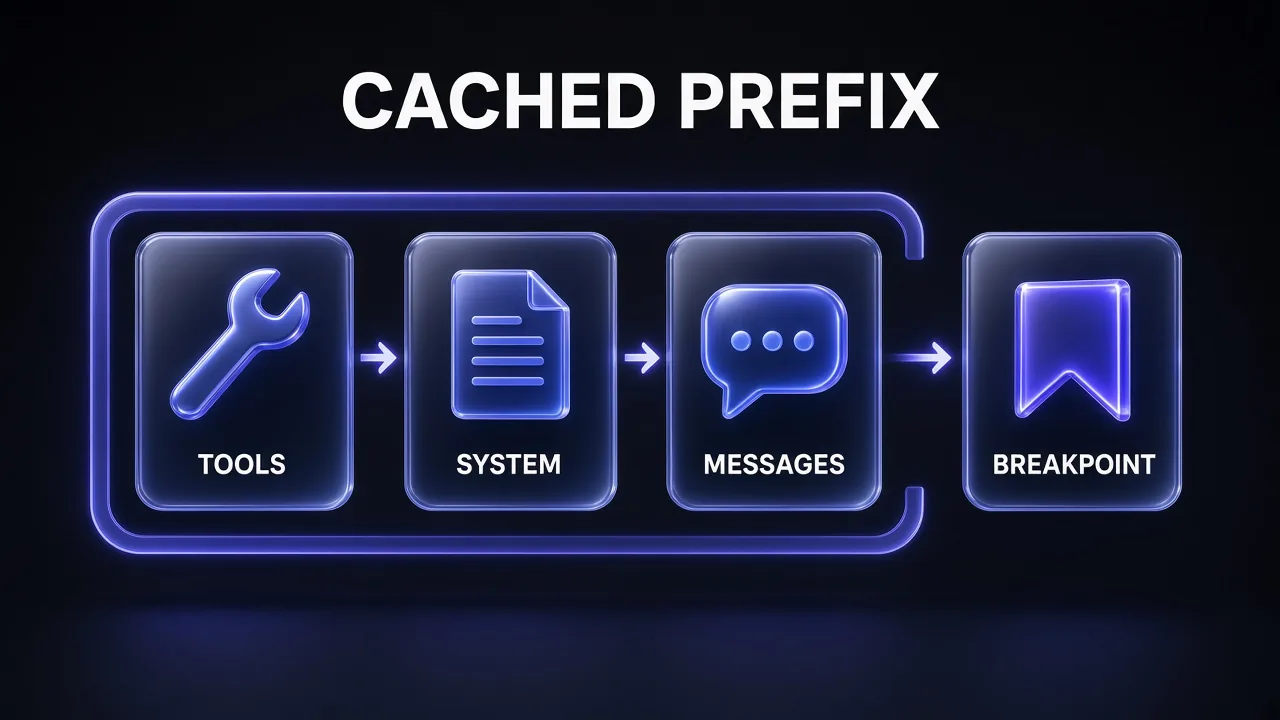
Three rules from the docs explain almost every surprise people hit:
- Matching is byte-exact. Hits need 100% identical prompt segments, including text and images, up to the breakpoint.
- The cache is pinned to one model. Switch from Opus to Sonnet mid-conversation and you start cold.
- Entries expire. The default lifetime is 5 minutes, refreshed for free every time the entry is read. There's also a 1-hour option at a higher write price.
One detail that catches long-running agents: the lifetime is measured from the start of the request that wrote or read the entry, not from the end of its response. If a response takes 4 minutes to stream, your follow-up has roughly 1 minute to start before the 5-minute entry lapses.
What It Costs: Writes, Reads and Break-Even
Caching changes how input is billed. Writing a prefix into the 5-minute cache costs 1.25 times the base input price, writing it into the 1-hour cache costs 2 times, and every read costs a small fraction. On most models a read is 0.1 times the input price. Anthropic made reads even cheaper on its newest models: 0.05 times on Claude Opus 5.5 and Sonnet 5.5, and 0.025 times on Claude Fable 5.1 and Mythos 5.1. Output tokens are unaffected.
| Model | Base input | 5-min write | 1-hour write | Cache read | Output |
|---|---|---|---|---|---|
| Claude Fable 5.1 | $10 | $12.50 | $20 | $0.25 | $50 |
| Claude Opus 5.5 | $4 | $5 | $8 | $0.20 | $20 |
| Claude Sonnet 5.5 | $2 | $2.50 | $4 | $0.10 | $10 |
| Claude Haiku 5.5 (prompts up to 100K) | $0.10 | $0.125 | $0.20 | $0.01 | $0.50 |
| Claude Haiku 5.5 (prompts over 100K) | $0.50 | $0.625 | $1 | $0.05 | $2.50 |
Prices in USD per million tokens, from Anthropic's prompt caching and pricing docs (20 October 2026). These multipliers stack with the Batch API's 50% discount, long-context pricing and the 1.1x multiplier for US-only inference. For more on the model itself, see our Claude Opus 5.5 overview.
Break-even comes fast. Anthropic's pricing page says caching pays off after one cache read on the 5-minute cache and after two reads on the 1-hour cache. Breakpoints themselves are free, so adding more of them doesn't raise your bill. You only pay for what's actually written and read.
A worked example on Opus 5.5
Here's simple arithmetic from list prices (not a measurement). Say your agent has a 50,000-token stable prefix (tool definitions plus a long system prompt) and makes 20 requests a few seconds apart:
- Without caching: 20 × 50,000 tokens × $4 per million = $4.00 for the prefix alone.
- With caching: one write (50,000 × $5 per million = $0.25) plus 19 reads (950,000 × $0.20 per million = $0.19) = $0.44.
That's about 9 times cheaper on the repeated part, before you count the growing conversation, which gets cached turn by turn too. Anthropic's own figures point the same way: on SWE-bench Pro runs, running without caching would have cost 3.3 times as much on Opus 5.5 and 3.1 times as much on Sonnet 5.5. On DeepResearch Bench II, caching cut cost per task by 2.7x to 5.5x depending on the model. If you pay for Claude through Claude Code rather than raw API calls, our breakdown of Claude Code API pricing and rate limits shows where these input costs land.
Step 1: Turn On Automatic Caching
The quickest start is automatic caching. Add one cache_control field at the top level of the request, and the API places the breakpoint on the last cacheable block for you. As the conversation grows, the breakpoint moves forward on its own, so each turn reads everything before it from the cache and writes only the new part.
import anthropic

client = anthropic.Anthropic()

response = client.messages.create(
    model="claude-opus-5-5",
    max_tokens=1024,
    cache_control={"type": "ephemeral"},   # automatic caching
    system="You are a code review agent for our monorepo. [long, stable instructions]",
    messages=[{"role": "user", "content": "Review the diff in PR 42."}],
)
print(response.usage)
Automatic caching works on every platform except the legacy Amazon Bedrock integration for Opus 4.6 and earlier, where a top-level cache_control returns a 400 error. It shares the same rules as manual breakpoints: same prices, same minimum lengths, same 20-block lookback. And "ephemeral" is still the only cache type.
Pro tip: If you see old code calling client.beta.prompt_caching.messages.create, delete the beta prefix. Prompt caching no longer needs it, and the old path throws errors in current SDKs.
Step 2: Put Explicit Breakpoints at the End of the Stable Prefix
Automatic caching is ideal for plain chat. Agents usually need more control, because their prompts have layers that change at different speeds: tool definitions almost never change, instructions change weekly, retrieved documents change per task, and the conversation changes every turn. Explicit breakpoints let you cache each layer separately. You can set up to 4 per request.
{
  "model": "claude-opus-5-5",
  "max_tokens": 1024,
  "tools": [
    { "name": "search_docs", "description": "...", "input_schema": { ... } },
    { "name": "get_doc", "description": "...", "input_schema": { ... },
      "cache_control": { "type": "ephemeral" } }
  ],
  "system": [
    { "type": "text", "text": "Stable agent instructions...",
      "cache_control": { "type": "ephemeral" } },
    { "type": "text", "text": "Today's retrieved documents...",
      "cache_control": { "type": "ephemeral" } }
  ],
  "messages": [ ...conversation, last user block marked with cache_control... ]
}
With that layout, appending a turn reuses all four segments, and swapping the documents keeps the tools and instruction caches intact. A change at any breakpoint invalidates that segment and everything after it, but never what came before.
The single most important rule is where the marker goes. Writes happen only at a breakpoint, and on the next request the API looks backward from your breakpoint for an entry an earlier request wrote. It does not go looking for stable content and cache it for you. So if your breakpoint sits on a block that changes every time, such as the incoming user message or a block containing a timestamp, every request pays for a fresh write and never gets a read.

Put the marker on the last block that is identical across the requests you want to share a cache. For a static prefix followed by a varying suffix, that's the end of the prefix, not the varying block. Automatic caching falls into the same trap in that structure, because it always targets the last block, so use an explicit breakpoint there instead.
Long agent turns have one more catch: the lookback checks at most 20 blocks per breakpoint. A run of parallel tool_use blocks counts as one position, and so does a run of tool_result blocks. But if a single turn adds more than 20 positions, the previous entry falls outside the window. A second breakpoint closer to the earlier position fixes it.
Step 3: Check the Minimum Cacheable Length
Short prompts can't be cached, and the API doesn't warn you. If the prefix falls below the model's minimum, the request is processed normally, no error is returned, and both cache fields in the usage block read 0. The minimums on the Claude API, Claude Platform on AWS, Google Cloud and Microsoft Foundry are:
| Minimum prefix | Models |
|---|---|
| 512 tokens | Fable 5.1, Mythos 5.1, Opus 5.5, Opus 5, Sonnet 5.5, Fable 5, Mythos 5, Haiku 5.5 |
| 1,024 tokens | Opus 4.8, Sonnet 5, Sonnet 4.6, Sonnet 4.5 |
| 2,048 tokens | Mythos Preview, Opus 4.7 |
| 4,096 tokens | Opus 4.6, Opus 4.5, Haiku 4.5 |
The current generation's 512-token floor is low enough that most real system prompts qualify. If yours falls just short on an older model, Anthropic notes that padding it to the threshold with genuinely useful content (more examples, clearer rules) is often worth it, because reads are so much cheaper than uncached input. Bedrock has its own minimums, so check its docs if you run there.
Step 4: Pick the 5-Minute or 1-Hour Cache
The 5-minute cache is the default and the right answer for most agent loops, because turns arrive seconds apart and every read refreshes the entry for free. The 1-hour cache, set with "ttl": "1h", costs more to write but survives longer pauses:
"cache_control": { "type": "ephemeral", "ttl": "1h" }
Anthropic's cost-optimization guide gives a decision table based on the gaps between requests in a conversation:
| Your gaps between requests | Use |
|---|---|
| Turns arrive seconds apart | 5-minute default |
| About 1 gap in 20 or more falls between 5 minutes and an hour, and few run longer | 1-hour cache |
| Most pauses longer than 5 minutes also run past an hour | 5-minute default (both expire anyway) |
| Only 1 or 2 gaps in 20 between 5 and 30 minutes, on Opus 5.5 or Sonnet 5.5 | 5-minute cache kept warm with keep-alive requests |
| A pause before every turn, on Opus 5.5 or Sonnet 5.5 | 1-hour cache |
Two more rules apply when you mix them. A 1-hour entry must come before any 5-minute entries in the same request. And on Fable 5.1, whose reads are the cheapest, Anthropic found that keeping the 5-minute cache warm beat the 1-hour cache unless pauses ran close to an hour.
Pre-warm the cache before users arrive
The first request on a cold cache pays full processing time. To hide that, send a pre-warm request with max_tokens: 0. The API reads the prompt, writes the cache at your breakpoint and returns an empty content array with stop_reason: "max_tokens". No output tokens are billed, just the write. Put the breakpoint on the shared system prompt or tools, not on the placeholder user message, and use the same thinking and effort settings as your real traffic. Pre-warming is rejected with streaming, extended thinking, structured outputs, a forced tool_choice, or inside a batch.
Step 5: Verify Hits in the Usage Fields
Never assume caching works. Read the usage block on every response (or the message_start event when streaming). Three fields tell the story:
cache_creation_input_tokens: tokens written to the cache on this request.cache_read_input_tokens: tokens served from the cache.input_tokens: only the tokens after your last breakpoint, not the whole prompt.
Total input is the sum of all three. That last point trips up dashboards: with a 200,000-token cached document and a 50-token question, input_tokens reads 50 while 200,050 tokens were actually processed. A healthy agent shows a large write on turn one, then mostly reads. Anthropic's benchmark: across a day of real traffic, agent loops read a median 84% of their input from the cache, and the top 10% read 94% or more. If you're below about 80%, something is breaking the cache.
When reads drop to zero and you can't see why, turn on cache diagnostics. Add a diagnostics object to each request, passing the previous response's id as previous_message_id (or null on the first turn). The response then reports the first point where the prefix diverged: model_changed, system_changed, tools_changed or messages_changed. Fix that one first, since later divergences can hide behind it.
What Breaks the Cache
Because the cache follows the tools, system, messages hierarchy, a change at one level invalidates that level and everything after it. Here's what Anthropic lists:
| Change | What it invalidates |
|---|---|
| Editing, adding, removing or reordering tool definitions | Everything |
| Toggling web search or citations | System and messages |
| Switching between fast and standard speed | System and messages |
Changing tool_choice or disable_parallel_tool_use | Messages |
| Adding or removing images anywhere | Messages |
Changing thinking settings or output_config.effort | Messages always; tools and system on some models |
| Switching models | Everything (the cache is per model) |
The costly breakers are usually invisible in code review. A timestamp, request ID or queue position interpolated into the system prompt. Tool schemas serialized with random key order (Anthropic calls out Go and Swift here). Conversation history that gets trimmed or re-serialized instead of appended to. Anthropic describes one small agent where a 25-token status line at the front of the system prompt made the run cost more than turning caching off altogether.
The stakes are real. By Anthropic's list-price arithmetic, one broken turn on a 100,000-token prefix costs $0.50 on Opus 5.5 against $0.02 for the read, which is 25 times more. On Fable 5.1 the gap is 50 times. It's also a good reason to pick the model for a task up front instead of routing between models mid-conversation. If you're still choosing, our Gemini 4 Argon vs Claude Opus 5.5 comparison lays out the trade-offs.
Two safer ways to change things mid-session exist on newer models. To add an instruction, append a {"role": "system"} message to messages instead of editing the top-level system field. That works on Opus 5.5, Sonnet 5.5, Haiku 5.5, Fable 5.1 and several others, but not Sonnet 5. And if you must make a cache-breaking change, make it on the first request after a compaction, when the prefix is being rebuilt anyway.
If you'd rather have an agent hunt for these problems, give it your request-building code and this prompt:
Prompt Cache Audit
You are auditing an application that calls the Claude Messages API with prompt caching. Read the code I paste below and report every place where the cached prefix could change between requests.

Check, in this order:
1. Tool definitions: are they always sent in the same order, with deterministically serialized JSON schemas?
2. System prompt: does it contain timestamps, dates, request IDs, user names, counters or any other per-request value?
3. Messages: is history strictly append-only, with assistant content and tool results echoed back verbatim?
4. Settings: can model, effort, thinking, tool_choice, speed or image presence change mid-conversation?
5. Breakpoints: is each cache_control marker on the last block that stays identical across requests, and are there 4 or fewer?

For each issue give the file and line, why it breaks the cache, and the smallest fix. Finish with a list of usage fields I should log to confirm cache hits.

[PASTE CODE HERE]
Caching in Agent Loops and Claude Code
Agents get the biggest savings, because each turn resends the entire conversation. Anthropic's guide puts it plainly: a 40-turn task sends its first turn 40 times, so cost grows with roughly the square of the turn count. That's why its cost-optimization guide says to turn on caching before any other lever. A few agent-specific behaviours are worth knowing:
- Server tools get automatic breakpoints. When a request already has at least one
cache_controlmarker and Claude uses web search, web fetch or code execution, the API caches the growing prefix after each server tool result. These writes always use the 5-minute TTL, so you may see 5-minute writes even if you asked for 1 hour. - Tool search keeps the prefix stable. Tools loaded with
defer_loadingaren't part of the cached prefix. When the model discovers one, it's appended to the conversation as atool_referenceblock, so the cache survives. - Parallel requests need a head start. A cache entry only becomes available once the first response begins. For hits on a fan-out of parallel calls, wait for the first response before sending the rest.
- Subagents share a cache only if they match exactly. A fork reuses the parent's cache only when its prefix is byte-identical, on the same model and at the same effort.
- Batches are best-effort. Batch requests run in any order, so Anthropic suggests sending one request with a 1-hour breakpoint first, then the rest once it completes.
If you build with Claude Code, you already get this for free: Anthropic's docs say Claude Code optimizes costs automatically through prompt caching and auto-compaction. From v2.1.251, /usage adds a "Prompt cache (main)" line showing the share of input served from cache, the number of misses, expected rebuilds after compaction, and whether the cache is warm. If that share drops after you add an MCP server or change models mid-session, now you know why. Our comparison of Claude Code and Google Antigravity covers how the two agents handle long sessions more broadly.
Here's a second prompt you can hand to Claude Code to restructure a project for caching:
Restructure for Cache Hits
Refactor how this project builds Claude API requests so prompt caching hits on every turn.

Goals:
- Order content as tools, then the stable system prompt, then per-task documents, then the conversation.
- Move every per-request value (timestamps, IDs, user context) into the newest user message, after the last breakpoint.
- Sort tool definitions by name and serialize schemas with sorted keys.
- Place explicit cache_control breakpoints on the last tool, the end of the stable system prompt, the end of the documents block and the final user block (4 maximum).
- Log cache_creation_input_tokens, cache_read_input_tokens and input_tokens for every response, and print the cached share per conversation.

Do not change model, effort or thinking settings. Show me the diff and a short test that sends three turns and asserts turns 2 and 3 have cache reads above zero.
Does Caching Hurt Quality?
No. Anthropic's prompt caching documentation says caching has no effect on output generation, and the response is identical to what you'd get without it. The model sees exactly the same tokens either way. Caching only skips recomputing work it has already done. In Anthropic's own cost measurements on a bug-triage agent, accuracy stayed within run-to-run noise at every caching setting it tried.
The quality risk runs the other way. Teams chasing cache hits sometimes freeze instructions they should update, or avoid raising effort on a hard turn because it would break the cache. Don't. A miss on one turn costs cents. A wrong answer costs more. Use mid-conversation system messages and post-compaction changes to adjust without paying for a full rebuild. And if you want sharper prompts to cache in the first place, our Claude Opus 5.5 coding prompts are a good stable base.
Common Mistakes (and the Fixes)
- Breakpoint on the user message. Every request writes, none read. Move the marker to the last stable block.
- Dynamic values in the system prompt. Move dates, IDs and user context into the latest user turn.
- Prefix under the minimum. Both cache fields read 0. Check your model's floor (512 tokens on current models).
- Reading
input_tokensas total input. Add the two cache fields to get the real number. - Long tool calls outliving the TTL. If a tool or subagent blocks for more than 5 minutes, use the 1-hour cache for that conversation.
- Switching models or effort mid-task. Each switch starts cold. Make changes at a natural break, such as right after compaction.
- Five breakpoints. The limit is 4, and automatic caching uses one of them. A fifth returns a 400 error.
The Verdict
My take: prompt caching is the highest-return change you can make to a Claude agent's bill, and it costs nothing in quality. Turn on automatic caching today. Then move to explicit breakpoints at the end of each stable layer, keep every per-request value after the last marker, and watch the cached share of input until it settles above 80%. On Opus 5.5 and Sonnet 5.5, where reads cost 5% of the input price, a well-cached loop pays full price on a tiny slice of what it sends.
Frequently Asked Questions
7 questions answered