What Is Context Engineering? The Next Step Beyond Prompt Engineering
Context engineering decides what an AI model sees at every step: instructions, memory, retrieved docs and tool results. Learn how it differs from prompt engineering, the 4 core techniques, 5 ways context fails, and a step-by-step workflow.
Advertisement
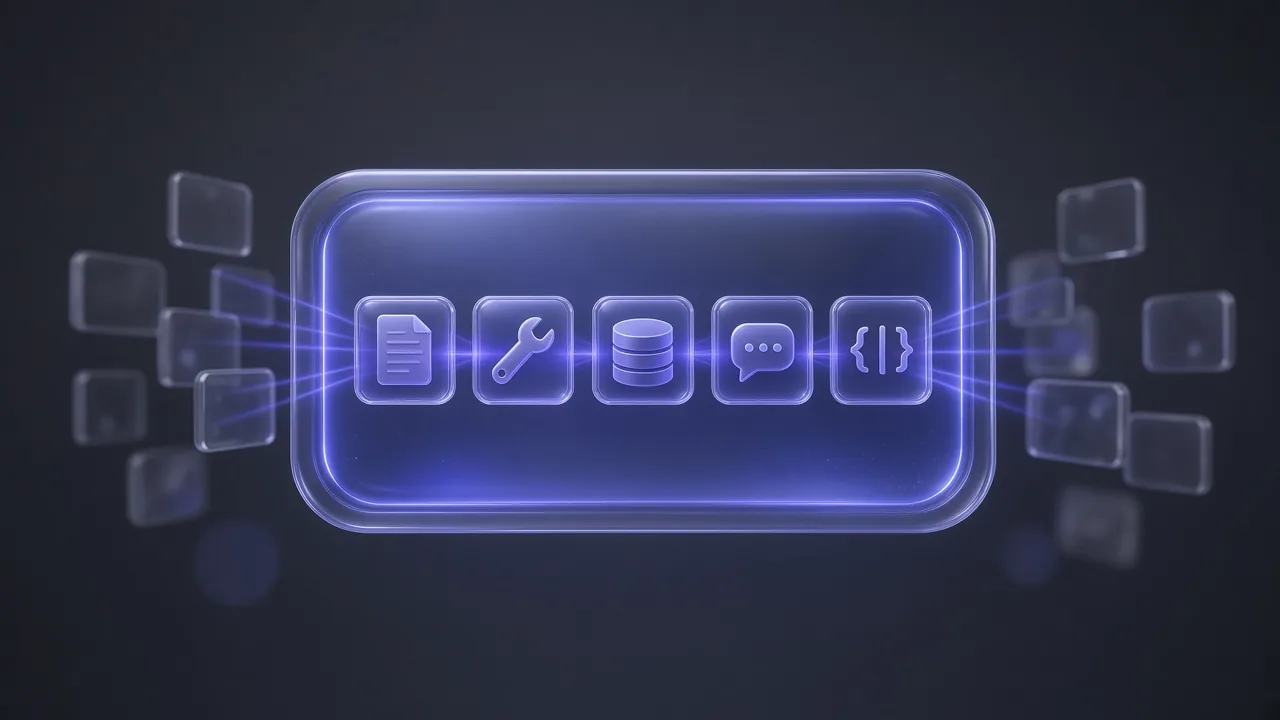
Context engineering is the practice of deciding everything a model sees before it answers: the instructions, the conversation so far, the memories, the documents, the tool definitions, the tool results and the format it must reply in. Prompt engineering is about writing one good instruction. Context engineering is about building the system that assembles the right information, at the right moment, for every step an AI agent takes.
Short version: if you have watched an agent forget a decision it made twenty minutes ago, call the wrong tool, or confidently repeat its own mistake, the wording of your prompt was rarely the problem. The context was. This guide covers the definition, how it differs from prompt engineering, the seven parts of context, the four techniques practitioners use to manage it (write, select, compress, isolate), the five ways context fails, and a step-by-step workflow you can apply whether you are building a support bot or just trying to get better work out of a coding agent.
What Is Context Engineering?
The term went mainstream in June 2025, in two posts on X. On June 19, 2025, Shopify CEO Tobi Lütke wrote:
"I really like the term “context engineering” over prompt engineering. It describes the core skill better: the art of providing all the context for the task to be plausibly solvable by the LLM." (Tobi Lütke, June 19, 2025)
Six days later, on June 25, 2025, Andrej Karpathy added his "+1" with the line LangChain later quoted in its own context engineering guide: in every industrial-strength LLM app, context engineering is "the delicate art and science of filling the context window with just the right information for the next step." He also named the trade-off in one line: "Too little or of the wrong form and the LLM doesn't have the right context for optimal performance. Too much or too irrelevant and the LLM costs might go up and performance might come down."
Neither of them invented the practice. Cognition had already called context engineering "effectively the #1 job of engineers building AI agents" in its June 12, 2025 post, and LangChain's Harrison Chase published a formal definition on June 23: "building dynamic systems to provide the right information and tools in the right format such that the LLM can plausibly accomplish the task." On September 29, 2025, Anthropic followed with Effective context engineering for AI agents, describing it as "the set of strategies for curating and maintaining the optimal set of tokens (information) during LLM inference."
Our working definition: context engineering is designing the system that decides what goes into a model's context window at each step, and what stays out. The phrase "each step" matters. Anthropic's simple definition of an agent is "LLMs autonomously using tools in a loop", and every pass through that loop rebuilds the context. If you are still fuzzy on where agents end and reusable capabilities begin, our guide to AI skills vs AI agents covers that line.
Prompt Engineering vs Context Engineering
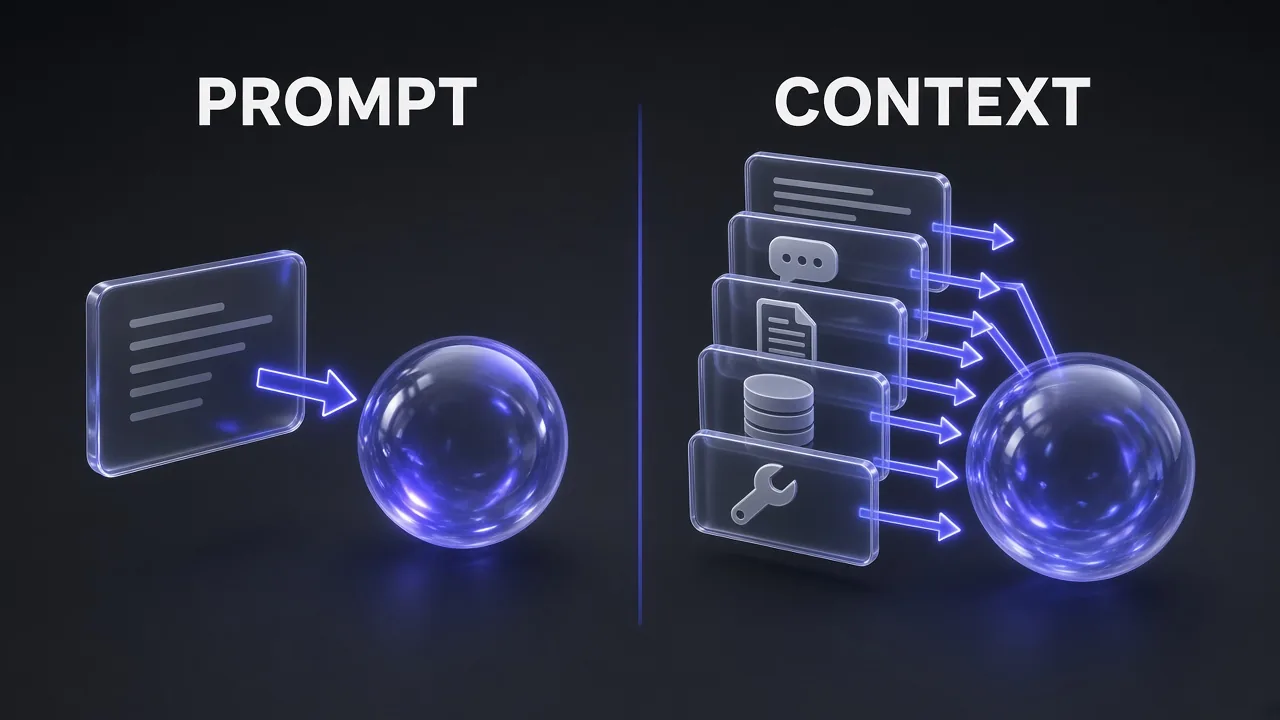
Anthropic calls context engineering "the natural progression of prompt engineering", and Harrison Chase argues that "prompt engineering is a subset of context engineering." Both framings hold. Prompt engineering is still the craft of writing clear instructions. Context engineering decides what else sits next to those instructions, where it comes from, and when it gets removed.
| Prompt engineering | Context engineering | |
|---|---|---|
| Unit of work | One instruction or template | Everything in the context window for this call |
| Core question | How should I phrase this? | What does the model need to see right now, and what should it not see? |
| When it happens | Once, before the call | On every turn of an agent loop |
| Where it lives | A chat box or a system prompt | Code, files, memory stores, retrieval pipelines, tool definitions |
| Inputs managed | Role, task, format, examples | Instructions, history, memories, retrieved documents, tools and their results, output schema |
| Typical failure | Vague or ambiguous wording | Missing, stale, conflicting or excessive information |
| Skills involved | Clear writing | Writing plus retrieval, memory design, summarisation, tool design and evaluation |
| Best for | One-shot tasks, chat, content drafts | Agents, long-running tasks, multi-step workflows, production apps |
Picture it this way: prompt engineering polishes one card, while context engineering decides the whole hand the model is dealt on every turn. For the related split between a one-off prompt and a packaged capability, see AI Skills vs Prompts: What's the Difference?
Why Context Engineering Matters Now
Two things changed at once: models became agents, and context windows became enormous. The second did not solve the first.
Bigger context windows did not fix the problem
Google's Gemini API docs note that many Gemini models accept 1 million or more tokens. Capacity is not the same as attention, though. The 2023 paper Lost in the Middle found a U-shaped curve: models used information best when it sat at the very start or end of the input, and worst when it sat in the middle. With the answer buried mid-context, GPT-3.5-Turbo sometimes scored below its own closed-book result of 56.1%, meaning the extra documents actively hurt.
Chroma's July 2025 report Context Rot tested 18 models, including GPT-4.1, Claude 4, Gemini 2.5 and Qwen3, and found that performance "consistently degrades with increasing input length", even on simple tasks. On a conversational memory benchmark, every model did significantly better with a focused prompt of about 300 tokens than with the full history of about 113,000 tokens. Anthropic explains why: transformers create n² pairwise relationships for n tokens, so every token draws on a finite "attention budget". Even Google's own docs advise that "if you don't need tokens to be passed to the model, it is best to avoid passing them."
Agents multiply the problem
An agent appends every action and every observation to its context, then reads the whole thing again on the next step. Manus reported that its average input-to-output token ratio is around 100:1, with a typical task needing around 50 tool calls. Anthropic measured that agents use about 4× more tokens than chat interactions, and multi-agent systems about 15× more. OpenAI's API docs are blunt about the cost side: requests are stateless, and even when you chain responses with previous_response_id, "all previous input tokens for responses in the chain are billed as input tokens." If you run coding agents on API billing, our breakdown of Claude Code API pricing and usage cost shows how quickly those tokens add up.
Honest answer: the bottleneck moved. Harrison Chase's diagnosis is that, more often than not and especially as models improve, mistakes happen because the model was not "passed the appropriate context", not because the model is incapable.
The 7 Components of Context
Context is everything the model sees before it generates a response. Philipp Schmid's breakdown lists seven parts, and they line up with the components Anthropic and LangChain describe. Each one is a lever you can tune, and each one competes for the same window.

1. System instructions
The standing rules: role, goals, constraints, examples. Anthropic recommends writing them at the "right altitude": specific enough to guide behaviour, not so rigid that you hardcode brittle if-else logic, and not so vague that the model has to guess. It also recommends a few "diverse, canonical examples" over a laundry list of edge cases.
2. User input
The immediate task or question. In a chat this is the latest message; in an agent it might be a ticket, a webhook payload or a scheduled job description. Google's long-context guidance adds a practical placement rule: performance is usually better when the question goes at the end of the prompt, after the material it refers to.
3. Short-term memory (conversation state)
The running history of this session: messages, tool calls and results. Each API request is stateless, so your application decides how much of that history to resend. This is where compaction and trimming live, and where most token bloat comes from.
4. Long-term memory
Facts that persist across sessions: user preferences, project decisions, past corrections. Claude Code's auto memory, for example, loads the first 200 lines or 25KB of a MEMORY.md index into every session and reads topic files only on demand. Its docs suggest that multi-step procedures belong in a skill rather than the always-loaded instruction file, which is exactly the job AI skills are designed for: procedural knowledge that loads only when it is relevant.
5. Retrieved knowledge (RAG)
Documents, database rows or web pages fetched for this specific question. Retrieval-augmented generation was introduced in a 2020 paper by Lewis et al. that paired a model's built-in knowledge with a searchable external index, which can be swapped to update what the system knows without retraining. In context engineering terms, RAG is one way to select context, not the whole discipline.
6. Tools and tool results
Tool definitions tell the model what it can do; tool results are what comes back, and they are often the largest thing in an agent's context. The Model Context Protocol, open-sourced by Anthropic on November 25, 2024 and described by its docs as "like a USB-C port for AI applications", made connecting tools trivial. That convenience has a context cost: every server you connect adds definitions the model must read, which is worth remembering when you browse lists like our best MCPs for generating images with Claude.
7. Structured output
The shape the answer must take, such as a JSON object with named fields. A schema is context too: it narrows what the model produces, and it makes the output safe to feed into the next step without another parsing pass.
The Four Core Techniques: Write, Select, Compress, Isolate
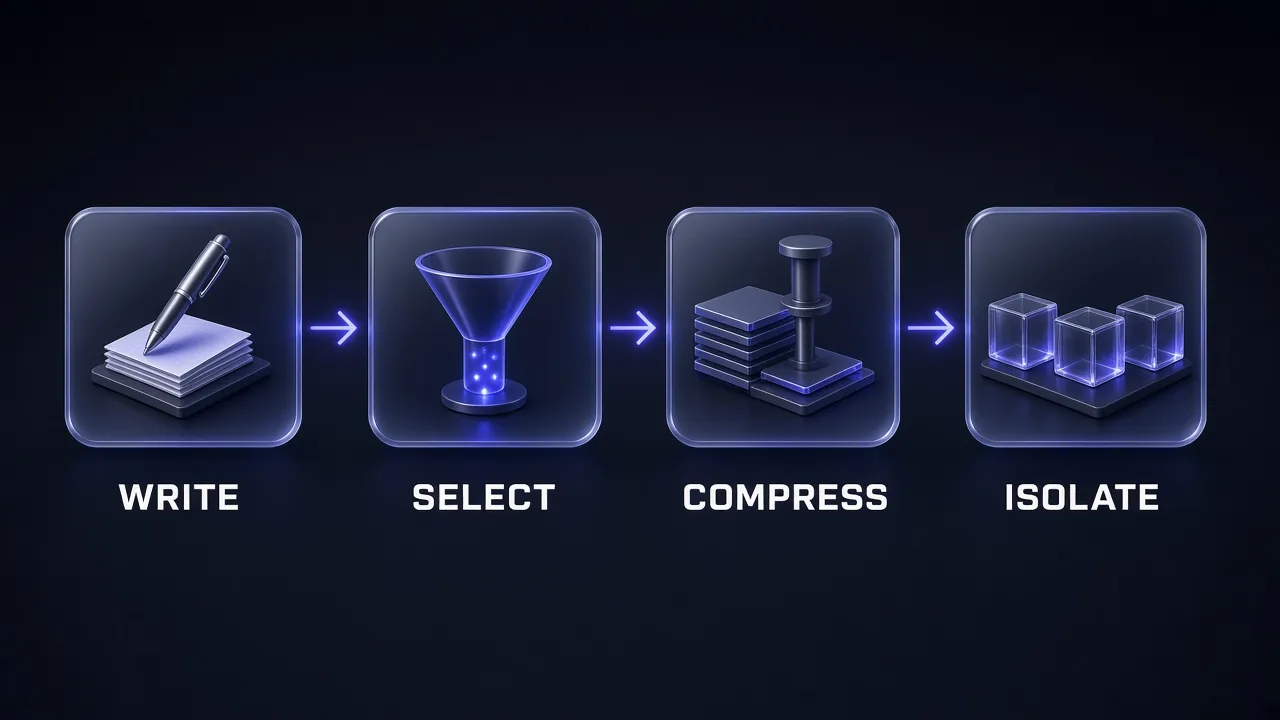
In July 2025, LangChain grouped the strategies used by popular agents into four buckets. Writing context means "saving it outside the context window". Selecting means "pulling it into the context window". Compressing means "retaining only the tokens required to perform a task". Isolating means "splitting it up". Almost every context engineering trick you will read about fits one of these four.
Write: save context outside the window
The agent writes notes, plans and progress to a file or memory store, then reads them back later. Anthropic's research agent saves its plan to memory first because, in its words, "if the context window exceeds 200,000 tokens it will be truncated". Manus keeps a todo.md and rewrites it as it works, which pushes the plan back to the end of the context where the model pays most attention. A minimal version for a long coding task looks like this:
# NOTES.md (agent-maintained)
Goal: migrate auth from sessions to JWT, no downtime
Decisions: keep /login route; refresh tokens in httpOnly cookie
Done: token service, middleware, 14/20 route handlers
Next: remaining 6 handlers in api/billing/
Open bug: logout does not revoke refresh token (see test_logout)
If you build agents on LangChain, its official LangChain Skills pack covers LangGraph persistence and memory patterns that implement exactly this.
Select: pull in only what this step needs
Selection is RAG, but also memory lookup, tool filtering and rule loading. Anthropic describes a "just in time" approach: keep lightweight references such as file paths, queries or links, and load the content with tools only when needed. Claude Code drops its CLAUDE.md in up front, then uses glob and grep to find files on demand. Cursor's rules do the same at the instruction level, with rules that always apply, apply to matching file paths, or load only when the agent judges them relevant.
Tool selection matters as much as document selection. Drew Breunig summarised research showing tool descriptions start to overlap and confuse a model past about 30 tools, and that retrieving a shortlist of relevant tools gave as much as 3× better tool selection accuracy. When the knowledge you need lives on the web, selection starts with getting clean, LLM-ready text instead of raw HTML; that is the job of web data APIs, and our Firecrawl pricing guide covers what that costs.
Compress: keep only the tokens that matter
Compression means summarising or trimming what is already in the window. Anthropic's Claude Code compaction passes the history to the model to summarise, preserving "architectural decisions, unresolved bugs, and implementation details" while discarding redundant tool output, then continues with that summary plus the five most recently accessed files. The lightest version is tool result clearing: once a raw search result has been used, the agent rarely needs to see it again.
The risk is losing a detail that only matters later. Manus's answer is to make compression restorable: drop a web page's content but keep its URL, drop a file's contents but keep its path. Cognition went further and fine-tuned a smaller model just to compress agent history.
Pro tip: Tune a compaction prompt the way Anthropic recommends: first maximise recall so nothing important is dropped, then tighten precision by removing filler. A summary that loses one key decision costs more than one that keeps three redundant lines.
Isolate: split work across clean context windows
Isolation gives a sub-task its own fresh context. In Anthropic's research system, subagents explore in parallel, each with its own window, and return condensed summaries; Anthropic notes a subagent may burn tens of thousands of tokens but hand back "often 1,000-2,000 tokens". Its multi-agent setup outperformed a single Claude Opus 4 agent by 90.2% on an internal research eval, and Anthropic says multi-agent systems use about 15× more tokens than chat. Sandboxes and state objects isolate context too: a large file or dataset can live in a variable or on disk while only the relevant slice reaches the model.
Isolation has a real counter-argument. Cognition's position is that parallel subagents make conflicting decisions because they cannot see each other's work, so it defaults to a single-threaded agent and shares full traces. My take: isolate read-heavy exploration (research, search, codebase questions) and keep write-heavy decisions in one thread.
| Technique | What it does | Concrete example | Watch out for |
|---|---|---|---|
| Write | Saves state outside the window | NOTES.md, todo lists, memory files, saved plans | Writing unverified claims that later poison the context |
| Select | Pulls in only what this step needs | RAG, just-in-time file reads, tool shortlists, path-scoped rules | Retrieving near-misses that distract more than they help |
| Compress | Shrinks what is already there | Compaction, tool result clearing, trimming old turns | Dropping a decision that matters ten steps later |
| Isolate | Splits work across separate windows | Subagents, sandboxes, state fields hidden from the model | Parallel agents making conflicting assumptions; token cost |
Five Ways Context Fails
Drew Breunig's June 2025 post How Long Contexts Fail named four failure modes that are now standard vocabulary, and Chroma's research added a fifth, broader one. Knowing which one you are looking at tells you which technique fixes it.
| Failure | What happens | Documented example | Usual fix |
|---|---|---|---|
| Context poisoning | A hallucination or error enters the context and keeps getting referenced | Gemini's Pokémon agent had its goals and summary "poisoned" with wrong game state | Validate before writing to memory; restart or quarantine the thread |
| Context distraction | The context grows so long the model leans on history instead of reasoning | Once its context grew well past 100k tokens, the same agent favoured repeating past actions over new plans | Compress and summarise; start fresh with a handoff |
| Context confusion | Irrelevant information or tools get used anyway | A quantised Llama 3.1 8b failed a GeoEngine benchmark query when given 46 tools, but succeeded with 19 | Trim the tool loadout; prune retrieved content |
| Context clash | Parts of the context contradict each other | Microsoft and Salesforce researchers spread prompts across multiple turns: scores fell 39% on average, and o3 dropped from 98.1 to 64.1 | Consolidate into one clear spec; remove superseded instructions |
| Context rot | Recall and accuracy fall as input length grows, even on simple tasks | All 18 models in Chroma's tests degraded with longer inputs | Keep context short; put key facts at the start or end |
One nuance: not every error should be removed. Manus deliberately leaves failed actions and stack traces in context so the model does not repeat them. The distinction is between evidence (a tool call that failed, with its real error message) and invented facts (a hallucinated file path written into the plan). Keep the first, purge the second.
A Step-by-Step Context Engineering Workflow
You do not need a framework to start. This is the order we recommend, from cheapest change to most involved, whether you are wiring up your own agent or tuning a tool like Claude Code or Cursor.
Step 1: Define "done" before you touch the context
Anthropic's research team started with a set of about 20 queries representing real usage and found that small samples were enough to see the effect of changes early on. Write five to twenty realistic tasks and the result you expect for each. Without them, you cannot tell whether a context change helped.
Step 2: Audit what the model actually sees
Dump the full context of one real run, not the prompt you think you are sending. Claude Code's /context command shows which memory files loaded; most frameworks have a tracing view. Then sort every block into the seven components and ask what each one is earning.
Context Audit
You are reviewing the full context sent to an AI agent on one real task. I will paste it below.

Task the agent was doing: [DESCRIBE THE TASK]
What went wrong (if anything): [DESCRIBE THE FAILURE]

1. Split the context into these components and estimate the share of tokens each uses: system instructions, user input, conversation history, long-term memory, retrieved documents, tool definitions, tool results, output format.
2. For each component, list what the agent actually needed for this task and what was irrelevant, duplicated or outdated.
3. Flag any contradictions between parts of the context.
4. Flag any claim that looks like an earlier hallucination being repeated.
5. Recommend specific cuts, and say for each whether to delete it, summarise it, fetch it on demand instead, or move it to a separate sub-task.

Context:
[PASTE THE FULL CONTEXT]
Step 3: Cut instructions to the right altitude
Anthropic's advice is to start with a minimal prompt on the best model available, then add instructions and examples only for failures you actually observe. Cursor's rule docs say the same in plainer words: keep rules under 500 lines, reference files instead of copying them, and add a rule only when you see the agent make the same mistake repeatedly.
Step 4: Trim the tool loadout
Anthropic's test is simple: if a human engineer cannot say which tool should be used in a given situation, the agent will not do better. Merge overlapping tools, write descriptions that state when not to use a tool, and return compact results rather than raw dumps. If you are building your own MCP server, the MCP Builder skill walks an agent through designing well-scoped tools with evals.
Step 5: Decide what loads up front and what is fetched on demand
Stable, always-relevant facts (build commands, house rules, the output schema) belong up front. Large or situational material (docs, past tickets, files) should be fetched by reference when needed. Keep a stable prefix: Manus points out that something as small as a timestamp at the top of a system prompt invalidates the cache for everything after it, raising cost and latency.
Step 6: Add a memory file and a handoff summary
For any task that spans hours or sessions, have the agent maintain a notes file and write a handoff summary before the context is compacted or a new session starts.
Handoff Summary Before Compaction
We are about to clear this conversation and continue the task in a fresh session. Write a handoff note that a new agent with no memory of this session can act on immediately.

Include, in this order:
1. Goal: the original objective in one or two sentences, in the user's words where possible.
2. Decisions made: every decision that constrains future work, with the reason.
3. Current state: what is finished, what is half-done, and the exact files, records or URLs involved.
4. Open problems: unresolved bugs or questions, with the exact error messages.
5. Next three actions, in order.
6. Do not repeat: approaches already tried that failed, and why.

Rules: keep facts that were verified by a tool result; mark anything unverified as UNVERIFIED. Leave out pleasantries, raw tool output and anything already finished and irrelevant to the next steps. Stay under [WORD LIMIT] words.
Step 7: Isolate heavy exploration in subagents
Anthropic found that vague subagent instructions caused duplicated work and gaps, and that each subagent needs an objective, an output format, guidance on tools and sources, and clear task boundaries. Give subagents questions to answer, not decisions to make.
Subagent Brief
You are a research subagent with your own clean context. Your output goes back to a lead agent that has limited room, so be thorough in your search and brief in your answer.

Objective: [ONE SPECIFIC QUESTION TO ANSWER]
Why it matters: [ONE SENTENCE OF CONTEXT FROM THE LEAD AGENT]
In scope: [SOURCES, FOLDERS OR TOPICS TO COVER]
Out of scope: [WHAT OTHER SUBAGENTS ARE HANDLING]
Tools to prefer: [TOOLS] Start with broad searches, then narrow.
Stop when: you can answer with evidence, or after [N] searches.

Return only:
- Answer: 3-6 sentences.
- Evidence: up to 8 bullet points, each with its source URL or file path.
- Confidence: high, medium or low, with one reason.
- Gaps: what you could not verify.
Step 8: Trace, measure and iterate
Rerun your test cases after each change and track two numbers: task success and tokens per task. LangChain's advice is to make sure you can see your agent's full inputs and token usage before you start optimising; context engineering without traces is guesswork.
Context Engineering Checklist
- Every block in the context can justify its tokens for this specific step.
- Instruction files (AGENTS.md, CLAUDE.md, Cursor rules) stay short; Claude Code's docs target under 200 lines per CLAUDE.md file.
- No two instructions contradict each other, superseded instructions are deleted rather than overridden, and failures are fixed by supplying missing information rather than piling on more rules.
- Tools have distinct jobs, clear descriptions and compact outputs; the agent sees only the tools this task needs, not every MCP server you have connected "just in case".
- The question and the most important facts sit at the start or the end of the context, not buried in the middle.
- Long tasks keep a notes file, and the agent writes a handoff summary before compaction.
- Old raw tool results are cleared or summarised once used; compression keeps references so it can be undone.
- Memory writes are validated so a hallucination cannot become a permanent "fact".
- Read-heavy exploration runs in isolated subagents that return short, sourced summaries.
- You have test cases and traces, and you measure tokens per task alongside success rate.
Real-World Examples of Context Engineering
Coding agents: AGENTS.md, CLAUDE.md and Cursor rules
Coding agents are where most people meet context engineering first, usually as a Markdown file in the repo. AGENTS.md describes itself as "a README for agents" and, as of October 2026, says it is used by over 60,000 open-source projects. It works across Cursor, Gemini CLI, Jules, Aider, Zed, Warp, Windsurf and others, the nearest AGENTS.md in the directory tree takes precedence, and the format is now stewarded by the Agentic AI Foundation under the Linux Foundation.
Cursor's docs state the reason these files exist: "Large language models don't retain memory between completions. Rules provide persistent, reusable context at the prompt level." Claude Code's docs say each session "begins with a fresh context window"; it loads CLAUDE.md at the start, can read AGENTS.md when there is no CLAUDE.md, and re-reads the project-root CLAUDE.md after /compact so standing instructions survive compression. That is write, select and compress, all in one Markdown file. The same logic applies to design context: our post on how design.md improves AI coding results shows what happens when an agent gets a design system instead of guessing one.
Draft a Lean AGENTS.md
Act as a senior engineer onboarding an AI coding agent to this repository. Using the files I paste below (README, package manifest, CI config and folder tree), draft an AGENTS.md under 120 lines.

Include only what an agent cannot reliably infer from the code:
- exact install, dev, test, lint and build commands
- project layout in 5-10 lines, pointing to key folders rather than describing every file
- conventions that differ from the defaults for this language and framework
- rules for tests, commits and pull requests
- things the agent must never do (generated folders, secrets, production data)
- known gotchas, with the file where each one bites

Leave out: generic style advice a linter already enforces, full dependency lists, and anything that duplicates the README.
End with a list of folders that deserve their own nested AGENTS.md.

Files:
[PASTE README, MANIFEST, CI CONFIG, FOLDER TREE]
Customer support bots
A support bot is a good illustration of all seven components working together. The system instructions set tone, escalation rules and what the bot may never promise. The user input is the customer's message. Short-term memory is this conversation; long-term memory is the customer profile and past tickets, selected by customer ID rather than dumped in full. Retrieval pulls the two or three policy articles that match the product and region. Tools look up orders and create refunds, and the structured output returns the reply plus fields such as an escalation flag and a reason code.
The classic failure here is context clash: an outdated refund policy retrieved alongside the current one. The fix is a retrieval index that only holds the current version of each policy, with effective dates in the metadata, rather than an instruction asking the model to "prefer the newest document".
Research agents
Research is the textbook case for isolation. Anthropic's Research feature uses a lead agent that plans, spins up subagents that search in parallel with their own context windows, and passes the findings to a citation step at the end. Anthropic reported that token usage alone explained 80% of the performance variance on the BrowseComp evaluation, which is why spreading the work across separate windows paid off. Consumer research agents follow similar patterns; our Genspark review looks at one of them in day-to-day use.
My Take: Is Context Engineering Just Prompt Engineering With a New Name?
Partly, and that is fine. The core skill of saying exactly what you mean to a model has not changed, and good prompts still sit at the heart of every context. What changed is the job around the prompt. Once a model runs in a loop, calls tools and works for hours, the hard questions are about information flow: what to load, what to fetch, what to forget and what to hand to a fresh window.
Our recommendation: start small. Write a short AGENTS.md or CLAUDE.md, trim your tool list, and add a handoff summary to any task that outlives one session. Those three changes fix most of the failures people blame on the model. Reach for subagents and custom compaction only when your traces show you need them. Anthropic's own advice, "do the simplest thing that works", is still the best rule in this field.
Keep Reading
- How to Write Better design.md Files: apply the same lean-context thinking to design instructions for coding agents.
- How to Create Your First Claude Skill: package a repeatable procedure so it loads only when needed.
- How to Use Claude Code for Free: put CLAUDE.md and AGENTS.md to work without a paid plan.
Frequently Asked Questions
8 questions answered