The PromptsRush journal
AI ToolsFirecrawl vs Apify vs Browserbase for AI Agents (2026)
Firecrawl reads pages, Apify runs ready-made scrapers and Browserbase drives real browsers. We compare plans, billing units and a 100,000-page cost example from each vendor's own pricing page, then say which one your agent needs.

Advertisement
Short version: these three tools solve three different problems, and picking the wrong one is how agent budgets leak. Firecrawl is the one to start with when your agent needs to read pages: search, scrape and crawl return clean Markdown or JSON through one API. Apify wins when you need a specific site already solved at scale, because its Store lists 123,000+ ready-made scrapers called Actors. Browserbase is what you reach for when the agent has to act on a page: log in, click, fill forms, get through a CAPTCHA.
The "agents need the web" trend has blurred the lines. Firecrawl now has an Interact endpoint that clicks and fills forms, Browserbase has added Search and Fetch APIs, and Apify has an MCP server. So this comparison is built from each vendor's own pricing page, docs and Store as they read on 17 November 2026. We are not claiming hands-on benchmarks; where a number comes from our own arithmetic on published rates, we say so. If you want the plan-by-plan detail on one of them, our Firecrawl pricing breakdown covers credits and modifiers in depth.
Firecrawl vs Apify vs Browserbase at a Glance
| Question | Firecrawl | Apify | Browserbase |
|---|---|---|---|
| What it is | Context API: search, scrape, interact | Marketplace and cloud for Actors (serverless scrapers and automations) | Headless browsers plus Search, Fetch, Functions and Stagehand |
| Best at | Clean Markdown or JSON for LLMs | Site-specific scrapers you do not have to write | Logins, clicks and multi-step browser tasks |
| Free tier | 1,000 credits per month, no card | $5 of usage per month, no card | 1 browser hour, 1,000 Search and 1,000 Fetch calls |
| First paid plan | Hobby, $19/month | Starter, $19/month | Developer, $20/month |
| Billing unit | Credits per page, per search, per browser minute | Per result, per event, or compute units plus proxy | Browser hours, plus per-1k Search and Fetch calls |
| MCP server | Yes, mcp.firecrawl.dev | Yes, mcp.apify.com | Browser, Search and Fetch via one API key (see docs) |
All prices are USD from each vendor's pricing page, checked 17 November 2026. They change often, so treat the vendor page as the final word.
What an Agent Actually Needs From the Web
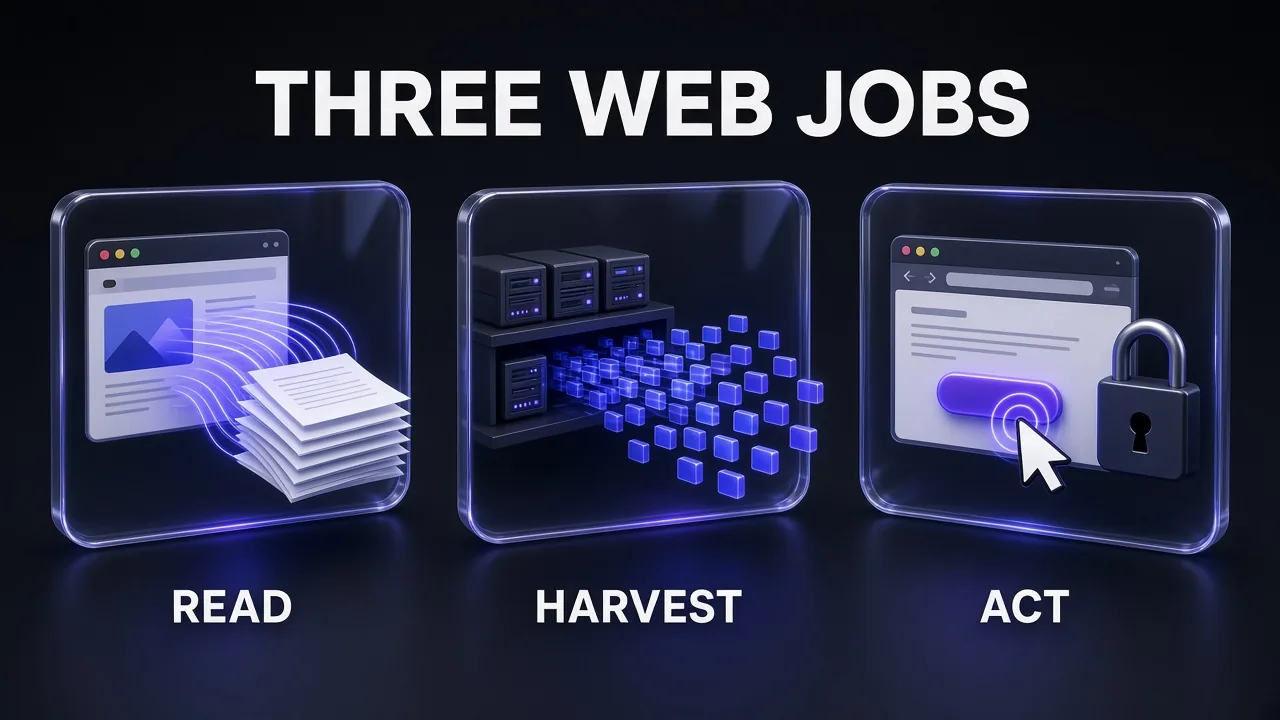
Browserbase's docs put the problem bluntly: traditional APIs cover roughly 15% of the web, and the rest sits behind logins, JavaScript rendering, CAPTCHAs and interactive flows. That claim is Browserbase's own, so read it as a pitch, but the underlying split is real. An agent's web work falls into three jobs:
- Read: find a page and get its text into the model without menus and cookie banners. This is a context-quality problem, the same one behind context rot.
- Harvest: pull the same fields from the same kind of site, thousands of times, on a schedule.
- Act: do something as a user would, which means a real browser session.
Each tool grew up around one of those jobs. The overlap is growing, but the centre of gravity still matters when you pick.
Firecrawl: Best for Reading and Searching the Web
Firecrawl describes itself as "the context API for AI agents": one API to search the web, scrape any page and interact with it. Output is clean Markdown, structured JSON or screenshots, with proxies, anti-bot handling and JavaScript rendering done for you. Beyond Search, Scrape and Interact, the docs list Agent (autonomous data gathering), Crawl, Map (discover every URL on a site), Parse (turn PDFs, DOCX and XLSX into Markdown) and a Browser Sandbox.
What stands out
- Almost no setup. The docs show a keyless MCP server at
https://mcp.firecrawl.dev/v2/mcpfor Search, Scrape and Parse, and say the first API call needs no account or key (an API key adds higher rate limits). - Predictable credit math. A scrape is 1 credit per page, a crawl 1 credit per page, a map 1 credit per call, a search 2 credits per 10 results and Interact 2 credits per browser minute. Modifiers add credits: JSON format is +4 per page and the prompt injection check is +4 per page.
- A self-serve ladder. Free is 1,000 credits and 2 concurrent requests. Hobby is $19 for 5,000 credits, Standard $99 for 100,000, Growth $399 for 500,000 and Scale $749 for 1,000,000 (monthly billing, about 17% to 20% cheaper billed annually).
For a working example of the read job, our Firecrawl and Claude tutorial walks through a search, scrape, clean and write pipeline. If you are choosing which servers to wire into your coding agent first, start with the best MCP servers for Claude Code.
Where it is weaker
Firecrawl is a single vendor's pipeline. It does not have a marketplace of per-site scrapers, and its interactive features are newer than Browserbase's browser-first stack. Credits also do not roll over on Hobby, Standard or Growth (only Scale and Enterprise get rollover), so a quiet month wastes allowance.
Apify: Best When Someone Already Built the Scraper
Apify's core idea is the Actor: a serverless program that takes JSON input, runs in the cloud and returns structured data. Apify Store says it holds 123,000+ of them, from social media and maps scrapers to SEO tools, and Actors can also run as web servers or MCP servers. For AI work, the headline Actor is Website Content Crawler, which crawls whole sites into Markdown, plain text or HTML for RAG pipelines and LLM apps. Its page lists 178,629 total users, a 4.59 out of 5 rating and 99.9% successful runs (Apify-reported).
How Apify bills
This is the part to understand before you commit, because there are three models:
- Pay per event: a fixed price per result. Apify's own example is an Instagram scraper at $2.30 per 1,000 results, so 10,000 results cost $23.
- Pay per usage: you pay only for compute units (1 CU is 1 GB of RAM for 1 hour), proxy and storage. Website Content Crawler works this way.
- Pay per event plus usage: both at once.
Plans are a monthly fee that doubles as prepaid usage: Free $0 with $5 of usage, Starter $19 with $19, Scale $199 with $199 and Business $999 with $999. Compute units cost $0.20 on Free and Starter, $0.16 on Scale and $0.13 on Business. Residential proxy is $8 per GB on Starter. Unused prepaid usage expires at the end of the cycle.
Pro tip: Apify's own docs say the easiest way to find an Actor's real cost is a test run, then reading your billing page. Cap spend with themaxTotalChargeUsdrun option, not withmaxItems, which only caps charges on per-result Actors.
Where it is weaker
The flip side of 123,000 Actors is quality variance: each one has its own author, pricing model and rating, so you vet the Actor, not just the platform. The cost of one job is harder to predict than a flat credit-per-page rate. And for a brand-new site nobody has scraped, you are writing and maintaining your own Actor.
Browserbase: Best for Logins, Clicks and Browser Agents
Browserbase positions itself as the platform to "build and deploy agents that browse and interact with the web like humans". One API key covers headless browsers, Search and Fetch APIs, Functions (deploy your agent next to the browser), a Model Gateway, Agent Identity for getting past anti-bot and CAPTCHA walls, and observability with live view and session replays. It is also the home of Stagehand, its SDK that adds act, extract and observe primitives on top of Playwright-style control.
What it costs
The pricing page lists four tiers:
| Plan | Price | Concurrent browsers | Browser hours | Fetch calls |
|---|---|---|---|---|
| Free | $0 | 3 | 1 | 1,000 |
| Developer | $20/month | 25 | 100, then $0.12 per hour | 1,000, then $1 per 1k |
| Startup | $99/month | 100 | 500, then $0.10 per hour | 10,000, then $0.50 per 1k |
| Scale | Custom | 250+ | Usage-based | Usage-based |
Search calls are $5 per 1,000 by default on paid plans, with other engines priced from $1 to $12 per 1,000. Fetch with proxies or Extract costs $4 per 1,000, and both together $7 per 1,000 (Developer-plan figures). Proxies are 1 GB included on Developer and 5 GB on Startup, then $12 and $10 per GB. Sessions on the Free plan are capped at 15 minutes, and automatic CAPTCHA solving starts on Developer.
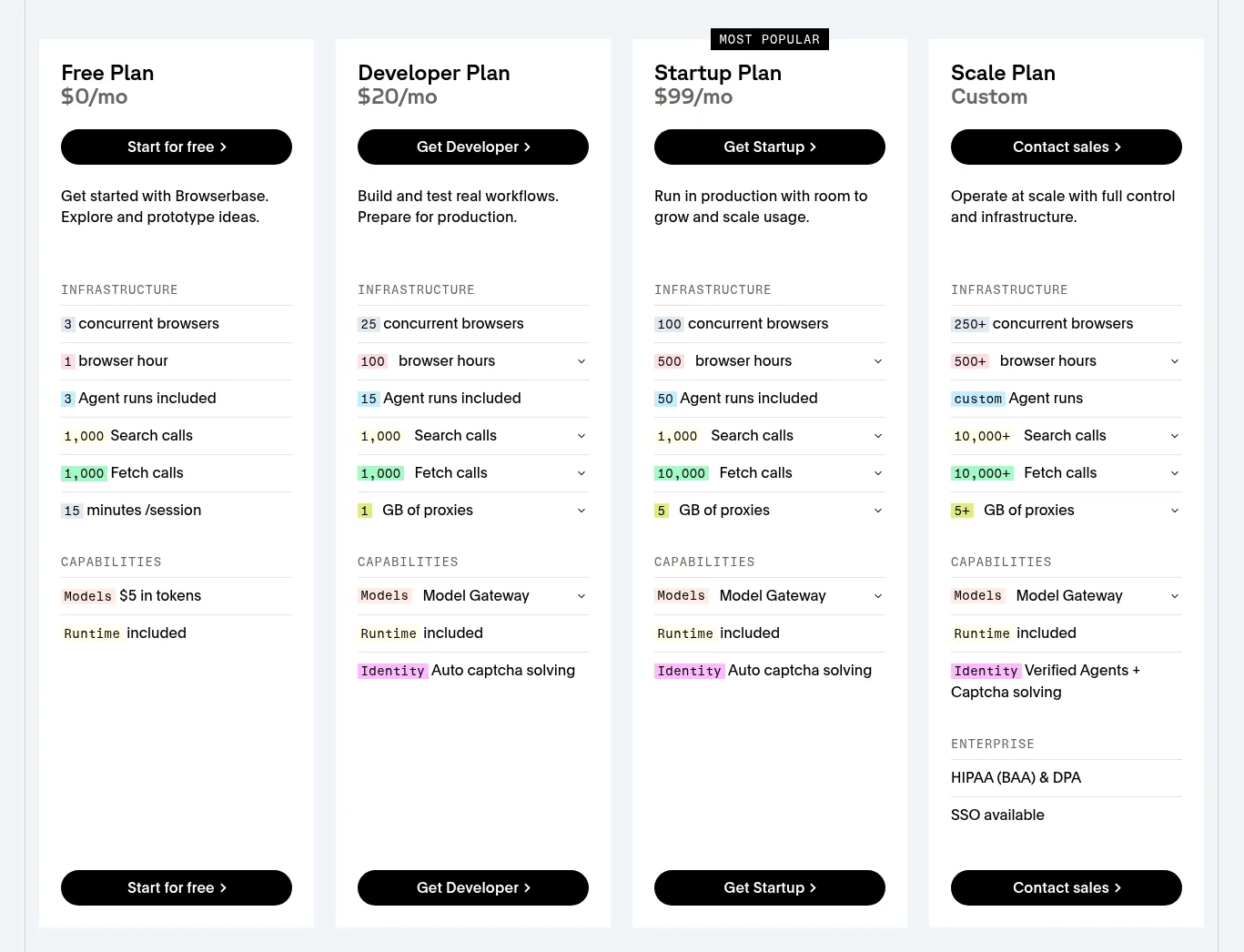
Browserbase's own guidance is that a typical web scrape runs under two minutes and that 100 browser hours is roughly 3,000 page-level tasks. That is a vendor estimate, but it shows the mental model: you pay for time in a browser, not for pages.
Where it is weaker
You are paying for a full browser even when a plain fetch would do, which is why Browserbase added its Fetch API. Browser agents are also more moving parts than a scrape call (our multi-agent workflows guide shows how quickly orchestration grows): you write or generate the automation, handle failures and watch session time. For pure content ingestion it is usually more machine than you need.
Pricing Compared at the Entry and Next Tier
Plan prices are the easy part to compare. What each plan includes is not comparable, because credits, prepaid dollars and browser hours are different units.
Monthly price: first paid plan vs next tier up
Monthly billing, USD. Included usage differs by vendor
- First paid plan
- Next tier up
Source: firecrawl.dev/pricing, apify.com/pricing, browserbase.com/pricing, checked 17 Nov 2026
The first rung is nearly identical at $19 to $20. The next rung is where they diverge: Firecrawl Standard ($99) and Browserbase Startup ($99) match on price, while Apify Scale is $199. Apify's tier also gives you a $199 balance to spend on any Actor, so the right comparison is what you spend it on.
A worked example: 100,000 plain page fetches
This is our arithmetic on the published rates, not a measured result. Assume plain pages with no JSON extraction, proxies or CAPTCHA.
- Firecrawl: 100,000 pages at 1 credit each is 100,000 credits, exactly the Standard plan's monthly allowance, so $99. Turn on JSON format (+4 credits) and the same 100,000 pages need 500,000 credits, which is the Growth plan at $399.
- Browserbase Fetch: on Developer, $20 plus 99,000 extra calls at $1 per 1,000 is $119. On Startup it is $99 plus 90,000 extra calls at $0.50 per 1,000, which is $144.
- Apify: it depends on the Actor. A pay-per-event Actor priced like Apify's $2.30 per 1,000 example would be $230 for 100,000 results before any plan credit applies; a pay-per-usage crawler depends on compute and proxy use, so run a small test first.
The takeaway: for plain read-only fetching, Firecrawl's flat credit is hard to beat on predictability, and Browserbase's Fetch API is competitive at volume. Apify earns its place when the site is hard and someone has already solved it.
Pick the Right Web Tool for Your Agent
I am building an AI agent that needs web data. The job is: [DESCRIBE JOB, e.g. monitor 200 competitor pricing pages weekly]. The target sites are: [LIST SITES]. Do they require login, clicks or CAPTCHA? [YES/NO]. Expected volume: [PAGES PER MONTH]. Output I need: [MARKDOWN / JSON FIELDS]. Compare three options: (1) an API that returns clean Markdown or JSON from a URL, (2) a marketplace of ready-made site scrapers, (3) cloud headless browsers I script or drive with an AI agent. For each, give the build effort, the failure risks and how cost scales with volume. Then recommend one, and say what would make you switch.
Which One Should You Pick?
| If your agent needs to... | Start with | Why |
|---|---|---|
| Research a topic and cite sources | Firecrawl | Search plus scrape in one call, clean Markdown out |
| Ingest a docs site or blog into RAG | Firecrawl or Apify | Firecrawl Crawl, or Apify's Website Content Crawler |
| Collect structured data from a popular platform (maps, social, marketplaces) | Apify | An Actor probably exists already |
| Log in to a portal and complete a task | Browserbase | Persistent browser sessions, identity and CAPTCHA handling |
| Click through one scraped page | Firecrawl Interact | Scrape, then prompt it to click or fill a form |
| Run scrapers on a schedule with no servers | Apify | Schedules and webhooks are built in |
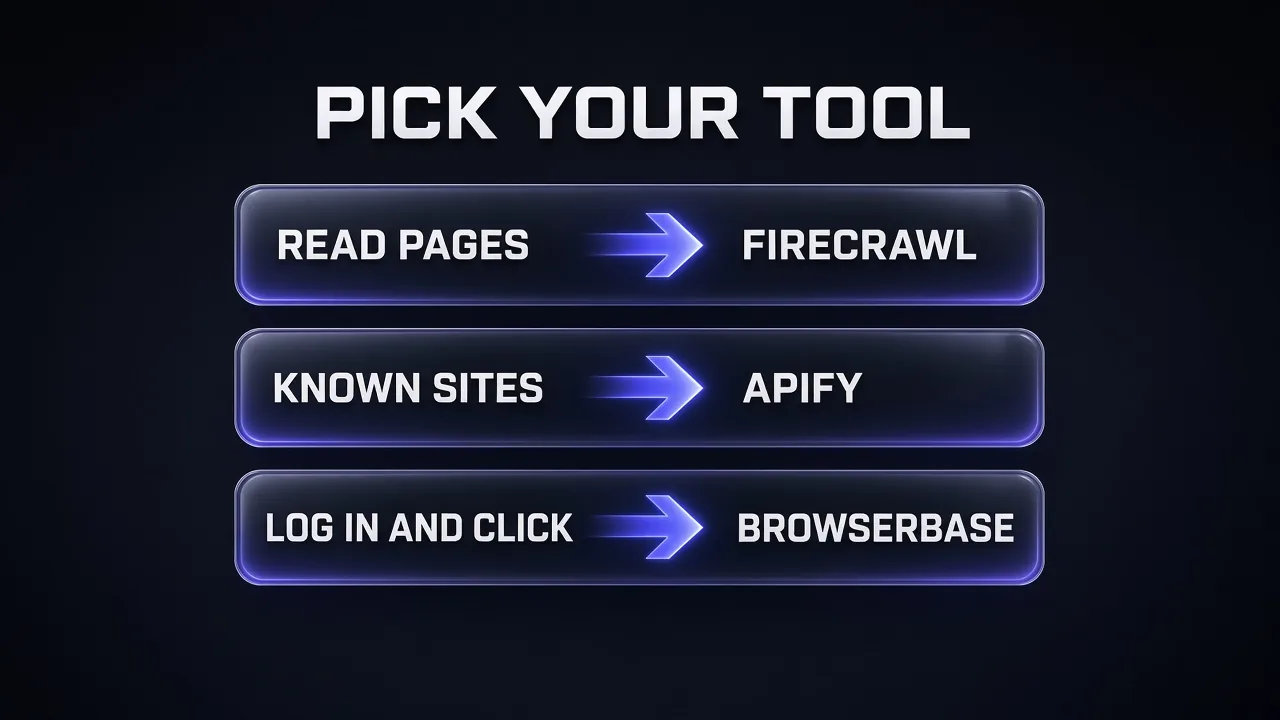
My take: most agent builders should start with Firecrawl because reading is the most common job and the setup is the lightest. Add Apify when a specific site fights back and an Actor already handles it. Add Browserbase when the task genuinely needs a logged-in browser. Many production stacks end up using two of the three, and that is fine; the same layering shows up in the Promptsrush AI builder stack.
Pitfalls That Cost Real Money
- Using a browser for a read job. If a page does not need a click, a scrape or fetch call is cheaper than a browser session.
- Leaving extraction modifiers on. On Firecrawl, JSON format adds 4 credits per page, a fivefold jump over a plain scrape.
- Not capping Apify runs. Set a maximum total charge and a usage limit before the first paid run.
- Ignoring session limits. Browserbase's Free plan sessions end at 15 minutes.
- Trusting scraped content. Pages can contain text that tries to instruct your agent. Treat everything fetched as data, and keep tool permissions narrow.
- Skipping robots.txt and terms. A tool can fetch a page; whether you are allowed to use it is your responsibility.
If your agent also drives a desktop or browser directly, our walkthrough of Claude computer use explains the safety limits, and Skills vs MCP vs subagents helps you decide where each web tool should plug in.
Verdict
Honest answer: there is no single winner, because they are not really the same product. Firecrawl is the best default for agents that read the web, Apify is the best shortcut for sites someone already scraped, and Browserbase is the best tool when the agent needs hands. If you are building research or RAG workflows, start with Firecrawl's free 1,000 credits and see how far one API gets you. For retrieval design after the scraping step, see how to build a RAG pipeline without hallucinating sources.
Frequently Asked Questions
10 questions answered