Descript Pricing (2026): Plans, Limits, Credits, Discounts
Descript meters you two ways at once — media hours and AI credits — and the plan you need depends on which runs out first. Full pricing breakdown, plus the top-up gotcha on the cheapest paid tier.
Advertisement
Most tools meter you one way. Descript meters you two ways at once, and the plan you need depends entirely on which limit you hit first.
Every paid tier gives you a monthly allowance of media hours — how much footage you can bring into the editor — and a separate monthly allowance of AI credits, spent on things like Studio Sound, Overdub, Eye Contact and translation. These are independent meters. Fill one and the other keeps running; exhaust one and you are stuck regardless of how much of the other remains.
That is the fact that should drive your plan choice, and it is not obvious from the pricing page. Below is what the tiers actually cost, where the real value sits, and the one gotcha that catches people on the cheapest paid plan.
Descript Pricing at a Glance
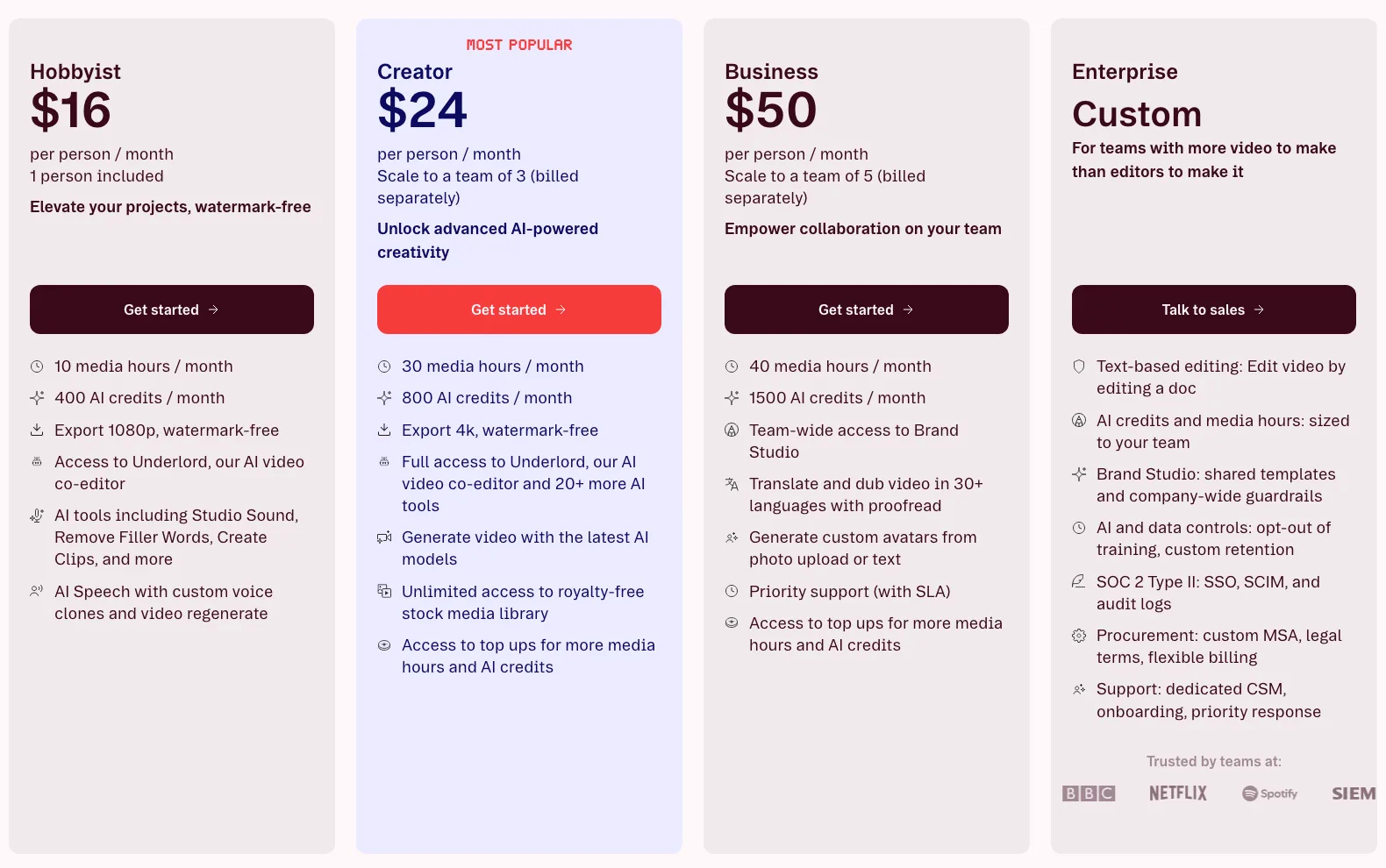
| Plan | Price (annual) | Media hours/mo | AI credits/mo | Export | Seats |
|---|---|---|---|---|---|
| Free | $0 | 1 hour | — | 720p, watermarked | 1 |
| Hobbyist | $16/mo | 10 hours | 400 | 1080p | 1 |
| Creator | $24/mo | 30 hours | 800 | 4K | Up to 3 |
| Business | $50/mo | 40 hours | 1,500 | 4K | Up to 5 |
| Enterprise | Custom | Custom | Custom | 4K | Custom |
Annual billing saves up to 35% against monthly. Prices are per seat.
The Two Meters

Media hours are consumed when you import footage into a project. A one-hour interview costs one hour, whether you keep five minutes of it or all sixty. Multi-camera shoots consume per camera. This meter tracks how much raw material you handle, not how much you publish.
AI credits are consumed by the generative features — Studio Sound, filler-word removal at scale, Overdub voice cloning, Eye Contact, green screen, translation and dubbing. Editing itself does not spend them; the AI does.
These two profiles diverge sharply by workflow:
- Long-form podcasters burn media hours fast and credits slowly. Two hosts, weekly, two-hour recordings — that is 16+ media hours a month before you touch a single AI feature.
- Short-form creators burn credits fast and hours slowly. Twenty 60-second clips is under an hour of media, but Studio Sound and Eye Contact on every one adds up.
Before you pick a plan, work out which meter you are: total the raw footage you import in a typical month, and count how many AI operations you run. One of those numbers will be your constraint. Buy for that one.
The Gotcha: Hobbyist Cannot Top Up
"Top up media minutes" is listed as unavailable on Free and Hobbyist, and available on Creator and Business.
This matters more than it reads. On Creator or Business, running out of media hours mid-month is an inconvenience you solve by buying more. On Hobbyist, there is no safety valve — hit 10 hours on the 18th and your only options are to stop editing until the reset or upgrade your plan.
Ten hours sounds like plenty until you count re-imports, multi-camera sessions and abandoned takes. If your monthly footage volume is anywhere near that ceiling, Hobbyist is a false economy: the upgrade you will be forced into costs the same as buying Creator up front, minus the disrupted week.
Where the Value Actually Sits
Divide each allowance by its price and Creator wins on both meters — decisively:
| Plan | Price | Media hours per $ | AI credits per $ |
|---|---|---|---|
| Hobbyist | $16 | 0.63 | 25.0 |
| Creator | $24 | 1.25 | 33.3 |
| Business | $50 | 0.80 | 30.0 |
Creator gives you twice the media hours per dollar of Hobbyist and about a third more credits per dollar. For $8 more a month you get three times the footage allowance, double the credits, 4K export, two extra seats and the ability to top up.
And note where Business lands: worse value per dollar than Creator on both meters. That is not a flaw in the pricing — it tells you what Business is actually for. You do not buy it for capacity. You buy it for the team and brand features.
What Each Tier Adds
Free — $0
One hour of media a month, 720p exports with a watermark. This is a trial, not a plan. Use it to confirm that text-based editing suits how you work, then move on.
Hobbyist — $16/mo
Removes the watermark and lifts exports to 1080p. 10 media hours, 400 AI credits, unlimited projects and transcription. Correct for genuinely light, occasional editing where you will never approach the ceiling. Anything more and the no-top-up limitation will find you.
Creator — $24/mo
The plan most people should buy. 30 media hours, 800 credits, 4K export, up to 3 seats, top-ups enabled, plus AI green screen, unlimited Overdub and Eye Contact. It is the value peak on every metric that scales, and the $8 step from Hobbyist is the best-value increment in the whole lineup.
Business — $50/mo
40 media hours, 1,500 credits, up to 5 seats — and the features that actually justify it: Brand Studio for consistent templates and styling across a team, dubbing in 30+ languages, custom AI avatars, and an SLA. If you need brand consistency across multiple editors or you are localising content, this is the tier. If you just need more hours, top up on Creator instead — it is cheaper.
Enterprise — custom
SOC 2 Type II, SSO, SCIM provisioning, audit logs, custom data retention and the ability to opt out of model training. That last one is the reason regulated teams end up here regardless of headcount.
Which Plan Should You Buy?
| If you... | Choose |
|---|---|
| Are testing whether text-based editing works for you | Free |
| Edit a few short videos a month, well under 10 hours of footage | Hobbyist |
| Publish regularly, in any format | Creator — the value peak |
| Need 4K export | Creator or above |
| Might exceed your allowance mid-month | Creator or above — Hobbyist cannot top up |
| Need brand templates across a team | Business |
| Are localising into multiple languages | Business — dubbing in 30+ languages |
| Need SSO, audit logs or training opt-out | Enterprise |
| Just need more hours, not more features | Creator + top-ups, not Business |
Three Ways to Spend Less
- Trim before you import. Media hours are charged on what enters the project, not what survives the edit. Cutting a two-hour recording down to the usable 40 minutes in any basic tool first saves the rest of that allowance.
- Batch your AI operations. Credits go on generative features, so running Studio Sound once on a finished cut costs less than running it repeatedly through revisions.
- Take annual if you have committed. Up to 35% is a large discount, though only worth locking in once you know Descript fits your workflow — which is what the Free tier is for.
The Verdict
Creator at $24/month is the right answer for most people, and unusually clearly so. It is the value peak on both meters simultaneously, it is the first tier with 4K and top-ups, and the increment from Hobbyist buys three times the footage allowance for eight dollars.
Hobbyist is only correct if you are certain you will stay under 10 media hours, because there is no top-up escape hatch when you do not.
Business is a team purchase, not a capacity purchase. Its per-dollar allowances are worse than Creator's — you are paying for Brand Studio, multi-language dubbing, custom avatars and five seats. Those are real, but if you only need more hours you will spend less topping up on Creator.
Work out which meter constrains you before you compare prices. That single question answers the plan choice faster than any feature table.
For whether the tool is worth it at all, see our Descript review after a year of use, or Descript vs HeyGen if you are weighing it against avatar-first video.
Keep Reading
More on Descript and its alternatives: Descript review 2026, Descript vs HeyGen, ElevenLabs pricing, Hedra pricing and Magnific pricing. Or browse all guides and prompts on PromptsRush.
Frequently Asked Questions
10 questions answered