Descript Review 2026: My Opinion after 1yr of Use
A year in, Descript is the fastest way to edit spoken-word content and it is not a video editor. Honest verdict on text-based editing, Underlord, Studio Sound, pricing and the frustrations that never went away.
Advertisement
Product Review
Descript
Descript
The fastest way in existence to edit spoken-word content, built on transcript-based editing that genuinely collapses hours of work. Outstanding at one thing, average at several others.
Excellent
Pricing
Free / from $16 per person per month (annual billing)
What we liked
- Transcript-based editing is transformative for dialogue-heavy content
- Collapses hours of timeline work into reading and deleting
- Studio Sound genuinely rescues imperfect audio
- Voice cloning fixes a fluffed line without re-recording
- Underlord removes most of the unglamorous production admin
- Fair pricing for what the core mechanic actually saves
What to watch for
- Not a real video editor — no keyframing, colour grading or motion graphics
- Stability wobbles on long, complex, media-heavy projects
- AI credits run down quickly and discourage experimentation
- No offline editing — fully cloud-dependent
- Underlord can be confidently wrong and needs checking
- Advantage disappears entirely on visually driven or short-form content
Key Capabilities
- Text-based editing — edit video by editing the transcript
- Underlord AI co-editor across the whole application
- Studio Sound noise and echo removal
- One-click filler word removal
- AI Speech with custom voice clones and video regenerate
- Eye Contact gaze correction
- Multitrack audio editing and screen recording
- Translation and dubbing in 30+ languages with proofread
- Automatic clip generation for social
- Brand Studio shared templates on team plans
The Verdict
Bottom line: buy it for text-based editing and treat everything else as a bonus. If your content is people talking, nothing else saves you more time. If your work is visually driven, it lacks keyframing, colour grading and motion graphics, and you want a real editor instead.
A year is long enough for the novelty to wear off. The tools that survive that long in a working stack are not the ones that impressed you in week one — they are the ones you stop noticing because they have become how you work.
Descript is in that category for me, with real caveats. It has permanently changed how I handle anything with a person talking in it. It has also, more than once, made me open a different application to finish a job. Both things are true, and a review that only tells you the first half is not worth reading.
Here is the honest position after a year: Descript is the fastest way in existence to edit spoken-word content, and it is not a video editor. Understanding that distinction is the whole decision.
What Descript Actually Is
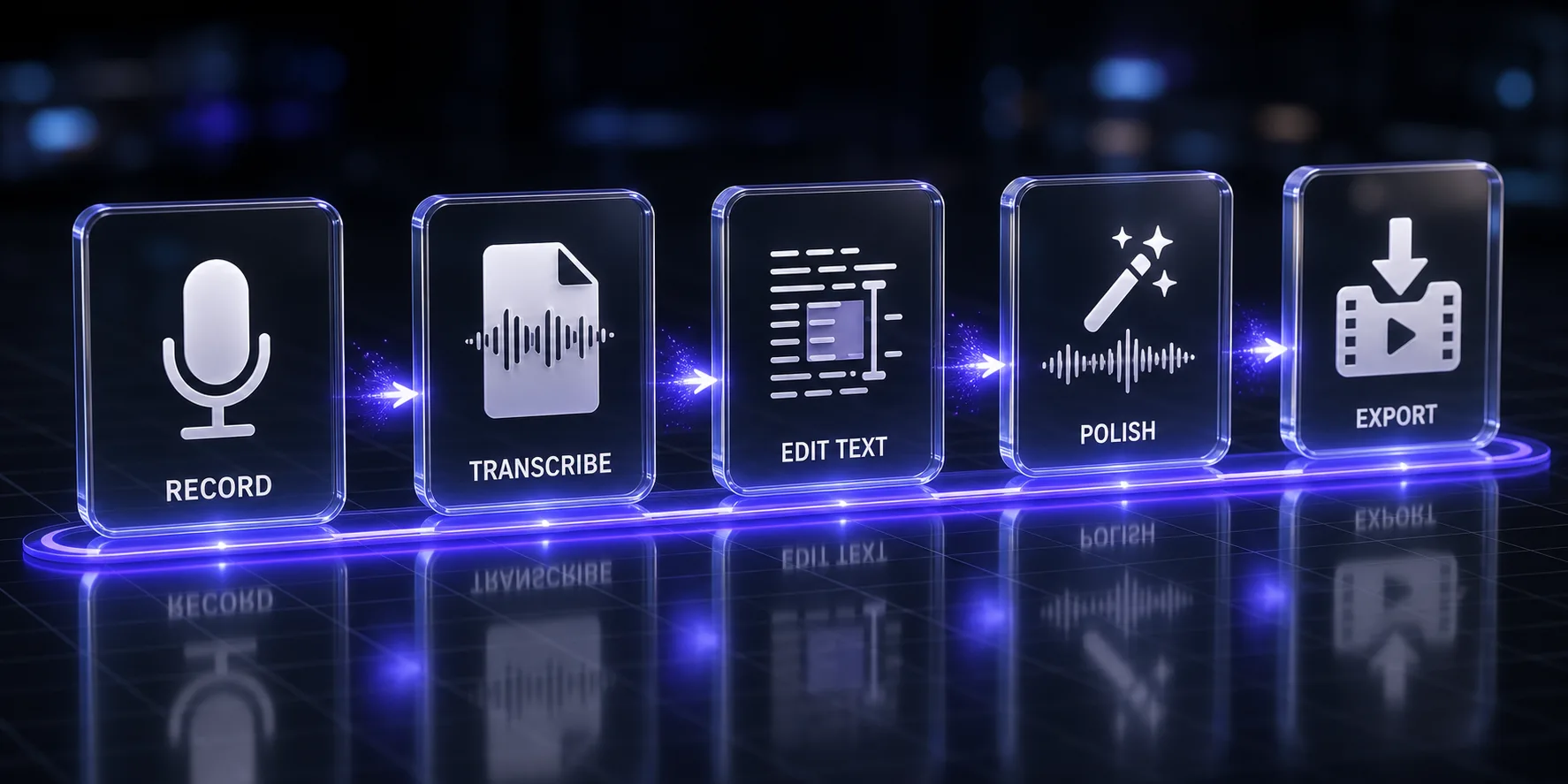
Descript transcribes your recording and then lets you edit the video by editing the transcript. Delete a sentence in the document, and that sentence disappears from the video. Cut a rambling paragraph, and the footage cuts with it. That is the core mechanic, and everything else the product does is built around it.
It is not a timeline editor with transcription bolted on. The document is the timeline. Once that clicks, editing a 40-minute interview stops feeling like video work and starts feeling like editing a Google Doc — which, if you have ever scrubbed through a waveform hunting for the exact frame where someone stopped saying "um", is a genuinely different life.
Around that sit a screen recorder, a multitrack audio editor, AI voice cloning, background noise removal, automatic clip generation for social, translation and dubbing, and Underlord — the AI assistant that now runs through the whole application. The company says more than 6 million creators and teams use it, and the pricing page lists Siemens, Shopify and the BBC among its business customers.
The One Feature That Justifies Everything Else
If Descript did nothing but text-based editing, I would still pay for it.
The time saving is not marginal. On a long recording of people talking, the traditional workflow is: watch it, note timecodes, cut on the timeline, adjust, re-watch. The Descript workflow is: read it, delete the bad parts, done. For interview and podcast content specifically, that is not a 20% improvement — it collapses a stage of production that used to take hours.
The second-order effect took me months to notice and matters more. Because editing is cheap, I edit more. I cut the boring bit I would previously have left in because removing it was not worth the effort. Anyone who has left a weak thirty seconds in a video purely because fixing it meant reopening the project knows exactly what I mean. Descript made ruthlessness affordable.
The catch: this only applies to spoken-word content. If your video is driven by visuals, music, motion, or anything where the words are not the spine, the core advantage evaporates and you are left using a fairly limited editor.
The Features I Use Every Week
Studio Sound
Takes badly recorded audio and makes it sound like it was recorded properly. This is the one that consistently impresses people who do not work in audio, and it is genuinely very good — room echo reduced, background noise gone, voice brought forward.
It is not magic. Push it on genuinely bad source audio and you get artefacts: a slightly processed, underwater quality on the voice. On decent source audio it is transparent and excellent. On terrible source audio it produces something listenable rather than something good. That is still a rescue worth having.
Remove Filler Words
One click strips every "um", "uh", and — if you let it — every "like" and "you know". It works, it saves a genuinely tedious job, and I have learned to use it at partial strength. Removing every single filler makes people sound uncanny; speech has a rhythm and stripping it entirely reads as artificial. I take out the worst and leave the rest.
Underlord
The AI assistant, now woven through the whole application. It will find your best clips, write chapter markers, suggest cuts, remove dead air, generate titles and descriptions, and answer questions about your own content.
When it works, it removes an hour of unglamorous work. When it does not, it can send you round in circles — I have had it suggest fixes that created new problems, and this is a criticism other reviewers report as well. Treat it as a fast, occasionally wrong assistant rather than something to trust unattended, and it earns its place.
AI Speech and voice cloning
Train a clone of your own voice, then fix a fluffed line by typing the correction. The result is spliced into your recording in your voice. For correcting a mispronounced name or a wrong number without re-recording a whole session, this is the feature that feels like the future.
Quality depends heavily on the training audio and on how much you ask it to do. A few words dropped into existing speech is often undetectable. A whole paragraph generated from scratch is usually detectable to anyone listening properly. If pure voice generation is your main need, a dedicated tool will beat it — our ElevenLabs pricing breakdown covers that category, where professional voice cloning starts on the Creator tier.
Eye Contact and video regenerate
Eye Contact adjusts your gaze so you appear to look at the camera while reading a script. It works, and it sits right at the edge of my comfort. Used lightly on someone glancing at notes, it is invisible and useful. Used heavily it produces a slightly fixed, unblinking quality that I find worse than the original problem. I use it sparingly.
What Changed in 2026
The direction of travel is clear: Descript is becoming an AI production suite rather than an editor with AI features. Underlord went from a helper to the connective tissue of the product. The current plans include generating video with recent AI models, translation and dubbing into 30+ languages with a proofread step, custom avatars generated from a photo or from text, and Brand Studio for shared templates and company-wide guardrails on team plans.
My honest read on that expansion: the editing core got better, and the surface area got much wider. Some of the new capability is excellent. Some of it is adequate rather than best-in-class, and if a given feature is your primary need, a specialist tool will beat Descript at it. The avatar and dubbing features are convenient because they are in the same place as your edit, not because they are the strongest implementations available.
How I Actually Use It
- Record elsewhere, edit here. I capture audio and video with dedicated tools and bring the files in. Descript's own recorder is fine, but I want the raw files independent of any one platform.
- Let it transcribe, then read. First pass is reading the transcript and deleting everything that does not earn its place. This is where the hours disappear.
- Studio Sound, then filler removal at partial strength. In that order.
- Underlord for the mechanical work. Chapters, clip candidates, a first draft of the description. Then I check all of it.
- AI Speech for the two or three broken lines that would otherwise mean a re-record.
- Export — and for anything visually ambitious, export and finish elsewhere. This step is the honest part of the workflow.
Pricing
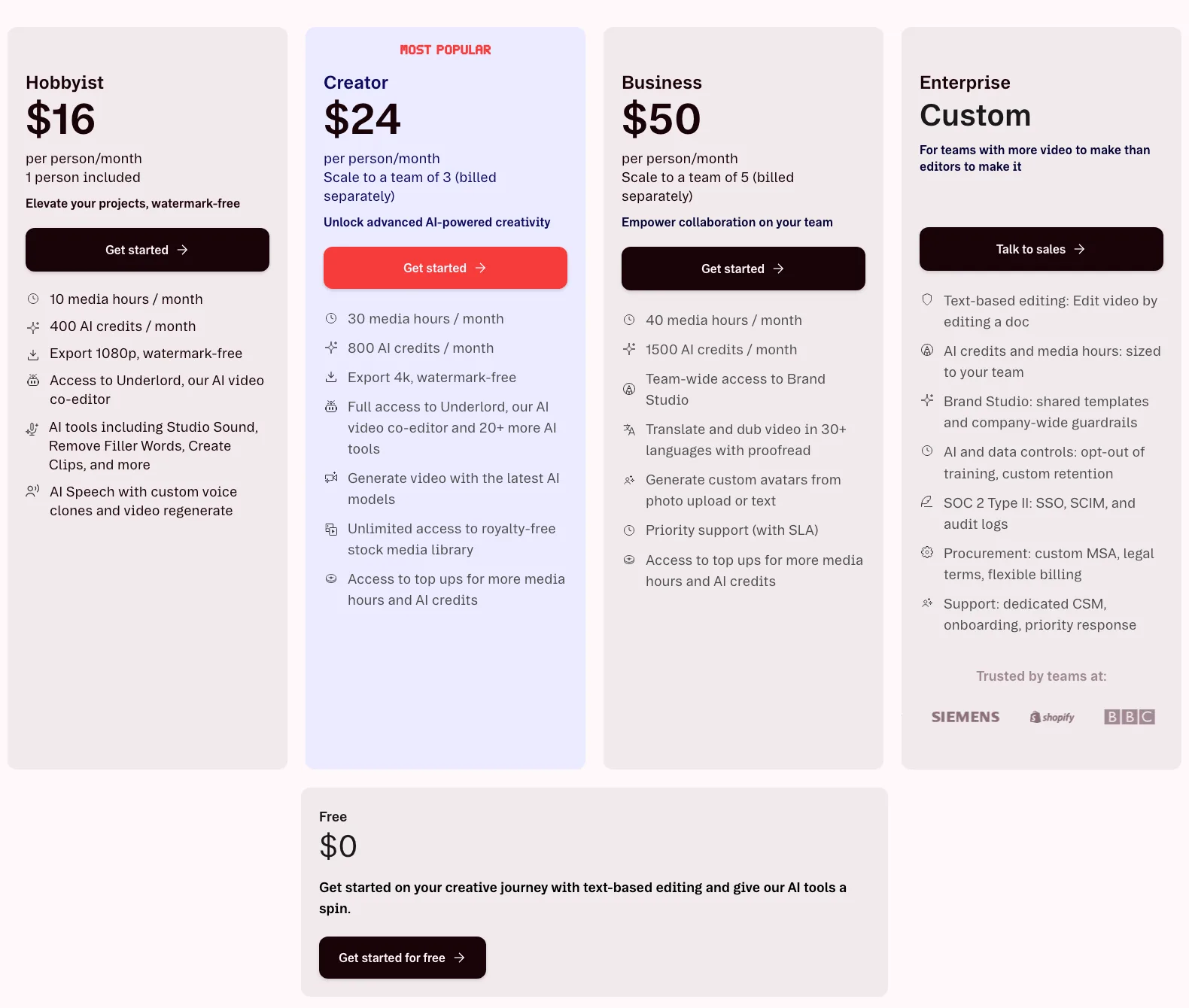
| Plan | Price (annual billing) | Media hours | AI credits | Export | Team |
|---|---|---|---|---|---|
| Free | $0 | 1 hr/month | 100 one-time | 720p | 1 |
| Hobbyist | $16/person/mo | 10 hrs/month | 400/month | 1080p, no watermark | 1 |
| Creator | $24/person/mo | 30 hrs/month | 800/month | 4K, no watermark | up to 3 |
| Business | $50/person/mo | 40 hrs/month | 1,500/month | 4K | up to 5 |
| Enterprise | Custom | Sized to team | Sized to team | 4K | Unlimited |
Those are the annual-billing figures, which is what the pricing page shows by default. Monthly billing costs more — the page states savings of up to 35% for paying annually, so budget accordingly if you want the flexibility of paying month to month.
Which tier is right: Free is a genuine trial rather than a usable plan at one hour a month. Hobbyist at $16 is enough if you publish a short weekly video and do not need 4K. Creator at $24 is the one most people should buy — 30 media hours, 4K export, full Underlord, and the stock library. Business at $50 is bought for the team features, Brand Studio and dubbing rather than for the extra 10 hours, which is a modest step up for double the price.
The thing to watch is AI credits, which the heavier AI features consume quickly. Media hours are usually not the binding constraint; credits often are. If you lean on generation features, model your usage before committing to a tier.
What Still Frustrates Me After a Year
This is the section I would want to read, so here it is without softening.
- It is not a real video editor. No keyframing, no proper colour grading, no motion graphics, no meaningful effects library. For anything visually ambitious you will finish in another application. I knew this going in and it still catches me out.
- Stability on long, complex projects. Short projects are fine. Long multitrack ones with a lot of media are where I have hit slowdowns, and it is the most common substantive complaint from other long-term users too. It ships fixes frequently and has improved, but this is still the weak point.
- Credits create a background anxiety. Knowing that experimenting costs credits changes how freely you experiment, which is exactly the wrong incentive for a creative tool.
- No offline editing. Cloud-dependent. On a bad connection, or on a plane, you are not working.
- Underlord can be confidently wrong. Useful assistant, unreliable authority. Check its work.
- The learning curve is real — not because it is hard, but because it is unfamiliar. If you have muscle memory from a timeline editor, the first week feels like editing with your hands tied. It takes roughly that long before the speed advantage appears.
Descript vs the Alternatives
| Tool | Best for | Where it beats Descript | Where Descript wins |
|---|---|---|---|
| Premiere Pro / DaVinci Resolve | Serious video work | Everything visual: grading, effects, keyframes, motion | Speed on dialogue-driven edits, by a wide margin |
| Riverside / Podcastle | Remote recording and podcasts | Recording quality, local capture reliability | Depth of editing after the recording exists |
| CapCut | Short-form social | Free, fast, better templates and effects for social | Long-form, multitrack, transcript-first editing |
| ElevenLabs | Voice generation | Substantially better synthetic voice | Voice fixes inside an actual edit |
| HeyGen | Avatar and presenter video | Far stronger avatars and multilingual presenters | Editing real recorded footage |
The pattern is consistent: Descript loses on every specialism and wins on the specific job of turning a recording of someone talking into a finished piece quickly. Nothing else does that as well. If avatars rather than real footage are your need, our HeyGen review and alternatives roundup cover that category properly.
Who Should Buy Descript
- Podcasters. This is the strongest case. If you publish conversation audio regularly, it will save you more time than anything else you could buy.
- Interview and talking-head YouTubers. Same mechanic, applied to video.
- Course creators. Long instructional recordings with a lot of verbal cleanup needed.
- Marketing teams repurposing recordings into clips, quotes and captions.
- Anyone who writes better than they edit video. If a transcript is a more comfortable medium for you than a timeline, this tool is built for your brain.
Who Should Not
- Anyone doing visually driven work. Music videos, motion graphics, narrative film, anything needing grading or effects. Wrong tool.
- Short-form-only creators. The advantage scales with length. On 30-second clips, a free social editor will serve you better.
- People who need offline access. Non-negotiable limitation.
- Anyone whose main need is synthetic voice or avatars. Specialist tools are meaningfully better.
- Editors deep in a timeline workflow with no dialogue-heavy footage. You would be paying for a mechanic you never use.
The Verdict
A year in, Descript is the tool I would replace last. Not because it is the most impressive thing in my stack, but because removing it would cost me the most hours per week — and that is the only test that matters at this distance.
What I would tell someone considering it: buy it for text-based editing, and treat everything else as a bonus. If the core mechanic fits how you work, the frustrations are annoyances around something genuinely valuable. If your content is not primarily people talking, none of the additional features are enough to justify it, and you will be happier with a real editor plus a transcription service.
The honest summary of the year: it did not replace my video editor. It replaced the part of my job I disliked most. That turned out to be worth more.
Rating: 4.2 out of 5. Outstanding at one thing, average at several others, and priced fairly for what the core actually saves.
Keep Reading
More on the video and audio stack: the HeyGen review, the Hedra review, best HeyGen alternatives, ElevenLabs pricing explained, prompts for video creators, and AI prompts for YouTube thumbnails. Or browse all guides and prompts on PromptsRush.
Frequently Asked Questions
10 questions answered