The PromptsRush journal
AI Tools25 Best Gemini 4 Argon Prompts for Developers
25 copy-ready Gemini 4 Argon prompts for developers, from clarify-first planning and verification loops to multi-file debugging, migrations, screen-recording bug reports, security passes and Flash subagents, built on Google's own Argon guidance and thinking levels.

Advertisement
Gemini 4 Argon is Google's best model yet for long, hard engineering work, and it responds best to a specific kind of prompt. Thinking is built in and set with a parameter, not with words. Temperature and top_p are ignored. A single response can run far past 64K tokens. The prompts that get the most out of it read like a short brief to a senior engineer: a measurable goal, the context, a scope and a check the model can run on its own.
This guide gives you 25 copy-ready Gemini 4 Argon prompts for developers, grouped into nine sections that follow a real project: planning, verification loops, debugging, refactors and migrations, frontend and multimodal work, security, agents, long context, and team workflow. Every prompt is built on Google's own Argon developer guide and Gemini prompting docs, and each section says which thinking level to use.
New to the model? Our Gemini 4 Argon explainer covers the specs, long decode, thinking levels and pricing. This post is the practical companion: what to type once you have access.
Who These Gemini 4 Argon Prompts Are For
Short version: developers who already build with Gemini, or are moving to it, and want Argon to finish real tasks instead of producing plausible first drafts. The prompts assume you know your stack. They hand over the slow parts of the job in a form you can check.
- Gemini API developers moving code from an older Gemini model to
gemini-4-argon, who need to clean up parameters Argon ignores or rejects. - Google Antigravity users on Google AI Ultra, where Argon is available for planning,
/goalruns and multi-agent work. - Teams building agents on the Interactions API or Gemini Managed Agents, who want long runs that stay on target.
- Tech leads and reviewers who want repeatable debugging, migration and security passes with evidence attached.
How to Use These Prompts
- Fill every [PLACEHOLDER]. Square brackets mark what only you know: stack, paths, commands, metrics. A placeholder you leave in is an invitation to guess.
- Keep the check. Most prompts end with a test, script or measurable target. That is how Argon knows it has finished, and how you know it is right.
- Keep the tags. Prompts that take logs, designs or code wrap them in XML-style tags. Google's prompting guide recommends clear delimiters so the model can tell your instructions from your data.
- Set the thinking level first. Each section names the level that fits. In the API it is
thinking_level; in AI Studio it is a dropdown. - Copy in one drag. Every prompt sits in its own code block.
Why Gemini 4 Argon for Development: The Facts That Shape Your Prompts
Everything below comes from Google's Gemini 4 Argon model page, the Argon developer guide and the Gemini API pricing page, checked on 18 October 2026.
| Spec | Gemini 4 Argon | What it means for your prompts |
|---|---|---|
| Released | 13 October 2026 | Knowledge cutoff is March 2026, so paste or ground anything newer. |
| Model ID | gemini-4-argon | Interactions API, generateContent and Gemini Managed Agents. |
| Context window | 1,048,576 tokens, shared by input and output | A huge prompt leaves less room for thinking and the answer. |
| Output | 65,536 by default; up to 1,048,576 minus input with long decode | Complete multi-file diffs and test suites in one response are possible. |
| Thinking | low, medium (default), high | Set depth with the parameter; no "think step by step" needed. |
| Sampling | temperature, top_p and top_k ignored | Control format with instructions or a response schema. |
| Inputs | Text, images, video, audio, PDF | Screenshots and screen recordings make good bug reports. |
| Caching | Implicit only, 95% off cached input | Put static context first and your question last. |
| API price | $2 / $10 per 1M tokens through 30 Nov 2026; $4 / $20 from 1 Dec | Thinking tokens bill as output, so pick the lowest level that works. |
How does that stack up against Anthropic's flagship? Our Gemini 4 Argon vs Claude Opus 5.5 comparison walks through the benchmarks, pricing and where each one wins.
Which Thinking Level for Which Prompt
Honest answer: most of these prompts run well at the default. Google's own guidance is to "run your evaluations at all three levels, then pick the lowest level that meets your quality bar". Here is the starting point we use for each section, based on the workloads Google assigns to each level.
| Level | Google's recommended workloads | Prompts in this guide |
|---|---|---|
low | Classification, routing, summarisation, targeted extraction | Simple lookups with prompt 21; triage passes before prompt 8 |
medium (default) | General coding, agentic tool use, document Q&A, video understanding | 1, 3-6, 8-9, 11-15, 18-25 |
high | Multi-file root-cause debugging, vulnerability patching and discovery, architecture design, formal proofs | 2, 7, 10, 16-17; prompt 12 with long decode |
Pro tip: max_output_tokens is a hard cutoff for thinking and answer together, and it does not reduce how much the model thinks. If a reply comes back cut short or empty, raise the limit or lower the thinking level; do not just shrink the limit to save money.
8 Meta-Rules for Better Argon Prompts
These rules sit underneath all 25 prompts. Most come straight from Google's Argon developer guide and its prompt design strategies page.
- Align before long runs. Ask for clarifying questions and agree on success criteria before Argon starts working on its own.
- Always give it a way to verify. Tests, logs, screenshots or a script it writes itself. A pass/fail target beats "make it better".
- Control thinking with the parameter. Google says it is generally not necessary to ask the model to outline its reasoning in the response.
- Be precise and direct. Google's guide warns against "unnecessary or overly persuasive language". State the goal, define ambiguous terms, drop the hype.
- Use one delimiter style per prompt. XML-style tags or Markdown headings, not both.
- Context first, question last. For long inputs, put the data at the top and the instruction at the end, with an anchor such as "Based on the code above". What goes into that context matters as much as the wording; our explainer on context engineering covers how to choose it.
- Ask for detail when you want it. Gemini models give direct, efficient answers by default; say so if you need a longer explanation.
- Gate the irreversible steps. Let Argon run, but have it pause before deletes, pushes, migrations and anything external.
1. Planning and Alignment (Prompts 1–3)
Google's own advice for Argon starts here: agree on a measurable goal before a long run, because once the model has a clear target it holds context well on its own. Run these three at the default medium thinking level, or high when the planning itself is the hard part, such as upfront architecture design.
1. Clarify Before You Run
For any task you plan to hand off for more than a few minutes.
I want you to [GOAL, e.g. add multi-tenant billing to our API] in this repository.

Before you change anything:
1. Read the code that this goal touches. Do not guess about files you have not opened.
2. Ask me every clarifying question you need about edge cases, error states,
   data migration, performance limits and what is explicitly out of scope.
   Group the questions by topic and number them.
3. Propose success criteria as checks you can run yourself
   (test commands, scripts, measurable targets).

Do not write code yet. Stop after the questions and the proposed criteria.
This follows the first of Google's five Argon tips: share the goal and ask the model to surface clarifying questions about edge cases and success criteria upfront. The runnable success criteria become the finish line for every later prompt in this list.
2. Pressure-Test the Architecture
For the planning phase of a new service, module or data model.
Here is my proposed design for [SYSTEM OR FEATURE]:

<design>
[PASTE DESIGN NOTES, SCHEMA OR DIAGRAM DESCRIPTION]
</design>

Act as a principal engineer reviewing this before we commit to it.
1. List the three weakest decisions, with the failure mode each one invites.
2. Propose two genuinely different alternatives for the riskiest part,
   with the trade-off of each in cost, complexity and migration effort.
3. Suggest any cleaner data model or API shape you would choose, and why.
4. End with the one question I should answer before we build anything.

Keep it concrete: name tables, endpoints and modules, not principles.
Google says its teams use Argon's planning phase to "pressure-test architecture and explore creative solutions", including cleaner data models and API design. Upfront architecture design is also one of the jobs Google lists for thinking_level="high", so this is a good prompt to spend extra thinking on.
3. Pre-Flight Check
Right before you let an agent run unattended.
Before you start the task we agreed on, run a pre-flight check and report back:

1. Restate the goal and the success criteria in your own words, in under 8 lines.
2. List the tools, commands, credentials and docs you will need. For each one,
   confirm you can actually use it now (run a harmless command or read a file).
3. List anything missing or blocked.
4. List the irreversible steps in the plan (deleting data, pushing to shared branches,
   running migrations, sending anything external). You will pause and ask me before each one.

If everything is ready, say READY and wait for my go-ahead.
Google calls this a quick pre-flight check: have Argon confirm it has the tools and docs it needs and understands the intent before starting. The irreversible-steps list matters because Google's guidance pairs "let Argon run to completion" with "pausing for your confirmation before taking irreversible steps".
2. Verification Loops (Prompts 4–6)
The single biggest lever with Argon is giving it something to check. Google's guide says the model "does its best long-horizon work when it can test its own changes against a real feedback loop": a test suite, runtime logs, browser screenshots or a script it writes itself. Medium thinking is usually enough here; the loop does the heavy lifting.
4. Build a Baseline, Then Fix in Clusters
For a broad quality problem with no automated checks yet (accessibility, lint debt, broken links).
We want to fix [PROBLEM, e.g. accessibility and layout issues] across [SCOPE, e.g. every route in src/routes/],
but we have no automated checks yet.

1. Write a script that checks [WHAT TO MEASURE] for every item in scope and logs each
   violation with its location. Run it and record the baseline count.
2. Group the failures into shared root causes (for example a shared component or helper).
3. Fix one cluster at a time. After each fix, re-run the script and confirm the whole
   cluster is resolved with zero new failures elsewhere.
4. Keep going until the script reports zero violations, or until you hit something
   that needs my decision.

Report the baseline, each cluster you fixed, and the final count.
This is a generalised version of the example prompt in Google's Argon developer guide, which asks the model to write a headless Chrome script, record a baseline accessibility score and fix violations cluster by cluster. Fill in your own problem and scope and the structure carries over.
5. Fix to a Pass/Fail Target
For a feature or bug fix where you already have tests.
Task: [WHAT TO BUILD OR FIX]

Definition of done: `[TEST COMMAND]` passes and `[LINT OR TYPECHECK COMMAND]` is clean.

Work in a loop:
1. Run the checks first and record the current failures as the baseline.
2. Make the smallest change that moves toward the target.
3. Re-run the checks after every change. If something new breaks, fix it before moving on.
4. Do not edit or delete existing tests to make them pass. If a test looks wrong,
   stop and explain why instead.

Stop when every check is green. Show me the final diff summary and the last check output.
A concrete pass/fail target is what lets Argon "record a baseline, test hypotheses in a loop, and iterate until the checks are green", in Google's words. The rule about not editing tests closes the obvious shortcut. Google's launch post says shortcut attempts on coding benchmarks dropped to 2%, but a written rule costs nothing.
6. No Benchmark? Ask for One
For performance or quality work where nobody knows the current number.
I want to improve [METRIC, e.g. API p95 latency / bundle size / build time] for [COMPONENT],
but we have no reliable measurement.

1. Analyse the project and propose a reproducible benchmark for this metric:
   what it measures, how it runs locally, how many runs, and how noise is handled.
2. Implement it as a script under [PATH, e.g. scripts/bench/] with a single command.
3. Run it [N] times and report the baseline with the spread between runs.
4. List the three changes most likely to move the number, ranked by expected impact.

Do not optimise anything yet.
Google's guide is explicit: "If you don't have something to measure, ask Argon to help analyze your project and build a baseline benchmark." Splitting measurement from optimisation keeps you from accepting a speed-up that is really just noise.
Prefer to hand a whole research-and-build job to an agent instead of driving each step yourself? General-purpose agents such as Genspark run the search, write and check loop for you, which suits non-code tasks like competitor research or report drafts.
3. Debugging (Prompts 7–9)
Multi-file root-cause debugging is the first job Google lists for thinking_level="high". Switch up for these three, and raise max_output_tokens if you set a low limit earlier: on Argon the limit covers thinking and answer together, so a small cap can return an incomplete or empty reply.
7. Multi-File Root Cause
For a bug that crosses modules and has resisted a first fix.
Bug: [WHAT HAPPENS] when [STEPS TO REPRODUCE]. Expected: [WHAT SHOULD HAPPEN].
Already tried: [WHAT YOU TRIED AND WHAT HAPPENED].

1. Reproduce it first with a failing test or a script. Show me the failing output.
2. Trace the data and control flow across every file involved. Cite file paths
   and line numbers for each step.
3. List at least two candidate root causes, including a less obvious one,
   and the evidence for and against each.
4. Fix the root cause, not the symptom. No try/except or null checks that only hide it.
5. Re-run the reproduction and the related tests, and show both passing.
Step 3 uses a dimension from Google's prompt design guide for agents, problem diagnosis: whether the model accepts the most obvious answer or explores "less probable explanations". Asking for two candidates makes it do the latter. The same reproduce-first pattern works on Anthropic's flagship too; our Claude Opus 5.5 coding prompts use it for debugging at higher effort.
8. Triage From Runtime Logs
For production errors where the logs are the main evidence.
Below are logs from [SERVICE] covering [TIME WINDOW] when [SYMPTOM] occurred.

<logs>
[PASTE LOGS]
</logs>

Based on the logs above:
1. Build a timeline of the incident in 5-10 lines, with timestamps.
2. Identify the first event that looks abnormal and explain why.
3. Separate cause from noise: which errors are consequences, not causes?
4. Name the code paths in this repository most likely responsible and open them
   to confirm. Mark anything you could not confirm as a hypothesis.
5. Propose a fix and a log line or metric that would catch this earlier next time.
Two Google prompting rules shape this one: put long context first with the instructions at the end, and bridge them with an anchor phrase such as "Based on the information above". The tags keep the pasted logs clearly separate from your instructions.
9. Debug From a Screen Recording
For timing bugs and UI glitches that are hard to describe in words.
Attached is a [LENGTH]-minute screen recording of me using [APP/FEATURE].
I narrate the problems out loud, and the browser console is visible on the right.

1. Find every moment where something goes wrong. Give the timestamp,
   what is on screen, what I say, and any console output at that moment.
2. For the bug at [TIMESTAMP], inspect the frames around it closely and describe
   exactly what changes on screen and in what order.
3. Match each problem to the components in this repository that render that UI.
4. Propose a fix for each, starting with the one users hit first.
Argon's agentic video understanding can scrub across timestamps, inspect frames in high resolution and connect what it sees with the narration or console audio. It is off by default: uploaded video is processed as "static" unless you switch on agentic processing (the Agent Platform docs name the setting media_processing="agentic"). Google suggests exactly this use: a quick screen-share where you click through your app and talk through the rough edges.
4. Refactors and Migrations (Prompts 10–12)
Long-horizon refactors are the headline use case in Google's developer guide: "untangling a legacy subsystem, refactoring a codebase from C++ to Rust". These are also the prompts most likely to need more than the default 65,536 output tokens, so read the note under prompt 12 before you run a large one.
10. Untangle a Legacy Subsystem
For a module everyone is afraid to touch.
Target: [MODULE OR DIRECTORY], which [WHY IT IS A PROBLEM].
Goal: [END STATE, e.g. split into three modules with no circular imports, same behaviour].

1. Map the subsystem: public entry points, internal dependencies, side effects
   and global state. Write the map to docs/[NAME]-map.md.
2. Write characterisation tests that pin down current behaviour, including odd cases.
   Run them and confirm they pass on the current code.
3. Propose a step-by-step refactor plan where every step leaves the build green.
   Wait for my approval.
4. After approval, do one step at a time and re-run the characterisation tests after each.
Characterisation tests give the model its feedback loop on code that has no tests, which is the precondition Google's guide keeps coming back to. The approval gate after the plan keeps a long run pointed at the target you agreed on.
11. Migrate Your Gemini Code to Argon
For any codebase that already calls an older Gemini model.
Audit this codebase for everything that must change to move from [CURRENT MODEL ID]
to gemini-4-argon. Check every call site and config file for:

1. thinking_budget: replace with thinking_level ("low", "medium" or "high").
   Flag any "minimal" level, which Argon does not support.
2. temperature, top_p, top_k: remove (ignored by Argon). Note where output format
   relied on them and suggest a response schema instead.
3. frequency_penalty, presence_penalty, candidate_count: remove.
4. Explicit context caching (cachedContents, caches.create, cached_content): remove,
   and move static content to the start of the prompt so implicit caching can apply.
5. max_output_tokens below 32,768: raise to at least 32,768.
6. HTTP client timeouts under 15 minutes on reasoning-heavy calls.
7. Any chat history that ends with a model turn or uses a prefilled model turn.

Output a table: file, line, current code, required change, risk. Then apply the
changes on a branch and run [TEST COMMAND].
Every line of this checklist comes from Google's migration notes in the what's new in Gemini 4 Argon page and the Agent Platform developer guide. Behaviour differs slightly by platform: on Agent Platform, thinking_budget, MINIMAL and the penalty parameters return HTTP 400 errors, while the Gemini API developer guide says thinking_budget is deprecated and returns a warning. Either way, remove them. Google also offers a gemini-api-dev skill for coding agents that can run this migration.
12. One-Pass Multi-File Change With Long Decode
For a large, well-specified change you want back as one complete diff.
Apply the following change across the whole codebase in one pass:
[CHANGE, e.g. replace our hand-rolled HTTP client with the shared client in lib/http,
including retries, timeouts and error mapping, in every service under services/].

Requirements:
- Return complete files or complete unified diffs for every file you change. No "..." placeholders.
- Keep public interfaces unchanged unless listed here: [ALLOWED INTERFACE CHANGES].
- Add or update tests for every changed module.
- End with a list of every file changed and the command to verify: [TEST COMMAND].
Normally Argon stops at 65,536 output tokens. To go past that on the Interactions API, set background: true and max_output_tokens above 65,536; Google suggests 131,072 or 262,144 for complex coding, up to 1,048,576 minus your input. The model then writes in hops of up to 64K tokens, and you join the text of every model_output step at the end. Our Gemini 4 Argon explainer covers how long decode works, what it costs and when not to use it. One caveat from Google: the model does not follow length targets, so do not ask for "about 100,000 tokens".
5. Frontend and Multimodal (Prompts 13–15)
Argon takes images, audio, video, PDFs and text as input, and Google's guide recommends passing visual references when you build frontends. Medium thinking fits most UI work. Google's prompting guide also says to treat every modality as an equal input and reference each one clearly in your instructions, which is why these prompts name the attachments.
13. Screenshot to Components
For rebuilding a design or competitor page in your own stack.
Attached: [1-2] reference screenshots of [PAGE OR COMPONENT].
Stack: [FRAMEWORK, STYLING, COMPONENT LIBRARY].

1. Describe the layout grid, spacing scale, type scale and colour palette you see,
   as concrete values (px, rem, hex).
2. Break the page into a component tree and name each component.
3. Build the components in [PATH] using our existing primitives where they fit.
4. Render the result, take a screenshot at [VIEWPORT WIDTHS], compare it with the
   reference, list the visible differences, and fix them. Repeat until the
   differences are cosmetic only.
Step 4 turns a vague "make it match" into a verification loop: Google lists browser screenshots as one of the feedback signals Argon works best with. Keep it to one or two references; Google's guide specifically says "1–2 concrete visual references".
14. Write DESIGN.md First
For a new project or a redesign that will span many components.
Attached: [REFERENCE IMAGES OR URLS OF THE TARGET STYLE].

Before building any UI, write a DESIGN.md file at the repository root that captures:
- Typography: font families, weights and a type scale with exact sizes and line heights
- Colour: a palette with hex values and the role of each colour (background, text, accent, states)
- Layout: grid, breakpoints, spacing scale and corner radii
- Components: rules for buttons, inputs, cards and navigation
- Do-not-use list: [PATTERNS TO AVOID, e.g. gradients on text, pill buttons]

Keep it under 150 lines. Every component you build later must follow it;
if a design need is not covered, update DESIGN.md first and tell me what you added.
This is tip three in Google's developer guide: ask Argon to summarise your typography, colour palette and layout rules into a lightweight DESIGN.md "so every component stays visually cohesive". The do-not-use list matters as much as the rules: naming the patterns you dislike works better than asking for something "modern". Already have a site that looks generic? Our prompts to improve an ugly AI-generated website pair well with this file.
15. Find Where Users Get Stuck
For a usability test recording or a support session video.
Attached: a [LENGTH]-minute recording of a user testing session for [FLOW, e.g. onboarding].
The participant thinks out loud.

1. List every point where the participant hesitates, backtracks, misclicks or says
   they are confused. Give the timestamp, what they were trying to do and the quote.
2. Rank the problems by how much they slowed the participant down.
3. For the top three, find the components in this repository behind that screen and
   propose a specific UI or copy change for each.
4. Implement the top fix and describe how we could check it in the next test.
Google suggests dropping in "a 20-minute user testing recording" and asking Argon to "pinpoint where users got stuck and patch the underlying components". Agentic video processing helps here too, and Google's pricing notes say it typically uses up to 88% fewer input tokens on long-form video, because the model loads only the parts it needs.
6. Security (Prompts 16–17)
Security vulnerability patching and vulnerability discovery are on Google's list of high thinking workloads. These prompts are for code you own or are authorised to test. Google's model card also lists hallucination among Argon's limitations, so both prompts require evidence for every finding.
16. Find and Patch Vulnerabilities With Proof
For a security pass on your own service before release.
Review [SERVICE OR DIRECTORY] in this repository for security vulnerabilities.
Focus on: [e.g. authentication, authorisation checks, injection, SSRF, secrets handling, file uploads].

For each finding:
1. Cite the file and line, and explain the attack path in two or three sentences.
2. Rate severity (critical / high / medium / low) with a one-line reason.
3. Write a failing test or a local proof-of-concept script that demonstrates it
   against a local build only.
4. Patch it, then show the test or script now fails to exploit it.

Do not report anything you cannot demonstrate. List suspected issues you could not
confirm separately, marked as unconfirmed.
Google's guide describes this pattern for long-horizon security work: let the model build its own verification harness and test hypotheses against compiler or runtime output. Requiring a demonstration for every finding is the best defence against confident false positives.
17. Harden a Tool-Using Agent Against Injection
For any agent that reads web pages, emails, tickets or documents.
Here is our agent's system instruction and tool list:

<system_instruction>
[PASTE]
</system_instruction>
<tools>
[PASTE TOOL DECLARATIONS]
</tools>

1. Identify every place untrusted content can reach the model (tool results, files,
   web pages, user uploads).
2. For each tool, classify it as read-only or state-changing, and say which
   state-changing tools could be triggered by text inside untrusted content.
3. Rewrite the system instruction so untrusted content is always treated as data,
   state-changing actions require explicit user confirmation, and the agent says
   what it was asked to do by the content instead of doing it.
4. Write [N] adversarial test inputs that try to hijack the agent, and the expected
   safe behaviour for each.
Risk assessment, which "explicitly distinguishes between low-risk exploratory actions (reads) and high-risk state changes (writes)", is one of the agent behaviours Google's prompt design guide tells you to steer. Google says Argon cut attack success on the Gray Swan indirect prompt injection benchmark to 0.7% across 15 adaptive attempts, but that is a model-level number; your tools and permissions decide what a successful attack can do.
7. Agents and Orchestration (Prompts 18–21)
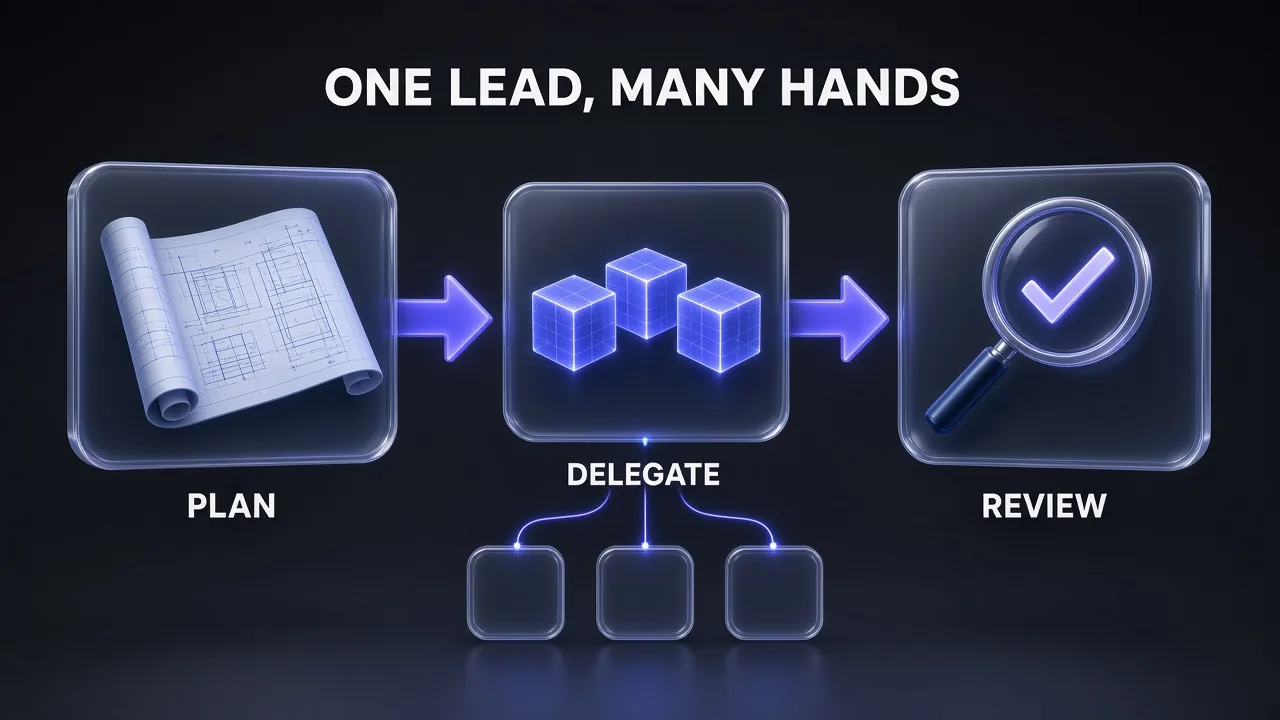
Google pitches Argon as an orchestrator: it plans, designs interfaces and reviews, while cheaper subagents do the parallel work. These prompts cover that split, Google's hosted Antigravity agent, and the function-calling conventions Argon expects. Use medium or high for the lead agent, as Google suggests.
18. Argon Leads, Flash Executes
For a big task that splits into many small, independent pieces.
You are the lead engineer on this task: [TASK].
You can delegate to subagents running [gemini-3.8-flash].

1. Break the task into independent, well-scoped work items. For each, write a brief:
   goal, files it may touch, interface it must match, and the check that proves it is done.
2. Delegate only items that need no design decisions: codebase exploration,
   boilerplate tests, migrating individual leaf modules, repetitive checks.
   Keep architecture, shared interfaces and final review for yourself.
3. When subagent results come back, review each diff against its brief and the
   shared interfaces. Reject and re-brief anything that drifts.
4. Integrate, run [TEST COMMAND] for the whole project and report what each
   subagent did and what you changed after review.
This mirrors tip four in Google's guide almost line by line: Argon as lead orchestrator, Gemini 3.8 Flash subagents for "fast codebase explorations, writing boilerplate tests, migrating individual leaf modules, or running high-frequency checks". If you have not used the smaller model yet, our Gemini 3.8 Flash overview covers what it does well. It is also a cost play: at current intro rates Flash costs $0.75 / $3.75 per million tokens against Argon's $2 / $10.
19. A Managed Agents Audit Task
For a one-call research-and-verify job on Google's hosted Antigravity agent.
Audit [URL] for [AREAS, e.g. performance, Core Web Vitals and SEO].
1. Measure each area with real tools and data sources, not estimates. Say which
   tool or source produced each number.
2. Check [SPECIFIC CHECK, e.g. which key pages are indexed in Google Search].
3. Format the output as a side-by-side scorecard table: metric, current value,
   target, status.
4. Finish with a prioritised fix list: the five changes with the biggest expected
   impact first, each with the evidence behind it.
Send this as the input of an Interactions API call with agent="antigravity-preview-09-2026", agent_config set to type antigravity and model gemini-4-argon, and environment="remote". Google's hosted sandbox lets the agent search the web, write and run code, verify its work and call MCP tools in that single call. The structure follows Google's own web.dev audit example.
20. System Instruction for a Tool-Calling Agent
For an agent you build yourself with function calling.
You are [AGENT ROLE] working on [DOMAIN].

Working rules:
- Plan before acting. Before each tool call, call the `update` function with
  previous_step, plan and next_step. Do not write free text before a tool call.
- Run tools one at a time and read each result before choosing the next call.
- Read-only tools ([LIST]) you may call freely. State-changing tools ([LIST])
  require the user's explicit confirmation in this conversation first.
- If a tool fails, retry once with corrected arguments, then report the failure
  and stop. Do not loop.
- If the request is ambiguous in a way that changes the result, ask one question.
  Otherwise choose a sensible default and say which default you chose.
- Final answer: [FORMAT, e.g. a short summary, then a table of actions taken].
The update function and the "no unstructured text before tool calls" rule come straight from Google's Agent Platform guide for Argon, which also asks for sequential tool turns and for each function response to match the id, name and order of its call. Declare the function with three required string properties: previous_step, plan and next_step.
21. Strictly Grounded Docs Assistant
For an internal Q&A bot over your own documentation.
You answer questions about [PRODUCT OR CODEBASE] using only the documents provided
in the user context.

- Rely only on facts that are directly stated in the provided documents.
- Cite the document title and section for every claim.
- If the answer is not in the documents, say "This isn't covered in the docs I have"
  and name the closest related section, if any.
- Do not fill gaps with general knowledge, even when it seems obviously true.
- Keep answers under [N] words unless the user asks for detail.
- Today's date is [DATE]. Treat anything in the documents dated after your training
  data as current.
This is a shortened, adapted version of the grounding clause in Google's prompt design strategies guide. Document Q&A sits in the medium tier of Google's thinking table; simple lookups over short documents can drop to low. If you need fresh public docs as the source, prompt 23 shows one way to pipe them in.
8. Long Context (Prompts 22–23)
Argon's 1,048,576-token window is shared between input and output, so a prompt that fills most of it leaves little room for thinking and answer; the API caps output to whatever space is left. Google also says to put static content at the start of the prompt so implicit caching can discount it, and to put your question at the end.
22. Whole-Codebase Question
For questions that need many files at once, such as "where is this invariant enforced?"
<codebase>
[PASTE OR ATTACH THE RELEVANT FILES, EACH PRECEDED BY ITS PATH]
</codebase>

Based on the code above, answer this question: [QUESTION].

Rules:
- Cite file path and line range for every claim.
- If the code above is not enough to answer with confidence, list the files or
  information you would need instead of guessing.
- Answer first in 3-5 sentences, then give the supporting evidence as a list.
Two Google rules in one prompt: supply all the context first with the question at the very end, and use an anchor phrase ("Based on the code above") to bridge them. Keeping the codebase block identical and first across requests also gives implicit caching the shared prefix it needs. On the Gemini API that discount kicks in from 4,096 tokens; the Agent Platform docs give 6,144.
23. Spec vs Implementation Conformance Check
For checking an implementation against a PDF spec, contract or API reference.
Attached:
1. [SPEC.pdf]: the specification we must follow
2. [DATA.csv or SHEET]: [e.g. the list of required endpoints or fields]
3. The implementation in [DIRECTORY]

Cross-reference all three:
- Build a table: requirement (with spec page or section), where it is implemented
  (file and line), status (met / partly met / missing / contradicts spec), notes.
- Flag every place where the spec and the spreadsheet disagree with each other.
- For each "missing" or "contradicts" row, propose the smallest change that fixes it.

Do not mark anything as met unless you found the code that does it.
Google highlights this kind of work for Argon: pointing it at "dense folders mixing long videos, PDFs, spreadsheets, financial ledgers, or legal filings to cross-reference facts across formats". For public docs that change often, scrape them to clean markdown first; a crawler like Firecrawl turns documentation sites into text you can attach or expose to an agent as a tool.
9. Reflection and Team Workflow (Prompts 24–25)
Google's fifth tip is to have Argon step back and review its own trajectory, because it "excels at synthesizing details across long histories". These two prompts turn a finished run into something your team keeps.
24. Session Retrospective Into AGENTS.md
At the end of a long session, or when a session keeps stalling.
Review this session from the start. Identify where we stalled, repeated work,
hit errors or needed extra steps, and explain why each one happened.

Then propose:
1. Additions to AGENTS.md: repo quirks, custom test flags, strict lint rules,
   deprecated helpers to avoid. One line per rule, written so a new session
   takes the direct path on the first try.
2. Any multi-step procedure we worked out (for example running a local migration or
   verifying a build) that should become a reusable skill, with its exact steps.

Show the proposed AGENTS.md diff and the skill drafts. Do not save them until I approve.
The first paragraph is adapted from the prompt Google gives in its guide: "Investigate our current session to see where things stalled or required extra steps, and analyze why." Keep AGENTS.md short; a rule earns its line only if leaving it out would cause a mistake. If your team also uses Claude Code, the same lessons can live in a skill; our tutorial on creating a Claude skill shows the format.
25. Interactive Explainer of the Change
Before you merge a large autonomous change you did not watch line by line.
You just completed [CHANGE] across [N] files. Before I review the diff,
build a single-file interactive HTML explainer of the change:

1. An architecture diagram showing the components before and after, with changed
   parts highlighted.
2. A data-flow view that walks through one real request step by step.
3. A list of every changed file grouped by component, each with a one-line reason.
4. A "risks" panel: what could break, and which tests cover it.

Use plain HTML, CSS and JavaScript with no external dependencies. Save it as
[PATH]/change-explainer.html.
Google suggests asking Argon for "an interactive visual explainer of its solution - like a live architecture diagram, a data-flow map, or a step-by-step pipeline walkthrough" as a faster way to sanity-check a big change before merging. It does not replace reading the diff, but it tells you where to read first.
How to Chain These Prompts Into a Workflow
The prompts are numbered in the order a real task moves through them, and they work best as a chain. Each step leaves behind a file or a check the next step uses.
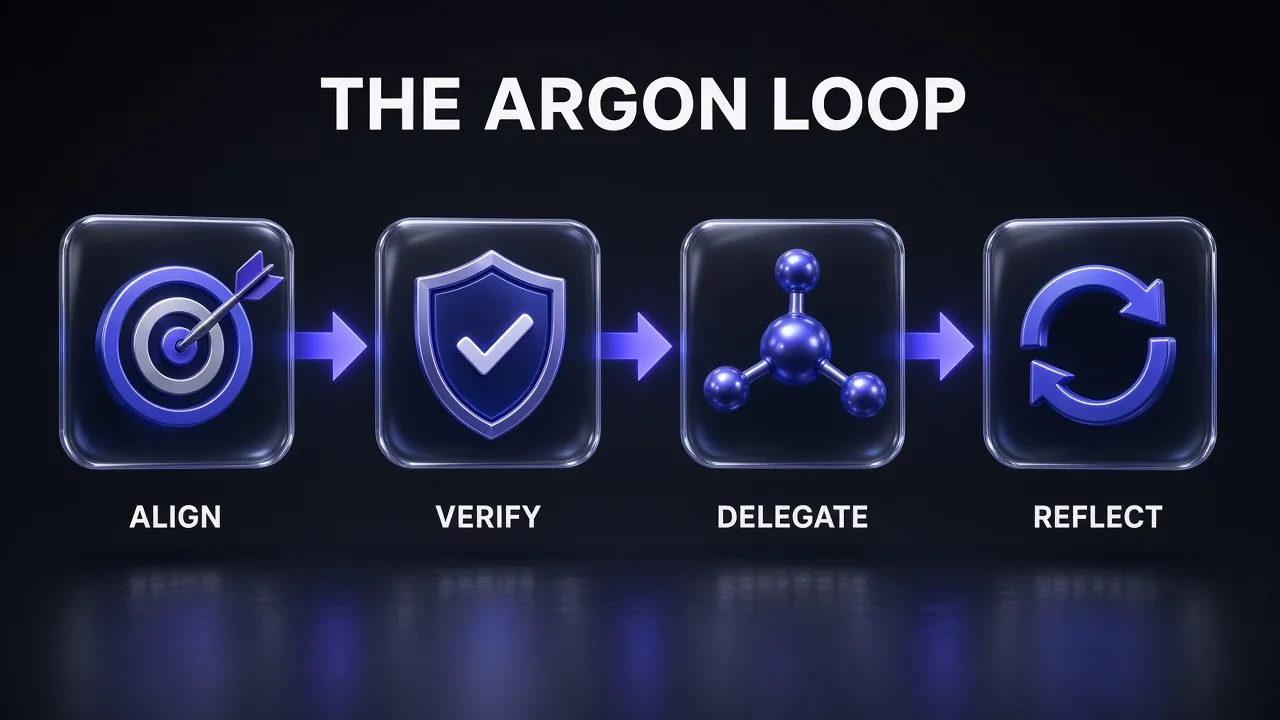
- Align with prompts 1-3. Output: agreed success criteria and a pre-flight report.
- Verify with prompts 4-6 before any big change, so there is a baseline to beat.
- Build and fix with prompts 7-17, raising the thinking level for debugging, refactors and security.
- Delegate with prompt 18 when the work splits into many small pieces, with Argon reviewing every result.
- Reflect with prompts 24-25: capture the lessons in AGENTS.md and review the explainer before you merge.
That chain lines up with Google's own prompting advice to break complex tasks into steps and chain the prompts, so the output of one becomes the input of the next. It also means you can read what happened at each stage instead of auditing one giant run at the end.
Pro tip: Save the prompts you reuse every week as skills in your coding agent rather than pasting them. Google recommends the same move in its fifth tip: package a reliable multi-step workflow into a reusable skill so nobody has to rediscover it.
7 Mistakes That Make Argon Look Worse Than It Is
- Keeping an old, low output cap. Argon can spend more of
max_output_tokenson thinking than earlier Gemini models. Google says to raise any limit under 32K to at least 32,768. - Tuning temperature. Argon ignores it. If output is too loose, tighten the instructions or use a response schema.
- Running everything at
high. It is the slowest and uses the most tokens. Start atmediumand move up only where your evaluations show a gain. - Using long decode for chat. Google says Q&A, summaries and extraction finish well under 32K tokens, and long decode can run for several minutes.
- Short client timeouts. Hard reasoning prompts can take minutes. Use background execution or a timeout of at least 15 minutes.
- No check to run. Without a test or target, the model decides for itself when it is finished.
- Using the flagship for everything. High-volume, well-specified tasks often do not need Argon. Gemini 3.8 Flash costs less, and open models cost less again.
On that last point: if most of your work is routine, well-scoped coding, a cheaper model with sharp prompts can carry much of it. Our GLM-5.3 coding prompts use the same brief structure on Z.ai's GLM-5.3.
The Verdict
My take: Gemini 4 Argon rewards preparation more than any Gemini model before it. The model is built to work on its own for a long time, so the few minutes you spend agreeing on a goal and giving it a check to run decide whether that long run lands. Keep the default medium thinking level for most work, switch to high for root-cause debugging, security and architecture, and save long decode for changes that genuinely need more than 64K tokens in one answer.
If you copy only three prompts from this list, take #1 (clarify before you run), #5 (fix to a pass/fail target) and #11 (the migration audit, if you already have Gemini code in production). Then let the session retrospective in prompt 24 turn whatever went wrong into a rule, so the next run starts smarter.
Keep Reading
Working with Google's faster models too? Our best Gemini 3.6 Flash prompts collection covers everyday writing and coding tasks, and the Gemini 3.5 Flash prompts cheat sheet has 100+ more by category. For the head-to-head with OpenAI and Anthropic, read Gemini 3.8 Flash vs Opus 5 vs GPT 5.6.
Frequently Asked Questions
9 questions answered