The PromptsRush journal
TutorialsBest Grok Bot Use Cases & Workflow in 2026
10 practical Grok Bot use cases, 17 copyable prompts, and a complete workflow for turning a one-time task into a reliable recurring routine.
Advertisement
The best Grok Bot use cases are recurring jobs with clear inputs and an output you can check: a daily decision brief, a competitor-change report, a batch of qualified accounts, or a reproducible bug report. Start with one of those. A Bot becomes useful when you can tell whether the work is finished.
Our recommendation is to build one dependable workflow before creating a whole roster. Give it a bounded task, inspect the result, save the method, and then schedule it. The quality of the source material matters as much as the instruction; that is where context engineering becomes practical.
This guide covers 10 Grok Bot use cases, 17 copyable prompts, a six-step setup process, and a first-week rollout plan. The workflows and acceptance criteria are our suggested designs, not claims that we benchmarked every integration. Product details were checked against official documentation on October 20, 2026. Replace every [BRACKETED] placeholder before using a prompt.
What Grok Bot is, and which Grok product you need
Grok Bot launched on August 11, 2026 as a product for persistent AI teammates. Its Bots can work across apps using a cloud computer, retain working context, and collaborate. The current product supports desktop and mobile platforms. Sources: launch announcement and current overview.
| Product or entry point | Use it for | What to understand |
|---|---|---|
| Grok chat | Questions, explanations, and interactive assistance. | A chat response is different from a configured recurring job. |
| Grok Bot | Delegating work across connected services, files, and websites. | Define the sources, deliverable, and allowed actions. |
| @bot on X | Forwarding a request from X to your Grok Bot. | It routes the request; it is different from asking @Grok for an answer. |
| xAI API | Building your own application or agent integration. | Developer setup and API billing are separate concerns. |
The distinction between @bot and @Grok is documented in X's @bot help page. For a custom application, xAI separately documents its API web-search tool. This article focuses on the Grok Bot application.
Choose your first workflow by its output
Pick a task you already understand well enough to review. Automation is easier to evaluate when you know what a good result looks like. We would start with a read-only brief or comparison, then introduce drafts and narrowly scoped writes after the results become consistent.
| Use case | Best fit | Finished output | Suggested first cadence |
|---|---|---|---|
| Daily decision brief | Founders and team leads | Five decisions with evidence | Weekday morning |
| Inbox triage | Client-facing operators | Priority queue and unsent replies | Once daily |
| Competitor monitoring | Product and marketing teams | Dated change log | Weekly |
| Account research | Sales teams | Evidence-backed account shortlist | One small batch |
| Content repurposing | Creators and marketers | Channel-ready drafts | Per approved source |
| Customer-risk review | Customer success teams | Account watch list | Weekly |
| Bug reproduction | Support and engineering | Reproduction steps and evidence | Per selected ticket |
| Expense matching | Small business operations | Receipt reconciliation file | Weekly |
| Meeting follow-through | Project managers | Decision log and proposed tasks | Per meeting |
| Website release checks | Agencies and product teams | Prioritized QA report | Per staging release |
Before connecting anything, answer three questions: What is the authoritative input? What artifact proves completion? How much review is acceptable? A job that requires you to reconstruct every source from scratch has not yet earned a recurring schedule.
1. A daily decision brief that filters for your priorities
Best for: founders and managers who spend their first hour reconstructing yesterday. The deliverable should identify decisions you owe, deadlines at risk, and meaningful changes. An unread-message count is rarely useful.
Create a short priorities document with three to five active goals. Give the Bot that document, a limited set of channels, and the relevant calendar. Ask it to ignore items that do not affect those goals. A launch delay belongs in the brief; ten acknowledgements of that delay do not need ten entries.
Suggested workflow: gather the last working day's activity, group messages by project, identify what changed, then return at most five items. Each item needs a source link, a named decision owner, and the next useful action. Label proposed owners as proposals when nobody has accepted responsibility.
Prepare today's decision brief using [PRIORITIES DOCUMENT], [APPROVED CHANNELS], and [CALENDAR].
Cover activity since [LAST REVIEW TIME AND TIME ZONE].
Return at most five items: change, business impact, decision needed, owner, deadline, source.
Combine repeated discussion of the same issue. Separate confirmed decisions from suggestions.
List inaccessible sources. Do not send messages or change calendar events.
Acceptance check: open every linked decision for the first three runs. Remove recurring categories you never act on. The brief improves when your feedback names what to exclude, not just what to add.
2. Inbox triage with replies ready for review
Best for: consultants, agency owners, and operators whose inbox mixes client deadlines with low-value notifications. Begin with classification and draft replies. Archive, deletion, and sending can remain outside the first workflow.
Define priority using concrete rules. For example, a current client reporting a blocked launch is urgent; a newsletter using the word “urgent” is not. Provide an approved tone sample and a list of commitments the Bot must not invent, such as delivery dates or refund promises.
Read the complete relevant thread before drafting. A reply that answers an earlier question while missing the latest correction creates more work than it saves. Grok Bot's collaboration documentation describes editable email and Slack drafts that you can review before sending.
Review [INBOX OR LABEL] for messages received since [DATE].
Classify threads as needs my decision, draftable reply, waiting on others, or informational.
Read the latest thread state and use [PRIORITY RULES] and [TONE SAMPLE].
Draft replies for at most five threads. Flag any missing fact or unapproved commitment.
Return thread links and unsent drafts. Do not send, archive, delete, or unsubscribe.
Acceptance check: recipients, names, dates, attachments, and commitments must match the thread. Track how many drafts need substantial rewriting. Fast drafts with the wrong promises are expensive drafts.
3. Competitor monitoring that reports actual changes
Best for: teams watching a small set of competitors. The useful output is a difference report: what changed, when it was observed, and what it might mean for your product or positioning.
Start with five named competitors and specific URLs: pricing, changelog, product pages, and official announcements. Save the first successful run as the baseline. On later runs, compare matching pages and distinguish a real feature change from a redesign or edited wording.
Public X activity can add context. Current computer and apps documentation says Bots can read and search public X content without an account connection; personal account data needs the relevant authenticated plugin. Treat social discussion as a lead to investigate, not proof of customer adoption.
Compare the current pages in [COMPETITOR URL LIST] with [BASELINE FOLDER].
Return only material changes: pricing, packaging, product capabilities, or positioning.
For each, include previous evidence, current evidence, observation date, URL, and possible implication.
If this is the first run, create a baseline and report that comparison is not yet possible.
Mark inaccessible pages as unknown. Do not interpret a failed fetch as a removed feature.
Acceptance check: every claimed change needs two comparable observations. Keep the scope small until the Bot reliably excludes cosmetic edits. Expand coverage only when the existing report changes decisions.
4. Account research before sales outreach
Best for: a sales team with an explicit ideal customer profile. Ask the Bot to qualify supplied companies using observable business evidence. A named account list is a better starting point than a vague request for “high-quality leads.”
Specify hard exclusions, qualification evidence, and the freshness window for buying signals. Hiring a relevant team, launching a product, or publishing a migration notice can be useful context. None proves that a company wants your product.
Keep company research separate from contact discovery. If you need a dedicated data source, our guide to lead-generation tools with AI integrations explains that part of the stack. Grok Bot should report missing contact information rather than guess an address.
Research the first 10 companies in [ACCOUNT LIST] against [ICP AND EXCLUSIONS].
Use official company pages and dated public evidence from [TIME WINDOW].
Return company, fit evidence, relevant signal, source URL, missing information, and proposed next step.
Label inferences. Exclude companies that fail a hard requirement.
Do not invent contacts, edit the CRM, or send outreach. Save an account-research CSV.
Acceptance check: a salesperson should understand why each account qualifies without repeating the research. Review the rejected accounts too; an overly strict rule can quietly remove your best prospects. Evaluate outreach copy separately using cold-email prompt templates after the account evidence is sound.
5. Content repurposing from one approved source
Best for: creators and marketers with useful source material: a webinar transcript, customer-approved case study, product announcement, or original article. Grok Bot can serve as the coordinator for collecting material and preparing drafts, subject to the tools available in your account.
Create a message map first: audience, central claim, supporting evidence, prohibited claims, and call to action. Then adapt the material to each channel. A newsletter introduction and a LinkedIn post should share the same facts while opening differently.
Our content-creation workflow guide covers the broader editorial process. For this Bot, the practical constraint is source fidelity: no invented customer quotations, results, or product capabilities.
Use only [APPROVED SOURCE] and [BRAND GUIDE] to create a repurposing pack.
First extract the core claim, supporting facts, audience, and prohibited claims.
Draft one newsletter opening, three LinkedIn posts, and one 45-second video script.
Map factual claims back to source sections. Flag gaps instead of filling them with invented details.
Save drafts in [DESTINATION]. Do not publish or schedule them.
Acceptance check: verify every number and customer reference, then read each draft in its destination format. Ask whether it gives the reader something useful without requiring the original asset.
If approved drafts need original visuals, OpenArt is an optional next step for the creative work. It is a separate product; using this workflow does not establish a native Grok Bot integration. Some tool links in this guide are affiliate links, and we may earn a commission if you purchase through them.
6. Customer-risk reviews with explicit thresholds
Best for: customer success teams that already maintain account identifiers across support, product usage, and CRM exports. The objective is an evidence-backed watch list, not a mysterious AI-generated churn score.
Agree on rules first. An illustrative rule might flag accounts with a material usage decline plus an unresolved high-priority ticket. Your team must choose the thresholds and time windows; the Bot should not invent a policy halfway through a run.
Compare like with like. An account with a seasonal usage pattern or an incomplete data export should not automatically receive a red label. Include the previous review's status so the report highlights new or worsening issues.
Review [ACCOUNT LIST] using [USAGE EXPORT], [SUPPORT EXPORT], and [RISK RULES].
Join records by account ID. State the date range and freshness of each source.
Return account, triggered rule, evidence, change since the last review, and proposed follow-up.
Separate insufficient-data accounts from flagged accounts. Do not infer churn probability.
Do not contact customers or update account status. Save a reviewable watch list.
Acceptance check: sample accounts from every category and recalculate the rule from the source rows. The report should tell the account owner what to investigate, with enough evidence to disagree.
7. Bug reproduction that engineers can act on
Best for: support teams receiving vague reports such as “checkout is broken.” Give the Bot a ticket, a staging environment, a test account, and a clearly bounded reproduction task.
A useful report contains the environment, exact steps, expected behavior, observed behavior, screenshots, and relevant logs. Keep hypotheses separate from reproduction evidence. An error appearing after a deploy does not prove which change caused it.
Grok Bot can also hand coding work to a Cloud Agent, according to the official files and results guide. That is a separate stage from collecting a trustworthy reproduction. For implementation work, our coding and debugging prompt examples show how to specify constraints and verification.
Investigate [TICKET URL] on [STAGING URL] using the approved test account.
Attempt the reported path and record environment, steps, expected result, and actual result.
Capture screenshots and relevant redacted logs. State whether you reproduced the issue.
Separate observed facts from suspected causes and list missing information.
Do not modify production, merge code, or close the ticket. Return a reproduction pack.
Acceptance check: another person should reproduce the result from the pack. “Could not reproduce” is a valid outcome when the report states exactly what was attempted. Never reward a Bot for inventing certainty.
8. Receipt matching and an expense exception queue
Best for: business owners who lose time matching receipts to transaction exports. Keep the job focused on organizing evidence for review. Do not ask it to make tax judgments or approve reimbursements.
Use transaction IDs where available, then compare merchant, amount, currency, and date. Account for duplicate receipts, refunds, pending transactions, and split charges. A matching amount alone is weak evidence.
Preserve the original exports and create a new result file. Every row should show the matching basis and any unresolved ambiguity. A useful exceptions tab is often more valuable than a confident-looking list of supposed matches.
Match [TRANSACTION CSV] to receipts in [APPROVED FOLDER].
Preserve transaction IDs, original currency, and original amounts.
Return a new file with matched, unmatched, ambiguous, and possible-duplicate groups.
Include receipt path, matching basis, and the specific question needed to resolve each exception.
Do not alter the originals, classify tax treatment, approve reimbursements, or make payments.
Acceptance check: the output must account for every transaction exactly once. Reconcile totals within each currency and investigate differences. Keep a human responsible for final accounting decisions.
9. Meeting follow-through without invented commitments
Best for: teams that already capture notes or an authorized transcript but struggle to turn discussion into action. The job is to identify decisions, confirmed owners, and unresolved questions.
A statement such as “we could ship on Friday” is not a deadline. “Can someone from design look at this?” does not assign a designer. Teach the Bot to preserve that uncertainty and surface the follow-up question.
Compare proposed tasks against the existing tracker before creating anything. Duplicate work is especially likely when the same meeting discusses an issue already represented by a ticket.
Turn [MEETING NOTES OR TRANSCRIPT] into a decision log and proposed task list.
For every action, include the source passage, confirmed owner, and confirmed due date.
Use unassigned or date not agreed when the source is unclear.
Compare against [PROJECT TRACKER] and mark likely duplicates.
Return proposed additions and updates for review. Do not create tasks or send follow-ups yet.
Acceptance check: ask the meeting owner to verify commitments before task creation. Once that step is approved, keep the original source reference in each task so later disagreements can be resolved quickly.
10. Website release checks tied to a real test plan
Best for: agencies and product teams shipping landing pages, onboarding changes, or documentation updates. Give the Bot a staging URL and a checklist that names what success looks like.
Prioritize the paths that matter: navigation, primary calls to action, form validation, success states, mobile layout, and broken links. State which browsers and viewport sizes must be covered. Do not let one successful desktop pass stand in for comprehensive QA.
Use landing-page audit prompts when you also want messaging and usability feedback. Keep those opinions separate from reproducible defects so engineering knows what actually failed.
Check [STAGING URL] against [RELEASE CHECKLIST] at [VIEWPORT SIZES].
Exercise navigation, key CTAs, and forms using [TEST DATA AND TEST MODE].
Report each check as passed, failed, or not tested, with evidence and reproduction steps.
Rank failures by user impact. Put subjective design suggestions in a separate section.
Do not submit real purchases, contact real customers, or deploy changes.
Acceptance check: every pass must correspond to an executed check. Ask for explicit coverage gaps, including authenticated states, unsupported browsers, or flows blocked by access. A partial report should look partial.
Build a reliable Grok Bot workflow in six steps
The reusable sequence is scope → connect → run once → verify → save skill → schedule. The prompts below are a working configuration kit. Use them in order with one chosen use case, adjusting the inputs and review rules to your actual process.
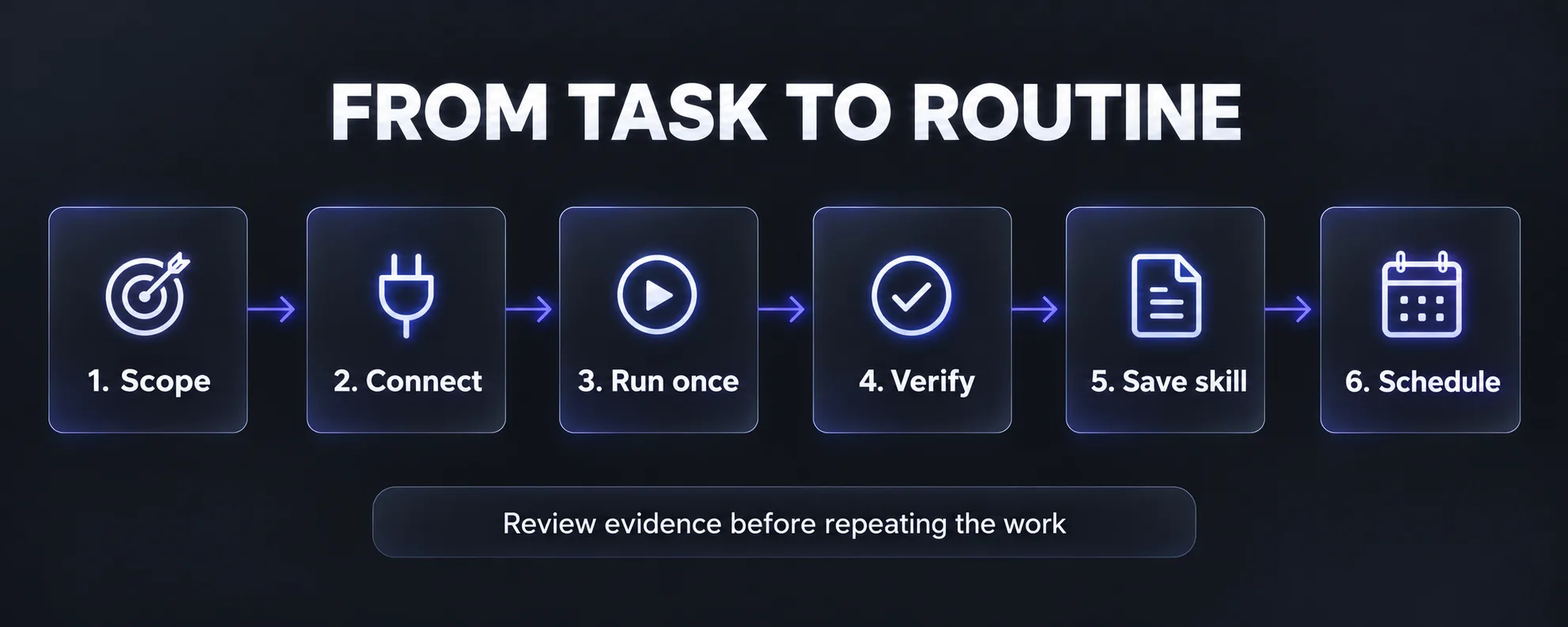
Step 1: Define the job and completion criteria
Name the Bot after the responsibility: Competitor Monitor, Release QA, or Inbox Triage. Describe an outcome you can accept or reject. “Help with marketing” leaves too much unresolved; “prepare a weekly competitor change log for these five companies” gives the work a boundary.
Act as [BOT ROLE] for [PROJECT].
Your deliverable is [ARTIFACT] for [AUDIENCE], using [SOURCE LIST].
Completion means [THREE CHECKABLE ACCEPTANCE CRITERIA].
You may [ALLOWED ACTIONS]. Ask before [APPROVAL ACTIONS].
Before starting, identify missing inputs and any assumption that could change the result.
Keep stable preferences in the role instructions. Reopen changing facts from their source. The official Bot management guide describes retained context while warning that memory does not replace current source data.
Step 2: Connect the minimum required sources
Install the desktop app from the official download page and sign in through the supported account flow. Use Connect apps for available plugins; authenticate through the browser or takeover flow when requested. These steps are covered in the getting-started guide.
Our practical preference is to begin with one source and add another only when the output needs it. Test access by reading a known record, not by assuming an installed plugin is fully authenticated.
Check access to [REQUIRED SOURCES] by reading [KNOWN SAFE RECORD] from each.
Return the source name, account or workspace used, access result, and source timestamp.
Do not connect unrelated services or change permissions.
If authentication is required, pause for the supported sign-in flow.
Do not begin the full task until the required inputs are available.
Step 3: Run one small, representative task
Use a batch small enough to inspect completely: five inbox threads, ten transactions, or one support ticket. Include one awkward example, such as a missing receipt or conflicting deadline. A workflow that only works on ideal inputs will disappoint when scheduled.
Run [WORKFLOW] once on [SMALL INPUT BATCH].
Do not schedule future runs.
Create [OUTPUT FILE] and include a brief action log.
Mark missing data, uncertain matches, and incomplete steps explicitly.
Stop at [REVIEW POINT] and show the artifact before requesting any external action.
Step 4: Audit the result against its sources
Correct the process, not just the final wording. If the report used a stale CSV, add a freshness check. If two accounts were merged incorrectly, specify the join key. These corrections are the foundations of the reusable skill.
Audit the result against [ACCEPTANCE CRITERIA].
For each criterion, show the supporting source or mark it unmet.
Check identifiers, date windows, missing rows, duplicate outputs, and unsupported claims.
Revise the existing artifact, then list the process changes needed to prevent the same errors.
Do not claim verification for a check you could not perform.
Step 5: Save the method as a skill
A skill records how a task should be done; a routine controls when it runs. Our guide to AI skills versus prompts explains why saving only the opening instruction often misses the most useful part: the rules learned during review.
Save the corrected process as a skill named [SKILL NAME].
Include required inputs, source precedence, steps, output schema, and acceptance checks.
Add the corrections from this run, handling for missing data, and the retry policy.
Specify exactly which actions require approval.
Show the saved instructions for review. Do not create a routine yet.
If Teach a task is available, Grok Bot can turn a browser demonstration into a draft skill. Availability may vary; written instructions remain an option. Review the generated method before relying on it. Source: skills and routines documentation.
Step 6: Add a schedule with explicit failure handling
Test the saved method on a second input before scheduling. Then specify the owner, time zone, input window, destination, and missing-data behavior. Grok Bot supports scheduled routines and supported event triggers; a trigger connection can be separate from a plugin. Routine Test run performs real work. Source: routine setup and testing.
Create a routine for [BOT NAME] using [APPROVED SKILL].
Run [SCHEDULE] in [IANA TIME ZONE], covering [INPUT WINDOW].
Save results to [DESTINATION] and report completion in this conversation.
Identify a run by [WORKFLOW NAME + PERIOD]; check for an existing result before creating another.
If a source is stale or unavailable, report the gap and do not present old data as current.
Keep [EXTERNAL ACTIONS] behind approval. Confirm the next run time and how to pause it.
A “no changes found” report and a “could not check” report must have different statuses. Otherwise a broken integration can look like a quiet week. Inspect early runs manually before reducing review frequency.
A complete example: competitor change to content draft
Here is a suggested workflow for a small software company. On Monday morning, one Bot compares five competitors with last week's saved baseline. It returns two verified changes and one page it could not access. The inaccessible page stays on the exception list.
The same Bot can then propose content angles based on the verified changes and your approved product facts. A writer reviews the proposed angle before drafting. This keeps a rumor from becoming an asserted fact in your marketing.
Split this into specialist Bots only when the responsibilities justify it. Grok Bot supports group conversations and Bot-to-Bot handoffs, but group chats do not display approval requests or email drafts. Keep final external-action review in the appropriate direct conversation. Source: message and collaborate.
Coordinate [PROJECT] with three roles: Researcher, Writer, and Reviewer.
Researcher: save verified changes and sources to [EVIDENCE FILE].
Writer: use only that evidence plus [APPROVED PRODUCT FACTS] to draft [ASSET].
Reviewer: check every factual claim and return blocking issues with source references.
Use one current draft and one owner at each stage. Do not restart completed research.
Return the reviewed draft in my direct conversation. Nothing may be published or sent without approval.
Use the same handoff format every time: input file, completed checks, remaining gaps, and next owner. For a broader campaign, our AI tools for marketers guide helps identify which specialist tools belong after the research stage.
If you are evaluating another tool for research-led work, Genspark is an alternative to investigate. Our Genspark review covers its feature set. Compare both products on the same sample task and acceptance criteria; the card below links to a separate service.
Access, subscriptions, and usage in October 2026
Do not buy a second plan until you check the access already attached to your account. Current Grok Bot billing documentation distinguishes The X Subscription from legacy Cursor and linked Grok plans.
| Account path | Documented access | What to verify |
|---|---|---|
| The X Subscription | Premium, Super, and Ultra include Grok Bot; Plus and Free do not. | Shared weekly usage and additional-credit settings. |
| Legacy paid Cursor individual or Teams plan | Grok Bot access is included. | Weekly allowance and on-demand usage controls. |
| Eligible linked individual Grok plan | SuperGrok, Plus, Heavy, and X Premium+ are documented linking paths. | Correct account linking and the allowance it grants. |
| Business or enterprise | Access depends on the seat or managed arrangement. | Organization policy and the assigned entitlement. |
On The X Subscription, Grok Bot shares the weekly pool with Cursor and Grok apps. Legacy grants follow different rules; linked Cursor and SuperGrok allowances do not simply add together. Use the billing page for current entitlement details and our Grok pricing guide for broader product context.
For your pilot, record usage before and after several representative runs. Long browsing sessions, repeated retries, and broad searches can make two apparently similar tasks consume different amounts. A subscription price alone cannot tell you the cost of an accepted deliverable.
Failure modes to design out before scheduling
Shared access mistaken for isolation. Personal Bots share the account's cloud computer, including files and browser sessions. Separate names do not create separate security boundaries. Auto Review is model-based and complements scoped permissions; it is not a guarantee against every unwanted action. Source: approvals, security, and privacy.
A successful test mistaken for a simulation. Treat test inputs and destinations as real. Use a staging site, a copied export, or a dedicated draft folder. Confirm that retries reuse the same period identifier rather than creating duplicate reports or tasks.
Missing data mistaken for a clean result. Require a coverage line: expected sources, sources checked, sources unavailable, and newest source timestamp. This is especially useful for customer-risk and release reports, where silence can be misread as reassurance.
Instructions inside source material mistaken for your request. A webpage, email, or document is evidence to inspect. It should not be allowed to expand the assignment, authorize a transfer, or redirect the output to an unexpected destination. Put that boundary in the saved process.
A Team Bot mistaken for a shared routine. Current Team Bot documentation says routines belong to their creator. OAuth plugins use the requesting person's connected account, while key-based plugins can use a Bot credential shared across conversations. Check that distinction before giving a team access.
Useful stopping rule: if you cannot tell which source supports a conclusion or which destination an action will change, return the task to preparation and review. Improve the workflow before expanding its permissions.
Measure time saved after review and repair
We would track three measures during the pilot: accepted outputs, human review time, and repair time. Add usage cost where the account exposes it. Count a report as accepted only when it meets the same criteria you would apply to a colleague's work.
| Measure | Calculation | What it reveals |
|---|---|---|
| Net time saved | Manual baseline minus setup, review, and repair time | Whether delegation reduces your workload. |
| Acceptance rate | Accepted outputs divided by total outputs | Whether the process is reliable enough to repeat. |
| Cost per accepted output | Attributable usage cost divided by accepted outputs | Whether retries are hiding poor economics. |
| Source coverage | Required sources checked divided by required sources | Whether the result rests on complete evidence. |
Illustrative example, not a benchmark: a manual report takes 40 minutes. Five reports therefore take 200 minutes. Bot setup takes 50 minutes, each review takes eight minutes, and repairs take another 20 minutes across the week. Human time becomes 110 minutes, saving 90 minutes. That is the relevant comparison, even if the Bot worked unattended for much longer.
Separate first-week setup from ongoing maintenance. A workflow can be worth keeping despite a slow start, but a weekly repair burden that keeps rising is a reason to narrow the task. For scheduled work more generally, our guide to Claude Routines offers another product perspective on recurring agent tasks.
Your first-week Grok Bot rollout
- Day 1: choose one repeatable output. Record the manual time and write acceptance criteria. Start with a decision brief, competitor report, or another task you can inspect fully.
- Day 2: run a small batch. Connect the required sources and verify access. Keep a copy of the inputs and the first result.
- Day 3: correct the process. Name each error and add a rule that would catch it. Remove steps that do not improve the output.
- Day 4: test a different input. Include missing data or an ambiguous case. Check whether the Bot reports uncertainty instead of inventing an answer.
- Day 5: save the skill and create one routine. Confirm the schedule, time zone, destination, review boundary, and failure report.
- After the first week: keep, narrow, or stop. Compare net time saved and acceptance rate with your baseline. Add another Bot only when a distinct responsibility has earned one.
Our strongest recommendation is a modest first assignment with an obvious finish line. A dependable weekly report is a better foundation for your workflow than a broad instruction to manage the business. Once the report is trustworthy, expand its scope one decision at a time.
Keep reading
Frequently Asked Questions
10 questions answered