The PromptsRush journal
AI ToolsImagineArt Pricing (2026): Plans, Credits, Usage
ImagineArt costs $9–$175 a month billed yearly or $13–$250 monthly. Here's what each plan's credits actually buy, why two of its discount badges overstate the saving, and what 'unlimited' really covers.

Advertisement
ImagineArt has four paid plans in 2026: Basic, Standard, Ultimate and Creator. Billed yearly, they cost $9, $20, $34 and $175 a month; billed monthly, $13, $30, $50 and $250. Each plan gives a fixed number of credits (3,000, 8,000, 16,000 or 100,000 a month), and the free tier gets 100 credits a day with no video. That credit-per-plan model is similar to OpenArt's plan structure, but ImagineArt bundles far more third-party video models into the same credit balance.
Those are the headline numbers. The detail that matters when you choose is further down: the discount badges on the pricing page don't all match ImagineArt's own checkout prices, credits never roll over, and "unlimited" generations only apply to the two most expensive plans. The prices below come from ImagineArt's US checkout price list, checked on 16 September 2026 during an active sale, so confirm them at checkout before you buy.
ImagineArt Plans at a Glance
| Plan | Monthly billing | Yearly billing | Credits per month | Best for |
|---|---|---|---|---|
| Free | $0 | $0 | 100 per day | Testing basic image models |
| Basic | $13/mo | $9/mo ($108/yr) | 3,000 | Occasional image work |
| Standard | $30/mo | $20/mo ($240/yr) | 8,000 | Regular creators, small teams of 3 |
| Ultimate | $50/mo | $34.17/mo ($410/yr) | 16,000 | Heavy use, unlimited models |
| Creator | $250/mo | $175/mo ($2,100/yr) | 100,000 | Studios and agencies, 20 seats |
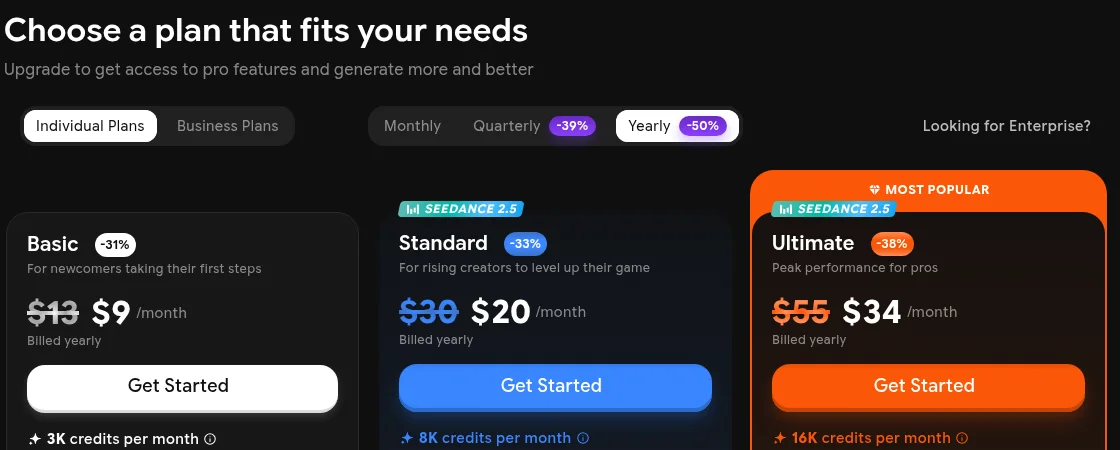
ImagineArt's pricing page on 16 September 2026, yearly billing selected. The struck-through prices and percentage badges are covered below.
Monthly vs Quarterly vs Yearly
ImagineArt offers three billing periods. Yearly is cheapest per month, but you pay the full year upfront, and refunds are limited to the first few days.
| Plan | Monthly | Quarterly | Yearly | Yearly saving vs monthly |
|---|---|---|---|---|
| Basic | $13 | $33 ($11/mo) | $108 ($9/mo) | 31% |
| Standard | $30 | $75 ($25/mo) | $240 ($20/mo) | 33% |
| Ultimate | $50 | $125 ($41.67/mo) | $410 ($34.17/mo) | 32% |
| Creator | $250 | $640 ($213.33/mo) | $2,100 ($175/mo) | 30% |
Quarterly billing saves 15–17% against monthly, and yearly saves 30–33%. If you're unsure whether you'll use the plan every month, monthly billing is the lower-risk way to find out.
What the discount badges actually compare against
The pricing page advertises "Quarterly -39%" and "Yearly -50%" on the billing toggle, and per-plan badges of -31%, -33%, -38% and -50%. Against ImagineArt's own monthly checkout prices, the real yearly savings are smaller for two plans:
- Basic is shown as $13 struck to $9, a 31% saving. That matches the $13 monthly price.
- Standard is shown as $30 struck to $20, a 33% saving. That also matches.
- Ultimate is shown as $55 struck to $34 (-38%). The monthly Ultimate plan at checkout is $50, so the saving against monthly billing is about 32%.
- Creator is shown as $350 struck to $175 (-50%). The monthly Creator plan at checkout is $250, so the saving against monthly billing is 30%.
The yearly prices themselves are accurate. The takeaway is simply to compare the yearly price against the monthly price you'd otherwise pay, rather than against the struck-through figure.
How ImagineArt Credits Work
Every generation costs credits, and the amount depends on the tool, the model, whether the output is an image or a video, and how many you generate at once. Four rules matter more than the per-plan totals.
Credits don't roll over
ImagineArt's FAQ states that credits reset at the start of each billing cycle and do not carry over. Unused credits at the end of a cycle are lost. If you run out mid-cycle, you can upgrade or buy extra credits.
One detail to confirm at checkout: ImagineArt's checkout lists yearly plans as a full-year credit allocation (36,000 credits for Basic yearly, for example), while the plan cards describe credits "per month." Whether yours arrive monthly or all at once changes how much you can use in a busy month.
Purchased credits last longer, with a condition
Credits you buy separately from a subscription are valid indefinitely, but you still need an active subscription to use them on Pro models.
Failed generations are refunded
If a generation fails, the credits come back straight away and the refund shows in your usage analytics.
Cost per generation depends heavily on the model
The plan cards estimate about 600 images or 97 videos from 3,000 credits, which works out to roughly 5 credits per image and 30 credits per video on the default models. The same ratio holds across every plan.
Premium models cost far more. ImagineArt's own comparison table shows the Basic plan covering up to 11 Kling Avatars 2.0 Pro lip-sync videos but only 1 Google Veo 3.1 lip-sync video. Those two models differ as much in cost as in output, as our Kling 3.0 vs Veo 3.1 comparison shows. The same table also lists higher image and video counts than the plan cards do, so read all these figures as "up to" estimates on the cheapest models.
| Plan (billing) | Per 1,000 credits | Per image (~5 credits) | Per video (~30 credits) |
|---|---|---|---|
| Basic, monthly | $4.33 | ~2.2¢ | ~$0.13 |
| Basic, yearly | $3.00 | ~1.5¢ | ~$0.09 |
| Standard, yearly | $2.50 | ~1.3¢ | ~$0.08 |
| Ultimate, yearly | $2.14 | ~1.1¢ | ~$0.06 |
| Creator, yearly | $1.75 | ~0.9¢ | ~$0.05 |
These per-generation costs use the default-model estimates. A project built on premium video models will cost several times more per clip, so test your actual workflow before committing to a yearly plan.
What Each Plan Includes
| Feature | Basic | Standard | Ultimate | Creator |
|---|---|---|---|---|
| Credits per month | 3,000 | 8,000 | 16,000 | 100,000 |
| Models | Basic models | Basic + premium | Basic + premium | Basic + premium |
| Image privacy | Public | Private | Private | Private |
| Concurrent image generations | 4 | 8 | 12 | 16 |
| Concurrent video generations | 2 | 3 | 4 | 5 |
| Video length | 3–6 s | 3–10 s | 3–12 s | 3–12 s |
| Video resolution | Up to 768p | Up to 4K | Up to 4K | Up to 4K |
| @ References | 1 | Up to 5 | Up to 30 | Unlimited |
| Team users included | — | 3 | 6 | 20 |
| Priority generation queue | No | Yes | Yes | Yes |
| Priority support | No | Yes | Yes | Yes |
| Unlimited models | No | No | Yes | Yes, expanded list |
| GPT, Gemini and Claude chat models | Included | Included | Included | Included |
Two rows are easy to miss. Basic generations are public, so don't use it for client work or anything confidential. And Basic video tops out at 768p and 6 seconds, which rules it out for most real video work; Standard is the practical entry point for video.
The Unlimited Models on Ultimate and Creator
Ultimate and Creator include unlimited generations on a set of models, which don't draw down your credit balance. On the pricing page on 16 September 2026, the lists were:
- Ultimate: Runway 4.5, Kling 2.6 Pro, Nano Banana, Wan 2.6, xAI Grok Video, Seedance 1.5 Pro, ImagineArt 4.0 and 1.5, and V7, among others.
- Creator: everything on Ultimate, plus Seedance 2 Fast, Kling 3.0 Pro, Nano Banana 2, GPT Image 2, ImagineArt 2.0 and 1.5 Pro, Luma Ray2, Flux.2 Pro and xAI Grok Imagine.
For a heavy user, this can be worth more than the credit allowance. If you generate hundreds of Kling 3.0 Pro clips a month, Creator's unlimited access could replace a separate subscription. Our breakdown of Kling's own plans shows what the same volume costs directly.
Check three things before relying on "unlimited." The pricing page doesn't say whether unlimited generations run at lower queue priority, whether they're limited in resolution or duration, or whether any fair-use cap applies. The page also advertised "Unlimited Free Generations on top models" as part of a limited-time sale, so the model list may change when the sale ends.
The Free Plan
Free accounts get 100 credits a day, limited to specific models such as ImagineArt 1.0 Lite and Flux Dev. Premium models aren't available, and video generation requires a paid subscription. Free users can use generated images commercially only if they credit Imagine.Art; paid plans remove that requirement.
At about 5 credits per image, 100 daily credits is roughly 20 basic images a day. That's enough to learn the interface and test prompts, but not to judge the premium models you'd actually be paying for.
Real Cost Examples
A blogger making 150 featured images a month. At about 5 credits each that's roughly 750 credits, well inside Basic's 3,000. Basic yearly at $9/mo works, but the images would be public. If that matters, Standard yearly at $20/mo keeps them private and leaves plenty of headroom.
A social media manager making 60 short videos and 400 images a month. On default models that's about 1,800 credits for video plus 2,000 for images, or 3,800 in total. That's over Basic's allowance, and Basic's 768p video cap rules it out anyway. Standard's 8,000 credits cover it comfortably, with room for retries.
A small studio producing 300 premium video clips a month. On premium models the credit cost per clip is unpredictable, so the credit total matters less than the unlimited list. If the models you need, such as Kling 3.0 Pro or Seedance 2 Fast, are on Creator's unlimited list, Creator at $175/mo yearly can cost less than buying credits for that volume, provided the unlimited terms hold up in testing.
Which ImagineArt Plan Should You Choose?
| If you… | Choose | Why |
|---|---|---|
| Just want to try it | Free | 100 daily credits; no video |
| Make images occasionally and don't mind them being public | Basic, yearly | $9/mo; about 600 default-model images |
| Need private output, video, or up to 3 users | Standard, yearly | $20/mo; 4K video, private generations, priority queue |
| Generate heavily on the models in the unlimited list | Ultimate, yearly | $34.17/mo; unlimited models often matter more than credits |
| Run a studio or agency | Creator, yearly | $175/mo; 100,000 credits, 20 users, Kling 3.0 Pro and GPT Image 2 unlimited |
| Aren't sure about your usage yet | Any plan, monthly | Refunds on yearly plans are limited to the first few days |
Refunds, Cancellation and Commercial Use
Refunds are available on monthly and annual plans within 3–5 days, provided fewer than 300 credits have been used. ImagineArt refunds technical failures, duplicate charges and unauthorised transactions, but not dissatisfaction, user error, heavy use or accidental purchases. With a yearly plan, that window is your whole safety net, so test on monthly billing first if you're uncertain.
Downgrading or cancelling is done from Manage Subscription in your profile settings.
Commercial use is included on paid plans under ImagineArt's general commercial terms. Free users must credit Imagine.Art when they use images commercially.
How ImagineArt Compares
ImagineArt's main advantage is breadth: image, video, audio, lip sync, editing and upscaling in one subscription (our full ImagineArt review covers the studios, Workflows and integrations in detail), with access to third-party models such as Kling, Seedance, Runway and GPT Image. If you'd otherwise pay for several of those tools separately, one ImagineArt plan can cost less.
The trade-off is that credits are a platform currency, so you can't compare them directly with another service's credits. OpenArt is the closest like-for-like alternative for image-led work. Higgsfield is the stronger alternative for video-first creators, detailed in Higgsfield's pricing breakdown. For heavy upscaling, Magnific's credit costs are worth comparing against ImagineArt's upscale allowances.
Is ImagineArt Worth It in 2026?
For creators who use several generation tools, ImagineArt is good value, especially on yearly billing and on Ultimate or Creator if the models you need are on the unlimited list. Standard at $20/mo yearly is the sensible starting point for most people, because it's the cheapest plan with private output and usable video.
Go in with three things in mind. Compare yearly prices against the monthly checkout prices rather than the struck-through figures. Plan around credits that reset every cycle. And test the unlimited models and your real workflow during the short refund window before committing to a year.
Keep Reading
Higgsfield vs OpenArt compares two of ImagineArt's closest rivals, and Seedance 2.5 prompts help you get more from the video models in its plans. Browse all guides on PromptsRush.
Frequently Asked Questions
10 questions answered