Magnific Pricing (2026): Plans, API Cost, Credits
Magnific credits last a full year with no monthly resets — but they cost the same per unit on every tier. Full breakdown of plans, per-model credit costs and what the upgrades actually buy you.
Advertisement
Magnific's pricing does one genuinely unusual thing and one thing that looks generous but is not.
The unusual thing: credits are valid for a full year with no monthly resets. Almost every credit system in this category expires unused credits at the end of each billing month. Magnific pools them annually, which means a quiet January funds a busy March instead of evaporating.
The thing that looks generous but is not: the top tier is labelled "best credit value", and on the arithmetic it is barely that. Credits cost roughly the same per unit on every tier — around a 4% improvement from bottom to top. You are not buying cheaper credits by moving up. You are buying unlimited access to specific models, and that is a completely different proposition.
Everything below comes from Magnific's live pricing page, captured while writing.
A Note on Currency
Magnific prices in local currency, and our capture rendered in Indian rupees rather than dollars. The figures below are exactly what the page displayed, and the tier structure, credit allowances and model access are identical worldwide — but the numbers you see will differ by region.
Because of that, the analysis here leans on credits per tier and credits per generation, which are currency-independent and are the more useful figures anyway. Check your own region's prices before committing; the page also states that all prices exclude VAT and local taxes.
The Plans
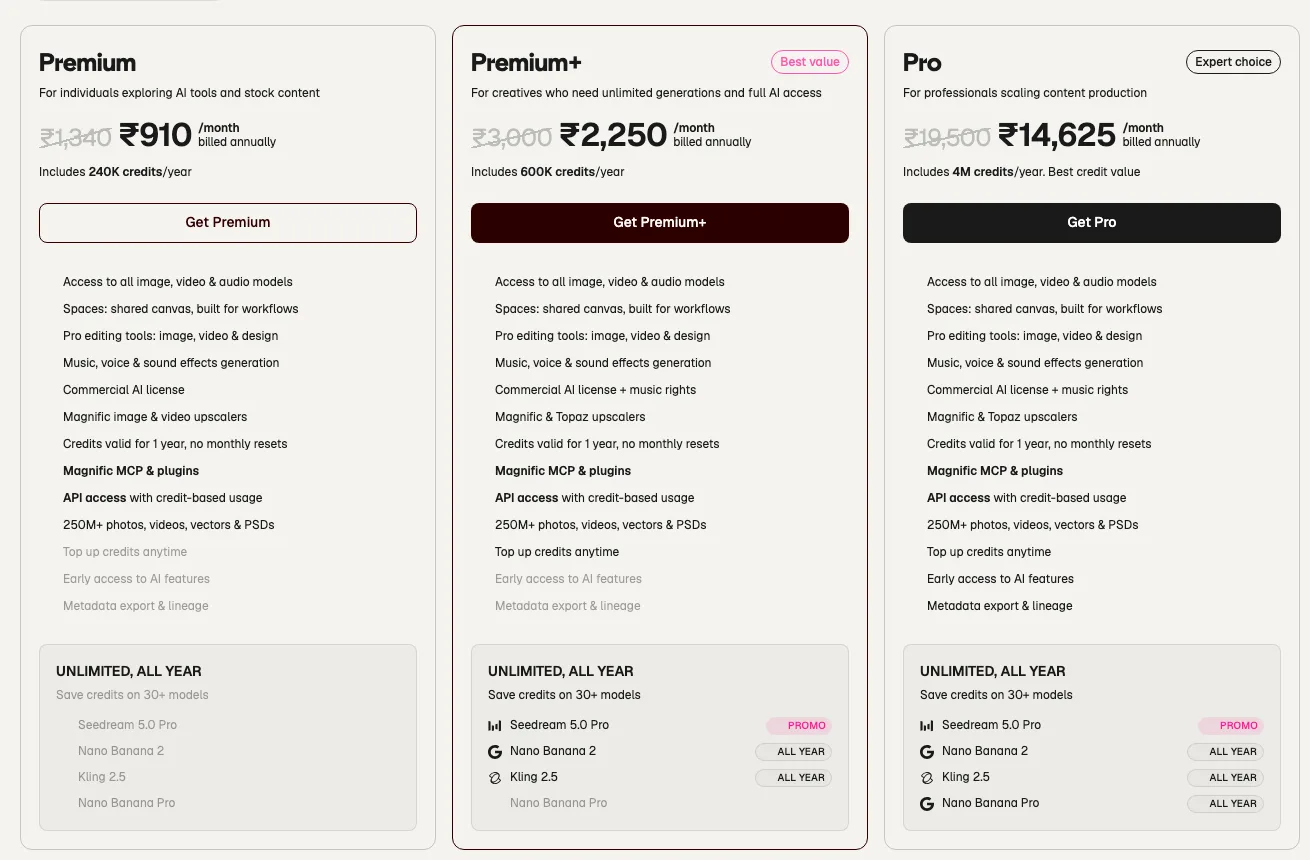
| Plan | Price (annual, as displayed) | Credits/year | Positioning |
|---|---|---|---|
| Premium | ₹910/month | 240,000 | Exploring AI tools and stock |
| Premium+ | ₹2,250/month | 600,000 | Marked "Best value" |
| Pro | ₹14,625/month | 4,000,000 | Marked "Expert choice" |
Annual billing saves 25% against monthly. There is also a Teams tab with separate pricing, and the page cites over 1 million subscribers.
The Credit Maths
Divide credits by annual cost and the "best credit value" label starts to look thin:
| Plan | Annual cost | Credits/year | Credits per unit of currency |
|---|---|---|---|
| Premium | ₹10,920 | 240,000 | ~22.0 |
| Premium+ | ₹27,000 | 600,000 | ~22.2 |
| Pro | ₹175,500 | 4,000,000 | ~22.8 |
Pro delivers about 4% more credits per unit spent than Premium, for sixteen times the price. On credits alone, there is essentially no volume discount in this lineup at all — which is unusual, and worth knowing before someone tells you the top tier is where the value is.
So if credits are flat, what are the higher tiers actually selling?
What You Are Really Buying: Unlimited Model Access
This is the genuine tier differentiator, and it sits in the "Unlimited, all year" block at the bottom of each plan card:
| Model | Premium | Premium+ | Pro |
|---|---|---|---|
| Seedream 5.0 Pro | — | Promo | Promo |
| Nano Banana 2 | — | All year | All year |
| Kling 2.5 | — | All year | All year |
| Nano Banana Pro | — | — | All year |
Premium gets none of it. Premium+ unlocks unlimited Nano Banana 2 and Kling 2.5 all year. Pro adds Nano Banana Pro.
This changes the whole calculation. If your work runs mostly on one of those models, unlimited access is not a 4% improvement — it removes the credit meter from your primary workflow entirely. If it does not, you are paying a large premium for models you will not touch.
The question that decides your tier: which model do you actually generate on most? If the answer is Nano Banana 2 or Kling 2.5, Premium+ pays for itself in a way the credit table cannot show. If it is anything else, Premium plus top-ups is likely the rational choice.
Feature Differences Beyond Credits
Three things gate by tier, and one of them matters more than it looks:
- Top up credits anytime — greyed out on Premium, available on Premium+ and Pro. If you exhaust Premium's allowance, you cannot simply buy more; the route out is an upgrade. Plan for that.
- Early access to AI features — Pro only.
- Metadata export and lineage — Pro only. Niche, but if you need provenance tracking on generated assets for compliance or client work, it is the only tier that offers it.
Upscaling also differs: Premium includes Magnific's own image and video upscalers, while Premium+ and Pro add Topaz upscalers alongside them. And the commercial licence broadens — Premium carries a commercial AI licence, while the higher tiers add music rights, which matters if you use the generated audio in published work.
Everything Included on Every Tier
Worth stating because it narrows the decision considerably. All three plans include access to all image, video and audio models, Spaces (a shared canvas for workflows), pro editing tools, music and voice generation, a commercial AI licence, a library of 250M+ photos, videos, vectors and PSDs, Magnific MCP and plugins, and API access with credit-based usage.
That last pair is the important one for developers: API and MCP access are not gated behind the expensive tiers. If you want to drive Magnific programmatically or wire it into an AI assistant, the entry plan can do it — you are constrained by credits, not permissions.
API Cost: How Credits Convert to Output

API usage is credit-based at the same rates as the interface, so the published per-generation costs tell you exactly what a call will cost. The spread is enormous:
| Model | Credit cost | Premium (240K/yr) | Pro (4M/yr) |
|---|---|---|---|
| Pixverse 6 1080p | 200 / 1s | 1,200 videos | 20,000 videos |
| MiniMax Hailuo 2.3 Fast 768p | 150 / 6s | 1,600 videos | — |
| Kling 3.0 Motion Control Pro | 450 / 3s | 533 videos | 8,888 videos |
| Wan 3.0 1080p | 480 / 2s | 500 videos | 8,333 videos |
| MiniMax H3 2K | 550 / 5s | 436 videos | 7,272 videos |
| Kling 3.0 Turbo 1080p | 780 / 3s | 307 videos | 5,128 videos |
| Google Veo 3.1 4K with audio | 2,080 / 4s | 115 videos | 1,923 videos |
| Flux 3 Video 1080p | 2,200 / 5s | 109 videos | 1,818 videos |
| Seedance 2.5 1080p | 3,160 / 4s | 75 videos | 1,265 videos |
| Seedance 2.0 4K 1080p | 5,600 / 4s | 42 videos | 714 videos |
Model choice dominates cost by a factor of 28. A one-second Pixverse clip costs 200 credits; a four-second Seedance 2.0 4K clip costs 5,600. On the entry plan that is the difference between 1,200 outputs a year and 42.
Which means the single most effective thing you can do to control spend here is not choosing a bigger plan — it is choosing the cheapest model that meets your quality bar, and reserving the expensive ones for final renders.
Which Plan Should You Buy?
| If you... | Choose |
|---|---|
| Are exploring, or generate occasionally | Premium — credits cost the same as any tier |
| Work mostly in Nano Banana 2 or Kling 2.5 | Premium+ — unlimited removes your main constraint |
| Need Topaz upscaling or music rights | Premium+ or Pro |
| Need Nano Banana Pro unlimited | Pro |
| Need metadata export, lineage or early access | Pro — the only tier that has them |
| Might exhaust your allowance mid-year | Premium+ or above — Premium cannot top up |
| Are building on the API or MCP | Any tier — access is not gated |
| Want cheaper credits by upgrading | Nobody — the rate is flat |
The Verdict
Premium is the correct default, and unusually so. Because credits cost effectively the same on every tier, upgrading buys you no volume discount — so the entry plan is not the compromise it usually is in credit-based pricing.
Premium+ is worth it for exactly one reason: unlimited all-year access to Nano Banana 2 and Kling 2.5. If those are your working models, that is transformative and the credit arithmetic becomes irrelevant. If they are not, the upgrade is hard to justify.
Pro is a professional tool at a professional price. Unlimited Nano Banana Pro, early feature access and metadata lineage are real capabilities, but at sixteen times Premium for 4% better credit value, it only makes sense when those specific features are load-bearing for your work.
And whichever you pick, the biggest lever on your bill is model selection, not plan selection. The annual credit rollover means you can afford to be strategic about it rather than rationing month to month.
For how Magnific compares on capability rather than price, see Higgsfield vs Magnific. For adjacent tools, OpenArt pricing and Higgsfield pricing use the same lens.
Keep Reading
More pricing breakdowns: Higgsfield vs Magnific, Higgsfield pricing, OpenArt pricing, Hedra pricing, Descript pricing, and 25+ Seedance 2.5 prompts. Or browse all guides and prompts on PromptsRush.
Frequently Asked Questions
10 questions answered