The PromptsRush journal
AI ToolsMagnific Review 2026: Upscaling, Relight & Is It Worth It?
Magnific is now the former Freepik suite, not just an upscaler. We break down Creative vs Precision upscaling, the 3-light Relight tool, Magnific One, real credit costs per upscale, and how Magnific compares with Topaz, Krea and OpenArt in late 2026.
Advertisement
Short version: Magnific is still the upscaler to beat when you want an image to come back richer than it went in, and Relight is the most controllable AI lighting tool we have seen on a creative platform. But Magnific is no longer just an upscaler. Since Freepik renamed itself Magnific in 2026, the name now covers a whole creative suite: image, video, audio and 3D models, 250M+ stock assets, Spaces, an MCP server and an API, all billed from one yearly pool of credits. That is great value if you use the suite, and overkill if all you want is sharper pixels.
This Magnific review is written from Magnific's own pricing page, help-center credit tables, tool pages and API docs as they read on 16 November 2026, cross-checked against Topaz Labs' and Krea's pricing pages the same day. We are not claiming hands-on test results here; where Magnific's own pages contradict each other, we say so. If you only care about plan maths, our Magnific pricing breakdown goes deeper on credits per dollar. Here we answer the bigger question: is Magnific worth paying for in late 2026?
What Is Magnific in 2026?
Magnific started life at magnific.ai as a "creative upscaler": instead of just enlarging pixels, it re-imagines texture and detail as it scales up. Freepik acquired it, and in 2026 Freepik went further and renamed its whole platform after it. The pricing page now literally reads "Magnific (formerly Freepik)", the help center answers "Is Magnific the same as Freepik?" with a plain yes, and magnific.ai sends new visitors to magnific.com.
So "Magnific" now means two things at once:
- The Magnific upscaling and enhancement models: Creative and Precision upscalers, Relight, Skin Enhancer, Style Transfer and the video upscaler.
- The Magnific platform: the former Freepik suite with third-party models such as Nano Banana 2, Kling and Wan, Seedance, Veo, Flux, GPT Image and Grok Imagine, Magnific's own Magnific One image model, Spaces (a node-based canvas), stock content, plugins, MCP and API.
The old magnific.ai app still runs for existing users. Its legacy page says accounts, galleries, tokens and subscriptions are untouched, that you can export everything as ZIP files, and that new sign-ups are only accepted on magnific.com. It also confirms that upscaling, style transfer, relight, skin enhancer and Mystic generations are all available as tools on the new platform.
Pro tip: If an older tutorial shows Magnific's sliders on a dark single-page app, that is the legacy magnific.ai interface. The same controls now live inside the Image Upscaler tool on magnific.com.
Key Features
Image Upscaler: Creative vs Precision
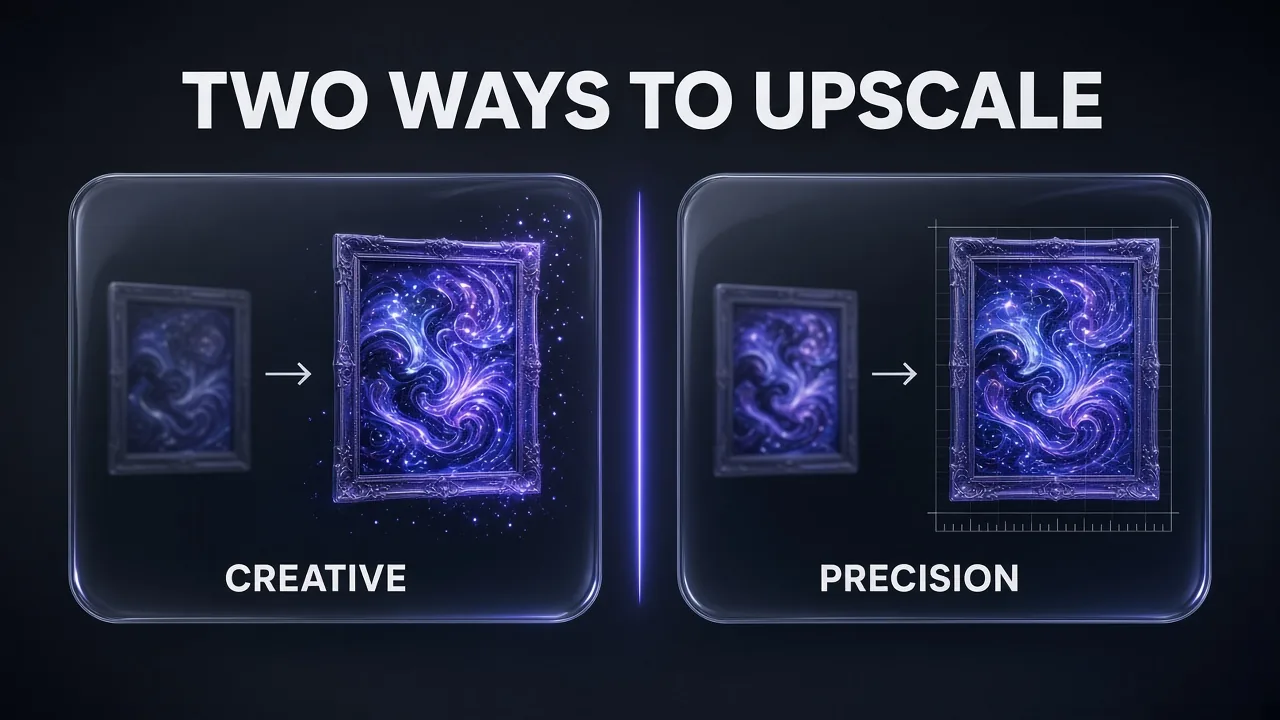
The upscaler has two modes, and choosing between them is the single most important decision you make in Magnific.
- Creative (models: Magnific and Classic) adds detail the original never had. Magnific's docs describe it as able to "reimagine textures" and add fine detail, controlled by a Creativity slider and a Resemblance slider, with prompt support. It is built for illustrations, 3D renders, concept art and AI-generated images. In the app, Creative scales 2x or 4x.
- Precision (models: Magnific v2 Sublime, Photo, Photo Denoiser and Magnific v1 High HDR) aims for faithful super-resolution: same content, bigger and sharper. Magnific positions it for photos, products, logos, UI and print, with scaling up to 16x in Sublime mode.
Bulk upscaling handles up to 20 images at once on paid plans (2 on free), and the tool accepts JPG, PNG and WEBP. Magnific's tool page advertises upscales "up to 10K", but it still labels that full Magnific upscale as being for "Premium+ users", the old name of today's Plus plan. Its credit table, meanwhile, lists 8K Magnific upscales with a credit price on Premium. Check the in-app credit hover before planning a 10K print job on the entry plan.
Honest answer on quality: generative upscaling is a trade. Creative can turn a soft 1K render into a crisp poster, but it can also change things you did not ask it to change, such as text, logos, fabric patterns or small facial features. That is exactly why Precision exists, and why the higher plans also bundle Topaz's more literal upscalers.
Relight: a three-light rig for any image
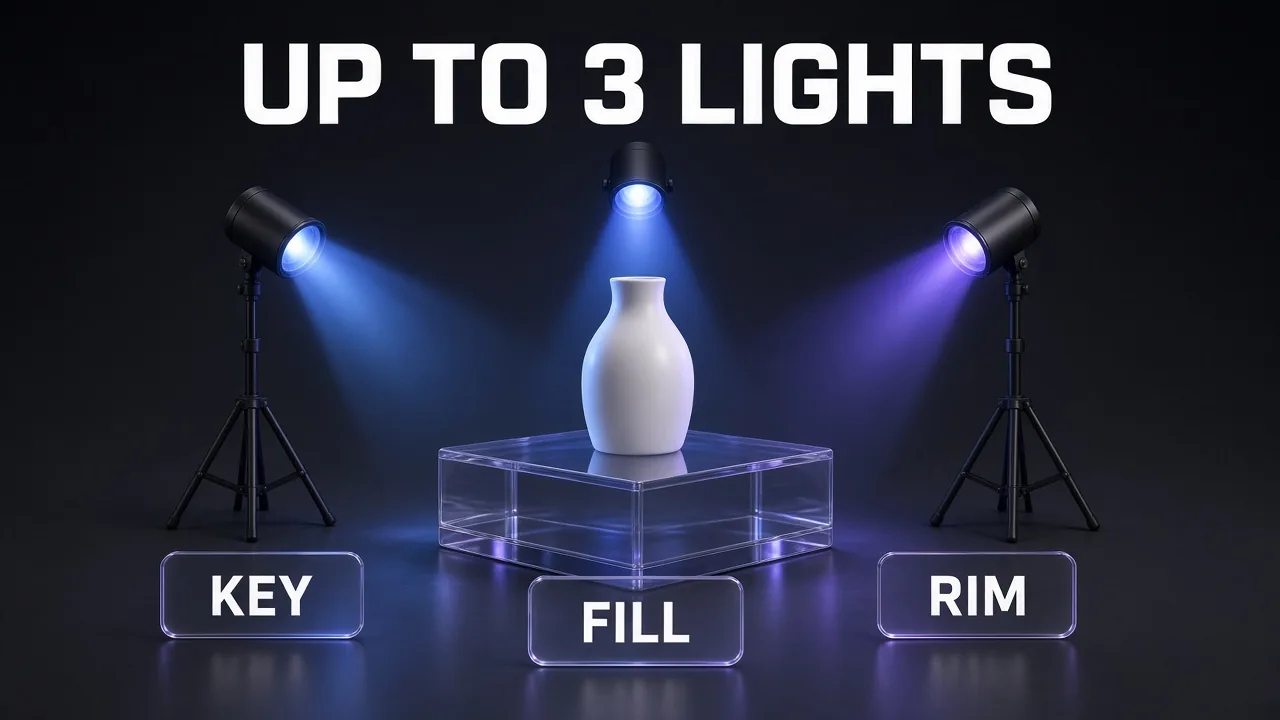
Relight is the feature that makes Magnific more than an upscaler. You can place up to 3 independent lights on any image and tune each one's rotation, elevation, intensity and colour. You can also copy the lighting from a reference image, or start from a preset. Magnific says Relight reads depth, surfaces and materials so shadows and highlights land where they should, and it works on your own photos as well as generated images.
For product and portrait work that matters: three lights is a classic key, fill and rim setup, which means you can rescue a flat product shot or shift an interior from noon to dusk without a reshoot. There is also Video Relight, which keeps the new lighting consistent across every frame of a clip.
Video Upscaler
The video upscaler takes clips up to 4K (2160p) and up to 60 fps, with two models: Magnific Video Upscaler for creative, AI-driven enhancement and Topaz Video Upscaler for faithful restoration of real footage. Clips can be up to 8 seconds long and it accepts MP4, MOV, AVI, WebM and MKV. It is included on any paid plan and charged in credits by resolution, frame rate and model. That 8-second limit makes it a finishing tool for AI-generated shots, not a way to remaster a whole video. If you are generating those shots in the first place, our AI video cost-per-second comparison shows what each model really costs.
Skin Enhancer, Style Transfer and editing tools
Skin Enhancer comes in three modes: Creative (100 credits per edit on Premium), Faithful (200) and Flexible (600). Around it sits the rest of the former Freepik editing kit: Retouch, Restyle, Change Camera, background tools, Expand and the Image Editor. The useful part is the chaining: Magnific's own Relight page lays out the intended flow as generate, edit, relight, upscale, extend, then animate, all in one account and one credit balance.
Magnific One and Brand Kit
Magnific One is the company's own image model, launched on 8 October 2026. Its pitch is "art direction built in": the model rewrites your short prompt into a full brief before it generates, so a one-line request comes back with considered composition, camera angle and colour. It has two modes. Draft returns a grid of 4, 8 or 16 options for the price of one image; Final renders at 2K or 4K in High or Max quality. Brand Kit extracts your logo, palette, typography and tone from a website, PDF or images and applies them in Final mode. Magnific's docs are refreshingly honest that it does not guarantee exact text, exact logo reproduction or perfect hands, and at launch Brand Kit works only with Magnific One.
Spaces, MCP, API, plugins and apps
Spaces is Magnific's node-based canvas for repeatable workflows, and any workflow can be saved as an App that a teammate runs in one click. Beyond the browser, Magnific ships:
- Magnific MCP for Claude, ChatGPT and Cursor, connected over OAuth with no API key. If you already generate images from Claude, our roundup of the best MCPs for generating images with Claude shows where it fits.
- Plugins for Photoshop, Premiere and Figma, plus Magnific for ComfyUI.
- Desktop apps for macOS, Windows and Linux, built for batch work, and mobile apps for iOS, Android and iPad.
- An API (docs.magnific.com) with endpoints for Upscaler Creative, Upscaler Precision, Relight and Style Transfer, authenticated with an
x-magnific-api-keyheader.
What's New at Magnific (Q4 2026)
- The Freepik-to-Magnific rebrand is complete: magnific.com is the platform, magnific.ai is a legacy app for existing users.
- Magnific One and Brand Kit launched on 8 October 2026 on all paid plans, on web, desktop, mobile and through the MCP.
- New models on the credit table include Kling 4.0 (840 credits per 3 seconds at 1080p) and GPT 2.6 Medium 2K (65 credits per image), both marked "New" on the pricing page today.
- A Seedream 5.5 promotion: "Save 40% on Credits", ending 10 December, individual subscriptions only. It is one of the live offers in our Black Friday 2026 AI tool deals tracker, which we update daily.
- Google Drive sync for projects and folders is new on Pro.
How to Upscale and Relight an Image in Magnific
The workflow Magnific's own docs recommend is simple, and it also saves credits:
- Generate or upload at low resolution. Magnific's upscaler docs advise starting at 1K for fast iteration and only upscaling the winners.
- Fix the light first. Open Relight, place up to three lights or upload a reference image, and render. Relighting before upscaling means the upscaler sharpens the final shadows, not the old ones.
- Pick the upscale mode. Precision for photos, products, logos and anything with text; Creative for art, renders and AI images where invented detail is welcome.
- Tune Creativity and Resemblance (Creative mode). Low creativity with high resemblance is the safe starting point; push creativity only when the result looks too soft.
- Hover before you click. Every tool shows its exact credit cost on the generate button. On Premium that matters, because an 8K Magnific upscale costs 16 times as much as a 2K one.
If you are building the base image in another tool first, here is a prompt that produces a clean, evenly lit product shot that relights and upscales well:
Relight-Ready Product Shot
Studio product photo of [PRODUCT] on a seamless light grey background, centred, three-quarter angle, soft even overhead light with gentle shadows, neutral white balance, no reflections of people, no text or logos added, sharp focus across the whole product, plenty of empty space around the edges, 1:1, 1K resolution.
Even, neutral light gives Relight a clean starting point, and the empty margins leave room for Expand if you need a wider format later. For more image prompts in this style, see our Nano Banana 2 fashion photography prompts, since Nano Banana 2 is one of the models Plus and Pro can run without spending credits.
Magnific Pricing in November 2026
Magnific sells three individual plans, all with a single credit pool. On annual plans, credits are valid for a full year with no monthly resets, which is genuinely unusual and works in your favour if your workload is lumpy. Prices below are from the USD version of the pricing page and exclude VAT.
| Plan | Price (billed annually) | Credits | Unlimited models | Upscalers |
|---|---|---|---|---|
| Free | $0 | Up to 20 images/day (in-house model) | None | Limited |
| Premium | $14.50/mo ($20 monthly) | 240K/year | None | Magnific image and video |
| Plus | $33.75/mo | 600K/year | Nano Banana 2 (1K), Kling 2.5 | Magnific + Topaz |
| Pro | from $82.50/mo | 1.5M or 4M/year | Nano Banana 2 (2K), Kling 2.5; Nano Banana Pro on the 4M tier | Magnific + Topaz |
Annual billing saves about 25% against monthly, according to the toggle on the page. The pricing page also offers a 30-day refund guarantee and no cancellation fees. The 4M-credit Pro tier did not show a USD price in our capture, so check it on the page in your region.
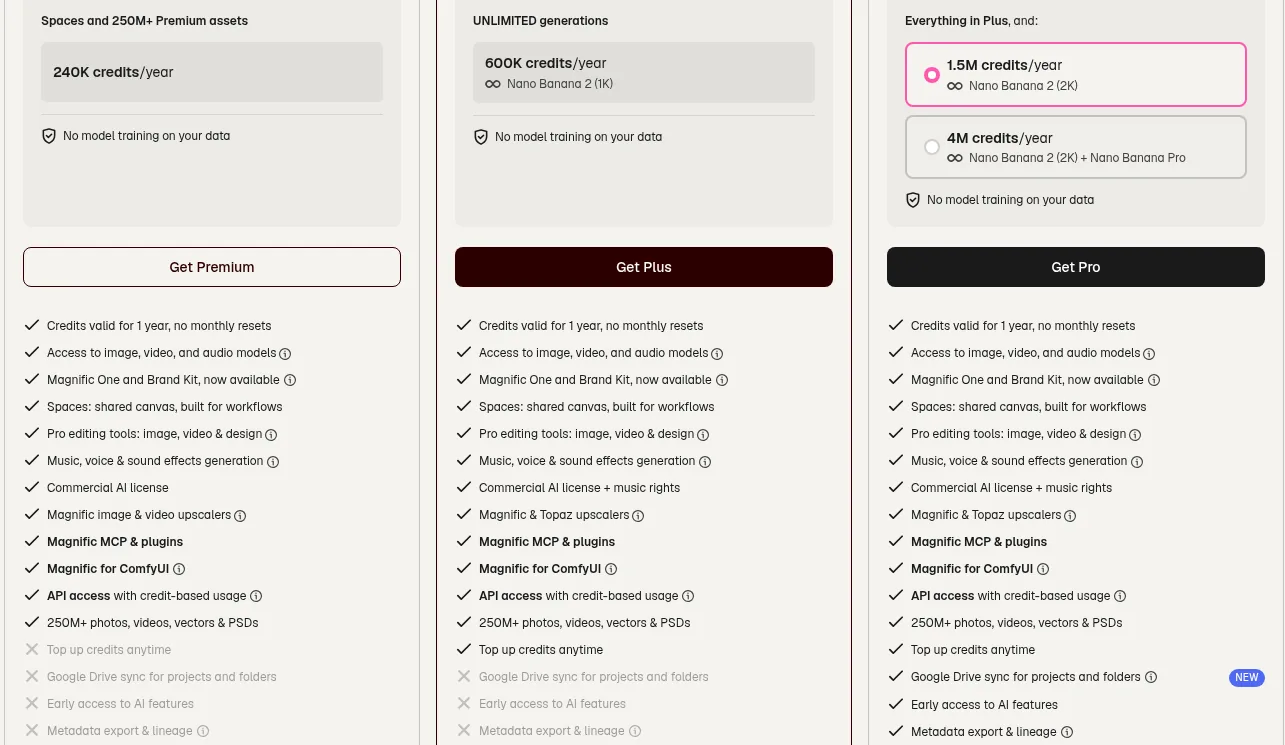
Three lines on that checklist decide most purchases:
- Top-ups: Premium cannot buy extra credits. When you run out, you wait or upgrade. Plus and Pro can buy packs, which stay valid for 3 years while your subscription is active.
- Topaz upscalers and music rights start at Plus.
- Metadata export and lineage, early access and Google Drive sync are Pro only.
API access with credit-based usage is ticked on all three plans. One catch from the API docs: "Unlimited" allowances only cover the web app. Every API call deducts credits, even on Plus and Pro, so budget for it.
What upscaling actually costs in credits
On Premium, Magnific's help center publishes the following per-image costs. (The same page says Plus, Pro and Business "include unlimited edition", but the general credits page says upscaling still consumes credits on those plans, and the upscaler page says only Magnific-model upscales cost credits there. Treat Plus and Pro upscales as "Classic is free, Magnific models may cost credits" and check the hover price.)
Magnific upscale cost by output size (Premium plan)
Credits per image, Magnific Creative or Precision v2 Sublime
Source: Magnific help center, AI editing tools credits, checked 16 Nov 2026
Put in money: Premium's annual price works out to $174 for 240,000 credits, or roughly $0.73 per 1,000 credits. A 2K Magnific upscale (90 credits) therefore costs about 6.5 cents, a 4K upscale (360 credits) about 26 cents and an 8K upscale (1,440 credits) about $1.04. Premium's yearly pool covers roughly 2,666 2K upscales, 666 at 4K or 166 at 8K. Relight costs 75 credits at 1K or 2K and 150 at 4K on Premium.
The rest of the credit table matters if you use the suite. Magnific One High costs 180 credits at 2K and 250 at 4K; Max quality jumps to 600 and 1,000. Video is where credits vanish fastest: Seedance 2.5 at 1080p costs 3,160 credits per 4 seconds, which is just 75 clips a year on Premium. Our full Magnific plans and credits guide has the per-model tables.
Magnific vs Topaz vs Krea vs OpenArt
Magnific's real competition depends on what you are buying it for. If it is upscaling, the comparison is Topaz Labs and Krea. If it is an all-in-one creative suite, OpenArt and others enter the picture.
| Magnific | Topaz Labs | Krea | OpenArt | |
|---|---|---|---|---|
| Entry price | $14.50/mo annual, $20 monthly | $19/mo (Topaz for Web, Image) | $9/mo Basic ($5.25 annual) | $14/mo Starter |
| Upscaling | Creative + Precision, up to 16x; Topaz included on Plus+ | Standard + Creative Upscale, unlimited image rendering, 32MP cloud export on Web | Up to 22K on paid plans | Not its focus |
| Relight | Up to 3 lights, reference, presets, video | Relight Image (Web plan) | Not listed on pricing | Video Relight |
| Generation models | Large catalogue + Magnific One | None (enhancement only) | Krea 3 + large catalogue | 100+ image, video and audio models |
| Credit expiry | Yearly pool on annual plans | Monthly video credits expire | Monthly units do not roll over | Monthly credits |
| Best for | Creative upscaling + full suite | Faithful photo and video restoration | Cheap entry, real-time generation | Generation-first creators |
Topaz Labs is the faithful-restoration specialist. Its Topaz for Web Image plan costs $19 a month with unlimited image rendering, and Topaz Studio bundles every app for $79 a month or $299 for the first year in its current Black Friday sale (normally $499). Note the "limited commercial use" line on cheaper Topaz plans, which covers organisations under $1M in annual revenue. Interesting twist: Magnific Plus already includes Topaz upscalers, so Plus users get both philosophies in one subscription.
Krea is the cheapest way in: Basic is $9 a month, or $5.25 billed annually, and every paid plan lists image upscaling up to 22K. Its units reset monthly, though, while Magnific's annual pool lasts a year.
OpenArt is the better pick if generation, characters and video are your main job and upscaling is an occasional step. Its pricing page currently runs extra discounts of up to 50% on Seedream 5.5, Kling 4.0, GPT Image 2.6 and Recraft V4.1 on its Pro and Wonder plans. Our OpenArt review covers it in depth, and the older Higgsfield vs Magnific comparison covers the video-first angle.
Who Should Use Magnific?
- Designers and illustrators who finish AI or 3D work for print or large displays and want Creative upscaling's added detail.
- Product and ecommerce teams who need Relight plus Precision upscaling to rescue imperfect shoots without booking a studio.
- Creators who already pay for several generators. Plus bundles unlimited Nano Banana 2 and Kling 2.5 with Magnific and Topaz upscalers, which can replace two or three subscriptions.
- Teams building agent workflows: the MCP works from Claude, ChatGPT and Cursor with no API key, and the API covers upscaling and relighting.
- Anyone with uneven workloads, because yearly credits survive a quiet month.
Who Should Skip It?
- Photographers who only need faithful upscaling. Topaz alone is more focused, and Magnific's strength is the creative mode you may not want.
- Anyone who wants the old magnific.ai simplicity. New users land in a large suite with dozens of tools and a credit system that takes time to learn.
- Heavy upscalers on Premium. With no top-ups, a busy month of 8K work can empty the pool, and the only exit is an upgrade.
- Video-first creators. Video generation burns credits fastest, and the video upscaler caps clips at 8 seconds. Compare our Kling AI pricing guide before buying video volume here.
Pros and Cons
| Pros | Cons |
|---|---|
| Creative upscaling that adds real detail, plus a faithful Precision mode | Creative mode can alter text, logos and small details |
| Relight with up to 3 independent lights, references, presets and video | Premium cannot top up credits |
| Annual credits last a full year with no monthly resets | Help-center pages contradict each other on what Plus and Pro upscales cost |
| Topaz upscalers bundled from Plus | Rebrand leaves old tutorials, plan names and docs out of date |
| MCP, API, plugins and desktop apps on every paid plan | API calls always use credits, even on Unlimited plans |
| 30-day refund guarantee, no model training on your data | Video upscaler limited to 8-second clips |
Verdict: Is Magnific Worth It?
My take: yes, for the right buyer, and Plus is the plan most people should look at. Magnific's upscaler is still the reference point for creative enhancement, Relight is a real differentiator, and Plus at $33.75 a month (billed annually) adds Topaz upscalers, credit top-ups and unlimited Nano Banana 2 and Kling 2.5. If you generate images anyway, that bundle is hard to beat.
Premium at $14.50 a month is fine for occasional upscaling, but watch the lack of top-ups. Pro only makes sense when you need metadata lineage, Drive sync or Nano Banana Pro unlimited on the 4M tier. And if all you want is faithful upscaling of real photos, a dedicated tool like Topaz is the more honest fit. Before you buy, check the live discounts in our Black Friday AI deals tracker.
Frequently Asked Questions
Keep Reading
More on AI image and creative tools: ImagineArt review, Higgsfield pricing and OpenArt pricing.
Frequently Asked Questions
10 questions answered