The PromptsRush journal
AI ToolsFirecrawl Pricing (2026): Limits, Credits, Plans & API
Firecrawl costs 1 credit per page — until you turn on JSON extraction and it costs 5. Full plan, credit and rate-limit breakdown, plus the Hobby-to-Standard break-even most users miss.
Advertisement
Firecrawl's pricing looks simple: pick a plan, get credits, one credit scrapes one page — flatter than Descript's two-meter model, until you turn a modifier on. Two things complicate that, and both cost people real money.
The first is modifiers — turning on JSON extraction quintuples the cost of every page you scrape. The second is the gap between Hobby and Standard, which is the steepest value cliff in the lineup and traps anyone who tries to bridge it with top-ups.
Everything below comes from Firecrawl's pricing page and billing documentation, captured while writing. All figures are USD.
A Note on Currency
Firecrawl's pricing page renders in local currency — our capture showed Indian rupees, and the page itself notes that "actual price may vary based on the exchange rate in place between USD and INR at the time of payment." The USD figures quoted throughout this article are Firecrawl's published dollar prices; the credit allowances and rate limits are identical worldwide.
The Plans
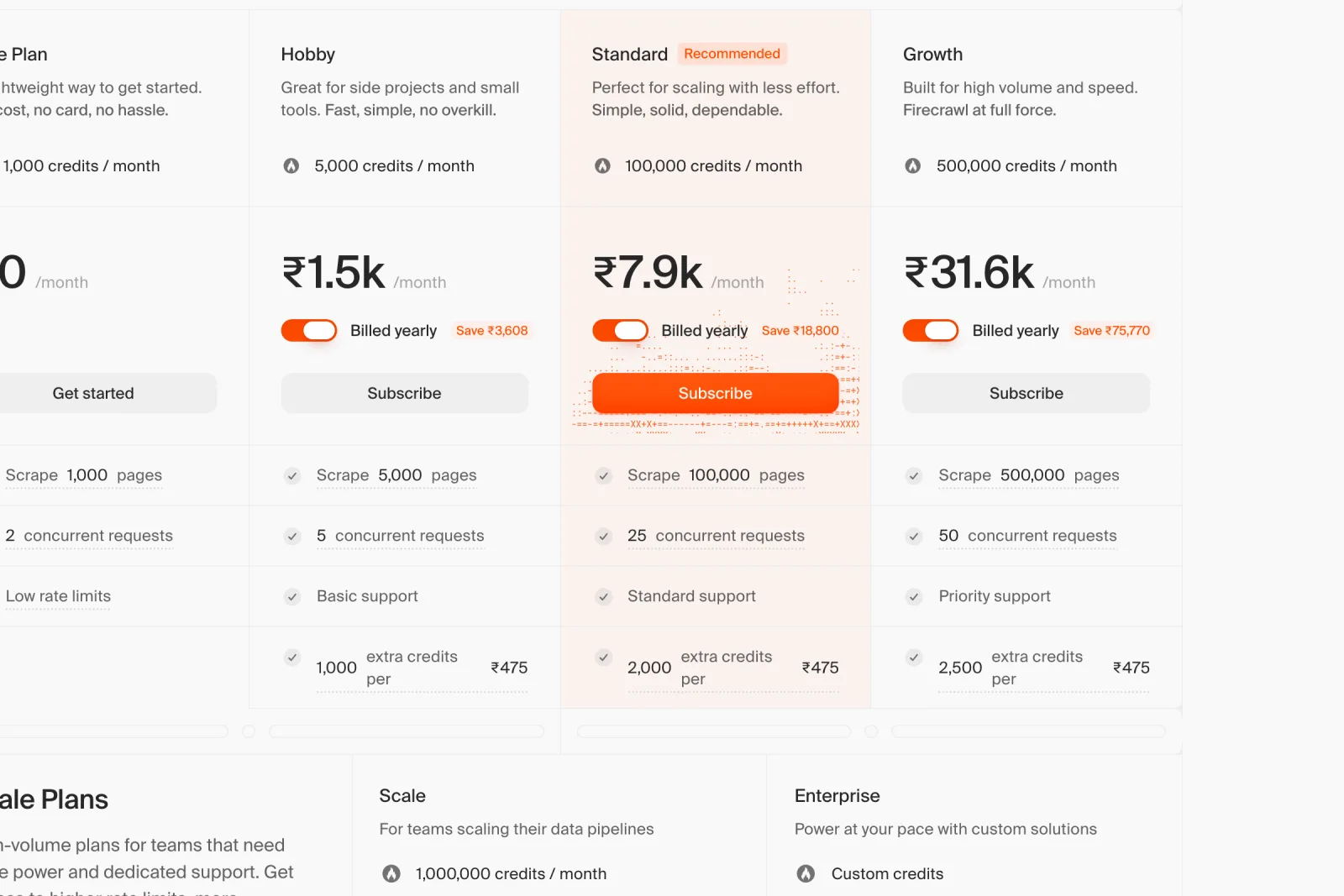
| Plan | Monthly | Billed yearly | Credits/mo | Concurrent requests |
|---|---|---|---|---|
| Free | $0 | $0 | 1,000 | 2 |
| Hobby | $19 | $16 | 5,000 | 5 |
| Standard (recommended) | $99 | $83 | 100,000 | 25 |
| Growth | $399 | $333 | 500,000 | 50 |
| Scale | $719 | $599 | 1,000,000 | 100 |
| Enterprise | Custom | Custom | Custom | |
Annual billing saves about 16% across the board. The Free tier needs no card and renews every month — it is a genuine free tier, not a trial.
Enterprise adds dedicated support with an SLA, zero-data retention, SSO, bulk discounts and unlimited pages. Scale is self-serve — it checks out instantly with no sales call, which is unusual at that price point.
What One Credit Actually Buys
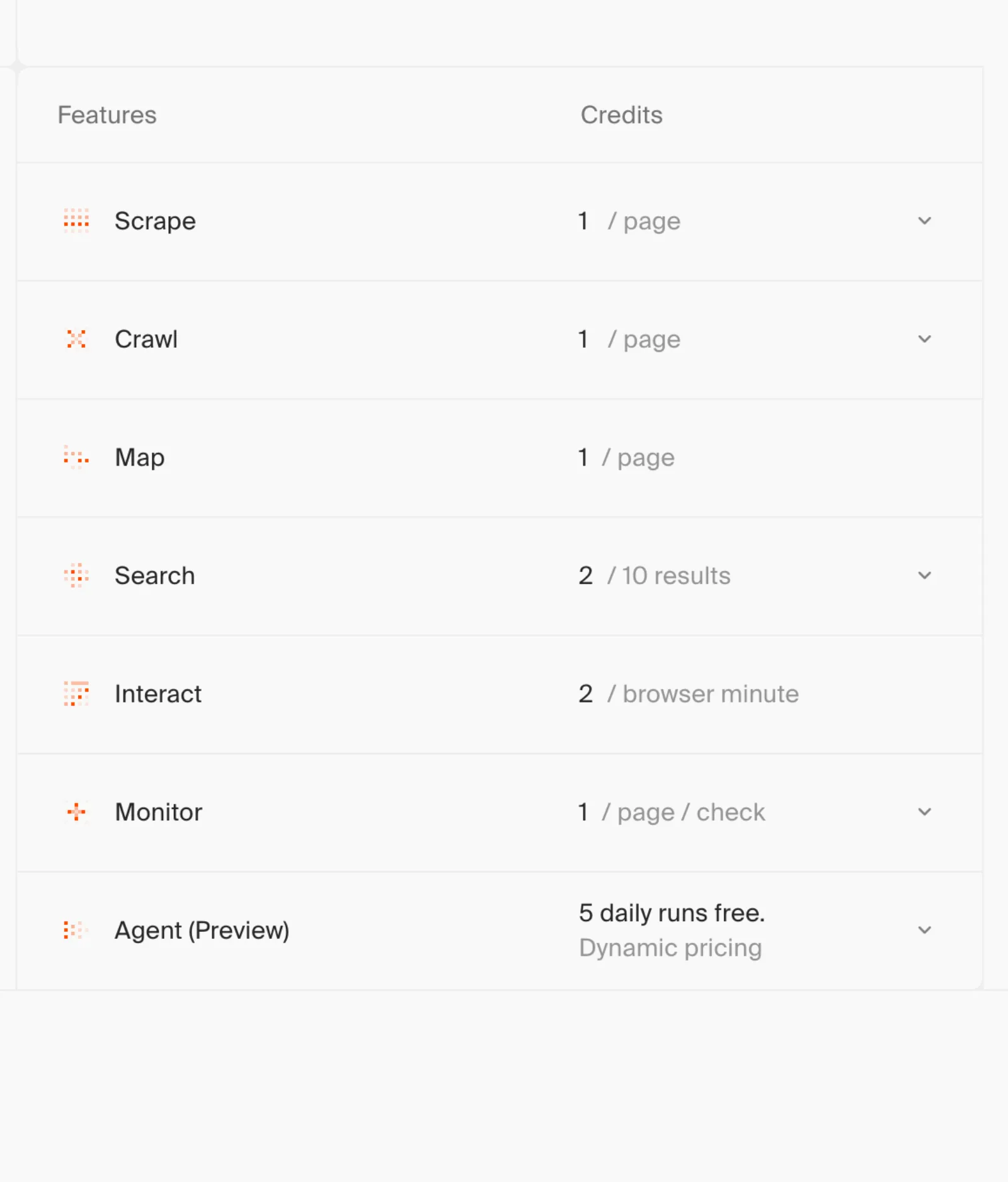
| Operation | Credit cost |
|---|---|
| Scrape | 1 / page |
| Crawl | 1 / page |
| Map | 1 / page |
| Search | 2 / 10 results |
| Monitor | 1 / page / check |
| Interact (browser sandbox) | 2–7 / browser minute |
| Agent (preview) | Dynamic — 5 daily runs free |
Status checks and job polling cost nothing, which matters if you poll a long crawl aggressively.
The Modifiers Are Where Budgets Break
This is the part that catches people. Base costs are only the start — several options add credits per page:
| Modifier | Added cost |
|---|---|
| JSON format (LLM extraction) | +4 / page |
| Prompt injection check | +4 / page |
| PDF parsing | +1 / PDF page |
| Zero Data Retention | +1 / page |
| Grok X Query (x.com) | +29 / request |
They stack additively, not multiplicatively — Firecrawl's own example: a page scraped with both JSON format and Zero Data Retention costs 1 + 4 + 1 = 6 credits. That is a meaningfully fairer design than the competitors who apply 5× or 10× multipliers for JavaScript rendering and premium proxies, where costs compound rather than add.
The single most expensive decision you will make is turning on JSON format. It takes a scrape from 1 credit to 5 — a 5× increase on every page. Scraping 100,000 pages with structured extraction consumes 500,000 credits, which is a Growth plan, not a Standard one. If you can post-process raw markdown yourself, you save 80% of your credit spend.
The X integration deserves its own warning: a single x.com request with Grok X Query costs 30 credits (1 base + 29), and 34 with JSON extraction on top. On the Free plan's 1,000 credits that is 33 requests for the entire month.
Where the Real Value Sits
Divide each plan's annual price by its credits and the curve is steep — unusually so:
| Plan | Annual $/mo | Credits/mo | Cost per credit | vs Hobby |
|---|---|---|---|---|
| Hobby | $16 | 5,000 | $0.00320 | — |
| Standard | $83 | 100,000 | $0.00083 | 3.9× better |
| Growth | $333 | 500,000 | $0.00067 | 4.8× better |
| Scale | $599 | 1,000,000 | $0.00060 | 5.3× better |
That curve is worth contrasting with Magnific, whose credits cost the same on every tier — Firecrawl rewards volume, Magnific does not. Standard costs 5.2× what Hobby costs but delivers 20× the credits. That is the largest single jump in the lineup, and it creates a sharp break-even worth knowing precisely.
The Hobby cliff
Hobby gives 5,000 credits for $16. Top-ups on Hobby are $5 per 1,000 credits. So bridging a shortfall costs $5 per extra thousand — and the gap to Standard's $83 is $67, which buys 13,400 top-up credits.
Above roughly 18,400 credits a month, Standard is cheaper than Hobby plus top-ups — and it hands you 100,000 credits instead of 18,400, plus five times the concurrency and five times the rate limits. If you are topping up Hobby more than about thirteen times a month, you are paying Standard money for a fraction of Standard.
Top-Ups and Auto-Reload
Extra credits are bought in $5 batches, either on demand or automatically when your balance hits zero. What $5 buys depends on your plan:
| Plan | Credits per $5 | Top-up cost/credit | Plan cost/credit | Overflow premium |
|---|---|---|---|---|
| Hobby | 1,000 | $0.0050 | $0.00320 | 1.6× |
| Standard | 2,000 | $0.0025 | $0.00083 | 3.0× |
| Growth | 2,500 | $0.0020 | $0.00067 | 3.0× |
| Scale | 5,000 | $0.0010 | $0.00060 | 1.7× |
Overflow always costs more than plan credits — between 1.6× and 3× more. Standard and Growth are penalised hardest, at triple the plan rate. The practical rule: size your plan to your realistic peak month rather than your average, because the months you exceed it are the expensive ones.
Auto-reload is controllable. Set a monthly limit in Billing as a whole multiple of $5 to cap what it can spend, enter 0 to switch it off entirely, or leave it blank for no cap. Credits you buy manually do not count against that limit.
One important asymmetry: credits do not roll over on self-serve plans — unused credits reset each cycle. Rollover is available on Scale.
Rate Limits: Throughput Is a Separate Axis
Credits govern volume; rate limits govern speed. They do not scale together, and the difference decides which plan you need.
| Plan | /scrape | /map | /search | /crawl | /agent | Concurrent browsers |
|---|---|---|---|---|---|---|
| Free | 10 | 10 | 10 | 2 | 2 | 2 |
| Hobby | 100 | 100 | 100 | 20 | 20 | 5 |
| Standard | 500 | 500 | 500 | 100 | 100 | 25 |
| Growth | 5,000 | 5,000 | 5,000 | 1,000 | 1,000 | 50 |
| Scale | 10,000 | 10,000 | 10,000 | 2,000 | 2,000 | 100+ |
All figures are requests per minute. Extract endpoints share the /agent limits, and batch scrape shares /crawl.
Notice the shape. From Standard to Growth, credits rise 5× but rate limits rise 10× — Growth is bought for throughput, not for volume. If you need to pull 500,000 pages a month but can do it slowly, Standard plus top-ups may serve you better than Growth. If you need to pull them fast, Growth is the only plan that will let you.
Two operational details worth knowing: queued jobs count their wait time against the request's timeout parameter, and anything still queued after 48 hours is dropped. Queue depth runs from 50,000 jobs on Free through 200,000+ on Scale.
A Contradiction Worth Knowing About Failed Requests
Firecrawl's pricing FAQ states that it only charges for successful requests. Its billing documentation says something different:
"Credits are charged whenever Firecrawl's infrastructure processes a request, even if the target site returns an HTTP error status code such as 403 Forbidden or 404 Not Found."
These can be reconciled — "failed" plausibly means a failure on Firecrawl's side rather than an error returned by the target — but the distinction is not one the pricing page makes, and it matters enormously in practice. Anyone scraping bot-protected sites will collect 403s in volume, and by the documentation those are billable. Budget for your real success rate, not your hoped-for one.
The one documented exception runs the other way: a failed prompt-injection detection costs 5 credits where an ordinary failed scrape costs 0.
What Real Workloads Cost
Worked examples on Standard, at $0.00083 per credit:
| Job | Credits | Cost |
|---|---|---|
| 10,000 pages, plain markdown | 10,000 | ~$8.30 |
| 10,000 pages with JSON extraction | 50,000 | ~$41.50 |
| 1,000 searches (10 results each) | 2,000 | ~$1.66 |
| 500 PDFs averaging 10 pages | 10,000 | ~$8.30 |
| Monitoring 200 pages daily for a month | 6,000 | ~$5.00 |
| 100 x.com requests with Grok X Query | 3,000 | ~$2.49 |
| 60 minutes of browser Interact | 120–420 | ~$0.10–0.35 |
The pattern is clear: plain scraping is cheap, and intelligence is what costs. The same 10,000 pages runs $8.30 raw or $41.50 with LLM extraction.
Which Plan Should You Buy?
| If you… | Choose |
|---|---|
| Are evaluating, or scrape under 1,000 pages a month | Free — no card, renews monthly |
| Run a side project under ~18,000 credits a month | Hobby ($16–19) |
| Exceed ~18,400 credits a month | Standard — cheaper than Hobby plus top-ups |
| Use JSON extraction at any real volume | Standard minimum — extraction is 5× per page |
| Need speed more than volume | Growth — 10× the rate limits of Standard |
| Run production pipelines above 500K pages | Scale — and the only self-serve tier with rollover |
| Need zero-data retention, SSO or an SLA | Enterprise |
| Top up more than ~13 times a month | Upgrade — overflow costs up to 3× plan rate |
The Verdict
Firecrawl's pricing is unusually honest in structure and unusually punishing at one specific seam. Additive modifiers instead of multipliers, a real free tier, no charge for polling, self-serve checkout right up to $719/month, and a published rate-limit table are all better than the category norm.
The seam is Hobby. At $16 for 5,000 credits it is the worst credit value on the board — nearly 4× the cost per credit of Standard — and its $5-per-1,000 top-ups make growing out of it expensive. It works for genuinely small projects and becomes a trap the moment you are not one.
Standard at $83/month is the plan most serious users should start on. It is where the credit curve flattens, and 100,000 credits absorbs the JSON-extraction multiplier that would wipe out Hobby in a week.
Two things to do before you commit: work out your real page volume with modifiers applied, not raw page count, and check your target sites' block rate — because by the billing docs, the 403s count.
Keep Reading
If the LLM bill behind your scraping pipeline is the other half of the budget, Claude Code API pricing breaks that side down. Or browse all guides and prompts on PromptsRush.
Frequently Asked Questions
10 questions answered