Loading model...
Best Nano Banana Pro prompts
153 prompts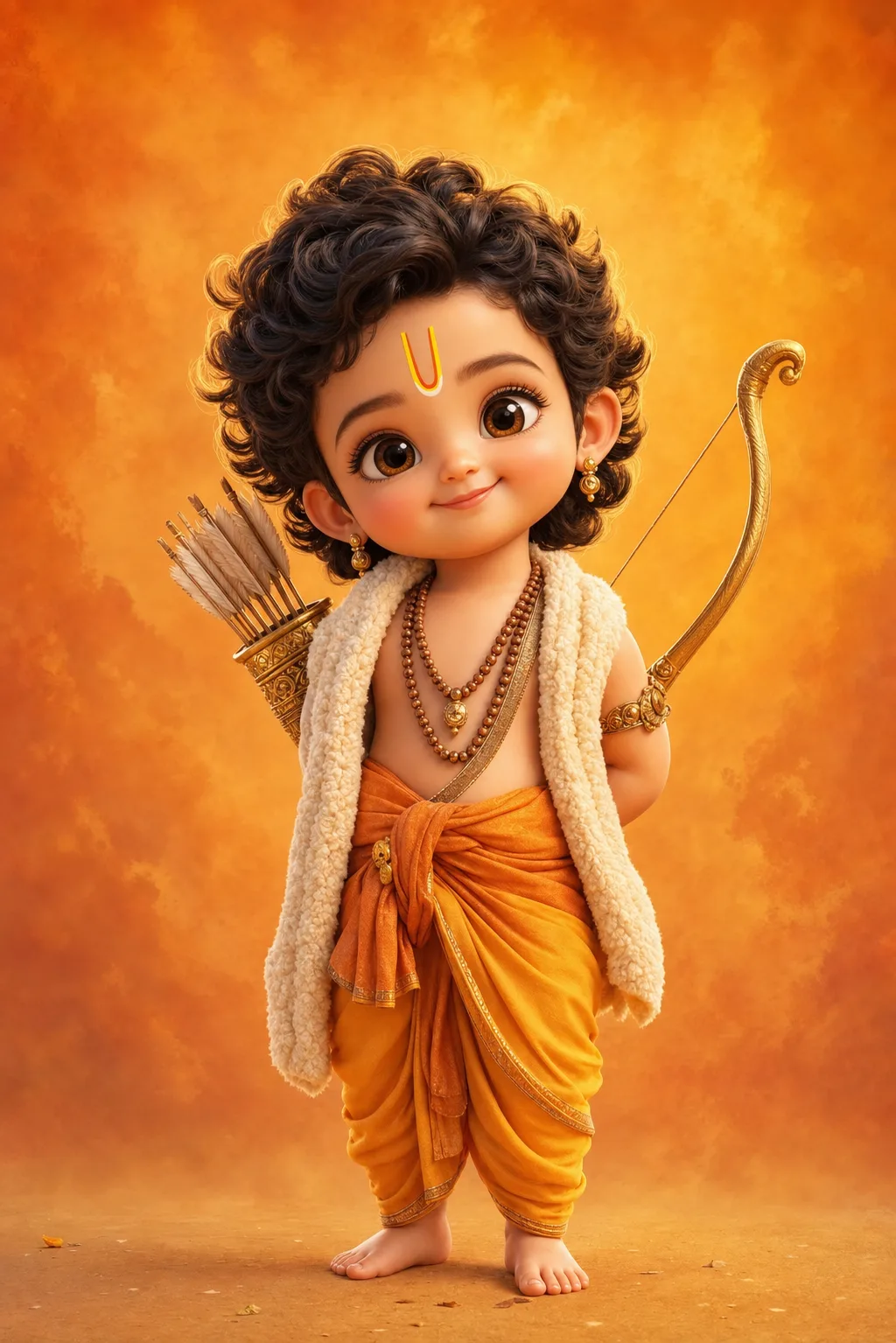
Image
Portrait & Character
Baby Ram & Krishna 3D Art Prompt
A baby Ram and baby Krishna AI art prompt that renders adorable Pixar-style 3D toddler deities — five divine characters with glossy eyes and soft light. The template recreates the beloved chibi devotional-art trend: a divine child with oversized sparkling eyes, chubby cheeks, curly hair and tiny bare feet, dressed and equipped with the authentic attributes of each deity, rendered like a frame from a premium animated film. Ultra-soft skin shading, fine fabric and wool texture, delicate gold jewelry and a warm rim light give every full-body render its huggable finish. Why the character stays reverent Every option keeps the character reverent and sweet: the charm comes from innocence, not caricature. Each deity's costume and props are written into the option itself, so the iconography arrives correct without extra prompting. What you can customize Divine Character — five options: Little Ram with his golden bow and tilak, Little Krishna with flute and peacock feather, Little Hanuman with his gada, Little Ganesha with a modak and his mouse friend, and Little Shiva with crescent moon and tiny trident Backdrop Tone — four washes: Saffron Warmth, Sky Blue Calm, Temple Gold bokeh and Pastel Peach Best for Devotional creators and family audiences — Ram Navami, Janmashtami and Ganesh Chaturthi festival posts, WhatsApp status images, phone wallpapers, kids' room art prints, YouTube devotional channel thumbnails, and greeting cards. Tips for the best results Nano Banana Pro and Midjourney both render the glossy-eye 3D toy style beautifully. Generate tall (2:3 or 9:16) for wallpapers and status images. Avoid combining two deities in one frame; each is composed as a solo portrait. Avoid adding text or logos to the image. Avoid photorealistic skin requests — the soft animated-film shading is what makes the style feel huggable.
133 ViewsTemplate
Image
Social Media
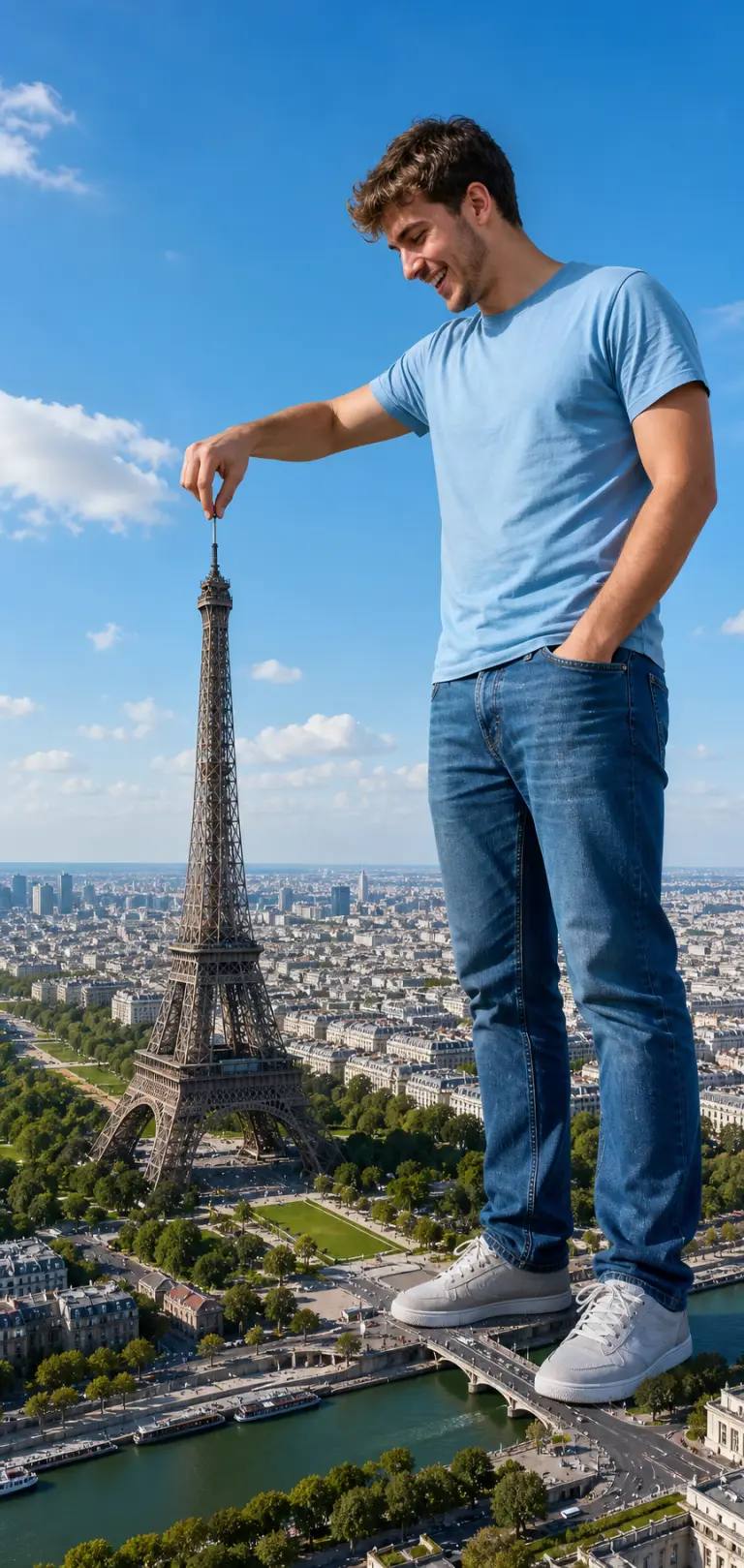
Giant Tourist Forced-Perspective Photo
A giant tourist forced-perspective prompt that drops anyone into a playful scale-illusion photo, towering over a landmark and pinching it like a toy. The template builds the viral "giant selfie" composite: your subject stands enormous in the foreground while a real city sprawls in miniature below, with matched sunlight and shadows so the forced perspective reads as one seamless shot rather than a paste-up. Because it works from an attached reference photo, the giant keeps your subject's real face and likeness. Output is a tall vertical, full-length composition with the giant on the right and the aerial cityscape sweeping away on the left. What you can customize Subject Description — a brief note on clothing and vibe, such as the default cheerful young man in a light blue t-shirt, jeans and white sneakers Landmark — six choices: Eiffel Tower, Big Ben, Statue of Liberty, Colosseum, Burj Khalifa and Taj Mahal Interaction — four gestures: Pinch the top, Hold it in palm, Poke it with a finger or Step over it Sky — Bright Blue Day, Golden Sunset or Dramatic Clouds Reference Photo — an image upload of the person; a clear full-length or three-quarter shot keeps the face and likeness Best for Creators, travel accounts and anyone who wants a scroll-stopping, funny personal-brand image for Instagram, Reels covers, birthday posts or "wish you were here" travel gags, without touching Photoshop. Tips for the best results Attach a clean full-length or three-quarter photo in casual clothes against a simple background; full-body references place the feet believably on the city below, and good lighting helps the composite match. Keep the pose to one clear gesture, and describe the subject briefly. The bright-sky default sells the daytime tourist look. Avoid tightly cropped headshots — the body has to be invented and the scale illusion weakens. Avoid busy backgrounds in the reference photo that bleed into the composite, and do not ask for two giants at once; the effect lands hardest with a single colossal subject and one landmark.
Image
Portrait & Character
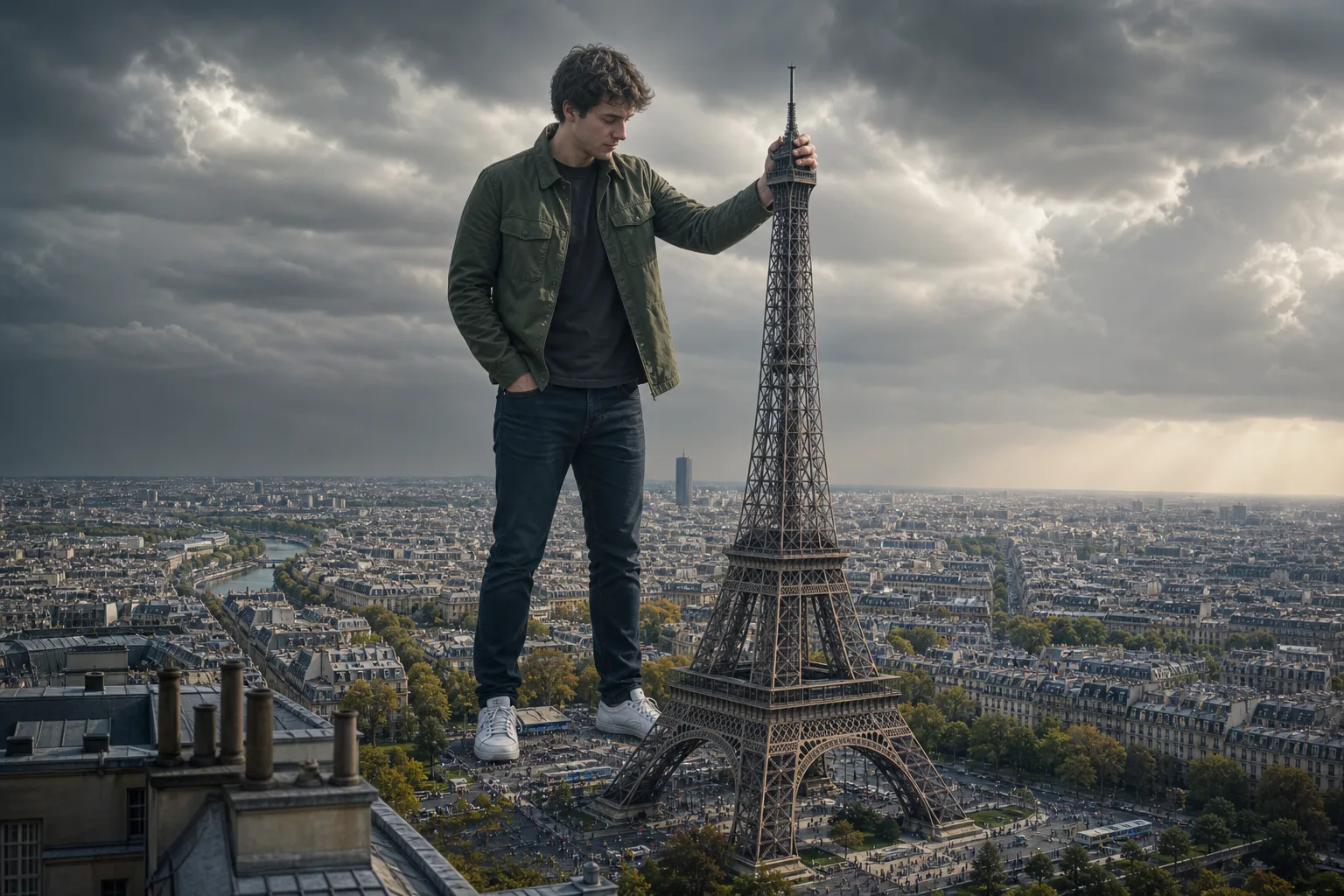
Giant in the City Photo Prompt
A giant photo AI prompt that turns your reference picture into a hyperrealistic colossus towering over Paris, London, Dubai and more. The template recreates the viral scale-illusion trend: you appear as a calm, friendly giant standing among the rooftops of a world-famous city, casually interacting with its most iconic landmark while tilt-shift crowds and traffic swarm far below. Everything that sells the illusion is engineered in — accurate perspective from a rooftop vantage at chest height, miniature detail on the streets, cinematic grading, and a pose matched to each landmark. What you can customize Landmark — five options with a built-in pose: grip the Eiffel Tower's spire, lean on Big Ben, steady yourself on the Empire State Building's antenna, rest a hand on the Burj Khalifa, or touch the Taj Mahal's dome Sky Mood — Moody Storm, Golden Sunset, Clear Afternoon or City Night; each changes the entire color grade Reference Photo — a required image upload; your exact face, hairstyle and outfit are preserved head to toe Best for Creators making viral Instagram and TikTok posts, YouTube thumbnails, profile pictures with a twist, and just-for-fun edits of friends and family. Tips for the best results Upload a full-body shot where possible, since the outfit is preserved in full; a half-body photo still composes well. Nano Banana Pro preserves likeness and outfit most faithfully, with ChatGPT Image 2 a strong alternative. Avoid group photos — one giant per city. Avoid heavily cropped face-only selfies if you can; the more of your outfit is visible, the more convincing the giant. Avoid busy patterned backgrounds in the reference photo, which can bleed into the clothing reconstruction.
Image
Social Media
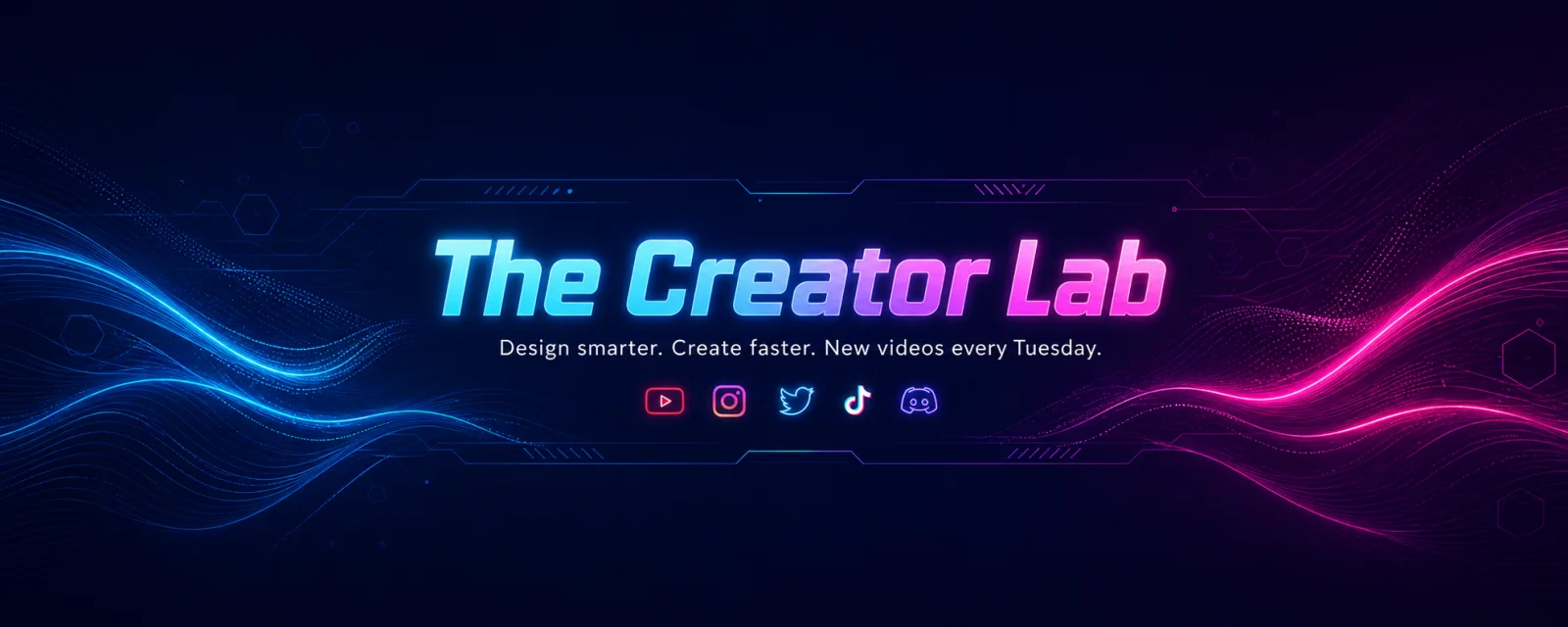
YouTube Channel Art Banner Prompt
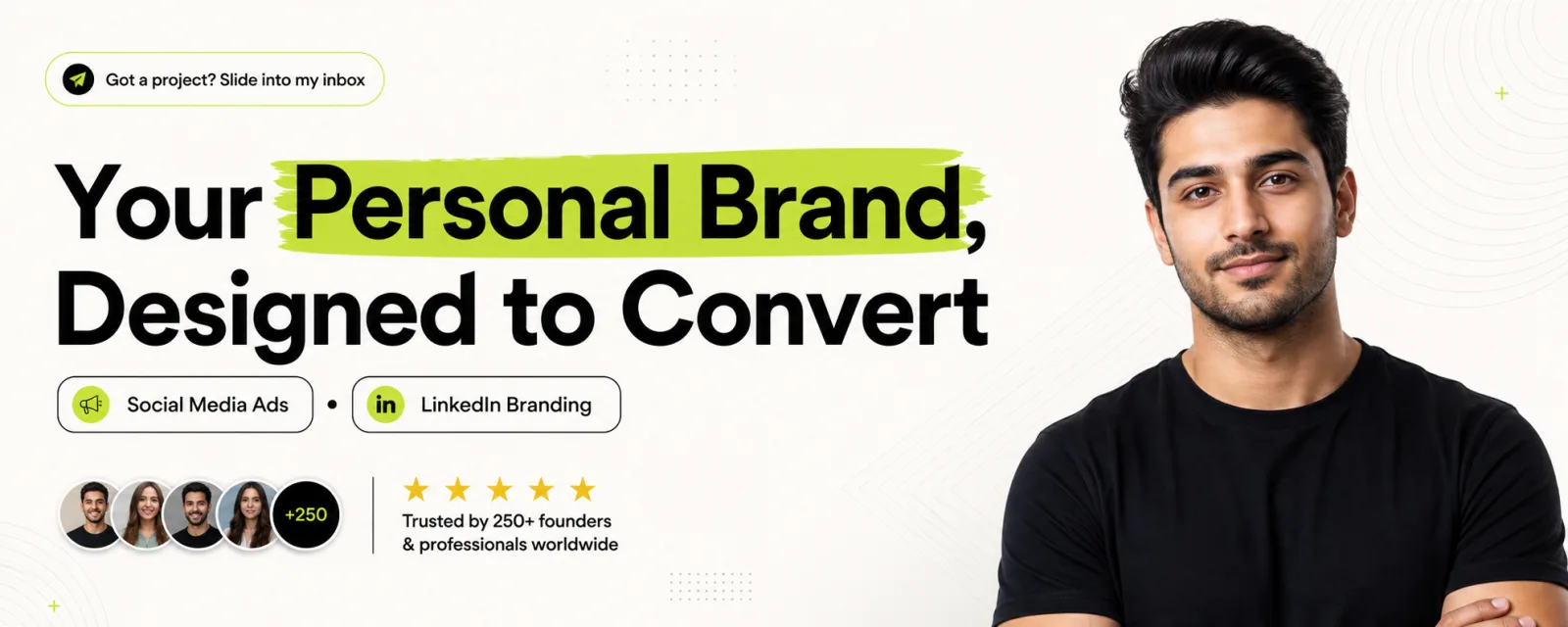
A YouTube channel art prompt that designs premium 2560×1440 banners with your channel name locked to the safe area — five styles from neon to minimal. The template solves the mistake that ruins most channel banners: YouTube crops the same artwork differently on TV, desktop and mobile, and only the centered 1546×423 safe band is visible everywhere. This prompt locks your channel name, tagline and social-icon row inside that band and pushes pure ambient design to the outer canvas, with vector-sharp typography and balanced negative space. Why the layout survives every crop The prompt renders the channel name as oversized hero type, the tagline beneath it and a slim icon row below that, all inside the safe band. The outer areas carry only pattern and design, never text, so nothing important is lost when a device trims the edges. What you can customize Channel Name — rendered as the oversized hero type Tagline — your niche, promise or upload schedule; short lines render crispest Design Style — five looks: Neon Tech for glowing creator-tech energy, Clean Studio for bright minimal professionalism, Playful Pop for bold color-blocked fun, Cinematic Dark for moody film-channel gravitas, or Nature Calm for organic lifestyle warmth Reference Photo (optional) — attach a headshot or half-body photo to appear as a clean studio-lit cutout at the right edge of the safe band, or skip it for a pure typographic brand banner Best for YouTubers, streamers, podcasters and brands setting up or refreshing a channel: gaming and tech channels, education and tutorial channels, vlogs, and business channels all fit. Tips for the best results Nano Banana Pro renders the typography and icon row most reliably, with ChatGPT Image 2 a strong alternative. Generate wide and upload straight to YouTube. Avoid long taglines — they shrink the hero type. Keep channel names to about four words or fewer. Avoid busy reference photos; a clean headshot blends best.
Image
Social Media
Premium LinkedIn Banner Prompt
A LinkedIn banner AI prompt that turns your photo into a premium profile cover — bold headline, highlight accents, social proof, and five design styles. The template composes a full agency-grade banner around your Reference Photo: you appear as a clean studio-lit cutout on the right, while the left two-thirds carries an oversized headline with marker-highlighted key words. Slim service tags with icons, a call-to-action badge, and a five-star social-proof strip with avatar circles complete the layout at the true 1584×396 banner size. Why it works as a real LinkedIn header The design deliberately keeps critical text away from the bottom-left corner, where LinkedIn overlays your circular profile photo. Balanced negative space and pixel-perfect alignment are written into the prompt, so the banner looks professionally designed rather than templated. What you can customize Headline — the oversized statement on the left; keep it under about eight words so the typography stays huge, with one or two words highlighted. Supporting Text — services, niche, or a short call to action, rendered as slim rounded tags with tiny icons. Design Style — five looks: Lime Pop for the viral highlighter style, Executive Dark for gold-on-charcoal elegance, Corporate Blue for a trustworthy consulting feel, Gradient Creator for creator-economy energy, or Minimal Editorial for quiet serif sophistication. Reference Photo — required upload; a clear headshot or half-body photo with good lighting becomes the professional cutout on the right. Best for Coaches, consultants, freelancers, founders, job seekers, and creators who want a LinkedIn or X/Twitter header that looks designed by an agency. It doubles as a personal-branding cover for any wide profile format. Tips for the best results Generate at a wide ratio — Nano Banana Pro handles the true 1584×396 size and renders the many short text labels crisply, with ChatGPT Image 2 a strong alternative. Avoid group photos and busy backgrounds in the reference; a single clearly lit person cuts out cleanest. Avoid paragraph-length supporting text — short tags keep the layout airy. Do not ask for more than two highlighted words; restraint is what makes the result look expensive.
Image
Social Media
YouTube Creator Talking-Head Shot
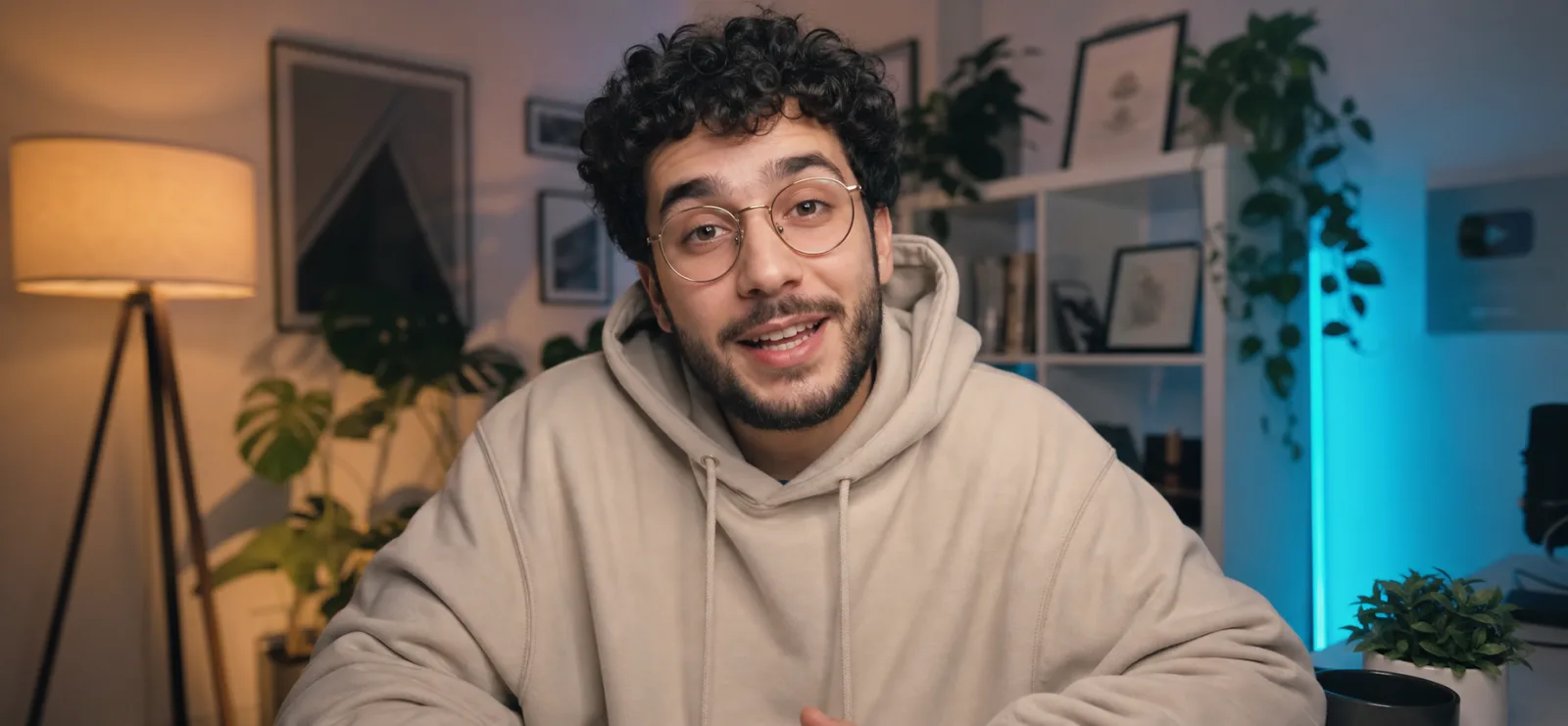
A YouTube talking head prompt that generates a cinematic creator shot — mid-sentence on camera in a cozy, softly lit home studio. The template frames the classic creator-economy look: an engaging subject leaning into the lens as if explaining something they love, set against a dreamy blurred backdrop of warm lamps, leafy plants, white shelving and a teal LED accent glow. The result reads instantly as a premium YouTube video still, with the shallow depth of field, eye-level framing and soft key lighting of a channel that takes production seriously. What you can customize Creator Description — hair, facial features, glasses and clothing anchor the render; the default is a friendly young man with dark curly hair, a short beard, wire-frame glasses and an oversized cream hoodie. Studio Backdrop — four settings: Cozy Evening Studio (warm lamp plus teal LED glow), Minimal Daylight, Neon Gamer Den or Book-Lined Office. Creator Photo — optional upload; attach a clear chest-up photo of yourself and the creator in frame will resemble you. The prompt also carries an expression variable that controls the exact mid-sentence energy, plus a 35mm f/1.8 cinema-camera look with sharp focus on the eyes. Best for YouTubers, course creators, podcasters and marketers who need channel art, video thumbnails, website hero images, course landing pages or ad creative showing a person mid-conversation with the camera — without setting up lights and rolling footage for a single frame. Tips for the best results Describe the creator concretely; an oversized hoodie or knit reads on-trend for the genre. Pick the backdrop that matches your brand: the cozy evening default gives the warm-plus-teal contrast that dominates YouTube, while Minimal Daylight suits productivity and lifestyle channels. Avoid full-body poses — this is a chest-up desk framing. Avoid cramming logos or readable screen text into the background. Keep it to one creator, one camera, one conversation; over-specifying multiple people breaks the format.
Image
Social Media
Floating Glass Instagram Profile Card
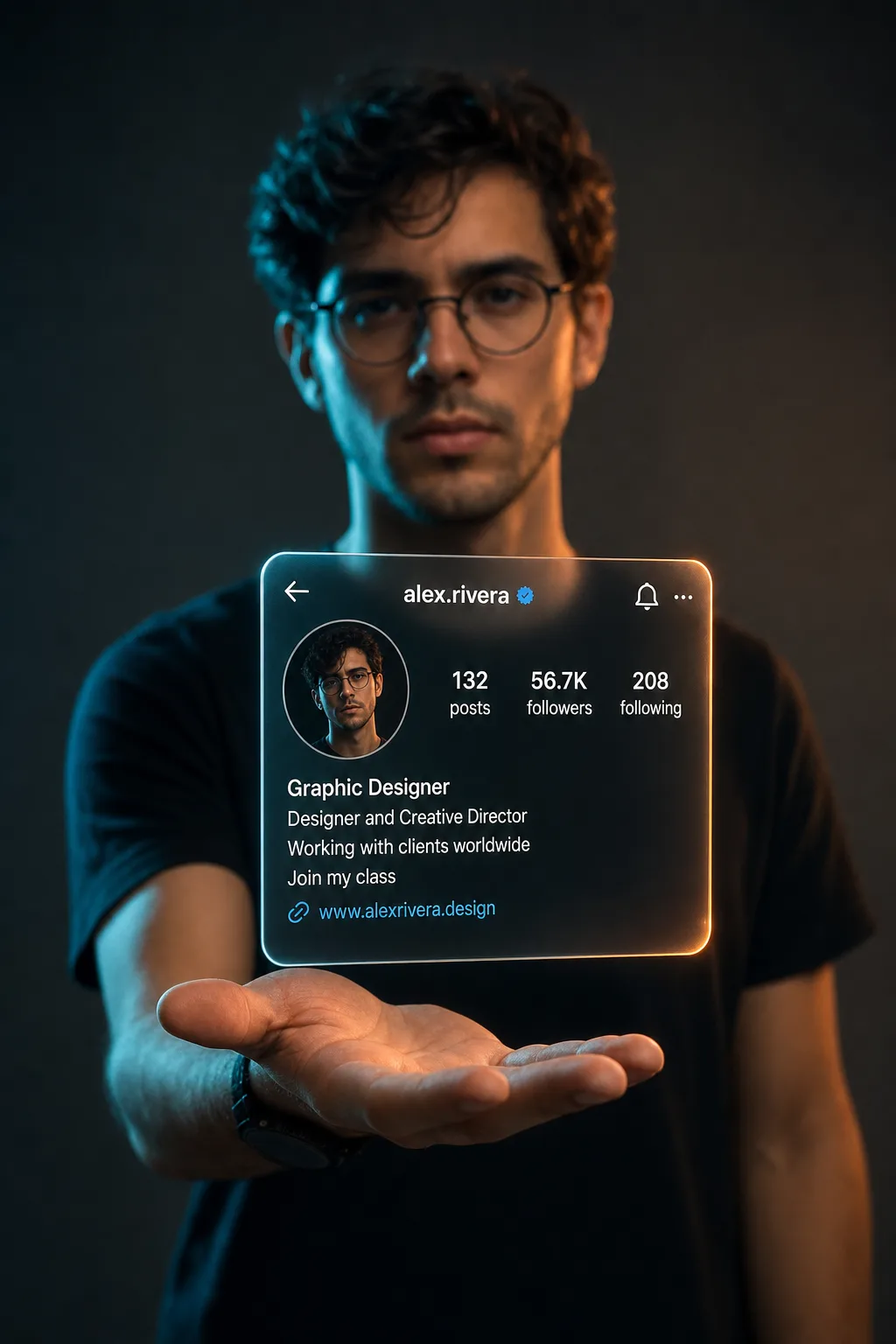
An Instagram profile card prompt that renders you holding your own profile as a floating glass hologram — the viral 3D social media portrait effect. The template stages a cinematic studio portrait: you stand against a dark moody backdrop with one palm open, and a translucent frosted-glass Instagram profile card hovers above it like a projection, complete with your username, blue verified badge, circular profile photo, post and follower stats, bio lines and link. The card stays in razor-sharp focus while you blur softly behind it, and dramatic lighting wraps the scene in a premium, futuristic glow. What you can customize Instagram Username — the handle shown beside the verified badge; keep it short and lowercase, exactly as it appears on Instagram. Profile Details — post, follower and following counts, bio lines and a link; the default reads 132 posts, 56.7K followers, a designer bio and a website link. Lighting Style — four grades: Teal & Orange split lighting, Neon Purple, Golden Hour or Clean Studio. Your Portrait Photo — optional upload of a clear chest-up photo; it drives both the person holding the card and the circular profile picture on it. Best for Designers, creators, coaches and freelancers who want a scroll-stopping profile announcement, follower-milestone post, personal-branding reel cover or link-in-bio hero image — anywhere your social presence should feel like a product launch. Tips for the best results Upload a well-lit portrait; likeness quality follows photo quality because the same image feeds both the person and the profile picture. Use your real numbers — concrete stats like "56.7K followers" read as authentic — and keep to three or four short bio lines. Avoid long paragraphs in the bio; the glass card gets crowded and the text degrades. Avoid sunglasses or heavily filtered source photos that fight the likeness. Skip busy patterned clothing; a plain dark shirt keeps the hologram as the hero of the frame.
Image
Social Media
Scrapbook Portfolio Poster Prompt
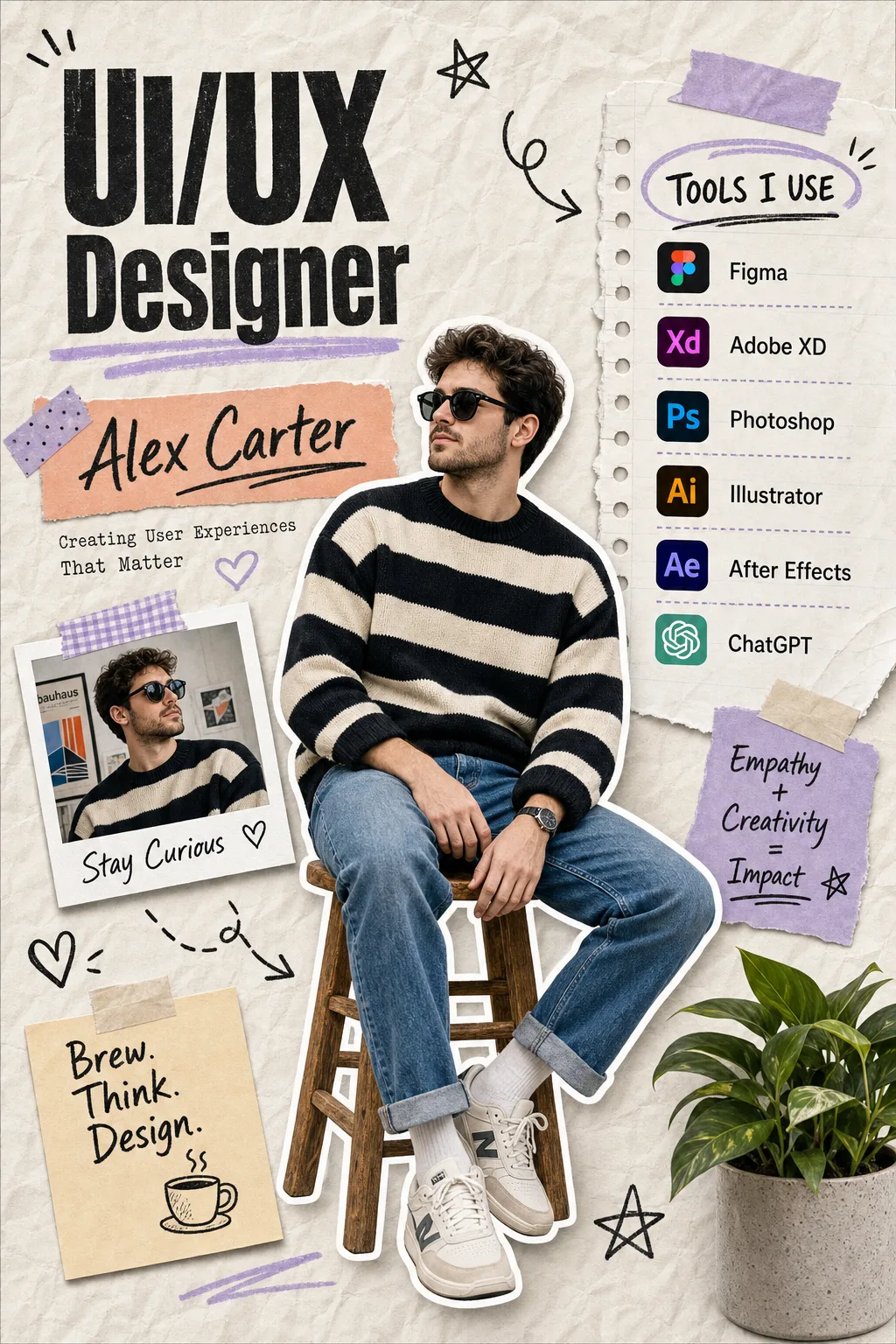
A portfolio poster AI prompt that turns any reference photo into a trendy scrapbook-style personal branding poster with your title, name, and tools. The template recreates the viral cutout-collage aesthetic: your photo is clipped with a bold white sticker outline and seated at the center of a crumpled-paper canvas, surrounded by torn notebook panels, washi tape, hand-drawn doodles, a captioned polaroid and sticky-note mantras. Everything sits in muted lavender-and-peach pastels with a potted plant in the corner, and the generator preserves your face, hair and outfit in both the central cutout and the polaroid. What you can customize Profession Title — the big bold black headline in the top-left with a pastel lavender underline (default "UI/UX Designer"). Name — set inside the peach highlighted banner beneath the headline, alongside a short tagline about your craft. Tools You Use — the list on the torn "TOOLS I USE" notebook panel, rendered with recognizable app icons; four to six apps reads best. Reference Photo — required upload; a clear waist-up or full-body shot with good lighting cuts out cleanest. Best for Designers, developers, video editors, photographers, marketers and freelancers who want a scroll-stopping LinkedIn profile banner, an Instagram carousel opener, a resume header or a portfolio hero image. Tips for the best results Nano Banana Pro is the strongest match: it handles reference-photo likeness and the poster's many short text labels exceptionally well, with ChatGPT Image 2 a close second. Avoid group photos or busy backgrounds in the reference; a single clearly lit person produces the cleanest sticker cutout. Do not list more than six tools — the panel gets cramped and icons blur. Keep taglines short so the handwritten typography stays crisp. Leave the doodles, tape strips, plant and pastel accents alone; they are already engineered into the prompt.
Image
Product & Commercial
Glassmorphism E-Commerce Product Poster
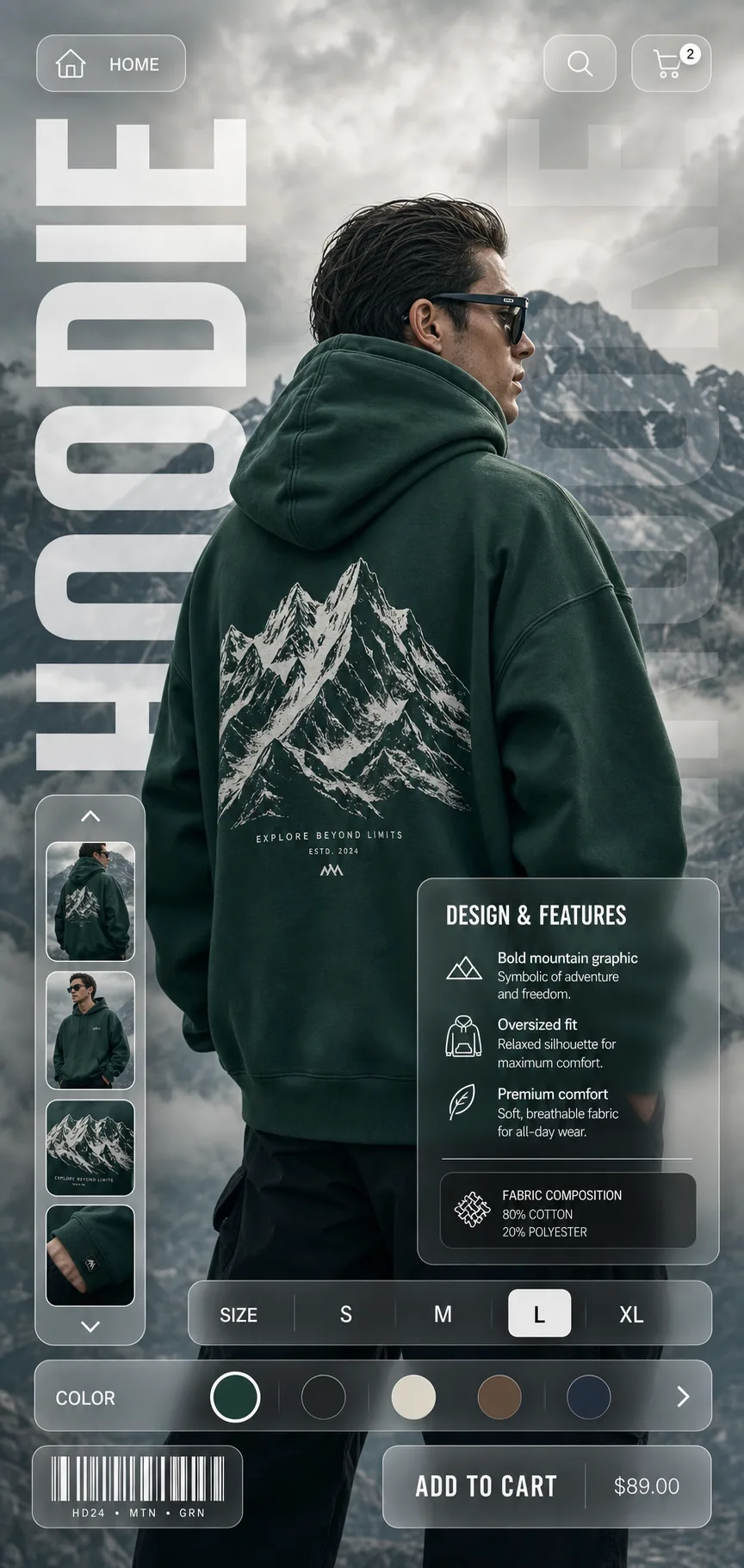
A glassmorphism product poster prompt that turns any apparel or product shot into a sleek e-commerce campaign visual with frosted-glass UI overlays. The template composes a full vertical poster around your product: a hero model or product shot against a cinematic backdrop, oversized translucent typography running down the left edge, and a layer of floating frosted-glass interface elements — navigation pills with home, search and cart icons, a vertical thumbnail carousel, a Design & Features info card, an S M L XL size selector, a color-swatch slider and a barcode chip. The result reads like a landing page and a fashion editorial at once, which is why the style dominates streetwear lookbooks, Behance shop concepts and premium direct-to-consumer feeds. What you can customize Product Description — the garment, its exact color, the print it carries and how the model wears it; the default is a back-view model in an emerald hoodie with a white mountain-range graphic. Product Name — the huge condensed uppercase word running down the edge; one short, punchy word like HOODIE, JACKET or RUNNER. Backdrop — four scenes: Misty Mountains, Urban Concrete, Desert Dunes or Studio Gradient. Best for E-commerce designers, apparel brands, print-on-demand sellers and social media marketers who need scroll-stopping product creative for Instagram, store banners, lookbooks and client mockups without commissioning a studio shoot and a UI designer. Tips for the best results Be generous in the Product Description — the render follows what you describe almost literally. Pick a backdrop that contrasts with the product color so the subject pops through the glass panels. Avoid cramming multiple products into a single poster. Avoid long product names that break the vertical typography. Skip busy or cluttered backdrops; the frosted-glass panels need calm negative space behind them to stay readable at a glance.
Image
Product & Commercial
Epic Flying Food Ad Prompt
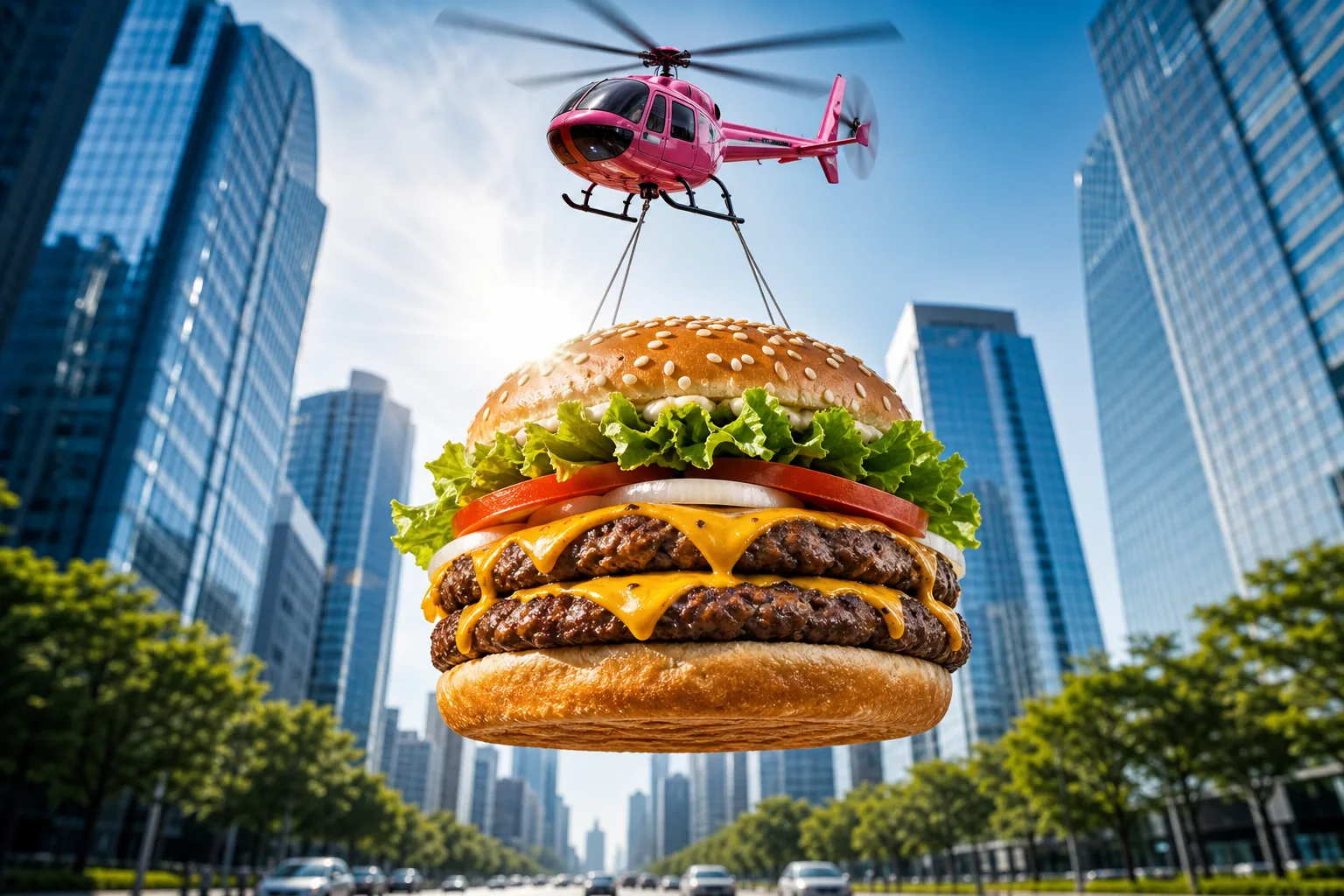
A food advertising prompt that airlifts a giant photorealistic burger — or any dish you describe — through the sky for scroll-stopping commercial shots. The template stages your hero food as an epic airborne delivery: suspended on cables beneath a glossy toy-like helicopter, framed from a dramatic low angle against a bright blue sky, with a sunburst lens flare and a softly blurred avenue of glass skyscrapers below. The result reads like a big-budget fast-food campaign frame — vibrant, crisp and instantly thumb-stopping. What you can customize Hero Food — describe the dish layer by layer; the default is a double cheeseburger with a toasted sesame bun, lettuce, tomato, onion rings, two charbroiled patties and dripping cheddar. Aerial Carrier — four options: Pink Toy Helicopter with motion-blurred rotors, Cargo Drone, Retro Blimp or Hot Air Balloon. Backdrop — three scenes: a symmetrical City Avenue, a sunny Coastal Boardwalk or a Desert Highway with red-rock mesas and heat shimmer. Best for Restaurants, food trucks, delivery apps and creative agencies producing social ads, billboards, menu screens and app-launch banners. Render wide for banners or square for feed posts. Tips for the best results Match the default's level of ingredient detail in the Hero Food field — it produces the most appetizing results. Keep the low-angle sunburst composition intact; it is what sells the scale. Nano Banana Pro, Midjourney and Flux all resolve the food textures and metallic carrier finishes beautifully. Avoid stacking different dishes into one frame — one hero product per shot keeps the ad readable — and avoid adding brand names or text inside the image. Avoid muted palettes; the saturated commercial color grade is part of the format's punch.
Image
Portrait & Character
Radha Krishna Divine AI Art Prompt
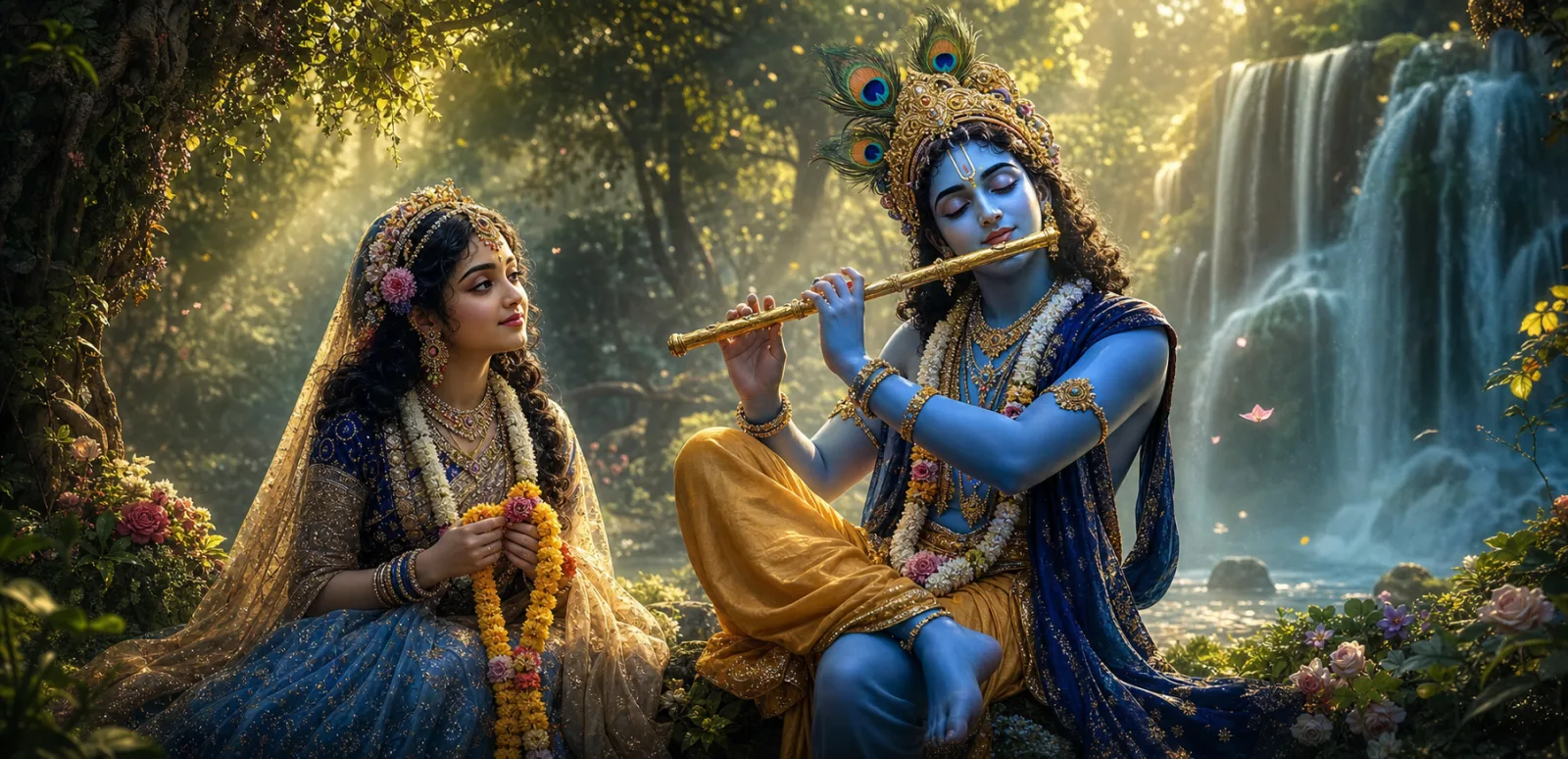
A Radha Krishna AI art prompt that renders the divine couple in luminous devotional detail — sapphire-blue skin, golden god rays, glittering jewelry. The template produces temple-worthy devotional artwork in a photorealistic fantasy style: Krishna crowned with a golden peacock feather in a royal silk dhoti, Radha in an ornately embroidered saree with floral jewelry woven through her hair, and the whole scene wrapped in a sapphire-and-gold palette with petals drifting through cinematic light. The composition is centered and symmetrical, tuned for the divine pair alone. What you can customize Sacred Moment — four poses: the iconic Flute Serenade with Radha holding a marigold garland, a Loving Gaze with hands joined, the Jhula Swing on a flower-adorned wooden swing, or a Raas Dance with silk garments mid-twirl. Divine Setting — four locations: a Forest Waterfall with rising mist, the Yamuna Riverbank at dusk with floating lotus blossoms, a Kadamba Grove with fireflies, or a Moonlit Garden in Vrindavan under a full moon. The defaults recreate the classic waterfall flute scene. Best for Devotional and spiritual creators — Janmashtami and Radha Ashtami festival posts, bhajan channel art, spiritual Instagram pages, phone wallpapers, framed prints and temple community content. Tips for the best results Keep the built-in sapphire blue and gold palette; it is what gives the artwork its signature devotional glow. Generate at a wide ratio for banners or a tall ratio for phone wallpapers. Nano Banana Pro and Midjourney handle the intricate jewelry and fabric embroidery especially well. Avoid adding extra deities or crowds into the same frame, and avoid requesting text or typography inside the image. Do not switch to harsh neon palettes, which break the reverent mood; the god rays, glittering skin and floating petals are already engineered into the prompt.
Image
Social Media
Urban Chill – Low-Angle Streetwear Portrait
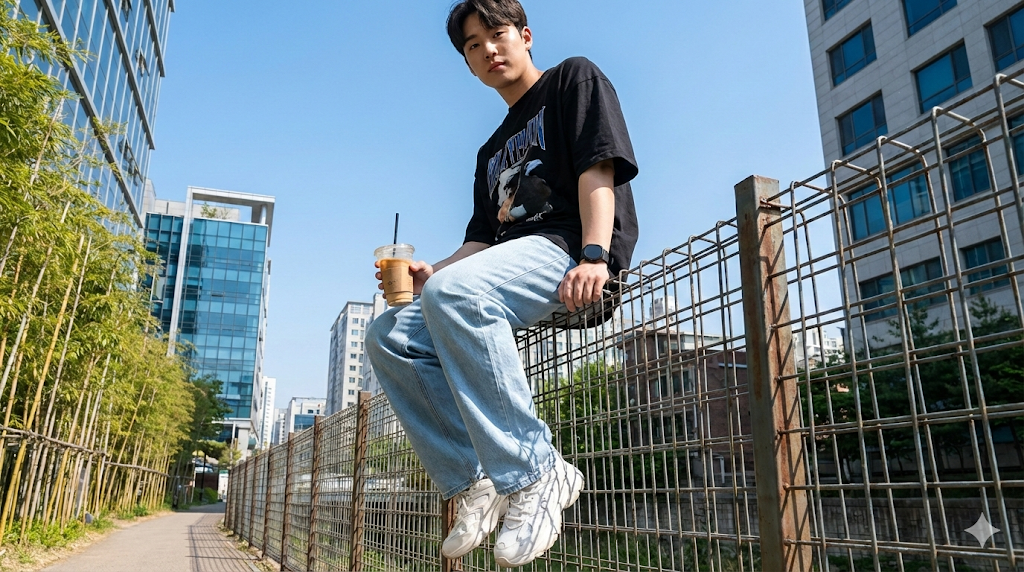
This template creates a photorealistic streetwear portrait with a relaxed, confident vibe. The subject’s identity is strictly preserved from the uploaded photo while the environment, wardrobe, and camera angle deliver a modern, lifestyle-editorial look. The low-angle perspective adds attitude and presence without exaggeration, making it ideal for social media, lookbooks, or personal branding.
326 Views