The PromptsRush journal
TutorialsHow to Create a Landing Page using AI with Prompts
“Build me a landing page” fails because one prompt does four jobs at once. This is the four-stage workflow — 18 prompts from buyer research to published page — that produces copy worth shipping.
Advertisement
Ask any AI to “build me a landing page” and you get a generic hero, three feature boxes and a button. It looks like a landing page. It converts like a brochure.
The problem is not the model — it is that one prompt is being asked to do four different jobs: research the buyer, decide the argument, write the copy, and lay out the page. Split those into stages and the output changes completely.
This walks through that workflow end to end: 18 prompts across four stages, then building the result into a live page — the prompt-led counterpart to our roundup of AI landing page builders. It assumes no design skill and no code.
Why One Prompt Never Works
A landing page is an argument arranged in a specific order. Each section has one job, and each job needs different input:
| Section | Its one job | What the AI needs to write it |
|---|---|---|
| Hero headline | State the outcome in the reader’s words | Buyer language, not your feature list |
| Subheadline | Say who it is for and how it works | Mechanism + audience |
| Social proof | Make the claim credible | Real numbers or named outcomes |
| Problem section | Show you understand the pain | The reader’s current workaround |
| Benefits | Translate features into outcomes | Feature list + the “so what” |
| Objection handling | Remove the reason to leave | The three real hesitations |
| Offer + CTA | Make the next step obvious and small | Risk reversal, exact action |
| FAQ | Answer what the CTA raised | Post-click anxieties |
Notice the right-hand column. Most of it is information the model does not have when you type a single sentence. That is the whole reason generic output happens — not weak prompting, missing input.
Stage 1 — Strategy Prompts (Before Any Copy)
These four produce the raw material every later prompt consumes. Run them once, keep the answers, paste them into everything after.
1. Buyer language extraction
You are a conversion researcher. My product is [PRODUCT] for [AUDIENCE].

List the 10 phrases this audience would actually use to describe the problem
my product solves — in their words, not marketing words.

For each phrase, note whether it describes a symptom, a cost, or a frustration.
Do not use my product name or any feature language.
2. Current workaround audit
For [AUDIENCE] facing [PROBLEM], list the 5 things they are most likely
doing right now instead of buying a product like [PRODUCT].

For each: why they chose it, what it costs them in time or money,
and the specific moment it breaks down.

That breaking point is what my landing page must name.
3. Objection inventory
I sell [PRODUCT] at [PRICE] to [AUDIENCE].

List the 8 real reasons someone would read my landing page,
agree with everything, and still not buy.

Rank them by how many buyers they affect.
Exclude “price is too high” unless you can say what they compare it to.
4. Single-claim test
Here is what my product does: [DUMP EVERYTHING — features, benefits, differentiators].

Compress this into ONE claim that is:
- specific enough to be falsifiable
- valuable enough that the buyer would act on it
- true (flag anything you are not sure I can support)

Then give me 5 alternative phrasings of that claim, ordered
from most concrete to most aspirational.
Do not skip stage 1. Every prompt after this is only as good as the buyer language it inherits. Ten minutes here is the difference between copy that sounds like your customer and copy that sounds like every SaaS page ever written.
Stage 2 — Copy Prompts (Section by Section)
Each prompt takes the stage 1 output as context. Paste the relevant answers in place of the bracketed blocks.
5. Hero headline
Buyer phrases: [PASTE FROM PROMPT 1]
Single claim: [PASTE FROM PROMPT 4]

Write 10 hero headlines under 12 words each.

Rules:
- lead with the outcome, not the product category
- use the buyer’s vocabulary from the phrases above
- no “revolutionise”, “unlock”, “effortless”, “game-changing”
- at least 3 must include a concrete number or timeframe

After the list, tell me which one you would ship and why.
6. Subheadline
Chosen headline: [HEADLINE]

Write 5 subheadlines of 15–25 words that each do three things:
name the audience, state the mechanism (how it works),
and remove the biggest ambiguity the headline leaves open.

The subheadline must not restate the headline in different words.
7. Problem section
Workarounds and breaking points: [PASTE FROM PROMPT 2]

Write a problem section of 3 short paragraphs that describes
the reader’s current situation so accurately they feel recognised.

Do not mention my product at all. End on the breaking point,
not on a solution. Second person, present tense.
8. Benefits, not features
Feature list: [FEATURES]
Buyer phrases: [PASTE FROM PROMPT 1]

For each feature, write one benefit line in this format:
[what it does] so you [outcome the buyer named].

Then cut the list to the 3 strongest and tell me what you cut and why.
Three strong beats eight weak.
9. Objection handling
Top objections: [PASTE FROM PROMPT 3]

For the top 3, write a short block that:
- states the objection plainly, in the reader’s voice
- concedes what is legitimate about it
- answers it with a specific fact, not reassurance

Never open with “Don’t worry” or “Actually”.
10. Social proof framing
Here is my raw proof: [TESTIMONIALS / METRICS / LOGOS / CASE OUTCOMES].

Rewrite each into a proof point that supports my single claim: [CLAIM].

For each, state which objection it neutralises.
If a piece of proof does not support the claim or kill an objection,
tell me to cut it.
11. Offer and CTA
Product: [PRODUCT]. Price: [PRICE]. Risk reversal: [GUARANTEE / FREE TIER / TRIAL].

Write the offer block and 8 CTA button labels.

CTA rules:
- describe what happens next, not “Submit” or “Get started”
- under 5 words
- first person where it reads naturally (“Start my free page”)

Flag any label that promises something the next screen does not deliver.
12. FAQ that closes
Objections not yet handled: [REMAINING FROM PROMPT 3]
CTA: [CTA]

Write 6 FAQ entries answering the questions a reader has
AFTER deciding they are interested — practical, post-click anxieties.

Answers under 50 words. No question that reads as a sales pitch
disguised as a question.
Stage 3 — The Build Brief
This is the stage most workflows skip, and it is the one that turns copy into a page. Rather than pasting paragraphs into a builder and hoping, you assemble a single structured brief that a page generator can act on directly.
13. Assemble the page brief
Turn everything below into a landing page brief, section by section, in order.

Headline: [FROM 5]
Subheadline: [FROM 6]
Problem: [FROM 7]
Benefits: [FROM 8]
Proof: [FROM 10]
Objections: [FROM 9]
Offer + CTA: [FROM 11]
FAQ: [FROM 12]

For each section output exactly:
- SECTION NAME
- the final copy
- layout note (single column / two column / 3-card grid / accordion)
- one image direction in a sentence

Keep total body copy under 400 words. Ruthless.
14. Visual direction
Brand: [DESCRIBE — industry, tone, existing colours if any].
Audience: [AUDIENCE].

Give me: a 3-colour palette with hex codes, a heading and body font pairing
from Google Fonts, and a one-line photography direction.

Justify each against the audience, not against taste.
The palette must pass WCAG AA for body text on background.
15. Section-by-section image briefs
For each section in this brief: [PASTE BRIEF FROM 13]

Write a one-sentence image search query I could paste into a stock library
to find the right image — describing subject, composition and mood.

Mark any section where an image would add nothing.
An empty section beats a stock handshake.
Building It: Prompt Output to Live Page
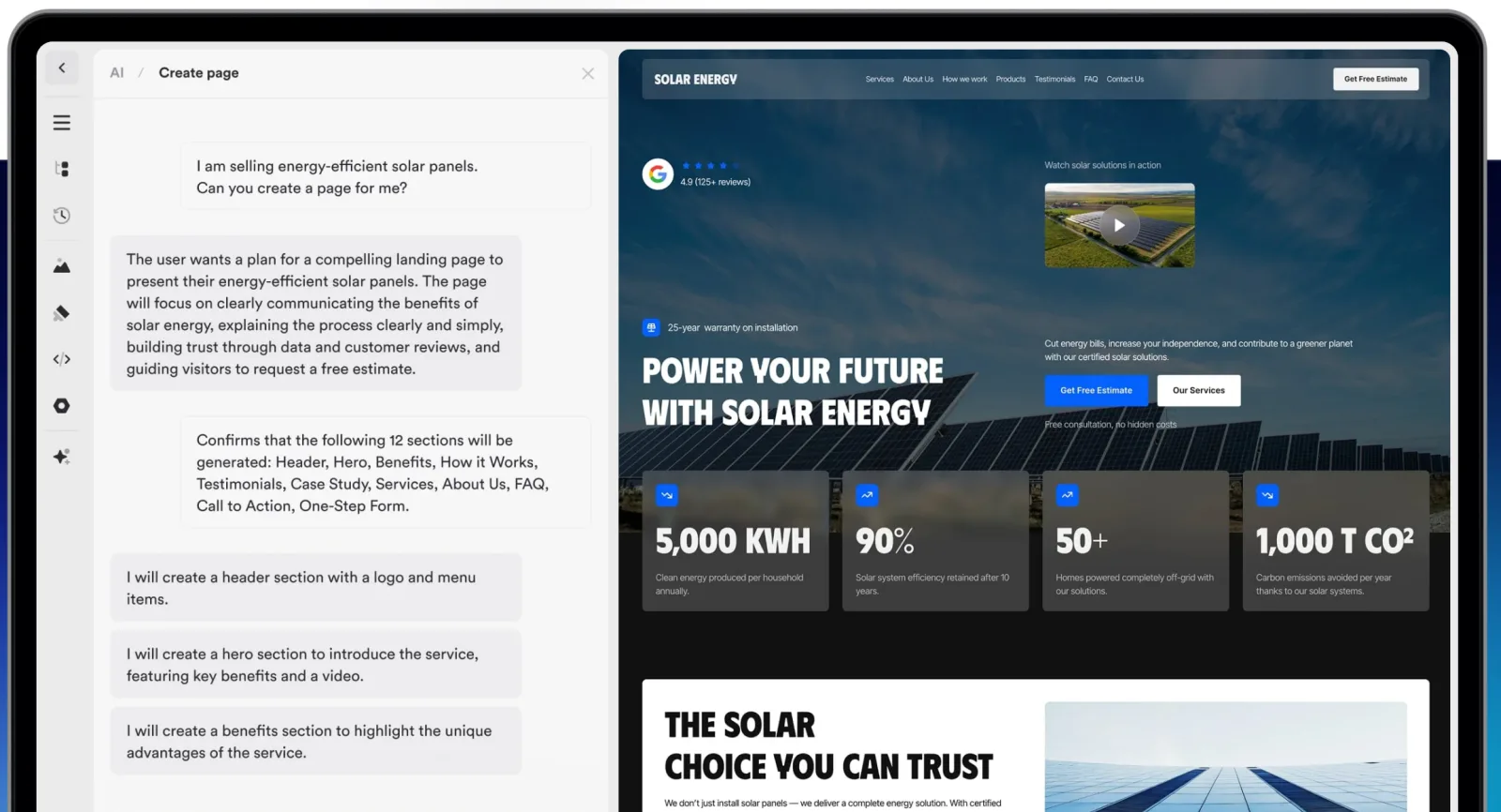
At this point you have finished copy, a layout note per section, a palette, a font pairing and image briefs. What you need now is somewhere to put it that will not fight you.
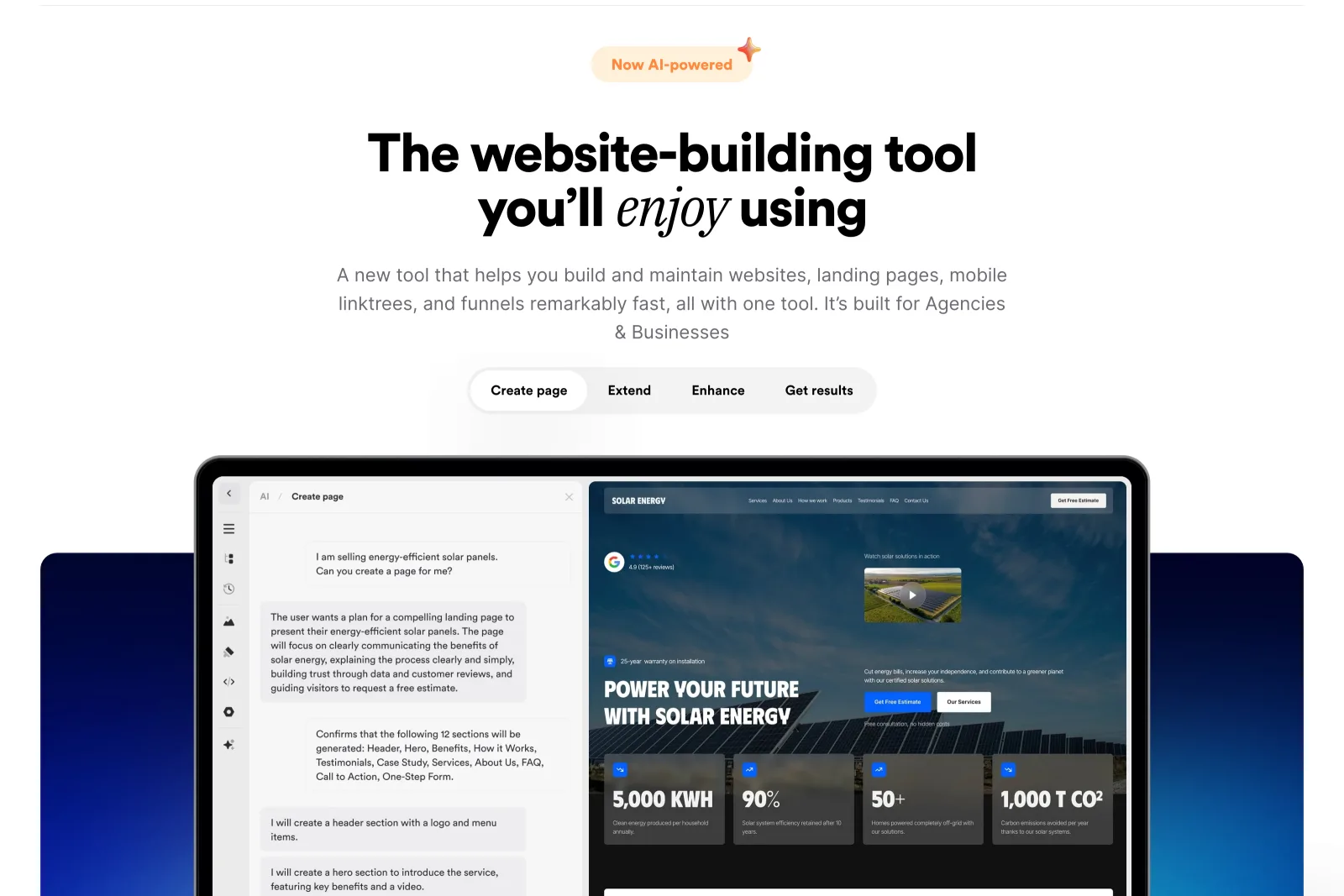
Onepage's AI works the same way your brief does: give it the product and audience and it returns a named section plan — header, hero, benefits, how it works, testimonials, case study, services, about, FAQ, call to action and form — then builds each one. That is the same unit your stage 3 brief is written in, which is why the handoff is a paste rather than a translation.
This is where Onepage fits the workflow cleanly, for reasons that are structural rather than promotional. It is section-based, which is the same unit your stage 3 brief is written in — you are pasting section into section, not fighting a freeform canvas. Its editor is built so layouts do not break whatever you drag, which matters when you are moving fast and not a designer. And it has its own AI page and funnel generation, so the brief you just assembled can seed the build rather than being retyped.
The practical sequence
- Start from AI generation or a template. Paste your stage 3 brief into Onepage’s AI page generator, or pick from the 650+ templates and treat it as scaffolding. Templates are deliberately neutral — you are supplying the argument, not borrowing one.
- Map section to section. Work top-down through your brief. Each SECTION NAME becomes one page section, and the layout note tells you which block type to use.
- Apply the palette and fonts from prompt 14. Google Fonts are built in, so the pairing you generated drops straight in.
- Fill images from your prompt 15 briefs. Free Unsplash integration and a 2,500-icon library cover most of what a landing page needs without a stock subscription.
- Wire the form to the CRM. If the page is one step of a longer sequence, the same brief feeds a multi-step funnel — Onepage generates those too. Onepage has lead capture and a built-in CRM, so you are not bolting on a separate tool before you have a single lead.
- Connect a domain and publish. Custom domain with free SSL, mobile-responsive by default, GDPR-compliant templates and cookie banners, EU hosting.
Build it free first. Onepage’s free plan is a real plan rather than a countdown trial — 1 website, 3 pages, 20 AI credits, no card required. That is enough to take this entire workflow from prompt to published page and see whether it converts before you decide anything. A custom domain and the CRM start on Essential at $16.58/month billed annually.
Stage 4 — Conversion Prompts (After It Is Live)
A landing page is a hypothesis. These three turn it into something you can improve on evidence rather than opinion.
16. Headline variants for testing
Live headline: [HEADLINE]. It is currently converting at [RATE]%.

Write 4 test variants, each changing exactly ONE variable:
(a) outcome vs process, (b) specific number vs general claim,
(c) audience-named vs universal, (d) question vs statement.

Label which variable each one tests, so the result tells me something.
17. Drop-off diagnosis
Here is my page copy, in order: [PASTE FULL PAGE].

Analytics: visitors read to [SECTION] then leave.

Identify the three most likely reasons for the drop at that exact point.
For each, give a specific rewrite of that section, not general advice.
Rank by how cheap the fix is to test.
18. Objection gap audit
Page copy: [PASTE FULL PAGE].
Questions real prospects ask me before buying: [PASTE ACTUAL QUESTIONS].

Which of those questions does my page fail to answer before the CTA?

For each gap, tell me the exact section it belongs in
and write the 2 sentences that close it.
Five Mistakes That Waste the Whole Workflow
- Feeding the model your feature list instead of buyer language. Stage 1 exists precisely to prevent this. A page written from your internal vocabulary reads as inward-facing to everyone outside your company.
- Accepting the first headline. Prompt 5 asks for ten and a recommendation for a reason. The first output is a regression to the mean of every landing page in the training data.
- Writing eight benefits. Three specific beats eight vague, every time. Prompt 8 forces the cut deliberately.
- Adding an image to every section. A stock photo that illustrates nothing costs attention and load time. Prompt 15 explicitly marks sections where an image adds nothing.
- Publishing and stopping. Stage 4 is where the conversion actually comes from. A page you never revise is a guess you never checked.
The Realistic Timeline
| Stage | What you produce | Time |
|---|---|---|
| 1 — Strategy | Buyer language, workarounds, objections, single claim | 20–30 min |
| 2 — Copy | Every section written and cut | 30–45 min |
| 3 — Brief | Structured build brief, palette, image directions | 15 min |
| Build | Live page on a custom domain | 30–60 min |
| 4 — Iterate | Test variants and diagnosed fixes | Ongoing |
Roughly a focused afternoon from blank page to published, which is the honest number. Anyone promising fifteen minutes is describing generation, not a page anyone will convert on.
The Takeaway
The reason “build me a landing page” fails is not that the models are weak. It is that a landing page is a structured argument, and structure is exactly what a single prompt destroys.
Split it into research, copy, brief and iteration; give each stage the input it actually needs; and build it somewhere section-based so the structure survives contact with the editor. The prompts above are the scaffolding — the part worth keeping is the sequence.
Frequently Asked Questions
10 questions answered