Loading model...
Best Nano Banana 2 prompts
124 prompts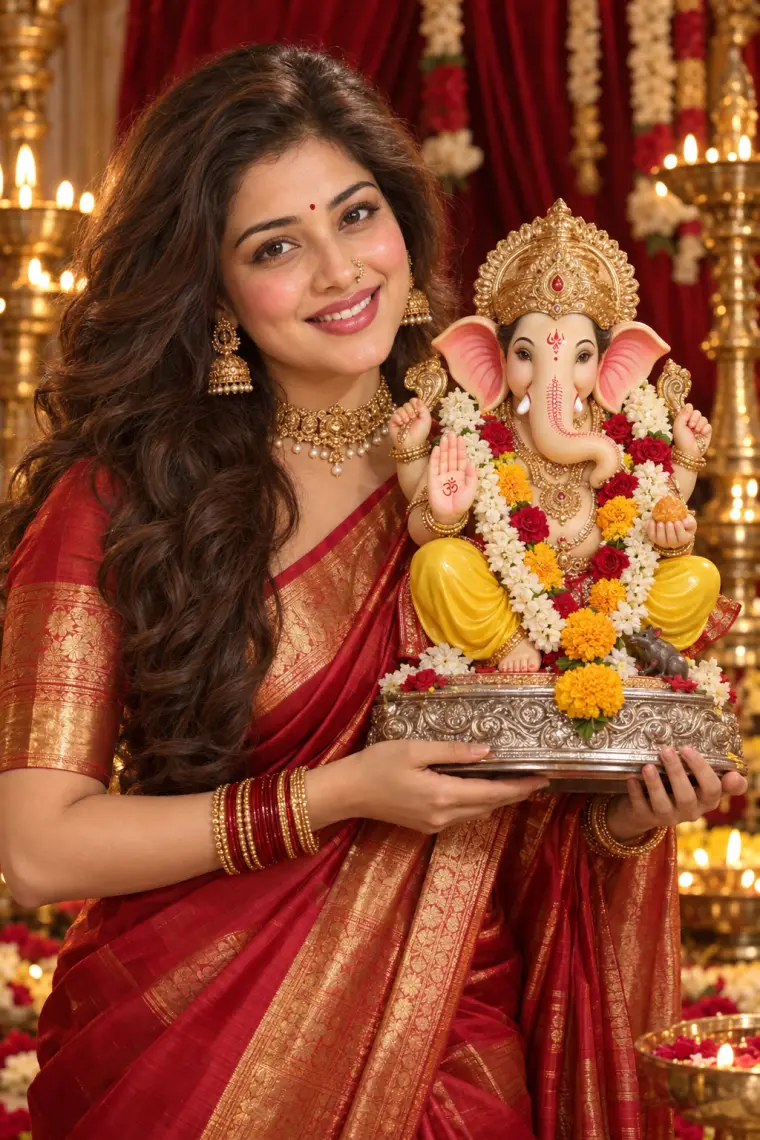
Image
Portrait & Character
Festive Portrait Holding Ganpati Idol
A festive portrait prompt that shows you in a silk saree holding a garlanded Ganpati idol, with your real face and seven festival looks. Upload one photo and it creates a studio-lit devotional portrait: you in rich silk and temple jewellery, holding a beautifully decorated idol close, framed by velvet drapes and glowing brass lamps. What you can customize Sacred Idol — Ganpati for Ganesh Chaturthi, Lakshmi for Diwali, Laddu Gopal for Janmashtami, Maa Durga for Navratri, plus Krishna, Saraswati and Radha Krishna. Subject — used only when no photo is attached; your upload carries your real face. Expression — a warm smile by default, or any mood from the shared expression list. How You Hold It — beside the shoulder, cradled at the chest, raised in offering or placing it on the altar. Saree — red-gold Kanjivaram, yellow Paithani, green Banarasi, white-red Bengali, royal purple silk, pink Chanderi or maroon bridal. Jewellery — temple gold, kundan polki, Maharashtrian pearl nath, oxidized silver or minimal gold. Makeup Look — soft festive glow, natural dewy, bold bridal red lip or classic kohl eyes. Backdrop — velvet with brass lamps, marigold toran decor, home mandir, rangoli with diyas, Durga pandal lights or evening fairy lights. Best for Festival wishes and WhatsApp status for Ganesh Chaturthi, Diwali, Janmashtami and Navratri, family festive photos, and saree or jewellery brand posts with a devotional theme. Tips for the best results Upload a clear, front-facing photo of just you with visible hair so the likeness carries over. Match the idol, saree and backdrop to one festival, such as Lakshmi with a rangoli and diyas for Diwali. Pick the Maharashtrian pearl nath with the yellow Paithani for a classic Ganeshotsav look. Avoid tightly cropped selfies; the idol needs room beside you in the frame.
114 ViewsTemplate
Image
Social Media
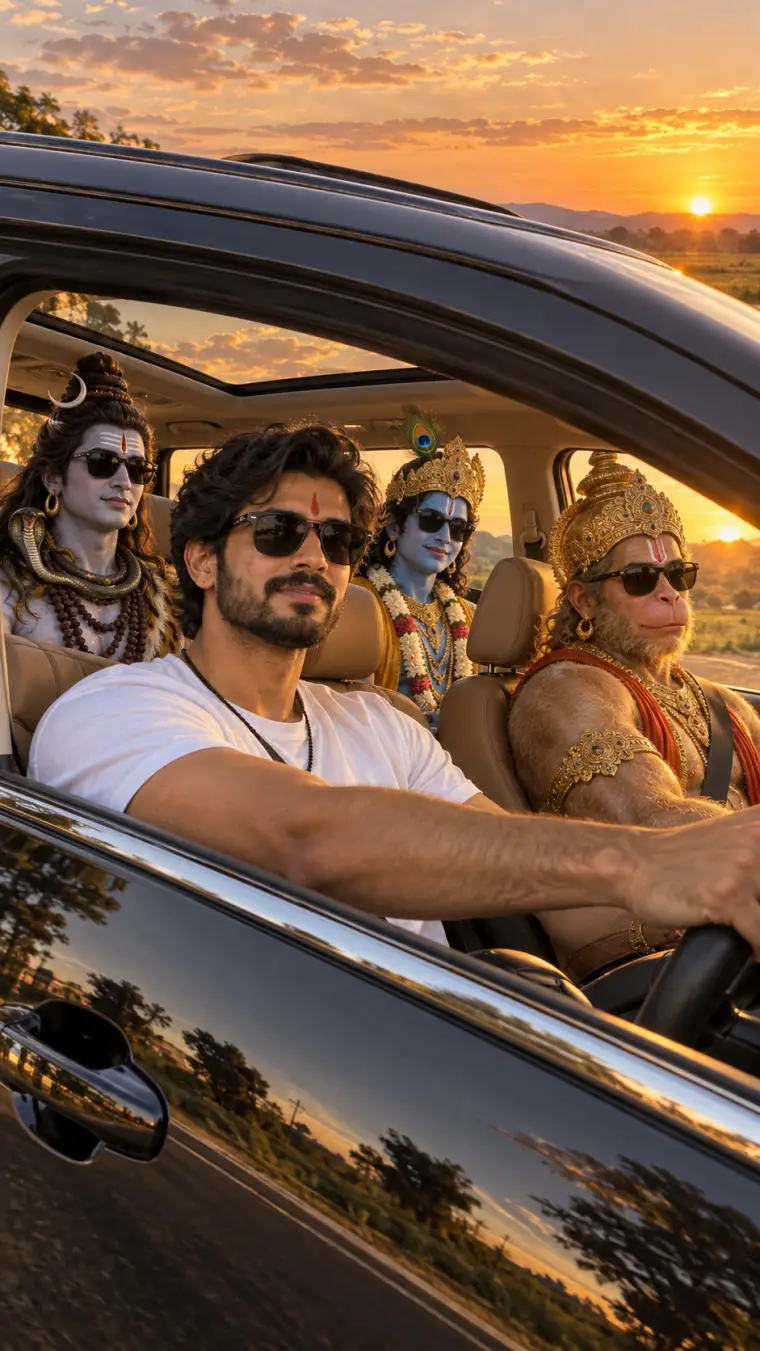
Road Trip with Hindu Gods Photo
A road trip with Hindu gods AI photo prompt that seats Hanuman, Shiva and Krishna in your car, with your real face at the wheel. Upload one photo and it renders the viral devotional road-trip photo: you driving a car at golden hour while your favorite deities ride along in full traditional iconography, wearing matching sunglasses. What you can customize Divine Passengers — eight groups, including Hanuman, Shiva and Krishna, Ram Darbar, the Shiva family, Radha Krishna, Lakshmi-Ganesha-Saraswati, Maa Durga, Krishna and Arjuna, and the Trimurti. Driver — used only when no photo is attached; your upload carries your real face. Driver Outfit — type any look, from a white tee to a kurta or a festive sherwani. Sunglasses — everyone in shades, only the driver, or the deities in their traditional form. Vehicle — luxury SUV with sunroof, open-top jeep, classic white Ambassador, red convertible or a garlanded sedan. Setting — golden-hour road, Himalayan highway, coastal road, desert dunes, monsoon drive, city lights or a temple town. Camera View — through the driver window, through the windshield, a dashboard selfie or a drone shot through the sunroof. Extra Details — small touches like a marigold garland on the mirror or diyas on the dashboard. Best for Festival wishes for Janmashtami, Mahashivratri, Hanuman Jayanti and Diwali, WhatsApp and Instagram status posts, and devotional reels that stand out from ordinary god wallpapers. Tips for the best results Upload a clear, front-facing photo of just you in good light so your likeness carries into the driver seat. Match the setting to the occasion — a temple town for pilgrimages, a monsoon drive for Shravan, city lights for Diwali. Keep the passenger group to the one you pick; adding extra deities in Extra Details crowds the car. Choose the no-sunglasses option for a more traditional, reverent version of the same scene.
Image
Social Media
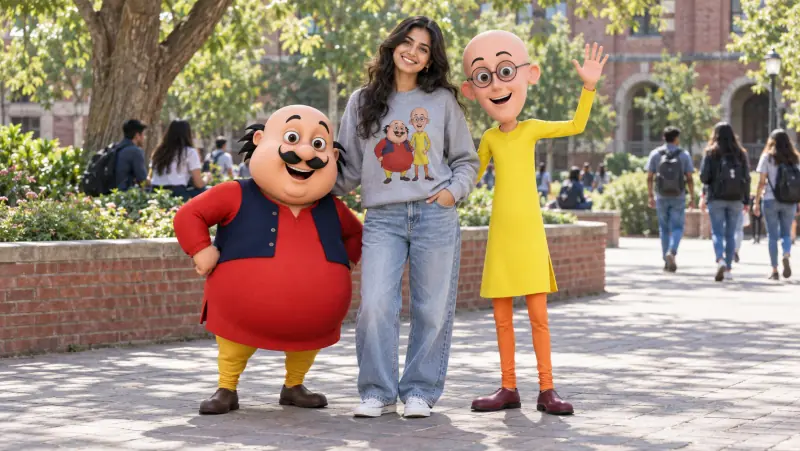
Motu Patlu AI Photo Prompt
A Motu Patlu AI photo prompt that puts you in a real photo with the famous cartoon duo — your exact face, eight fun poses, and six render styles. Upload one photo and it builds the viral fan picture: you standing, laughing or snacking with Motu and Patlu, rendered as real characters sharing the scene with you. It matches the lighting, color and soft contact shadows so the cartoons look like they are actually standing next to you. Why Motu and Patlu stay on-model Both characters are written into the prompt as a fixed lock that no field can change: Motu short and round with his curled mustache, red kurta and navy vest, and Patlu tall and thin with round glasses, a yellow kurta and orange leggings. Every field changes the scene around them, so the duo stays recognizable whatever you pick. What you can customize The Pose — standing between them, group selfie, arms around shoulders, samosa party, bench, high-five jump, walking together, or a candid laugh Motu & Patlu Reaction — cheerful wave, big laughter, surprised wow, thumbs up, dance moves, or proud best friends Your Outfit — a character print sweatshirt, the same sweatshirt with the name printed, streetwear hoodie, summer tee, casual kurta, festive ethnic, or keep your own outfit Location — campus plaza, cartoon hometown street, samosa stall, city park, mall atrium, beach promenade, amusement park, or railway platform Character Render — 3D animated in a real photo, soft feature-film 3D, life-size mascot costumes, hyperreal live-action, clay stop-motion, or a 2D cartoon overlay Photo Look — bright daylight, golden hour, phone candid, cinematic grade, evening lights, or vivid pop color Extra Details — anything else to add to the scene Best for Instagram posts and reels covers, WhatsApp status and display pictures, nostalgic fan posts, birthday surprises for a Motu Patlu fan, and fun profile pictures. Tips for the best results Use a clear, well-lit, front-facing solo photo without sunglasses, hats or heavy filters. The printed-name sweatshirt adds real lettering, so use a model with strong text rendering and regenerate if a letter garbles. If a character drifts off-model, such as Patlu growing hair or Motu gaining glasses, regenerate rather than editing. Pick Keep My Outfit to wear exactly what you have on in the photo. Motu and Patlu are trademarked characters, so keep results to personal fan posts rather than ads or merchandise.
Image
Social Media
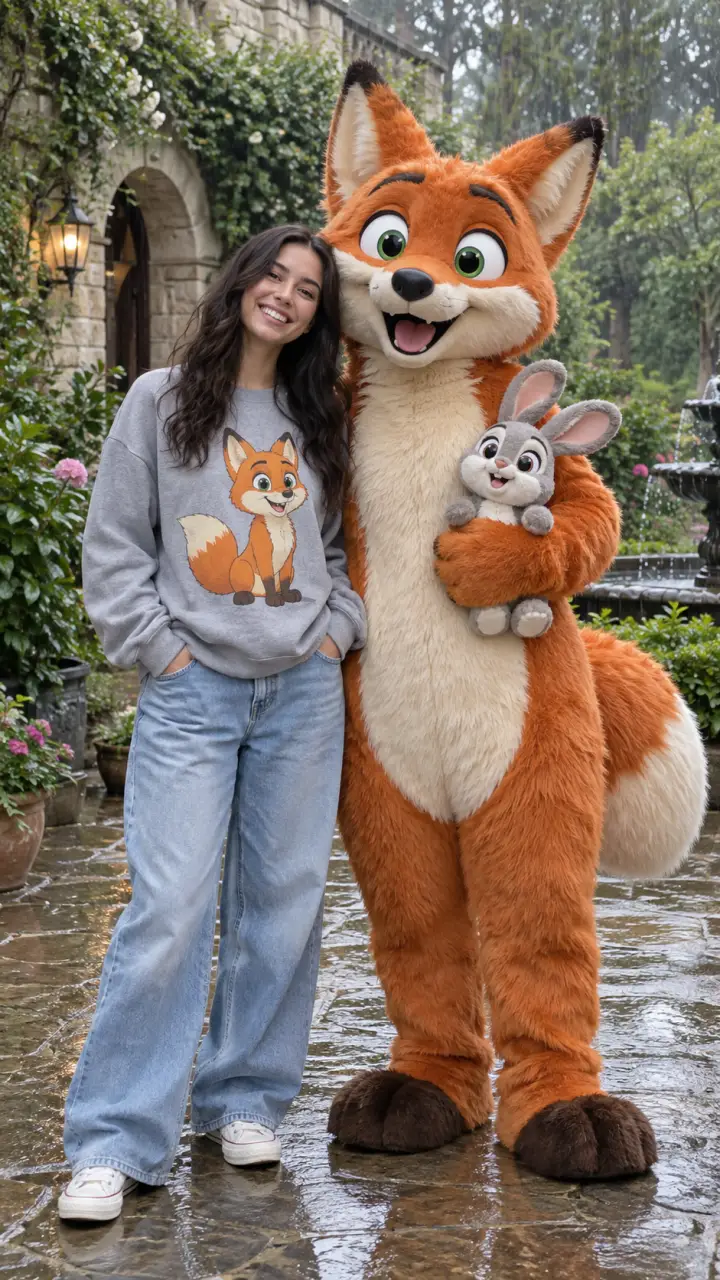
Life-Size Cartoon Mascot Photo
A cartoon character photo prompt that puts you beside a life-size version of your favorite character, wearing a matching graphic sweatshirt. Upload one photo and it renders a joyful meet-and-greet snapshot: you in an outfit printed with the character, standing next to that same character brought to life at human height in a real setting. What you can customize Cartoon Character — describe any character by look, or name your favorite, including a sidekick to hold. Person — used only when no photo is attached; your upload carries your real face. Character Look — realistic plush costume, 3D animated character, soft felt toy or claymation figure. Matching Outfit — graphic sweatshirt with baggy jeans, graphic tee, graphic hoodie or tee dress. Pose — side by side, arm around the shoulder, high five, big hug or both waving. Setting — rainy garden courtyard, theme park street, city sidewalk, sunny park or studio backdrop. Best for Fans who want a share-worthy photo with a beloved character, brand and event teams creating mascot meet-and-greet visuals, and creators making playful Instagram and WhatsApp posts. Tips for the best results Upload a clear full-length photo of one person on a simple background so your likeness and proportions carry over. Describe the character by species, colors, eyes and signature features rather than by name alone. Keep the matching-outfit option on; the printed graphic is what makes the photo read instantly. Avoid group photos and busy backgrounds as the reference image. Famous characters belong to their studios, so keep those images for personal fun, not posters or merchandise.
Image
Social Media
Selfie with Ganpati Bappa AI Prompt
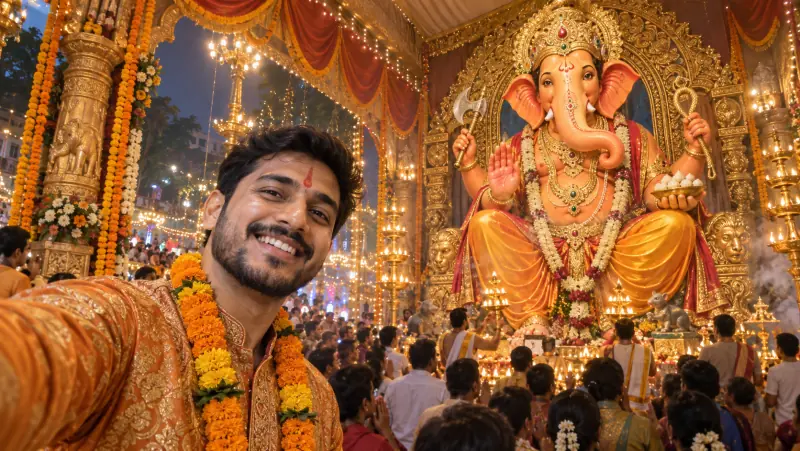
A Ganpati selfie AI prompt that places you in front of a colossal Lord Ganesha murti at a public pandal, with your exact face and festive glow. Upload one photo and it builds the selfie everyone wants from pandal visits: you large and smiling in the foreground, a towering Bappa rising behind, and the lights, drums and marigolds of the celebration all around. It works just as well for anyone who could not make it to the pandal this year. Why you and Bappa both stay recognizable Your photo is treated as a strict identity source, so your face, skin tone and hair are preserved while the outfit and scene are rebuilt. The fixed framing puts you in the left foreground and the murti on the right with open space between you, so neither covers the other, and the phone is never shown. What you can customize Selfie Moment — joyful arm-out selfie, one-hand namaste, pointing up at Bappa, gulal celebration, dhol dance, modak moment, or serene tilak portrait Festive Outfit — saffron and gold festive wear, nauvari saree, kurta with pheta, dhol-tasha troupe uniform, pastel ethnic, or keep your own outfit Murti Behind You — royal seated king, gold ornament splendor, eco shadu clay, dancing Ganesha, standing protector, or white marble Pandal Setting — grand street pandal, temple replica, floral mandap, visarjan procession, housing-society pandal, or village chowk Festive Moment — evening aarti, night lights, gulal celebration, morning sunlight, monsoon drizzle, or golden hour Photo Look — modern phone selfie, portrait-mode bokeh, night flash, cinematic warm grade, vivid HDR, or soft film Extra Details — a tilak, a garland, fairy lights, or anything else to add Best for Instagram posts and stories, WhatsApp status and display pictures, festival wishes to family and friends, and sharing a pandal moment with relatives who live far away. Tips for the best results Use a clear, well-lit, front-facing solo photo without sunglasses, hats or heavy filters. Pick Keep My Outfit to wear what you have on in the photo. With Portrait Mode Bokeh the murti softens but stays recognizable; choose Modern Phone Selfie for a fully sharp background. Only upload photos of people who are happy to be featured. The image is text-free, so add a Ganpati Bappa Morya greeting in any editor afterward.

Image
Fashion & Beauty
Hairstyle Analysis Grid Prompt
A hairstyle AI prompt that builds a side-by-side comparison grid from one portrait, so you can see which cut actually suits your face. Every panel shows the same person with a different haircut, labelled underneath in short clean type, on a minimal neutral background. It is visual-first by design — short labels only, no paragraphs — so the whole comparison reads at a glance on a phone. Why the comparison stays fair The prompt locks identical framing, lighting, expression and clothing across every panel and holds the natural hair color constant, so only the cut changes. A comparison stops being a comparison the moment the pose or the light shifts between tiles. What you can customize Hairstyles to Compare — a free text field: list the cuts you want in panel order, from fades and buzz cuts to bobs, layers, curtain bangs or braids Layout — a four-up grid, a side-by-side pair, a row of three, or a six-up sheet Verdict Style — a BEST MATCH badge on the strongest panel, ranked numbers, a suits-versus-avoid split, or no ranking at all Background — warm ivory, studio grey, soft beige, or charcoal with the labels reversed out in light type Best for Deciding before a salon appointment, stylist and barber consultations, client decks for hair and image consultants, personal-shopping services, and salon social content. Tips for the best results Upload a clear, front-facing photo with the whole face visible and hair pulled away from the cheeks — the model has to rebuild the hairline in every panel. Keep each style name short; long names are where the rendered labels start to garble. Run it in a model with strong text handling and regenerate if a word comes out wrong. Compare four styles at a time — a six-up sheet packs the faces smaller and makes fine differences harder to judge.

Image
Fashion & Beauty
Personal Color Analysis Graphic
A personal color analysis prompt that turns one portrait into a graphic showing which clothing colors flatter you and which wash you out. The template builds the whole comparison from a single photo: the same face repeated across tiles in different colored tops, split into labelled BEST and AVOID groups, with swatch chips, short color names and a seasonal palette strip. It is visual-first by design — short labels only, no paragraphs — so it reads instantly on a phone. What you can customize Color Season — warm autumn, cool winter, soft summer, bright spring, deep winter, or light spring Best Colors — three or four short color names that make up the flattering group Avoid Colors — three or four short names for the washing-out group Layout — best-versus-avoid row, 2x2 quadrant grid, color drape fan, portrait with a palette ring, or a two-row grid Design Style — clean minimal editorial, soft pastel, bold modern, or magazine spread Background — soft off-white, clean white, warm cream, or light grey Subject — a written description used when no photo is attached Best for Stylists and color consultants delivering client palettes, personal-shopping and wardrobe services, salon and image-consulting content, and anyone mapping their own best colors before shopping. Tips for the best results Upload a clear, well-lit, front-facing photo on a neutral background with minimal makeup — accurate skin, hair and eye tone is what the whole analysis rests on. Avoid filtered photos or colored lighting; they distort the very tones being compared. Keep color names to one or two words so the labels stay crisp. Pick a season that matches the undertone rather than a favorite palette. Treat the result as a styling guide, not a professional draping diagnosis.

Image
Product & Commercial
Sports Bobblehead Toy Prompt
A bobblehead AI prompt that turns your photo into a cheap plastic sports figurine — oversized head, molded vinyl face, and a real stadium product shot. The output is styled as an e-commerce product photograph rather than a character render: a comically huge head on a tiny body, a simplified painted face, and a circular display base, shot with soft even light and a crisp contact shadow. Why asking for a cheap toy works The prompt deliberately requests a badly made figurine — visible paint boundaries, slight paint misalignment, mold seam lines, small scuffs and chunky grooved hair instead of individual strands. Those flaws are exactly what make it read as a photographed object instead of a polished 3D render, so keep them in. What you can customize Sport & Base — soccer with a ball on a green pitch base, cricket with a bat on a sandy base, basketball on a polished court, or tennis on clay Team Colors — a free text field: type any country or color pair and the kit is built from those colors alone Pose — a foot on the ball, arms raised in celebration, hands on hips, or caught mid-action Backdrop — an early-evening stadium pitch, a clean studio sweep, a trophy shelf, or a stadium tunnel Best for Fan-club and matchday posts, gift and merchandise mockups, print-on-demand product shots, team group chats, and personalized keepsakes for a player or supporter. Tips for the best results Use a clear, well-lit face photo without sunglasses or hats. Expect a loose likeness — the toy keeps your recognizable features but renders them younger and smiling, the way real bobbleheads flatter their subjects. Name colors rather than clubs; the kit carries no crests, numbers or patterns, which keeps the render clean and avoids garbled fake logos. If a result drifts toward a glossy premium collectible or a CGI character, regenerate — the long avoid list is doing the work and one clean run usually lands it.

Image
Portrait & Character
80s Time Travel Photo Prompt
An 80s AI photo prompt that rebuilds your photo as a genuine 1985 snapshot — teased hair, neon wardrobe, direct flash, and a red-orange date stamp. The identity lock is what makes the trend work: the face, skin tone and apparent age are held exactly, while the hair, clothing, accessories and the entire room around the subject are rebuilt for the era. The result reads as a photo someone actually took and left in a shoebox, not a costume filter dropped over a modern picture. Why it looks like a real photograph The period styling is only half the job — the other half is the analog camera character. Direct on-camera flash, blown highlights, a hard shadow on the wall behind, heavy grain and faded color are what date a picture to its decade, and the Photo Finish field carries all of it. What you can customize Decade — mid 1980s by default, or late 1970s, early 1990s, and late 1960s; the whole scene moves with it Style Vibe — neon pop, rock and denim, preppy polished, or full glamour, each written to adapt to whichever year you pick Setting — a poster-covered bedroom wall, a neon arcade, a suburban driveway with a period car, or a roller rink under colored lights Photo Finish — direct-flash snapshot with the corner date stamp, faded instant photo with its white border, laser-backdrop studio portrait, or camcorder still with scanlines Best for Throwback and #tbt posts, reel and short covers, nostalgia content, profile pictures, birthday and anniversary surprises, and decade-themed party invitations. Tips for the best results Use a sharp, well-lit photo without sunglasses or hats — the face has to survive a hard flash and a heavy grain pass. If a smartphone, a modern logo or present-day clothing slips into the frame, regenerate rather than editing; one anachronism breaks the period illusion instantly. Only the flash-snapshot and camcorder finishes carry a date stamp — the instant-photo and studio options are deliberately clean. Change one field at a time so the era, styling and setting stay coherent with each other.
Image
Portrait & Character
Dramatic Studio Portrait
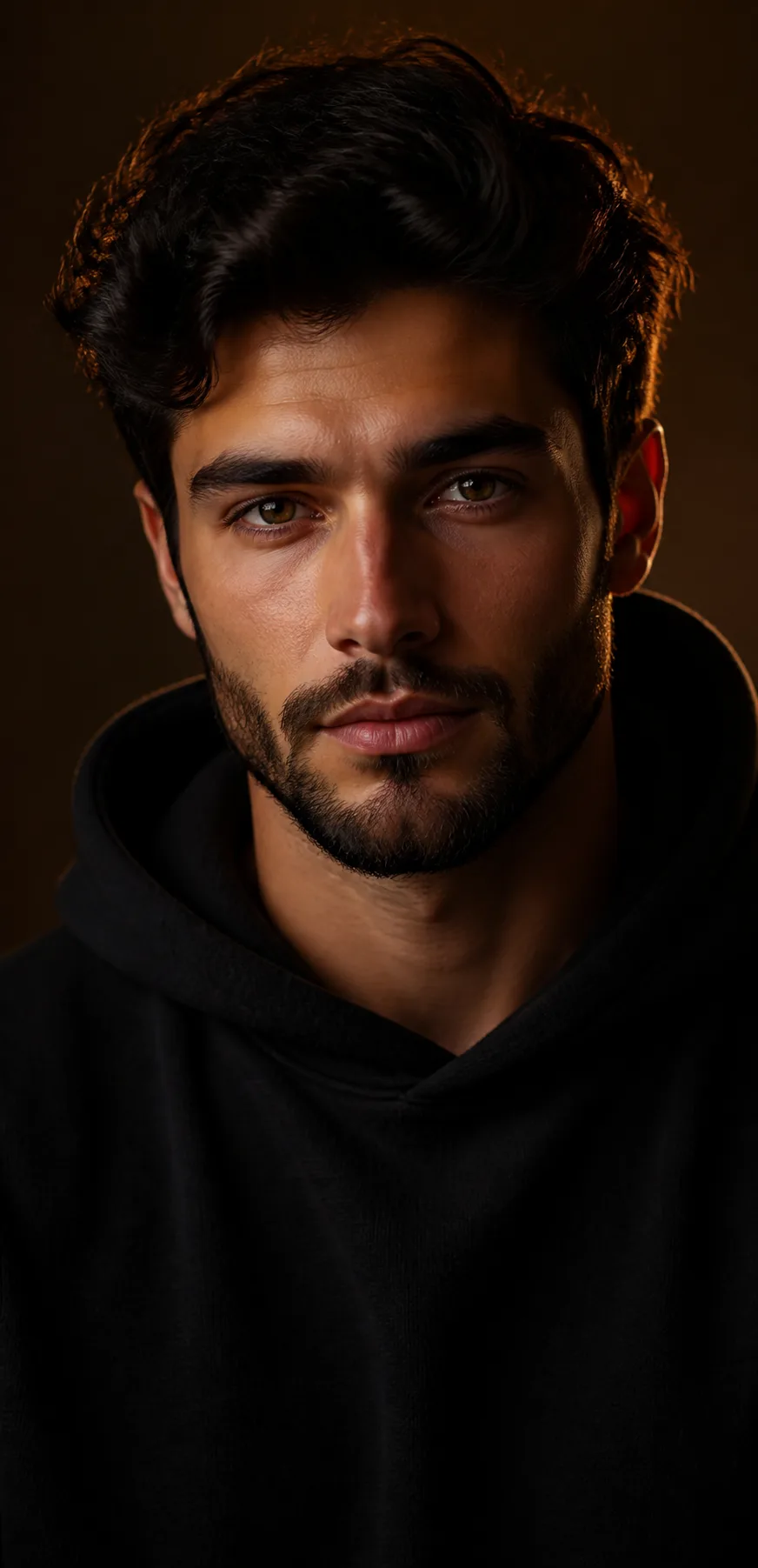
A studio portrait prompt that creates a dramatic professional headshot on a clean colored backdrop with moody, sculpted lighting. It reproduces the premium look of a real photographer's session: a tight head-and-shoulders frame, a single directional key light, a soft separating rim light and rich controlled shadows against a solid backdrop, rendered with realistic skin texture rather than an over-smoothed finish. What you can customize Subject Description — hair, beard, features and expression, in your own words Outfit — a free text field; matching it to the backdrop color keeps the frame cohesive Backdrop Color — warm dark brown, deep red, cool blue, teal, charcoal grey, or emerald green Lighting Mood — moody warm key, bold colored gel, soft beauty light, high-contrast split, or bright clean studio Accessories — none, sunglasses, silver earrings, clear glasses, or a cap Best for LinkedIn and social avatars, personal-brand shots, actor and model headshots, artist and musician press photos, speaker profiles, and about-page portraits. Tips for the best results Describe the person clearly, and optionally attach a photo to carry a real likeness. Match the backdrop color to the mood you want, and keep the expression to one clear look — calm and confident, or a natural smile. Avoid busy backgrounds and flat even lighting; the drama comes from a clean backdrop and directional light. Skip heavy beauty filters on the source photo — the look depends on natural skin detail surviving.
Image
Social Media
Birthday Countdown Poster
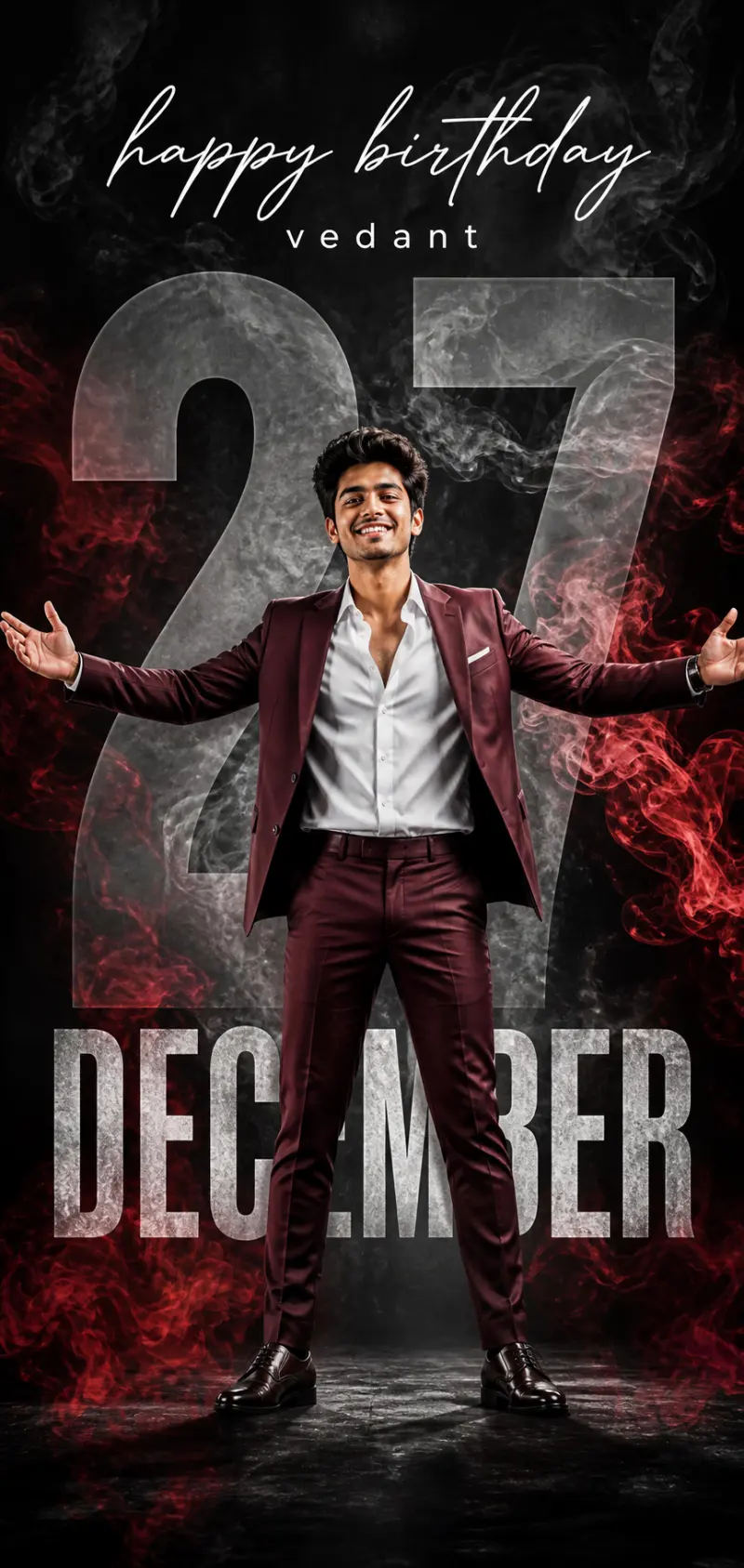
A birthday poster prompt that turns one photo into a bold birthday countdown poster — giant age number, cut-out figure, name and date in stylish type. Upload a picture and the template composes the whole poster: a full-body cut-out of the person lit like a studio shoot, a huge semi-transparent age number behind them, a handwritten "happy birthday" script, the name, and the birth month in big bold letters. Everything is wrapped in dramatic colored smoke, which is what gives the layout its viral, scroll-stopping look. What you can customize Name, Age Number, Date / Month Text and Greeting Text — the four typographic elements on the poster. Person & Outfit — a free-text description of who is in the cut-out and what they are wearing. Pose — five stances, including Arms Spread Wide, Hands in Pockets, Arms Crossed and Leaning Confident. Background Color & Smoke — six palettes, from Dark Red Smoke and Blue Smoke to Gold Luxe, Purple Neon and a Clean Grey Studio. Person Photo — an optional upload of a full-length or three-quarter photo, used as the cut-out figure. Best for Instagram and WhatsApp status wishes, story shout-outs, printed posters, and editor pages that make custom birthday edits on request. Because every text element and color is a field, it works for any person and any birthday. Tips for the best results Upload a clear full-length or three-quarter photo so the cut-out and pose read cleanly; tightly cropped headshots lose the full body that sells the poster. Keep the name short and the age a one or two digit number so the big typography stays crisp and correctly spelled — long names or messages degrade the text. Match the background color to the person's outfit for contrast. A confident open pose, such as arms spread or hands in pockets, suits the layout best. Use a clean photo of just the person; busy source backgrounds cut out poorly.
Image
Social Media
Birthday Poster with Name Prompt
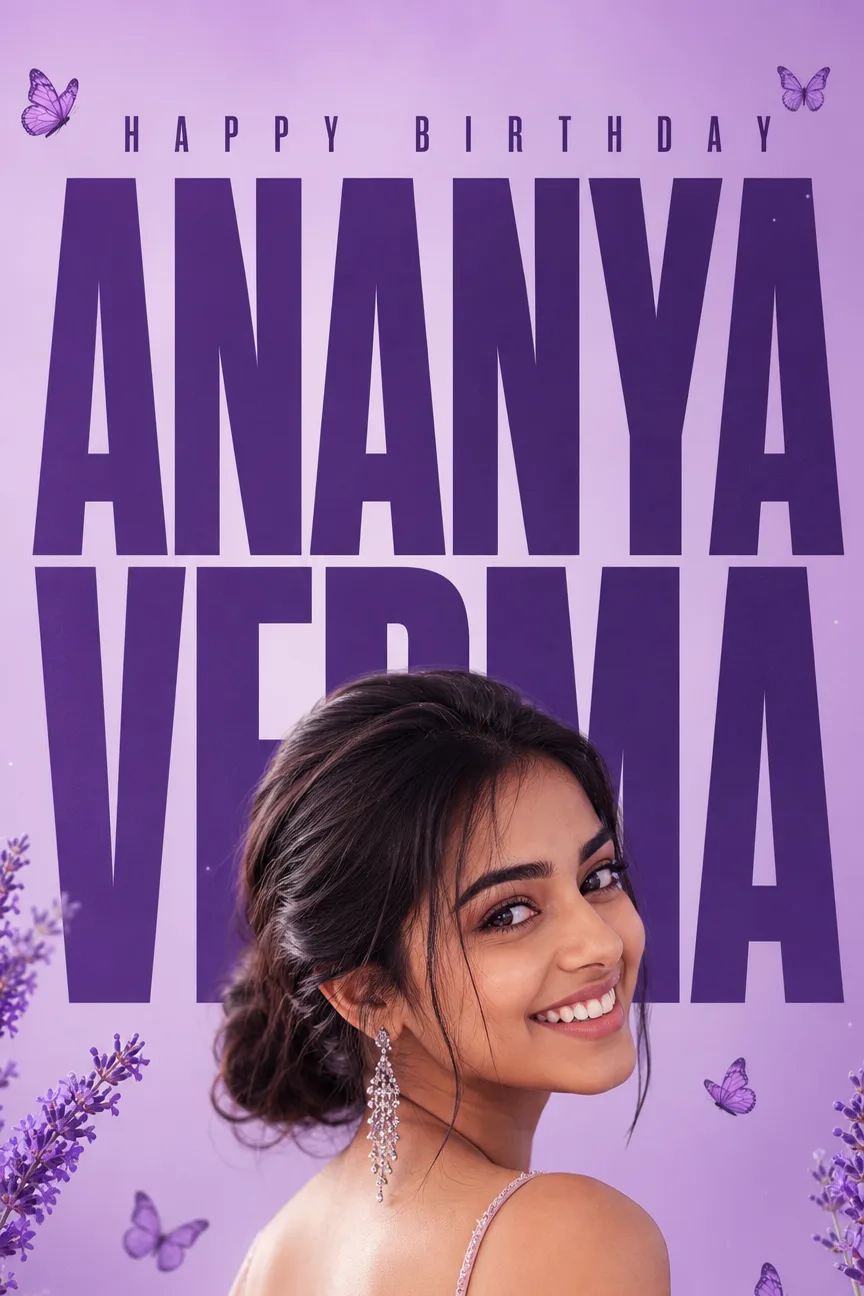
A birthday poster AI prompt that sets your name in giant typography behind your photo — lavender butterflies, rose petals, four themes and headers. The layered poster look works because the letters sit behind the subject: the head and shoulders cut into the giant condensed type, which is what makes it read as a designed poster rather than a caption. The outfit and pose are restyled around a preserved face taken from your reference photo. What you can customize Name — typed exactly as it should appear, one word per line. Header Text — four options: Happy Birthday, Happy Anniversary, Congratulations, or Best Wishes. Color Theme — four themes that set letters, background gradient and decor at once: Lavender & Butterflies, Rose Gold & Petals, Ocean Blue & Sparkles, and Emerald & Gold Leaves. Pose — four framings: Over-Shoulder Smile, Front-Facing Smile, Side Profile Laugh, or Chin on Hand. Reference Photo — a required upload of a clear, sharp photo of the face. Best for Birthday and anniversary posts, congratulations graphics and best-wishes cards where a single name is the hero of the design. The four headers make the same layout reusable across occasions. Tips for the best results Use a sharp, well-lit reference photo without sunglasses, hats, or heavy filters — the face is preserved and everything else is rebuilt around it. Keep names short: two words render most reliably, and a very long surname is better split or abbreviated. Run it in a model with strong text rendering such as Nano Banana Pro or ChatGPT Image 2. Regenerate once if a letter drifts rather than rewriting the whole prompt.