Loading elite prompt experience...
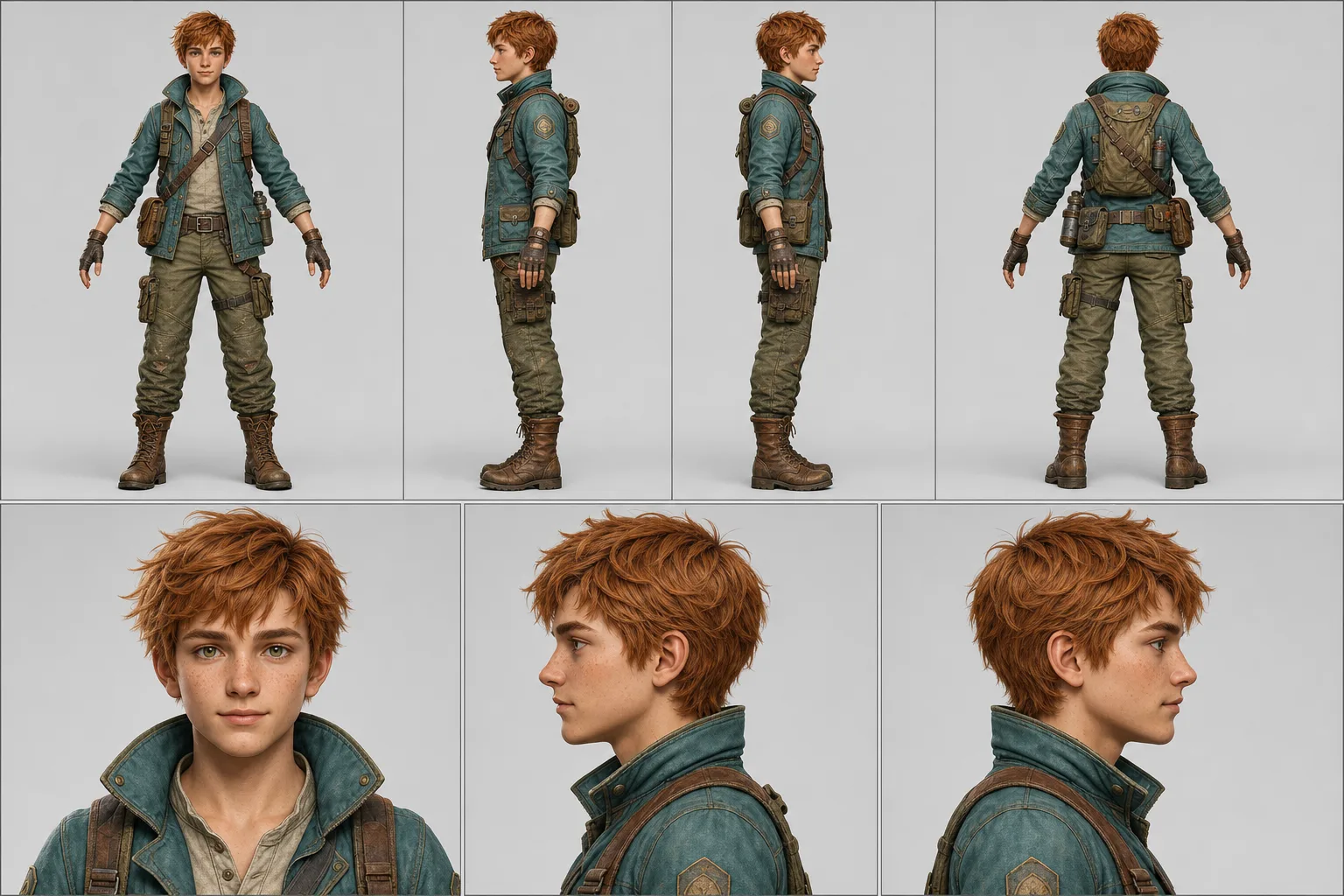
Example Output
 Open in Gallery
Loading elite prompt experience...
A curated stack for turning ideas into production-ready video, ads, and art.
Open in GalleryA character turnaround prompt that turns one uploaded image into a print-ready model sheet — four full-body views, three portraits, exact style match.
The template converts a single finished character design into the standardized reference document production actually uses: a two-row technical layout with a full-body turnaround (front, left, right, back) above an aligned portrait row. Every panel is locked to the reference image's identity, proportions, textures and rendering style, with identical lighting and uniform scale across the lineup.
The prompt instructs the model to match the reference's realism level, rendering approach and color treatment strictly, then enforces the same head height, framing and light direction in all seven panels. Nano Banana Pro reproduces identity and style across panels most faithfully; ChatGPT Image 2 is a strong alternative.
Character artists and commission work, game developers and riggers, animators, VTuber and mascot pipelines, and AI-video creators who need a character lock so their subject stays consistent across every scene of a series.
The finalized character design — full body on a simple background works best. Identity, style, anatomy and textures are matched exactly.
Click the "Copy" button above to copy the complete prompt text to your clipboard. This will copy all the text including any placeholders.
If you see placeholders like {{topic}} or {{style}} in the prompt, click "Customize & Use" to open the customization dialog. Fill in your specific values to personalize the prompt for your needs.
This prompt requires 1 attachment: "Character Reference Image" (image). Have these files ready before proceeding to the AI tool.
Go to gemini.google.com and sign in to your Google account. Make sure you have access to the image generation feature.
In Gemini, look for the "Create image" or image generation option. If available, switch to Gemini Pro or Advanced mode for higher quality outputs.
Before or along with your prompt, upload the required files. Required: Character Reference Image. Most AI tools have an attachment/upload button near the prompt input area.
Paste the copied prompt (Ctrl/Cmd + V) into the AI tool's text input field. Make sure your attachments are uploaded, then click the send/generate button to create your image.
Review the generated image. If it doesn't match your expectations, try regenerating or adjusting the prompt with more specific details. Most AI tools allow multiple generation attempts.
The finalized character design — full body on a simple background works best. Identity, style, anatomy and textures are matched exactly.
Generate with
prompt auto-copiesAffiliate links · We may earn a commission at no cost to you
Tested by the PromptsRush team
Stylish Indian Male Avatar — Dynamic Studio Portrait (9:16)
Advertisement